> ## Documentation Index
> Fetch the complete documentation index at: https://docs.laozhang.ai/llms.txt
> Use this file to discover all available pages before exploring further.
# Flux 图像生成 API
> FLUX AI 绘图 API:支持 flux-2-pro、flux-2-max、flux-2-flex 与 Flux Kontext 系列。提供文生图、多图编辑和尺寸参数示例。
## 前置要求
登录 [laozhang.ai 控制台](https://api2.laozhang.ai) 获取 API 密钥
编辑令牌设置,选择以下任一计费模式(两者价格相同):
* **按量优先**(推荐):优先使用余额计费,余额不足时自动切换。适合大多数用户
* **按次计费**:每次调用直接扣费。适合预算控制严格的场景
两种模式**价格完全相同**。当前 Flux 模型包含 `flux-2-pro`、`flux-2-max`、`flux-2-flex`、`flux-kontext-pro` 和 `flux-kontext-max`,实际价格以控制台为准。
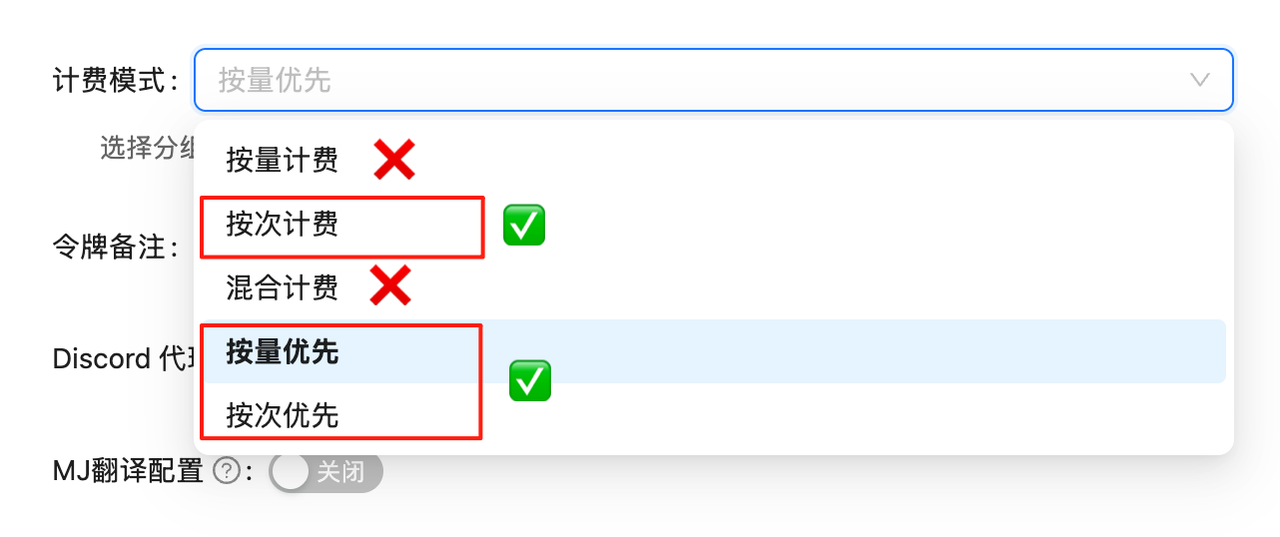 如果未设置计费模式,API调用会失败。必须先完成此配置!
## Flux 图像生成 API
Flux 是业界领先的图像生成和编辑模型。通过 老张API 的 `/v1/images/generations` 接口,您可以调用 Flux 2 系列模型生成图片;如果传入 `input_image`,同一个接口会进入图片编辑模式;继续传 `input_image_2` 到 `input_image_8` 则可进行多图融合编辑。实际模型价格和扣费记录以控制台显示为准。
**🎯 高质量生成**\
Flux 2 系列适合高质量文生图、多图融合、产品图和设计素材生成;旧版 Flux Kontext 系列仍可用于兼容既有接入。
## 🌟 核心特性
* **📐 明确尺寸**:Flux 2 支持 `size`,也支持 `width` / `height`
* **🎨 高质量输出**:支持 1024×1024、1792×1024、1024×1792 等常用尺寸
* **🧩 多图编辑**:Flux 2 官方原生结构通过 `input_image` 到 `input_image_8` 传入多张参考图
* **💰 价格说明**:定价以控制台为准,便于成本核算
* **🔧 JSON 调用**:文生图、单图改图、多图改图共用 `/v1/images/generations`
* **⏱️ URL 有效期**:生成结果 URL 有效期 10 分钟,需及时下载
* **🔄 可重现性**:支持 seed 参数,确保结果一致性
## 📋 模型对比
| 模型 | 模型 ID | 计费类型 | 当前价格 | 特点 |
| -------------------- | ------------------ | ----------- | ---------- | ----------------- |
| **Flux 2 Pro** | `flux-2-pro` | 按次付费 - Chat | \$0.0300/次 | 推荐默认模型,适合文生图和多图编辑 |
| **Flux 2 Flex** | `flux-2-flex` | 按次付费 - Chat | \$0.0600/次 | 更细控制场景,适合高要求设计 |
| **Flux 2 Max** | `flux-2-max` | 按次付费 - Chat | \$0.0700/次 | 最高质量,适合最终商业素材 |
| **Flux Kontext Pro** | `flux-kontext-pro` | 按次付费 - Chat | \$0.0350/次 | 旧版 Kontext 兼容模型 |
| **Flux Kontext Max** | `flux-kontext-max` | 按次付费 - Chat | \$0.0700/次 | 旧版 Kontext 高质量模型 |
💡 **价格说明**:通过 老张API 平台调用 Flux 模型,按模型实际价格扣费;请在控制台查看实时价格和调用日志。
## 📐 尺寸参数结构
Flux 2 和 Flux Kontext 的参数结构不同。当前推荐按下面方式传参:
| 场景 | 接口 | 尺寸参数 | 说明 |
| --------------- | ------------------------ | ------------------------------------------- | -------------------------------- |
| Flux 2 文生图 | `/v1/images/generations` | `size` 或 `width` + `height` | 不传 `input_image` |
| Flux 2 单图编辑 | `/v1/images/generations` | `input_image` + `size` 或 `width` + `height` | `input_image` 为公网 URL 或 data URL |
| Flux 2 多图编辑 | `/v1/images/generations` | `input_image` 到 `input_image_8` + 尺寸参数 | 多张参考图按字段编号 |
| Flux Kontext 旧版 | `/v1/images/generations` | `extra_body.aspect_ratio` | 旧版 Kontext 使用宽高比参数 |
Flux 2 改图不要使用 multipart `-F "image=@..."`。请使用 JSON 请求,并把参考图放到 `input_image`、`input_image_2`、`input_image_3` 等字段。
### Flux 2 常用尺寸
| 参数 | 输出尺寸 | 适用场景 |
| --------------------- | --------- | ------------- |
| `"size": "1024x1024"` | 1024×1024 | 通用方图、头像、产品图 |
| `"size": "1792x1024"` | 1792×1024 | 横版海报、网站横幅、封面图 |
| `"size": "1024x1792"` | 1024×1792 | 竖版海报、手机封面、故事图 |
### Flux Kontext 旧版宽高比
旧版 `flux-kontext-pro` / `flux-kontext-max` 支持从 **3:7 到 7:3** 的连续宽高比范围,总像素保持约 1 兆像素。以下是一些常用比例示例:
| 比例标识 | 类型 | 近似尺寸 | 适用场景 |
| ------ | ---- | ---------- | ----------- |
| `1:1` | 正方形 | 1024×1024 | 通用场景、社交媒体头像 |
| `2:3` | 竖版 | \~832×1248 | 手机壁纸、肖像照片 |
| `3:2` | 横版 | \~1248×832 | 电脑壁纸、风景照片 |
| `4:3` | 标准横版 | \~1182×886 | 传统显示器、演示文稿 |
| `16:9` | 宽屏 | \~1408×792 | 现代显示器、视频缩略图 |
| `9:16` | 竖屏 | \~792×1408 | 手机视频、竖版海报 |
| `21:9` | 超宽屏 | \~1680×720 | 电影海报、超宽显示器 |
| `3:7` | 最窄竖版 | \~662×1544 | 书签、竖版长图 |
| `7:3` | 最宽横版 | \~1544×662 | 网站横幅、全景图 |
**📏 自定义比例**:除了上述示例,您可以使用任何在 3:7 到 7:3 范围内的比例,如 `5:4`、`4:5`、`16:10` 等。系统会自动调整尺寸以保持约 1 兆像素的总面积。
## 🚀 快速开始
### Flux 2 文生图 cURL
```bash theme={null}
curl -X POST "https://api2.laozhang.ai/v1/images/generations" \
-H "Authorization: Bearer YOUR_API_KEY" \
-H "Content-Type: application/json" \
-d '{
"model": "flux-2-pro",
"prompt": "A ruby red retro robot riding a yellow skateboard in front of a turquoise glass greenhouse, clean product illustration style",
"n": 1,
"size": "1792x1024"
}'
```
### Flux 2 Python 示例
```python theme={null}
import requests
API_KEY = "YOUR_API_KEY"
def generate_flux_image(prompt, size="1024x1024", model="flux-2-pro"):
response = requests.post(
"https://api2.laozhang.ai/v1/images/generations",
headers={
"Authorization": f"Bearer {API_KEY}",
"Content-Type": "application/json",
},
json={
"model": model,
"prompt": prompt,
"n": 1,
"size": size,
},
timeout=240,
)
response.raise_for_status()
return response.json()["data"][0]["url"]
image_url = generate_flux_image(
"A cinematic product photo of a transparent smart speaker on a marble table",
size="1024x1024",
)
print(image_url)
```
## 📝 参数详解
### Flux 2 文生图参数
| 参数 | 类型 | 范围/选项 | 说明 | 默认值 |
| --------------- | ------- | ------------------------------------------- | -------------------------------------- | ----------- |
| `model` | string | `flux-2-pro` / `flux-2-flex` / `flux-2-max` | 模型 ID | - |
| `prompt` | string | - | 图像描述 | - |
| `n` | integer | 1 | 生成数量 | 1 |
| `size` | string | 如 `1024x1024` / `1792x1024` | OpenAI 风格输出尺寸;与 `width` / `height` 二选一 | `1024x1024` |
| `width` | integer | 64-2048,建议 16 的倍数 | BFL 风格输出宽度;与 `size` 二选一 | 1024 |
| `height` | integer | 64-2048,建议 16 的倍数 | BFL 风格输出高度;与 `size` 二选一 | 1024 |
| `output_format` | string | `jpeg` / `png` | 输出图片格式 | `jpeg` |
| `seed` | integer | - | 固定随机种子,便于复现 | 随机 |
**编辑接口**:单图改图和多图改图也使用 `/v1/images/generations`,通过 `input_image` 字段触发。详见 [Flux 图片编辑](/api-capabilities/flux-image-edit)。
### Flux 2 批量生成示例
```python theme={null}
def batch_generate_flux(prompts_with_sizes, model="flux-2-pro"):
"""批量生成不同尺寸的 Flux 2 图像"""
results = []
for prompt, size in prompts_with_sizes:
try:
print(f"正在生成 {size} 尺寸的图像...")
image_url = generate_flux_image(prompt, size=size, model=model)
results.append({
"prompt": prompt,
"size": size,
"url": image_url,
"success": True
})
except Exception as e:
results.append({
"prompt": prompt,
"size": size,
"error": str(e),
"success": False
})
return results
# 批量生成示例
prompts_and_sizes = [
("A beautiful sunset over mountains", "1792x1024"),
("Portrait of a wise old wizard", "1024x1792"),
("Cyberpunk street scene", "1792x1024"),
("Minimalist app icon design", "1024x1024"),
]
results = batch_generate_flux(prompts_and_sizes, "flux-2-pro")
# 打印结果
for result in results:
if result["success"]:
print(f"✅ {result['prompt']} ({result['size']}) -> {result['url']}")
else:
print(f"❌ {result['prompt']} ({result['size']}) -> {result['error']}")
```
## 🎯 使用场景
### 1. Web 设计素材
```python theme={null}
# 网站横幅
banner = generate_flux_image(
"Modern website banner with clean design and tech elements",
size="1792x1024",
model="flux-2-pro"
)
# 产品展示图
product = generate_flux_image(
"Elegant product photography of a smartphone on white background",
size="1024x1024",
model="flux-2-pro"
)
```
### 2. 社交媒体内容
```python theme={null}
# Instagram 帖子
instagram_post = generate_flux_image(
"Inspirational quote design with aesthetic background",
size="1024x1024",
model="flux-2-pro"
)
# 手机壁纸
mobile_wallpaper = generate_flux_image(
"Abstract cosmic art with stars and nebula",
size="1024x1792",
model="flux-2-pro"
)
```
### 3. 专业设计
```python theme={null}
# 海报设计
poster = generate_flux_image(
"Concert poster design with bold typography and music elements",
size="1024x1792",
model="flux-2-max"
)
# 网站背景
background = generate_flux_image(
"Subtle geometric pattern for website background",
size="1792x1024",
model="flux-2-pro"
)
```
## 💡 最佳实践
### 1. URL 管理和下载策略
由于 Flux 生成的图片 URL **仅有 10 分钟有效期**,正确的下载策略至关重要:
```python theme={null}
import time
from concurrent.futures import ThreadPoolExecutor
import requests
class FluxImageManager:
"""Flux 图像生成和下载管理器"""
def __init__(self, api_key):
self.api_key = api_key
def generate_and_save(self, prompt, **kwargs):
"""生成图像并立即保存"""
start_time = time.time()
# 生成图像
image_url = generate_flux_image(prompt, **kwargs)
if not image_url:
return None
# 立即下载(避免超时)
elapsed = time.time() - start_time
if elapsed > 540: # 超过 9 分钟
print("⚠️ 警告:接近 URL 失效时间!")
# 下载并保存
filename = f"flux_{int(time.time())}.png"
try:
response = requests.get(image_url, timeout=30)
response.raise_for_status()
with open(filename, 'wb') as f:
f.write(response.content)
print(f"✅ 已保存: {filename} (耗时: {elapsed:.1f}s)")
return filename
except Exception as e:
print(f"❌ 下载失败: {e}")
return None
```
### 2. 模型选择建议
**Flux 2 Pro**:
* ✅ 默认推荐模型
* ✅ 文生图和多图编辑
* ✅ 成本敏感项目
* ✅ 产品图、海报和常规设计素材
**Flux 2 Flex**:
* ✅ 需要更细控制的编辑场景
* ✅ 复杂设计和测试迭代
* ✅ 需要在质量与成本之间折中
**Flux 2 Max**:
* ✅ 最高质量要求
* ✅ 最终商业素材
* ✅ 复杂构图和高一致性需求
**Flux Kontext Pro / Max**:
* ✅ 旧项目兼容
* ✅ 日常设计需求
* ✅ 批量内容生成
### 3. 提示词优化
基于官方文档的建议,详细且描述性的提示词能获得更好的效果:
```python theme={null}
# ❌ 过于简单
prompt = "cat"
# ✅ 详细描述
prompt = """
A majestic orange tabby cat sitting by a window,
golden hour lighting, soft focus background,
professional pet photography style,
warm and cozy atmosphere
"""
# ✅ 利用 prompt_upsampling 增强简单提示词
enhanced_result = generate_flux_image(
prompt="cat by window",
prompt_upsampling=True # AI 会自动扩展和优化提示词
)
# ✅ 艺术风格提示词
artistic_prompt = """
A surreal landscape painting in the style of Salvador Dali,
melting clocks draped over twisted trees,
vibrant sunset colors bleeding into a starry night sky,
hyper-detailed, dreamlike atmosphere
"""
```
### 4. 尺寸选择策略
```python theme={null}
def choose_size(use_case):
"""根据用途选择常用输出尺寸"""
sizes = {
"social_media_post": "1024x1024",
"mobile_wallpaper": "1024x1792",
"desktop_wallpaper": "1792x1024",
"portrait_photo": "1024x1792",
"landscape_photo": "1792x1024",
"website_banner": "1792x1024",
}
return sizes.get(use_case, "1024x1024")
# 使用示例
size = choose_size("mobile_wallpaper")
wallpaper = generate_flux_image("Peaceful forest scene", size=size)
```
### 5. 批量处理优化
考虑到 10 分钟 URL 失效限制,批量处理需要特别注意:
```python theme={null}
import asyncio
import aiohttp
async def generate_async(session, prompt, size, model):
"""异步生成图像"""
payload = {
"model": model,
"prompt": prompt,
"n": 1,
"size": size
}
headers = {
"Authorization": f"Bearer {API_KEY}",
"Content-Type": "application/json"
}
async with session.post(
"https://api2.laozhang.ai/v1/images/generations",
json=payload,
headers=headers
) as response:
result = await response.json()
return result["data"][0]["url"]
async def batch_generate_async(tasks):
"""异步批量生成"""
async with aiohttp.ClientSession() as session:
results = await asyncio.gather(*[
generate_async(session, prompt, size, model)
for prompt, size, model in tasks
])
return results
```
## 📊 成本预估示例
```python theme={null}
def calculate_flux_costs(num_images, model_type="pro"):
"""按控制台参考价预估 Flux 生成成本"""
prices = {
"pro": 0.03,
"flex": 0.06,
"max": 0.07,
"kontext_pro": 0.035,
"kontext_max": 0.07,
}
estimated_cost = num_images * prices[model_type]
print(f"Flux {model_type.upper()} 成本预估:")
print(f"生成数量: {num_images} 张")
print(f"预估费用: ${estimated_cost:.2f}")
print("实际扣费以控制台账单记录为准")
# 成本计算示例
calculate_flux_costs(100, "pro") # 100张 Pro 版本
calculate_flux_costs(100, "flex") # 100张 Flex 版本
calculate_flux_costs(50, "max") # 50张 Max 版本
```
## ⚠️ 重要注意事项
1. **URL 有效期**:
* 生成的图片 URL **仅 10 分钟有效**
* 必须在失效前完成下载
* 建议生成后立即下载保存
2. **参数传递**:
* Flux 2 文生图:在 JSON 顶层传 `size` 或 `width` / `height`
* Flux 2 图片编辑:在 JSON 顶层传 `input_image` 和尺寸参数
* Flux Kontext 旧版:使用 `extra_body.aspect_ratio`
3. **尺寸范围**:
* Flux 2 常用尺寸:`1024x1024`、`1792x1024`、`1024x1792`
* Flux 2 改图可以使用 `size`,也可以使用 `width` + `height`
* Flux Kontext 旧版支持 3:7 到 7:3 的连续宽高比
4. **内容安全**:
* `safety_tolerance` 参数控制审核严格度 (0-6)
* 0 = 最严格,6 = 最宽松
* 默认值 2 适合大多数场景
5. **输出格式**:
* 默认 JPEG 格式,文件较小
* PNG 格式质量更高但文件更大
* 根据用途选择合适格式
6. **提示词处理**:
* `prompt_upsampling` 会自动优化提示词
* 可能会改变原始意图,建议先测试
* 对简单提示词效果明显
## 🔍 常见问题
### Q: 为什么图片 URL 会失效?
A: 这是 Flux 官方的安全设计,所有生成的图片 URL 在 10 分钟后自动失效。请确保及时下载保存。
### Q: Flux 与其他模型有什么区别?
A: Flux 模型专注于高质量图像生成和图像编辑。Flux 2 支持文生图、多图编辑和明确尺寸控制;Flux Kontext 旧版更适合已有 `aspect_ratio` 接入的兼容场景。
### Q: 如何选择 Pro、Flex 和 Max 版本?
A:
* **flux-2-pro**:\$0.0300/次,默认推荐,适合大多数生成和编辑
* **flux-2-flex**:\$0.0600/次,适合更细控制和复杂编辑
* **flux-2-max**:\$0.0700/次,适合最高质量和最终商业素材
* **flux-kontext-pro/max**:旧版 Kontext 兼容模型
### Q: 可以使用任意宽高比吗?
A: Flux 2 推荐直接使用明确尺寸,例如 `1024x1024`、`1792x1024`、`1024x1792`。旧版 Flux Kontext 可以使用 3:7 到 7:3 范围内的任意比例。
### Q: safety\_tolerance 如何设置?
A:
* 0-1:企业/商业环境,最严格
* 2-3:一般创作,平衡模式(推荐)
* 4-6:艺术创作,较宽松
### Q: prompt\_upsampling 有什么作用?
A: 启用后 AI 会自动扩展和优化您的提示词,特别适合简短提示词。但可能会改变原意,建议先测试效果。
### Q: 如何确保结果可重现?
A: 使用相同的 `seed` 值和完全相同的其他参数,可以生成一致的结果。这对迭代设计很有帮助。
### Q: 批量生成如何避免 URL 失效?
A:
1. 生成后立即下载
2. 使用并发控制,避免处理时间过长
3. 考虑使用异步处理提高效率
## 🎯 多图处理解决方案
Flux 2 支持多图编辑。使用 `/v1/images/generations` 时,在 JSON 中传 `input_image`、`input_image_2`、`input_image_3`,最多到 `input_image_8`;不要把重复 multipart `image` 字段当成多图结构。
### 应用场景
* **图案转移**:将设计图案转移到服装模特上
* **风格融合**:结合多张图的特色元素
* **产品合成**:将商品、背景和装饰元素融合到同一画面
### 技术原理
1. **多图字段**:使用 `input_image`、`input_image_2`、`input_image_3`
2. **提示词引用**:在 prompt 中使用 image 1、image 2、image 3 指定来源
3. **尺寸控制**:使用 `width` 和 `height` 控制输出
4. **结果处理**:返回 URL 后立即下载,避免 10 分钟链接失效
* 支持多对图片的自动化处理
* 统一的提示词控制处理效果
* 自动结果下载和文件管理
* 完整的错误处理和日志记录
### 快速开始
```bash cURL多图编辑 theme={null}
curl -X POST "https://api2.laozhang.ai/v1/images/generations" \
-H "Authorization: Bearer YOUR_API_KEY" \
-H "Content-Type: application/json" \
-d '{
"model": "flux-2-pro",
"prompt": "Use image 1 as the red robot, image 2 as the greenhouse background, and image 3 as the skateboard. Create one fused scene: the robot rides the yellow skateboard in front of the turquoise greenhouse.",
"input_image": "https://example.com/source_1_red_robot.png",
"input_image_2": "https://example.com/source_2_glass_greenhouse.png",
"input_image_3": "https://example.com/source_3_yellow_skateboard.png",
"width": 1792,
"height": 1024,
"output_format": "png"
}'
```
```bash 本地图片cURL多图编辑 theme={null}
cd ~/Downloads
export LAOZHANG_API_KEY="YOUR_API_KEY"
IMG1=$(base64 < source_1_red_robot.png | tr -d '\n')
IMG2=$(base64 < source_2_glass_greenhouse.png | tr -d '\n')
IMG3=$(base64 < source_3_yellow_skateboard.png | tr -d '\n')
curl -X POST "https://api2.laozhang.ai/v1/images/generations" \
-H "Authorization: Bearer $LAOZHANG_API_KEY" \
-H "Content-Type: application/json" \
--data-binary @- \
-o flux_local_multi_response.json <
## 🔗 相关资源
* [完整示例代码](https://github.com/laozhang-api/ai-api-code-samples/tree/main/flux-Image-API)
* [Flux 图像编辑 API](/api-capabilities/flux-image-edit) - 编辑现有图片
* [价格对比计算器](https://api2.laozhang.ai/account/pricing) - 实时价格查询
* [在线体验 Demo](https://yingtu.ai) - 测试 Flux 效果
🎨 **专业提示**:结合不同宽高比和模型版本,可以满足从社交媒体到专业设计的各种需求!
如果未设置计费模式,API调用会失败。必须先完成此配置!
## Flux 图像生成 API
Flux 是业界领先的图像生成和编辑模型。通过 老张API 的 `/v1/images/generations` 接口,您可以调用 Flux 2 系列模型生成图片;如果传入 `input_image`,同一个接口会进入图片编辑模式;继续传 `input_image_2` 到 `input_image_8` 则可进行多图融合编辑。实际模型价格和扣费记录以控制台显示为准。
**🎯 高质量生成**\
Flux 2 系列适合高质量文生图、多图融合、产品图和设计素材生成;旧版 Flux Kontext 系列仍可用于兼容既有接入。
## 🌟 核心特性
* **📐 明确尺寸**:Flux 2 支持 `size`,也支持 `width` / `height`
* **🎨 高质量输出**:支持 1024×1024、1792×1024、1024×1792 等常用尺寸
* **🧩 多图编辑**:Flux 2 官方原生结构通过 `input_image` 到 `input_image_8` 传入多张参考图
* **💰 价格说明**:定价以控制台为准,便于成本核算
* **🔧 JSON 调用**:文生图、单图改图、多图改图共用 `/v1/images/generations`
* **⏱️ URL 有效期**:生成结果 URL 有效期 10 分钟,需及时下载
* **🔄 可重现性**:支持 seed 参数,确保结果一致性
## 📋 模型对比
| 模型 | 模型 ID | 计费类型 | 当前价格 | 特点 |
| -------------------- | ------------------ | ----------- | ---------- | ----------------- |
| **Flux 2 Pro** | `flux-2-pro` | 按次付费 - Chat | \$0.0300/次 | 推荐默认模型,适合文生图和多图编辑 |
| **Flux 2 Flex** | `flux-2-flex` | 按次付费 - Chat | \$0.0600/次 | 更细控制场景,适合高要求设计 |
| **Flux 2 Max** | `flux-2-max` | 按次付费 - Chat | \$0.0700/次 | 最高质量,适合最终商业素材 |
| **Flux Kontext Pro** | `flux-kontext-pro` | 按次付费 - Chat | \$0.0350/次 | 旧版 Kontext 兼容模型 |
| **Flux Kontext Max** | `flux-kontext-max` | 按次付费 - Chat | \$0.0700/次 | 旧版 Kontext 高质量模型 |
💡 **价格说明**:通过 老张API 平台调用 Flux 模型,按模型实际价格扣费;请在控制台查看实时价格和调用日志。
## 📐 尺寸参数结构
Flux 2 和 Flux Kontext 的参数结构不同。当前推荐按下面方式传参:
| 场景 | 接口 | 尺寸参数 | 说明 |
| --------------- | ------------------------ | ------------------------------------------- | -------------------------------- |
| Flux 2 文生图 | `/v1/images/generations` | `size` 或 `width` + `height` | 不传 `input_image` |
| Flux 2 单图编辑 | `/v1/images/generations` | `input_image` + `size` 或 `width` + `height` | `input_image` 为公网 URL 或 data URL |
| Flux 2 多图编辑 | `/v1/images/generations` | `input_image` 到 `input_image_8` + 尺寸参数 | 多张参考图按字段编号 |
| Flux Kontext 旧版 | `/v1/images/generations` | `extra_body.aspect_ratio` | 旧版 Kontext 使用宽高比参数 |
Flux 2 改图不要使用 multipart `-F "image=@..."`。请使用 JSON 请求,并把参考图放到 `input_image`、`input_image_2`、`input_image_3` 等字段。
### Flux 2 常用尺寸
| 参数 | 输出尺寸 | 适用场景 |
| --------------------- | --------- | ------------- |
| `"size": "1024x1024"` | 1024×1024 | 通用方图、头像、产品图 |
| `"size": "1792x1024"` | 1792×1024 | 横版海报、网站横幅、封面图 |
| `"size": "1024x1792"` | 1024×1792 | 竖版海报、手机封面、故事图 |
### Flux Kontext 旧版宽高比
旧版 `flux-kontext-pro` / `flux-kontext-max` 支持从 **3:7 到 7:3** 的连续宽高比范围,总像素保持约 1 兆像素。以下是一些常用比例示例:
| 比例标识 | 类型 | 近似尺寸 | 适用场景 |
| ------ | ---- | ---------- | ----------- |
| `1:1` | 正方形 | 1024×1024 | 通用场景、社交媒体头像 |
| `2:3` | 竖版 | \~832×1248 | 手机壁纸、肖像照片 |
| `3:2` | 横版 | \~1248×832 | 电脑壁纸、风景照片 |
| `4:3` | 标准横版 | \~1182×886 | 传统显示器、演示文稿 |
| `16:9` | 宽屏 | \~1408×792 | 现代显示器、视频缩略图 |
| `9:16` | 竖屏 | \~792×1408 | 手机视频、竖版海报 |
| `21:9` | 超宽屏 | \~1680×720 | 电影海报、超宽显示器 |
| `3:7` | 最窄竖版 | \~662×1544 | 书签、竖版长图 |
| `7:3` | 最宽横版 | \~1544×662 | 网站横幅、全景图 |
**📏 自定义比例**:除了上述示例,您可以使用任何在 3:7 到 7:3 范围内的比例,如 `5:4`、`4:5`、`16:10` 等。系统会自动调整尺寸以保持约 1 兆像素的总面积。
## 🚀 快速开始
### Flux 2 文生图 cURL
```bash theme={null}
curl -X POST "https://api2.laozhang.ai/v1/images/generations" \
-H "Authorization: Bearer YOUR_API_KEY" \
-H "Content-Type: application/json" \
-d '{
"model": "flux-2-pro",
"prompt": "A ruby red retro robot riding a yellow skateboard in front of a turquoise glass greenhouse, clean product illustration style",
"n": 1,
"size": "1792x1024"
}'
```
### Flux 2 Python 示例
```python theme={null}
import requests
API_KEY = "YOUR_API_KEY"
def generate_flux_image(prompt, size="1024x1024", model="flux-2-pro"):
response = requests.post(
"https://api2.laozhang.ai/v1/images/generations",
headers={
"Authorization": f"Bearer {API_KEY}",
"Content-Type": "application/json",
},
json={
"model": model,
"prompt": prompt,
"n": 1,
"size": size,
},
timeout=240,
)
response.raise_for_status()
return response.json()["data"][0]["url"]
image_url = generate_flux_image(
"A cinematic product photo of a transparent smart speaker on a marble table",
size="1024x1024",
)
print(image_url)
```
## 📝 参数详解
### Flux 2 文生图参数
| 参数 | 类型 | 范围/选项 | 说明 | 默认值 |
| --------------- | ------- | ------------------------------------------- | -------------------------------------- | ----------- |
| `model` | string | `flux-2-pro` / `flux-2-flex` / `flux-2-max` | 模型 ID | - |
| `prompt` | string | - | 图像描述 | - |
| `n` | integer | 1 | 生成数量 | 1 |
| `size` | string | 如 `1024x1024` / `1792x1024` | OpenAI 风格输出尺寸;与 `width` / `height` 二选一 | `1024x1024` |
| `width` | integer | 64-2048,建议 16 的倍数 | BFL 风格输出宽度;与 `size` 二选一 | 1024 |
| `height` | integer | 64-2048,建议 16 的倍数 | BFL 风格输出高度;与 `size` 二选一 | 1024 |
| `output_format` | string | `jpeg` / `png` | 输出图片格式 | `jpeg` |
| `seed` | integer | - | 固定随机种子,便于复现 | 随机 |
**编辑接口**:单图改图和多图改图也使用 `/v1/images/generations`,通过 `input_image` 字段触发。详见 [Flux 图片编辑](/api-capabilities/flux-image-edit)。
### Flux 2 批量生成示例
```python theme={null}
def batch_generate_flux(prompts_with_sizes, model="flux-2-pro"):
"""批量生成不同尺寸的 Flux 2 图像"""
results = []
for prompt, size in prompts_with_sizes:
try:
print(f"正在生成 {size} 尺寸的图像...")
image_url = generate_flux_image(prompt, size=size, model=model)
results.append({
"prompt": prompt,
"size": size,
"url": image_url,
"success": True
})
except Exception as e:
results.append({
"prompt": prompt,
"size": size,
"error": str(e),
"success": False
})
return results
# 批量生成示例
prompts_and_sizes = [
("A beautiful sunset over mountains", "1792x1024"),
("Portrait of a wise old wizard", "1024x1792"),
("Cyberpunk street scene", "1792x1024"),
("Minimalist app icon design", "1024x1024"),
]
results = batch_generate_flux(prompts_and_sizes, "flux-2-pro")
# 打印结果
for result in results:
if result["success"]:
print(f"✅ {result['prompt']} ({result['size']}) -> {result['url']}")
else:
print(f"❌ {result['prompt']} ({result['size']}) -> {result['error']}")
```
## 🎯 使用场景
### 1. Web 设计素材
```python theme={null}
# 网站横幅
banner = generate_flux_image(
"Modern website banner with clean design and tech elements",
size="1792x1024",
model="flux-2-pro"
)
# 产品展示图
product = generate_flux_image(
"Elegant product photography of a smartphone on white background",
size="1024x1024",
model="flux-2-pro"
)
```
### 2. 社交媒体内容
```python theme={null}
# Instagram 帖子
instagram_post = generate_flux_image(
"Inspirational quote design with aesthetic background",
size="1024x1024",
model="flux-2-pro"
)
# 手机壁纸
mobile_wallpaper = generate_flux_image(
"Abstract cosmic art with stars and nebula",
size="1024x1792",
model="flux-2-pro"
)
```
### 3. 专业设计
```python theme={null}
# 海报设计
poster = generate_flux_image(
"Concert poster design with bold typography and music elements",
size="1024x1792",
model="flux-2-max"
)
# 网站背景
background = generate_flux_image(
"Subtle geometric pattern for website background",
size="1792x1024",
model="flux-2-pro"
)
```
## 💡 最佳实践
### 1. URL 管理和下载策略
由于 Flux 生成的图片 URL **仅有 10 分钟有效期**,正确的下载策略至关重要:
```python theme={null}
import time
from concurrent.futures import ThreadPoolExecutor
import requests
class FluxImageManager:
"""Flux 图像生成和下载管理器"""
def __init__(self, api_key):
self.api_key = api_key
def generate_and_save(self, prompt, **kwargs):
"""生成图像并立即保存"""
start_time = time.time()
# 生成图像
image_url = generate_flux_image(prompt, **kwargs)
if not image_url:
return None
# 立即下载(避免超时)
elapsed = time.time() - start_time
if elapsed > 540: # 超过 9 分钟
print("⚠️ 警告:接近 URL 失效时间!")
# 下载并保存
filename = f"flux_{int(time.time())}.png"
try:
response = requests.get(image_url, timeout=30)
response.raise_for_status()
with open(filename, 'wb') as f:
f.write(response.content)
print(f"✅ 已保存: {filename} (耗时: {elapsed:.1f}s)")
return filename
except Exception as e:
print(f"❌ 下载失败: {e}")
return None
```
### 2. 模型选择建议
**Flux 2 Pro**:
* ✅ 默认推荐模型
* ✅ 文生图和多图编辑
* ✅ 成本敏感项目
* ✅ 产品图、海报和常规设计素材
**Flux 2 Flex**:
* ✅ 需要更细控制的编辑场景
* ✅ 复杂设计和测试迭代
* ✅ 需要在质量与成本之间折中
**Flux 2 Max**:
* ✅ 最高质量要求
* ✅ 最终商业素材
* ✅ 复杂构图和高一致性需求
**Flux Kontext Pro / Max**:
* ✅ 旧项目兼容
* ✅ 日常设计需求
* ✅ 批量内容生成
### 3. 提示词优化
基于官方文档的建议,详细且描述性的提示词能获得更好的效果:
```python theme={null}
# ❌ 过于简单
prompt = "cat"
# ✅ 详细描述
prompt = """
A majestic orange tabby cat sitting by a window,
golden hour lighting, soft focus background,
professional pet photography style,
warm and cozy atmosphere
"""
# ✅ 利用 prompt_upsampling 增强简单提示词
enhanced_result = generate_flux_image(
prompt="cat by window",
prompt_upsampling=True # AI 会自动扩展和优化提示词
)
# ✅ 艺术风格提示词
artistic_prompt = """
A surreal landscape painting in the style of Salvador Dali,
melting clocks draped over twisted trees,
vibrant sunset colors bleeding into a starry night sky,
hyper-detailed, dreamlike atmosphere
"""
```
### 4. 尺寸选择策略
```python theme={null}
def choose_size(use_case):
"""根据用途选择常用输出尺寸"""
sizes = {
"social_media_post": "1024x1024",
"mobile_wallpaper": "1024x1792",
"desktop_wallpaper": "1792x1024",
"portrait_photo": "1024x1792",
"landscape_photo": "1792x1024",
"website_banner": "1792x1024",
}
return sizes.get(use_case, "1024x1024")
# 使用示例
size = choose_size("mobile_wallpaper")
wallpaper = generate_flux_image("Peaceful forest scene", size=size)
```
### 5. 批量处理优化
考虑到 10 分钟 URL 失效限制,批量处理需要特别注意:
```python theme={null}
import asyncio
import aiohttp
async def generate_async(session, prompt, size, model):
"""异步生成图像"""
payload = {
"model": model,
"prompt": prompt,
"n": 1,
"size": size
}
headers = {
"Authorization": f"Bearer {API_KEY}",
"Content-Type": "application/json"
}
async with session.post(
"https://api2.laozhang.ai/v1/images/generations",
json=payload,
headers=headers
) as response:
result = await response.json()
return result["data"][0]["url"]
async def batch_generate_async(tasks):
"""异步批量生成"""
async with aiohttp.ClientSession() as session:
results = await asyncio.gather(*[
generate_async(session, prompt, size, model)
for prompt, size, model in tasks
])
return results
```
## 📊 成本预估示例
```python theme={null}
def calculate_flux_costs(num_images, model_type="pro"):
"""按控制台参考价预估 Flux 生成成本"""
prices = {
"pro": 0.03,
"flex": 0.06,
"max": 0.07,
"kontext_pro": 0.035,
"kontext_max": 0.07,
}
estimated_cost = num_images * prices[model_type]
print(f"Flux {model_type.upper()} 成本预估:")
print(f"生成数量: {num_images} 张")
print(f"预估费用: ${estimated_cost:.2f}")
print("实际扣费以控制台账单记录为准")
# 成本计算示例
calculate_flux_costs(100, "pro") # 100张 Pro 版本
calculate_flux_costs(100, "flex") # 100张 Flex 版本
calculate_flux_costs(50, "max") # 50张 Max 版本
```
## ⚠️ 重要注意事项
1. **URL 有效期**:
* 生成的图片 URL **仅 10 分钟有效**
* 必须在失效前完成下载
* 建议生成后立即下载保存
2. **参数传递**:
* Flux 2 文生图:在 JSON 顶层传 `size` 或 `width` / `height`
* Flux 2 图片编辑:在 JSON 顶层传 `input_image` 和尺寸参数
* Flux Kontext 旧版:使用 `extra_body.aspect_ratio`
3. **尺寸范围**:
* Flux 2 常用尺寸:`1024x1024`、`1792x1024`、`1024x1792`
* Flux 2 改图可以使用 `size`,也可以使用 `width` + `height`
* Flux Kontext 旧版支持 3:7 到 7:3 的连续宽高比
4. **内容安全**:
* `safety_tolerance` 参数控制审核严格度 (0-6)
* 0 = 最严格,6 = 最宽松
* 默认值 2 适合大多数场景
5. **输出格式**:
* 默认 JPEG 格式,文件较小
* PNG 格式质量更高但文件更大
* 根据用途选择合适格式
6. **提示词处理**:
* `prompt_upsampling` 会自动优化提示词
* 可能会改变原始意图,建议先测试
* 对简单提示词效果明显
## 🔍 常见问题
### Q: 为什么图片 URL 会失效?
A: 这是 Flux 官方的安全设计,所有生成的图片 URL 在 10 分钟后自动失效。请确保及时下载保存。
### Q: Flux 与其他模型有什么区别?
A: Flux 模型专注于高质量图像生成和图像编辑。Flux 2 支持文生图、多图编辑和明确尺寸控制;Flux Kontext 旧版更适合已有 `aspect_ratio` 接入的兼容场景。
### Q: 如何选择 Pro、Flex 和 Max 版本?
A:
* **flux-2-pro**:\$0.0300/次,默认推荐,适合大多数生成和编辑
* **flux-2-flex**:\$0.0600/次,适合更细控制和复杂编辑
* **flux-2-max**:\$0.0700/次,适合最高质量和最终商业素材
* **flux-kontext-pro/max**:旧版 Kontext 兼容模型
### Q: 可以使用任意宽高比吗?
A: Flux 2 推荐直接使用明确尺寸,例如 `1024x1024`、`1792x1024`、`1024x1792`。旧版 Flux Kontext 可以使用 3:7 到 7:3 范围内的任意比例。
### Q: safety\_tolerance 如何设置?
A:
* 0-1:企业/商业环境,最严格
* 2-3:一般创作,平衡模式(推荐)
* 4-6:艺术创作,较宽松
### Q: prompt\_upsampling 有什么作用?
A: 启用后 AI 会自动扩展和优化您的提示词,特别适合简短提示词。但可能会改变原意,建议先测试效果。
### Q: 如何确保结果可重现?
A: 使用相同的 `seed` 值和完全相同的其他参数,可以生成一致的结果。这对迭代设计很有帮助。
### Q: 批量生成如何避免 URL 失效?
A:
1. 生成后立即下载
2. 使用并发控制,避免处理时间过长
3. 考虑使用异步处理提高效率
## 🎯 多图处理解决方案
Flux 2 支持多图编辑。使用 `/v1/images/generations` 时,在 JSON 中传 `input_image`、`input_image_2`、`input_image_3`,最多到 `input_image_8`;不要把重复 multipart `image` 字段当成多图结构。
### 应用场景
* **图案转移**:将设计图案转移到服装模特上
* **风格融合**:结合多张图的特色元素
* **产品合成**:将商品、背景和装饰元素融合到同一画面
### 技术原理
1. **多图字段**:使用 `input_image`、`input_image_2`、`input_image_3`
2. **提示词引用**:在 prompt 中使用 image 1、image 2、image 3 指定来源
3. **尺寸控制**:使用 `width` 和 `height` 控制输出
4. **结果处理**:返回 URL 后立即下载,避免 10 分钟链接失效
* 支持多对图片的自动化处理
* 统一的提示词控制处理效果
* 自动结果下载和文件管理
* 完整的错误处理和日志记录
### 快速开始
```bash cURL多图编辑 theme={null}
curl -X POST "https://api2.laozhang.ai/v1/images/generations" \
-H "Authorization: Bearer YOUR_API_KEY" \
-H "Content-Type: application/json" \
-d '{
"model": "flux-2-pro",
"prompt": "Use image 1 as the red robot, image 2 as the greenhouse background, and image 3 as the skateboard. Create one fused scene: the robot rides the yellow skateboard in front of the turquoise greenhouse.",
"input_image": "https://example.com/source_1_red_robot.png",
"input_image_2": "https://example.com/source_2_glass_greenhouse.png",
"input_image_3": "https://example.com/source_3_yellow_skateboard.png",
"width": 1792,
"height": 1024,
"output_format": "png"
}'
```
```bash 本地图片cURL多图编辑 theme={null}
cd ~/Downloads
export LAOZHANG_API_KEY="YOUR_API_KEY"
IMG1=$(base64 < source_1_red_robot.png | tr -d '\n')
IMG2=$(base64 < source_2_glass_greenhouse.png | tr -d '\n')
IMG3=$(base64 < source_3_yellow_skateboard.png | tr -d '\n')
curl -X POST "https://api2.laozhang.ai/v1/images/generations" \
-H "Authorization: Bearer $LAOZHANG_API_KEY" \
-H "Content-Type: application/json" \
--data-binary @- \
-o flux_local_multi_response.json <
## 🔗 相关资源
* [完整示例代码](https://github.com/laozhang-api/ai-api-code-samples/tree/main/flux-Image-API)
* [Flux 图像编辑 API](/api-capabilities/flux-image-edit) - 编辑现有图片
* [价格对比计算器](https://api2.laozhang.ai/account/pricing) - 实时价格查询
* [在线体验 Demo](https://yingtu.ai) - 测试 Flux 效果
🎨 **专业提示**:结合不同宽高比和模型版本,可以满足从社交媒体到专业设计的各种需求!