> ## Documentation Index
> Fetch the complete documentation index at: https://docs.laozhang.ai/llms.txt
> Use this file to discover all available pages before exploring further.
# Nano Banana Pro 文生图
> Nano Banana Pro 文生图 API:Google Gemini 3 Pro 图像生成。支持 4K 高清、复杂指令理解、思考模式。当前 0.09 美元/张,价格以控制台为准。
**🚀 Nano Banana Pro (Gemini 3) 现已上线!**
这是 Google 目前最强大的图像生成模型。
* **4K 画质**: 支持 1K, 2K, 4K 三种分辨率
* **超高智商**: 基于 Gemini 3 架构,精准理解复杂 Prompt
* **按量接入**: 仅需 **\$0.09/张**(比外部参考价 \$0.24 成本较低 62.5%)
创建 API Key,查看余额和调用日志
影图 AI 即刻体验,无需写代码
## 前置要求
登录 [laozhang.ai 控制台](https://api.laozhang.ai) 获取 API 密钥
编辑令牌设置,选择以下任一计费模式(两者价格相同):
* **按量优先**(推荐):优先使用余额计费,余额不足时自动切换。适合大多数用户
* **按次计费**:每次调用直接扣费。适合预算控制严格的场景
两种模式**价格完全相同**,都是 \$0.09/张,仅扣费方式不同。
**按次扣费说明**:Nano Banana Pro 以 Google 官方返回的成功调用为计费依据。若 Prompt 没有明确要求“生成图片/返回图片数据”,或文本、参考图触发 Google 官方版权 IP、敏感人物、敏感内容风控,可能出现“调用成功但没有图片返回”的情况,此时通常仍按一次成功调用扣费。429、5xx、网络超时、参数校验失败等官方异常请以控制台订单状态为准。
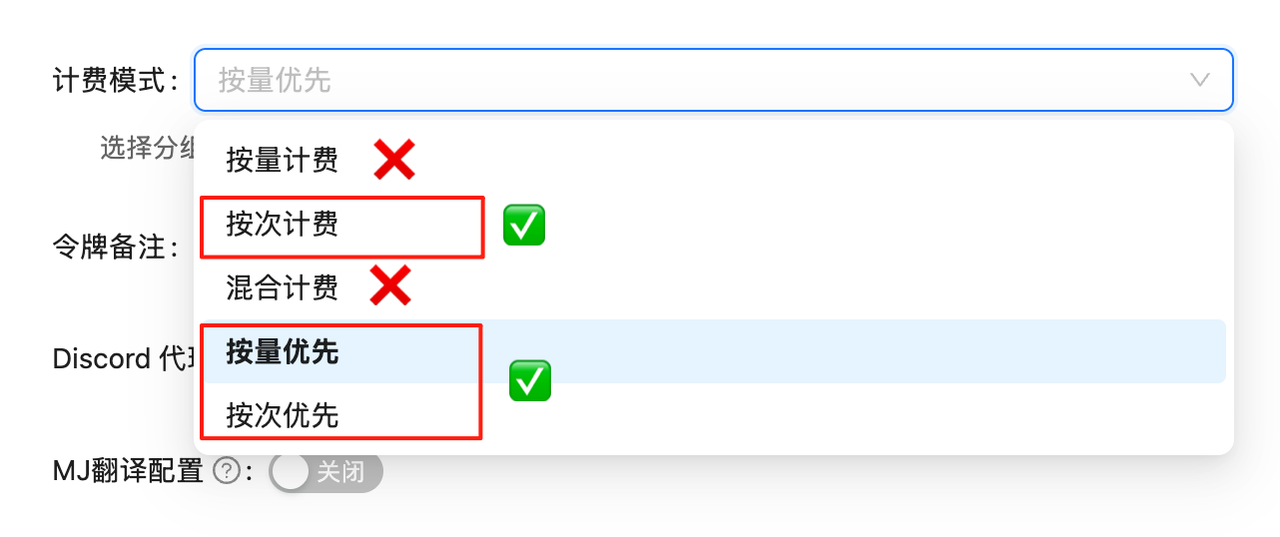 如果未设置计费模式,API调用会失败。必须先完成此配置!
## 模型简介
**Nano Banana Pro** 是老张API对 Google **Gemini 3 Pro Image Preview** (`gemini-3-pro-image-preview`) 模型的定制版称呼。它专为追求极致画质和复杂语义理解的专业场景设计。
### 核心优势
1. **🌟 4K 原生分辨率**: 支持生成最大 4096×4096 的超高清图像。
2. **🧠 Gemini 3 智能**: 内置逻辑推理,能理解 "一只没吃早饭的猫看着空盘子的失落感" 这种抽象描述。
3. **💪 复杂构图**: 能够精准控制画面中的物体位置、数量和文字渲染。
4. **💰 极致价格**: \$0.09/张,适合高质量专业图像生成场景。
## 🌟 核心特性
* **⚡ 极速响应**:平均 10 秒生成,显著快于 OpenAI 系列
* **💰 价格以控制台为准**:\$0.09/张,实际扣费以控制台记录为准
* **🔄 双重兼容**:支持 OpenAI SDK 和 Google 原生格式
* **📐 灵活尺寸**:Google 原生格式支持 10 种纵横比
* **🖼️ 高分辨率**:支持 1K、2K、4K 三种分辨率
* **🧠 思考模式**:内置推理过程,生成前优化构图(默认启用)
* **🌐 搜索接地**:支持使用 Google Search 验证事实并生成图片
* **🎨 多图参考**:支持最多 14 张参考图片(6 张物体 + 5 张人物等)
* **📦 Base64 输出**:直接返回 base64 编码图片数据,无需二次下载
## 🔀 两种调用方式
Nano Banana Pro 支持两种调用端点,各有优势:
| 特性 | OpenAI 兼容模式 | Google 原生格式 |
| -------- | ---------------------------- | ----------------------------------------------------------- |
| **端点** | `/v1/chat/completions` | `/v1beta/models/gemini-3-pro-image-preview:generateContent` |
| **模型名** | `gemini-3-pro-image-preview` | URL 中指定 |
| **图片尺寸** | 固定 1:1 | 支持 10 种纵横比 |
| **分辨率** | 固定 1K | 支持 1K/2K/4K |
| **兼容性** | 完美兼容 OpenAI SDK | 需要原生调用 |
| **返回格式** | Base64 | Base64 |
| **使用场景** | 快速迁移、简单需求 | 需要自定义尺寸或高分辨率 |
💡 **如何选择?**
* 如果价格要正方形(1:1)图片,使用 **OpenAI 兼容模式**更简单
* 如果需要宽屏(16:9)、竖屏(9:16)等特定比例或高分辨率(2K/4K),使用 **Google 原生格式**
## 📋 模型对比
### 与其他图像模型对比
| 模型 | 模型 ID | 计费方式 | 老张API价格 | 外部参考价 | 备注 | 分辨率 | 速度 |
| -------------------- | -------------------------------- | ------ | ------------------- | -------- | ----- | -------- | ----- |
| **Nano Banana Pro** | `gemini-3-pro-image-preview` | 按次计费 | \$0.09/张 | \$0.24/张 | 62.5% | 1K/2K/4K | \~10秒 |
| **Nano Banana2** | `gemini-3.1-flash-image-preview` | 按次计费 | \$0.055/张 | - | - | 1K/2K/4K | \~10秒 |
| **Nano Banana** | `gemini-2.5-flash-image` | 按次计费 | \$0.025/张 | \$0.04/张 | 37.5% | 1K(固定) | \~10秒 |
| **GPT-Image-1** | `gpt-image-1` | 按Token | \$10输入/\$40输出 per M | - | - | - | 中等 |
| **Flux Kontext Pro** | `flux-kontext-pro` | 按次计费 | \$0.035/张 | \$0.04/张 | 12.5% | - | 快速 |
| **Sora Image** | `sora_image` | 按次计费 | \$0.01/张 | - | - | - | 较慢 |
💰 **价格说明**
* **Nano Banana Pro**:\$0.09/张(老张API)vs \$0.24/张(官网),成本较低 62.5%
* **价格透明**:按次计费,实际扣费可在调用日志中查看
**Nano Banana Pro 在老张 API 成本控制超高!**
## 🚀 快速开始
### 准备工作
登录 [老张API令牌管理](https://api.laozhang.ai/token) 创建**按次计费**类型的令牌
如果未设置计费模式,API调用会失败。必须先完成此配置!
## 模型简介
**Nano Banana Pro** 是老张API对 Google **Gemini 3 Pro Image Preview** (`gemini-3-pro-image-preview`) 模型的定制版称呼。它专为追求极致画质和复杂语义理解的专业场景设计。
### 核心优势
1. **🌟 4K 原生分辨率**: 支持生成最大 4096×4096 的超高清图像。
2. **🧠 Gemini 3 智能**: 内置逻辑推理,能理解 "一只没吃早饭的猫看着空盘子的失落感" 这种抽象描述。
3. **💪 复杂构图**: 能够精准控制画面中的物体位置、数量和文字渲染。
4. **💰 极致价格**: \$0.09/张,适合高质量专业图像生成场景。
## 🌟 核心特性
* **⚡ 极速响应**:平均 10 秒生成,显著快于 OpenAI 系列
* **💰 价格以控制台为准**:\$0.09/张,实际扣费以控制台记录为准
* **🔄 双重兼容**:支持 OpenAI SDK 和 Google 原生格式
* **📐 灵活尺寸**:Google 原生格式支持 10 种纵横比
* **🖼️ 高分辨率**:支持 1K、2K、4K 三种分辨率
* **🧠 思考模式**:内置推理过程,生成前优化构图(默认启用)
* **🌐 搜索接地**:支持使用 Google Search 验证事实并生成图片
* **🎨 多图参考**:支持最多 14 张参考图片(6 张物体 + 5 张人物等)
* **📦 Base64 输出**:直接返回 base64 编码图片数据,无需二次下载
## 🔀 两种调用方式
Nano Banana Pro 支持两种调用端点,各有优势:
| 特性 | OpenAI 兼容模式 | Google 原生格式 |
| -------- | ---------------------------- | ----------------------------------------------------------- |
| **端点** | `/v1/chat/completions` | `/v1beta/models/gemini-3-pro-image-preview:generateContent` |
| **模型名** | `gemini-3-pro-image-preview` | URL 中指定 |
| **图片尺寸** | 固定 1:1 | 支持 10 种纵横比 |
| **分辨率** | 固定 1K | 支持 1K/2K/4K |
| **兼容性** | 完美兼容 OpenAI SDK | 需要原生调用 |
| **返回格式** | Base64 | Base64 |
| **使用场景** | 快速迁移、简单需求 | 需要自定义尺寸或高分辨率 |
💡 **如何选择?**
* 如果价格要正方形(1:1)图片,使用 **OpenAI 兼容模式**更简单
* 如果需要宽屏(16:9)、竖屏(9:16)等特定比例或高分辨率(2K/4K),使用 **Google 原生格式**
## 📋 模型对比
### 与其他图像模型对比
| 模型 | 模型 ID | 计费方式 | 老张API价格 | 外部参考价 | 备注 | 分辨率 | 速度 |
| -------------------- | -------------------------------- | ------ | ------------------- | -------- | ----- | -------- | ----- |
| **Nano Banana Pro** | `gemini-3-pro-image-preview` | 按次计费 | \$0.09/张 | \$0.24/张 | 62.5% | 1K/2K/4K | \~10秒 |
| **Nano Banana2** | `gemini-3.1-flash-image-preview` | 按次计费 | \$0.055/张 | - | - | 1K/2K/4K | \~10秒 |
| **Nano Banana** | `gemini-2.5-flash-image` | 按次计费 | \$0.025/张 | \$0.04/张 | 37.5% | 1K(固定) | \~10秒 |
| **GPT-Image-1** | `gpt-image-1` | 按Token | \$10输入/\$40输出 per M | - | - | - | 中等 |
| **Flux Kontext Pro** | `flux-kontext-pro` | 按次计费 | \$0.035/张 | \$0.04/张 | 12.5% | - | 快速 |
| **Sora Image** | `sora_image` | 按次计费 | \$0.01/张 | - | - | - | 较慢 |
💰 **价格说明**
* **Nano Banana Pro**:\$0.09/张(老张API)vs \$0.24/张(官网),成本较低 62.5%
* **价格透明**:按次计费,实际扣费可在调用日志中查看
**Nano Banana Pro 在老张 API 成本控制超高!**
## 🚀 快速开始
### 准备工作
登录 [老张API令牌管理](https://api.laozhang.ai/token) 创建**按次计费**类型的令牌
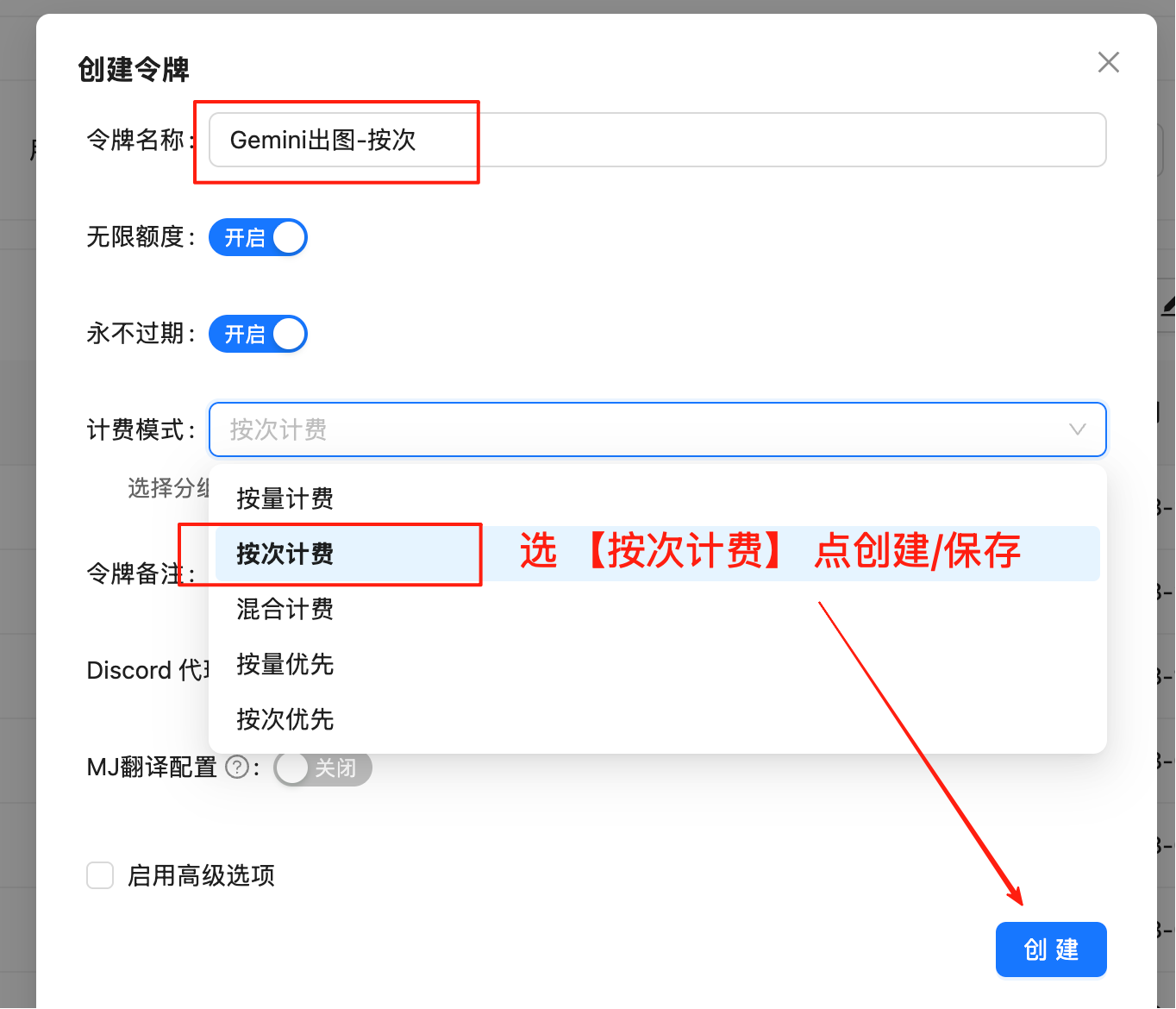 **重要**:必须选择"按次计费"类型,不要选择"按量计费"
复制生成的令牌,格式为 `sk-xxxxxx`
## 方式一:OpenAI 兼容模式(1:1 图片)
适合快速接入,默认生成 1024x1024 (1K) 图片。
### 基础示例 - Curl
```bash theme={null}
curl -X POST "https://api.laozhang.ai/v1/chat/completions" \
-H "Authorization: Bearer $API_KEY" \
-H "Content-Type: application/json" \
-d '{
"model": "gemini-3-pro-image-preview",
"stream": false,
"messages": [
{
"role": "user",
"content": "a beautiful sunset over mountains"
}
]
}'
```
### Python SDK 示例
```python theme={null}
from openai import OpenAI
import base64
import re
client = OpenAI(
api_key="sk-YOUR_API_KEY",
base_url="https://api.laozhang.ai/v1"
)
response = client.chat.completions.create(
model="gemini-3-pro-image-preview",
messages=[
{
"role": "user",
"content": "a beautiful sunset over mountains"
}
]
)
# 提取 base64 图片数据
content = response.choices[0].message.content
match = re.search(r'!\[.*?\]\((data:image/png;base64,.*?)\)', content)
if match:
base64_data = match.group(1).split(',')[1]
image_data = base64.b64decode(base64_data)
with open('output.png', 'wb') as f:
f.write(image_data)
print("✅ 图片已保存: output.png")
```
## 方式二:Google 原生格式(支持自定义纵横比 + 4K)
适合需要 **4K 分辨率** 或 **特殊纵横比** 的场景。
### 支持的纵横比
| 类型 | 纵横比选项 |
| ------- | ----------------------------- |
| **横向** | 21:9(超宽屏), 16:9(宽屏), 4:3, 3:2 |
| **正方形** | 1:1 |
| **纵向** | 9:16(竖屏), 3:4, 2:3 |
| **其他** | 5:4, 4:5 |
### 支持的分辨率
| 纵横比 | 1K 分辨率 | 2K 分辨率 | 4K 分辨率 |
| -------- | --------- | --------- | --------- |
| **1:1** | 1024×1024 | 2048×2048 | 4096×4096 |
| **16:9** | 1376×768 | 2752×1536 | 5504×3072 |
| **9:16** | 768×1376 | 1536×2752 | 3072×5504 |
| **4:3** | 1200×896 | 2400×1792 | 4800×3584 |
| **3:4** | 896×1200 | 1792×2400 | 3584×4800 |
| **21:9** | 1584×672 | 3168×1344 | 6336×2688 |
| **3:2** | 1248×832 | 2496×1664 | 4992×3328 |
| **2:3** | 832×1248 | 1664×2496 | 3328×4992 |
| **5:4** | 1152×896 | 2304×1792 | 4608×3584 |
| **4:5** | 896×1152 | 1792×2304 | 3584×4608 |
💡 **分辨率选择建议**
* **1K**:适合网页展示、社交媒体、快速预览
* **2K**:适合高质量打印、专业展示
* **4K**:适合大型打印、专业设计、极致细节
### 完整 Curl 示例(文生图 4K)
```bash theme={null}
#!/bin/bash
# 1. 设置 API 密钥
export API_KEY="sk-YOUR_API_KEY"
# 2. 发送请求(使用 Nano Banana Pro 生成 4K 图片)
curl -s -X POST "https://api.laozhang.ai/v1beta/models/gemini-3-pro-image-preview:generateContent" \
-H "Authorization: Bearer $API_KEY" \
-H "Content-Type: application/json" \
-d '{
"contents": [{
"parts": [
{"text": "A futuristic city skyline at sunset, high detailed, 4k"}
]
}],
"generationConfig": {
"responseModalities": ["IMAGE"],
"imageConfig": {
"aspectRatio": "16:9",
"imageSize": "4K"
}
}
}' \
| jq -r '.candidates[0].content.parts[0].inlineData.data' \
| base64 --decode > output_4k.png
echo "✅ 图片已保存: output_4k.png"
```
### Python 代码示例
💡 **三个示例递进关系**
示例1生成图 → 示例2用它变换风格 → 示例3融合前两张图。这样逻辑更清晰!
```python theme={null}
import requests
import base64
# ========== 配置 ==========
API_KEY = "sk-YOUR_API_KEY"
API_URL = "https://api.laozhang.ai/v1beta/models/gemini-3-pro-image-preview:generateContent"
PROMPT = "一只可爱的橘猫"
ASPECT_RATIO = "1:1"
IMAGE_SIZE = "2K" # Nano Banana Pro 支持: 1K, 2K, 4K
# ============================
headers = {"Authorization": f"Bearer {API_KEY}", "Content-Type": "application/json"}
payload = {
"contents": [{"parts": [{"text": PROMPT}]}],
"generationConfig": {
"responseModalities": ["IMAGE"],
"imageConfig": {
"aspectRatio": ASPECT_RATIO,
"imageSize": IMAGE_SIZE
}
}
}
response = requests.post(API_URL, headers=headers, json=payload, timeout=180)
result = response.json()
# 保存图片
image_data = result["candidates"][0]["content"]["parts"][0]["inlineData"]["data"]
with open("output.png", "wb") as f:
f.write(base64.b64decode(image_data))
print("✅ 图片已保存: output.png")
```
```python theme={null}
import requests
import base64
# ========== 配置 ==========
API_KEY = "sk-YOUR_API_KEY"
API_URL = "https://api.laozhang.ai/v1beta/models/gemini-3-pro-image-preview:generateContent"
INPUT_IMAGE = "output.png" # 使用示例1生成的图片
PROMPT = "把这张图变成梵高星空风格的油画"
ASPECT_RATIO = "1:1"
IMAGE_SIZE = "2K"
# ============================
# 读取并编码图片
with open(INPUT_IMAGE, "rb") as f:
image_b64 = base64.b64encode(f.read()).decode("utf-8")
headers = {"Authorization": f"Bearer {API_KEY}", "Content-Type": "application/json"}
payload = {
"contents": [{
"parts": [
{"text": PROMPT},
{"inline_data": {"mime_type": "image/jpeg", "data": image_b64}}
]
}],
"generationConfig": {
"responseModalities": ["IMAGE"],
"imageConfig": {
"aspectRatio": ASPECT_RATIO,
"imageSize": IMAGE_SIZE
}
}
}
response = requests.post(API_URL, headers=headers, json=payload, timeout=180)
result = response.json()
# 保存图片
output_data = result["candidates"][0]["content"]["parts"][0]["inlineData"]["data"]
with open("output_styled.png", "wb") as f:
f.write(base64.b64decode(output_data))
print("✅ 图片已保存: output_styled.png")
```
```python theme={null}
import requests
import base64
# ========== 配置 ==========
API_KEY = "sk-YOUR_API_KEY"
API_URL = "https://api.laozhang.ai/v1beta/models/gemini-3-pro-image-preview:generateContent"
# 使用前面生成的两张图(示例1和示例2的输出)
IMAGES = ["output.png", "output_styled.png"]
PROMPT = "将这两张图融合成一个艺术作品"
ASPECT_RATIO = "16:9"
IMAGE_SIZE = "2K"
# ============================
# 构建 parts: 文本 + 多张图片
parts = [{"text": PROMPT}]
for img_path in IMAGES:
with open(img_path, "rb") as f:
img_b64 = base64.b64encode(f.read()).decode("utf-8")
parts.append({"inline_data": {"mime_type": "image/png", "data": img_b64}})
headers = {"Authorization": f"Bearer {API_KEY}", "Content-Type": "application/json"}
payload = {
"contents": [{"parts": parts}],
"generationConfig": {
"responseModalities": ["IMAGE"],
"imageConfig": {
"aspectRatio": ASPECT_RATIO,
"imageSize": IMAGE_SIZE
}
}
}
response = requests.post(API_URL, headers=headers, json=payload, timeout=180)
result = response.json()
# 保存图片
output_data = result["candidates"][0]["content"]["parts"][0]["inlineData"]["data"]
with open("output_mixed.png", "wb") as f:
f.write(base64.b64decode(output_data))
print("✅ 图片已保存: output_mixed.png")
```
```python theme={null}
#!/usr/bin/env python3
# -*- coding: utf-8 -*-
"""
Nano Banana Pro 图片生成 - 完整演示脚本
包含三个场景:文生图、单图生图、多图混合
"""
import requests
import base64
import os
from datetime import datetime
# ========== 配置区 ==========
API_KEY = "sk-YOUR_API_KEY"
API_URL = "https://api.laozhang.ai/v1beta/models/gemini-3-pro-image-preview:generateContent"
# ============================
def generate_text_to_image(prompt, aspect_ratio="16:9", image_size="2K"):
"""场景1: 文生图"""
print(f"\n📸 文生图: {prompt}")
payload = {
"contents": [{"parts": [{"text": prompt}]}],
"generationConfig": {
"responseModalities": ["IMAGE"],
"imageConfig": {
"aspectRatio": aspect_ratio,
"imageSize": image_size
}
}
}
return call_api(payload, f"text_{image_size}")
def generate_image_to_image(input_image, prompt, aspect_ratio="1:1", image_size="2K"):
"""场景2: 单图生图"""
print(f"\n🎨 单图生图: {input_image}")
with open(input_image, "rb") as f:
img_b64 = base64.b64encode(f.read()).decode("utf-8")
payload = {
"contents": [{
"parts": [
{"text": prompt},
{"inline_data": {"mime_type": "image/jpeg", "data": img_b64}}
]
}],
"generationConfig": {
"responseModalities": ["IMAGE"],
"imageConfig": {
"aspectRatio": aspect_ratio,
"imageSize": image_size
}
}
}
return call_api(payload, f"styled_{image_size}")
def generate_multi_image_mix(images, prompt, aspect_ratio="16:9", image_size="2K"):
"""场景3: 多图混合"""
print(f"\n🖼️ 多图混合: {len(images)} 张图片")
parts = [{"text": prompt}]
for img in images:
with open(img, "rb") as f:
parts.append({"inline_data": {"mime_type": "image/jpeg", "data": base64.b64encode(f.read()).decode()}})
payload = {
"contents": [{"parts": parts}],
"generationConfig": {
"responseModalities": ["IMAGE"],
"imageConfig": {
"aspectRatio": aspect_ratio,
"imageSize": image_size
}
}
}
return call_api(payload, f"mixed_{image_size}")
def call_api(payload, prefix):
"""调用 API"""
headers = {"Authorization": f"Bearer {API_KEY}", "Content-Type": "application/json"}
try:
response = requests.post(API_URL, headers=headers, json=payload, timeout=180)
result = response.json()
image_data = result["candidates"][0]["content"]["parts"][0]["inlineData"]["data"]
filename = f"{prefix}_{datetime.now().strftime('%Y%m%d_%H%M%S')}.png"
with open(filename, "wb") as f:
f.write(base64.b64decode(image_data))
print(f"✅ 已保存: {filename}")
return filename
except Exception as e:
print(f"❌ 错误: {e}")
return None
# ========== 主程序 ==========
def main():
print("🎨 Nano Banana Pro 图片生成 - 完整演示")
# 场景 1: 文生图
img1 = generate_text_to_image(
"A futuristic cyberpunk city at night, 4k",
aspect_ratio="16:9",
image_size="4K"
)
# 场景 2: 单图生图 (需要 test_cat.jpg)
if os.path.exists("test_cat.jpg"):
img2 = generate_image_to_image(
"test_cat.jpg",
"Van Gogh Starry Night style",
aspect_ratio="1:1",
image_size="2K"
)
# 场景 3: 多图混合 (需要 test_cat.jpg, test_apple.jpg)
if os.path.exists("test_cat.jpg") and os.path.exists("test_apple.jpg"):
generate_multi_image_mix(
["test_cat.jpg", "test_apple.jpg"],
"A cat eating an apple",
aspect_ratio="16:9",
image_size="2K"
)
print("\n✅ 演示完成!")
if __name__ == "__main__":
main()
```
### Bash 脚本示例
```bash theme={null}
#!/bin/bash
# ============================================================
# Nano Banana Pro 图片生成工具 - Bash/Curl 版本
# 支持 4K 分辨率和多种纵横比
# ============================================================
# ========== 配置区 ==========
API_KEY="sk-YOUR_API_KEY"
API_URL="https://api.laozhang.ai/v1beta/models/gemini-3-pro-image-preview:generateContent"
PROMPT="A futuristic cyberpunk city at night, neon lights, flying cars, highly detailed, 4k"
ASPECT_RATIO="16:9"
IMAGE_SIZE="4K" # 1K, 2K, 4K
OUTPUT_FILE="gemini_${IMAGE_SIZE}_$(date +%Y%m%d_%H%M%S).png"
# ============================
# 检查依赖
if ! command -v jq &> /dev/null; then
echo "❌ 错误: 需要安装 jq 工具"
echo ""
echo "安装方法:"
echo " macOS: brew install jq"
echo " Ubuntu: sudo apt-get install jq"
echo " CentOS: sudo yum install jq"
exit 1
fi
echo "============================================================"
echo "Nano Banana Pro 图片生成工具"
echo "============================================================"
echo "⏰ 开始时间: $(date '+%Y-%m-%d %H:%M:%S')"
echo "🚀 开始生成图片..."
echo "📝 提示词: ${PROMPT}"
echo "📐 纵横比: ${ASPECT_RATIO}"
echo "🖼️ 分辨率: ${IMAGE_SIZE}"
# 构建 JSON 请求
REQUEST_JSON=$(jq -n \
--arg prompt "$PROMPT" \
--arg ratio "$ASPECT_RATIO" \
--arg size "$IMAGE_SIZE" \
'{
contents: [{
parts: [{text: $prompt}]
}],
generationConfig: {
responseModalities: ["IMAGE"],
imageConfig: {
aspectRatio: $ratio,
imageSize: $size
}
}
}')
# 发送请求
RESPONSE=$(curl -s -X POST "${API_URL}" \
-H "Authorization: Bearer ${API_KEY}" \
-H "Content-Type: application/json" \
-d "${REQUEST_JSON}")
# 检查错误
if echo "${RESPONSE}" | jq -e '.error' &> /dev/null; then
echo "❌ 生成失败"
echo "💥 错误信息:"
echo "${RESPONSE}" | jq -r '.error.message // .error'
exit 1
fi
# 提取图片数据
echo "💾 正在保存图片..."
IMAGE_DATA=$(echo "${RESPONSE}" | jq -r '.candidates[0].content.parts[0].inlineData.data' 2>/dev/null)
if [ -z "$IMAGE_DATA" ] || [ "$IMAGE_DATA" = "null" ]; then
echo "❌ 未找到图片数据"
exit 1
fi
# 解码并保存图片
echo "${IMAGE_DATA}" | base64 --decode > "${OUTPUT_FILE}"
# 检查结果
if [ -f "${OUTPUT_FILE}" ]; then
FILE_SIZE=$(du -h "${OUTPUT_FILE}" | cut -f1)
echo "✅ 图片已保存: ${OUTPUT_FILE}"
echo "📊 文件大小: ${FILE_SIZE}"
echo "============================================================"
echo "🎉 生成成功!"
echo "⏰ 结束时间: $(date '+%Y-%m-%d %H:%M:%S')"
else
echo "❌ 图片保存失败"
exit 1
fi
```
## 🚀 Gemini 3 Pro 高级特性(Nano Banana Pro 独有)
### 🧠 思考模式 (Thinking Mode)
Nano Banana Pro 内置了**推理能力**,在生成图片前会自动优化构图和逻辑,以确保更高质量的输出。此功能默认启用,无需额外配置。
💡 **思考模式的优势**
* 自动优化构图和布局
* 理解复杂的多步骤指令
* 生成过程中会创建临时"思维图像"(在后端,不收费)
* 最终输出质量更高、更符合预期
### 🌐 Google 搜索接地 (Grounding)
模型可以使用 Google 搜索作为工具,利用实时数据(如天气、股价、新闻)生成图片。
```bash theme={null}
curl -s -X POST "https://api.laozhang.ai/v1beta/models/gemini-3-pro-image-preview:generateContent" \
-H "Authorization: Bearer $API_KEY" \
-H "Content-Type: application/json" \
-d '{
"contents": [{"parts": [{"text": "Visualize the current weather forecast for the next 5 days in San Francisco as a clean, modern weather chart."}]}],
"tools": [{"google_search": {}}],
"generationConfig": {
"responseModalities": ["TEXT", "IMAGE"],
"imageConfig": {"aspectRatio": "16:9"}
}
}'
```
**注意**:使用搜索接地时,`responseModalities` 必须包含 `"TEXT"`(即 `["TEXT", "IMAGE"]`),纯图片模式下无法返回搜索结果。
### 🎨 多图参考 (Reference Images)
Nano Banana Pro 支持混合使用最多 **14 张参考图片**:
* **最多 6 张** 高保真对象图片(用于包含在最终图片中)
* **最多 5 张** 人物图片(用于保持角色一致性)
```python theme={null}
# 多图参考示例(Python)
import requests
import base64
API_KEY = "sk-YOUR_API_KEY"
API_URL = "https://api.laozhang.ai/v1beta/models/gemini-3-pro-image-preview:generateContent"
# 准备多张参考图片
image_paths = ["cat.jpg", "apple.jpg"]
parts = [{"text": "Combine these images: a cat eating an apple on a table"}]
for path in image_paths:
with open(path, "rb") as f:
image_data = base64.b64encode(f.read()).decode("utf-8")
parts.append({
"inline_data": {
"mime_type": "image/jpeg",
"data": image_data
}
})
# 发送请求
response = requests.post(
API_URL,
headers={
"Authorization": f"Bearer {API_KEY}",
"Content-Type": "application/json"
},
json={
"contents": [{"parts": parts}],
"generationConfig": {
"responseModalities": ["IMAGE"],
"imageConfig": {
"aspectRatio": "16:9",
"imageSize": "2K"
}
}
}
)
```
💡 **多图参考最佳实践**
* 物体图片:用于产品合成、场景构建
* 人物图片:保持角色外观一致性(如制作系列图片)
* 组合使用:创建复杂的视觉叙事
## 💡 最佳实践
### 提示词优化
使用具体、详细的描述,包括主体、风格、颜色、光线等
可以指定艺术风格:"油画风格"、"水彩画"、"赛博朋克风格"等
避免使用过于抽象或模糊的词汇
英文提示词通常效果更好,中文也支持
### 纵横比选择建议
| 用途 | 推荐纵横比 |
| ------------- | --------- |
| 社交媒体横图 | 16:9 |
| 手机壁纸/竖屏 | 9:16 |
| Instagram 正方形 | 1:1 |
| 打印照片 | 4:3 或 3:2 |
| 电影海报 | 2:3 |
| 横幅广告 | 21:9 |
## ❓ 常见问题
1. 访问 [api.laozhang.ai](https://api.laozhang.ai) 注册账号
2. 创建令牌,选择"按次计费"
3. 调用 `gemini-3-pro-image-preview` 模型
4. 在控制台调用日志中查看实际扣费
\$0.5 可直接抵扣多次 Nano Banana Pro 调用费用。
| 渠道 | 价格 | 说明 |
| ---------- | ------------ | -------- |
| **老张 API** | **\$0.09/张** | 价格以控制台为准 |
| Google 官方 | \$0.24/张 | 原价 |
实际扣费以控制台调用日志为准。
**方法一**:[API Playground](https://api.laozhang.ai/playground) 可视化测试
**方法二**:Curl 命令
```bash theme={null}
curl -X POST "https://api.laozhang.ai/v1/chat/completions" \
-H "Authorization: Bearer YOUR_API_KEY" \
-d '{"model": "gemini-3-pro-image-preview", "messages": [{"role": "user", "content": "a cute cat"}]}'
```
| 特性 | Nano Banana Pro | Nano Banana |
| ---- | ---------------------------- | ------------------------ |
| 模型 | `gemini-3-pro-image-preview` | `gemini-2.5-flash-image` |
| 技术 | Gemini 3 | Gemini 2.5 |
| 分辨率 | 1K/2K/4K | 1K(固定) |
| 价格 | \$0.09/张 | \$0.025/张 |
| 思考模式 | ✅ 有 | ❌ 无 |
| 搜索接地 | ✅ 有 | ❌ 无 |
| 多图参考 | 最多 14 张 | 最多 3 张 |
* 如果价格要 1:1 正方形图片,使用 **OpenAI 兼容模式**更简单
* 如果需要特定纵横比(如 16:9 宽屏)或高分辨率(2K/4K),使用 **Google 原生格式**
**4K 仅 Nano Banana Pro 支持**,使用 Google 原生格式并添加 `imageSize` 参数:
```json theme={null}
{
"generationConfig": {
"responseModalities": ["IMAGE"],
"imageConfig": {
"aspectRatio": "16:9",
"imageSize": "4K"
}
}
}
```
**重要**:必须使用大写 "K"(1K、2K、4K)。
**完美支持!** Gemini 3 Pro 拥有顶级的多语言理解能力,您可以直接使用中文描述画面,无需翻译。
1. **详细描述**:提供具体的细节(颜色、风格、场景等)
2. **英文提示词**:英文通常效果更好
3. **参考风格**:指定艺术风格(如"油画风格"、"水彩画")
4. **多次尝试**:可以用不同的提示词尝试,价格低廉
Base64 数据可以直接在网页中显示:
```html theme={null}
**重要**:必须选择"按次计费"类型,不要选择"按量计费"
复制生成的令牌,格式为 `sk-xxxxxx`
## 方式一:OpenAI 兼容模式(1:1 图片)
适合快速接入,默认生成 1024x1024 (1K) 图片。
### 基础示例 - Curl
```bash theme={null}
curl -X POST "https://api.laozhang.ai/v1/chat/completions" \
-H "Authorization: Bearer $API_KEY" \
-H "Content-Type: application/json" \
-d '{
"model": "gemini-3-pro-image-preview",
"stream": false,
"messages": [
{
"role": "user",
"content": "a beautiful sunset over mountains"
}
]
}'
```
### Python SDK 示例
```python theme={null}
from openai import OpenAI
import base64
import re
client = OpenAI(
api_key="sk-YOUR_API_KEY",
base_url="https://api.laozhang.ai/v1"
)
response = client.chat.completions.create(
model="gemini-3-pro-image-preview",
messages=[
{
"role": "user",
"content": "a beautiful sunset over mountains"
}
]
)
# 提取 base64 图片数据
content = response.choices[0].message.content
match = re.search(r'!\[.*?\]\((data:image/png;base64,.*?)\)', content)
if match:
base64_data = match.group(1).split(',')[1]
image_data = base64.b64decode(base64_data)
with open('output.png', 'wb') as f:
f.write(image_data)
print("✅ 图片已保存: output.png")
```
## 方式二:Google 原生格式(支持自定义纵横比 + 4K)
适合需要 **4K 分辨率** 或 **特殊纵横比** 的场景。
### 支持的纵横比
| 类型 | 纵横比选项 |
| ------- | ----------------------------- |
| **横向** | 21:9(超宽屏), 16:9(宽屏), 4:3, 3:2 |
| **正方形** | 1:1 |
| **纵向** | 9:16(竖屏), 3:4, 2:3 |
| **其他** | 5:4, 4:5 |
### 支持的分辨率
| 纵横比 | 1K 分辨率 | 2K 分辨率 | 4K 分辨率 |
| -------- | --------- | --------- | --------- |
| **1:1** | 1024×1024 | 2048×2048 | 4096×4096 |
| **16:9** | 1376×768 | 2752×1536 | 5504×3072 |
| **9:16** | 768×1376 | 1536×2752 | 3072×5504 |
| **4:3** | 1200×896 | 2400×1792 | 4800×3584 |
| **3:4** | 896×1200 | 1792×2400 | 3584×4800 |
| **21:9** | 1584×672 | 3168×1344 | 6336×2688 |
| **3:2** | 1248×832 | 2496×1664 | 4992×3328 |
| **2:3** | 832×1248 | 1664×2496 | 3328×4992 |
| **5:4** | 1152×896 | 2304×1792 | 4608×3584 |
| **4:5** | 896×1152 | 1792×2304 | 3584×4608 |
💡 **分辨率选择建议**
* **1K**:适合网页展示、社交媒体、快速预览
* **2K**:适合高质量打印、专业展示
* **4K**:适合大型打印、专业设计、极致细节
### 完整 Curl 示例(文生图 4K)
```bash theme={null}
#!/bin/bash
# 1. 设置 API 密钥
export API_KEY="sk-YOUR_API_KEY"
# 2. 发送请求(使用 Nano Banana Pro 生成 4K 图片)
curl -s -X POST "https://api.laozhang.ai/v1beta/models/gemini-3-pro-image-preview:generateContent" \
-H "Authorization: Bearer $API_KEY" \
-H "Content-Type: application/json" \
-d '{
"contents": [{
"parts": [
{"text": "A futuristic city skyline at sunset, high detailed, 4k"}
]
}],
"generationConfig": {
"responseModalities": ["IMAGE"],
"imageConfig": {
"aspectRatio": "16:9",
"imageSize": "4K"
}
}
}' \
| jq -r '.candidates[0].content.parts[0].inlineData.data' \
| base64 --decode > output_4k.png
echo "✅ 图片已保存: output_4k.png"
```
### Python 代码示例
💡 **三个示例递进关系**
示例1生成图 → 示例2用它变换风格 → 示例3融合前两张图。这样逻辑更清晰!
```python theme={null}
import requests
import base64
# ========== 配置 ==========
API_KEY = "sk-YOUR_API_KEY"
API_URL = "https://api.laozhang.ai/v1beta/models/gemini-3-pro-image-preview:generateContent"
PROMPT = "一只可爱的橘猫"
ASPECT_RATIO = "1:1"
IMAGE_SIZE = "2K" # Nano Banana Pro 支持: 1K, 2K, 4K
# ============================
headers = {"Authorization": f"Bearer {API_KEY}", "Content-Type": "application/json"}
payload = {
"contents": [{"parts": [{"text": PROMPT}]}],
"generationConfig": {
"responseModalities": ["IMAGE"],
"imageConfig": {
"aspectRatio": ASPECT_RATIO,
"imageSize": IMAGE_SIZE
}
}
}
response = requests.post(API_URL, headers=headers, json=payload, timeout=180)
result = response.json()
# 保存图片
image_data = result["candidates"][0]["content"]["parts"][0]["inlineData"]["data"]
with open("output.png", "wb") as f:
f.write(base64.b64decode(image_data))
print("✅ 图片已保存: output.png")
```
```python theme={null}
import requests
import base64
# ========== 配置 ==========
API_KEY = "sk-YOUR_API_KEY"
API_URL = "https://api.laozhang.ai/v1beta/models/gemini-3-pro-image-preview:generateContent"
INPUT_IMAGE = "output.png" # 使用示例1生成的图片
PROMPT = "把这张图变成梵高星空风格的油画"
ASPECT_RATIO = "1:1"
IMAGE_SIZE = "2K"
# ============================
# 读取并编码图片
with open(INPUT_IMAGE, "rb") as f:
image_b64 = base64.b64encode(f.read()).decode("utf-8")
headers = {"Authorization": f"Bearer {API_KEY}", "Content-Type": "application/json"}
payload = {
"contents": [{
"parts": [
{"text": PROMPT},
{"inline_data": {"mime_type": "image/jpeg", "data": image_b64}}
]
}],
"generationConfig": {
"responseModalities": ["IMAGE"],
"imageConfig": {
"aspectRatio": ASPECT_RATIO,
"imageSize": IMAGE_SIZE
}
}
}
response = requests.post(API_URL, headers=headers, json=payload, timeout=180)
result = response.json()
# 保存图片
output_data = result["candidates"][0]["content"]["parts"][0]["inlineData"]["data"]
with open("output_styled.png", "wb") as f:
f.write(base64.b64decode(output_data))
print("✅ 图片已保存: output_styled.png")
```
```python theme={null}
import requests
import base64
# ========== 配置 ==========
API_KEY = "sk-YOUR_API_KEY"
API_URL = "https://api.laozhang.ai/v1beta/models/gemini-3-pro-image-preview:generateContent"
# 使用前面生成的两张图(示例1和示例2的输出)
IMAGES = ["output.png", "output_styled.png"]
PROMPT = "将这两张图融合成一个艺术作品"
ASPECT_RATIO = "16:9"
IMAGE_SIZE = "2K"
# ============================
# 构建 parts: 文本 + 多张图片
parts = [{"text": PROMPT}]
for img_path in IMAGES:
with open(img_path, "rb") as f:
img_b64 = base64.b64encode(f.read()).decode("utf-8")
parts.append({"inline_data": {"mime_type": "image/png", "data": img_b64}})
headers = {"Authorization": f"Bearer {API_KEY}", "Content-Type": "application/json"}
payload = {
"contents": [{"parts": parts}],
"generationConfig": {
"responseModalities": ["IMAGE"],
"imageConfig": {
"aspectRatio": ASPECT_RATIO,
"imageSize": IMAGE_SIZE
}
}
}
response = requests.post(API_URL, headers=headers, json=payload, timeout=180)
result = response.json()
# 保存图片
output_data = result["candidates"][0]["content"]["parts"][0]["inlineData"]["data"]
with open("output_mixed.png", "wb") as f:
f.write(base64.b64decode(output_data))
print("✅ 图片已保存: output_mixed.png")
```
```python theme={null}
#!/usr/bin/env python3
# -*- coding: utf-8 -*-
"""
Nano Banana Pro 图片生成 - 完整演示脚本
包含三个场景:文生图、单图生图、多图混合
"""
import requests
import base64
import os
from datetime import datetime
# ========== 配置区 ==========
API_KEY = "sk-YOUR_API_KEY"
API_URL = "https://api.laozhang.ai/v1beta/models/gemini-3-pro-image-preview:generateContent"
# ============================
def generate_text_to_image(prompt, aspect_ratio="16:9", image_size="2K"):
"""场景1: 文生图"""
print(f"\n📸 文生图: {prompt}")
payload = {
"contents": [{"parts": [{"text": prompt}]}],
"generationConfig": {
"responseModalities": ["IMAGE"],
"imageConfig": {
"aspectRatio": aspect_ratio,
"imageSize": image_size
}
}
}
return call_api(payload, f"text_{image_size}")
def generate_image_to_image(input_image, prompt, aspect_ratio="1:1", image_size="2K"):
"""场景2: 单图生图"""
print(f"\n🎨 单图生图: {input_image}")
with open(input_image, "rb") as f:
img_b64 = base64.b64encode(f.read()).decode("utf-8")
payload = {
"contents": [{
"parts": [
{"text": prompt},
{"inline_data": {"mime_type": "image/jpeg", "data": img_b64}}
]
}],
"generationConfig": {
"responseModalities": ["IMAGE"],
"imageConfig": {
"aspectRatio": aspect_ratio,
"imageSize": image_size
}
}
}
return call_api(payload, f"styled_{image_size}")
def generate_multi_image_mix(images, prompt, aspect_ratio="16:9", image_size="2K"):
"""场景3: 多图混合"""
print(f"\n🖼️ 多图混合: {len(images)} 张图片")
parts = [{"text": prompt}]
for img in images:
with open(img, "rb") as f:
parts.append({"inline_data": {"mime_type": "image/jpeg", "data": base64.b64encode(f.read()).decode()}})
payload = {
"contents": [{"parts": parts}],
"generationConfig": {
"responseModalities": ["IMAGE"],
"imageConfig": {
"aspectRatio": aspect_ratio,
"imageSize": image_size
}
}
}
return call_api(payload, f"mixed_{image_size}")
def call_api(payload, prefix):
"""调用 API"""
headers = {"Authorization": f"Bearer {API_KEY}", "Content-Type": "application/json"}
try:
response = requests.post(API_URL, headers=headers, json=payload, timeout=180)
result = response.json()
image_data = result["candidates"][0]["content"]["parts"][0]["inlineData"]["data"]
filename = f"{prefix}_{datetime.now().strftime('%Y%m%d_%H%M%S')}.png"
with open(filename, "wb") as f:
f.write(base64.b64decode(image_data))
print(f"✅ 已保存: {filename}")
return filename
except Exception as e:
print(f"❌ 错误: {e}")
return None
# ========== 主程序 ==========
def main():
print("🎨 Nano Banana Pro 图片生成 - 完整演示")
# 场景 1: 文生图
img1 = generate_text_to_image(
"A futuristic cyberpunk city at night, 4k",
aspect_ratio="16:9",
image_size="4K"
)
# 场景 2: 单图生图 (需要 test_cat.jpg)
if os.path.exists("test_cat.jpg"):
img2 = generate_image_to_image(
"test_cat.jpg",
"Van Gogh Starry Night style",
aspect_ratio="1:1",
image_size="2K"
)
# 场景 3: 多图混合 (需要 test_cat.jpg, test_apple.jpg)
if os.path.exists("test_cat.jpg") and os.path.exists("test_apple.jpg"):
generate_multi_image_mix(
["test_cat.jpg", "test_apple.jpg"],
"A cat eating an apple",
aspect_ratio="16:9",
image_size="2K"
)
print("\n✅ 演示完成!")
if __name__ == "__main__":
main()
```
### Bash 脚本示例
```bash theme={null}
#!/bin/bash
# ============================================================
# Nano Banana Pro 图片生成工具 - Bash/Curl 版本
# 支持 4K 分辨率和多种纵横比
# ============================================================
# ========== 配置区 ==========
API_KEY="sk-YOUR_API_KEY"
API_URL="https://api.laozhang.ai/v1beta/models/gemini-3-pro-image-preview:generateContent"
PROMPT="A futuristic cyberpunk city at night, neon lights, flying cars, highly detailed, 4k"
ASPECT_RATIO="16:9"
IMAGE_SIZE="4K" # 1K, 2K, 4K
OUTPUT_FILE="gemini_${IMAGE_SIZE}_$(date +%Y%m%d_%H%M%S).png"
# ============================
# 检查依赖
if ! command -v jq &> /dev/null; then
echo "❌ 错误: 需要安装 jq 工具"
echo ""
echo "安装方法:"
echo " macOS: brew install jq"
echo " Ubuntu: sudo apt-get install jq"
echo " CentOS: sudo yum install jq"
exit 1
fi
echo "============================================================"
echo "Nano Banana Pro 图片生成工具"
echo "============================================================"
echo "⏰ 开始时间: $(date '+%Y-%m-%d %H:%M:%S')"
echo "🚀 开始生成图片..."
echo "📝 提示词: ${PROMPT}"
echo "📐 纵横比: ${ASPECT_RATIO}"
echo "🖼️ 分辨率: ${IMAGE_SIZE}"
# 构建 JSON 请求
REQUEST_JSON=$(jq -n \
--arg prompt "$PROMPT" \
--arg ratio "$ASPECT_RATIO" \
--arg size "$IMAGE_SIZE" \
'{
contents: [{
parts: [{text: $prompt}]
}],
generationConfig: {
responseModalities: ["IMAGE"],
imageConfig: {
aspectRatio: $ratio,
imageSize: $size
}
}
}')
# 发送请求
RESPONSE=$(curl -s -X POST "${API_URL}" \
-H "Authorization: Bearer ${API_KEY}" \
-H "Content-Type: application/json" \
-d "${REQUEST_JSON}")
# 检查错误
if echo "${RESPONSE}" | jq -e '.error' &> /dev/null; then
echo "❌ 生成失败"
echo "💥 错误信息:"
echo "${RESPONSE}" | jq -r '.error.message // .error'
exit 1
fi
# 提取图片数据
echo "💾 正在保存图片..."
IMAGE_DATA=$(echo "${RESPONSE}" | jq -r '.candidates[0].content.parts[0].inlineData.data' 2>/dev/null)
if [ -z "$IMAGE_DATA" ] || [ "$IMAGE_DATA" = "null" ]; then
echo "❌ 未找到图片数据"
exit 1
fi
# 解码并保存图片
echo "${IMAGE_DATA}" | base64 --decode > "${OUTPUT_FILE}"
# 检查结果
if [ -f "${OUTPUT_FILE}" ]; then
FILE_SIZE=$(du -h "${OUTPUT_FILE}" | cut -f1)
echo "✅ 图片已保存: ${OUTPUT_FILE}"
echo "📊 文件大小: ${FILE_SIZE}"
echo "============================================================"
echo "🎉 生成成功!"
echo "⏰ 结束时间: $(date '+%Y-%m-%d %H:%M:%S')"
else
echo "❌ 图片保存失败"
exit 1
fi
```
## 🚀 Gemini 3 Pro 高级特性(Nano Banana Pro 独有)
### 🧠 思考模式 (Thinking Mode)
Nano Banana Pro 内置了**推理能力**,在生成图片前会自动优化构图和逻辑,以确保更高质量的输出。此功能默认启用,无需额外配置。
💡 **思考模式的优势**
* 自动优化构图和布局
* 理解复杂的多步骤指令
* 生成过程中会创建临时"思维图像"(在后端,不收费)
* 最终输出质量更高、更符合预期
### 🌐 Google 搜索接地 (Grounding)
模型可以使用 Google 搜索作为工具,利用实时数据(如天气、股价、新闻)生成图片。
```bash theme={null}
curl -s -X POST "https://api.laozhang.ai/v1beta/models/gemini-3-pro-image-preview:generateContent" \
-H "Authorization: Bearer $API_KEY" \
-H "Content-Type: application/json" \
-d '{
"contents": [{"parts": [{"text": "Visualize the current weather forecast for the next 5 days in San Francisco as a clean, modern weather chart."}]}],
"tools": [{"google_search": {}}],
"generationConfig": {
"responseModalities": ["TEXT", "IMAGE"],
"imageConfig": {"aspectRatio": "16:9"}
}
}'
```
**注意**:使用搜索接地时,`responseModalities` 必须包含 `"TEXT"`(即 `["TEXT", "IMAGE"]`),纯图片模式下无法返回搜索结果。
### 🎨 多图参考 (Reference Images)
Nano Banana Pro 支持混合使用最多 **14 张参考图片**:
* **最多 6 张** 高保真对象图片(用于包含在最终图片中)
* **最多 5 张** 人物图片(用于保持角色一致性)
```python theme={null}
# 多图参考示例(Python)
import requests
import base64
API_KEY = "sk-YOUR_API_KEY"
API_URL = "https://api.laozhang.ai/v1beta/models/gemini-3-pro-image-preview:generateContent"
# 准备多张参考图片
image_paths = ["cat.jpg", "apple.jpg"]
parts = [{"text": "Combine these images: a cat eating an apple on a table"}]
for path in image_paths:
with open(path, "rb") as f:
image_data = base64.b64encode(f.read()).decode("utf-8")
parts.append({
"inline_data": {
"mime_type": "image/jpeg",
"data": image_data
}
})
# 发送请求
response = requests.post(
API_URL,
headers={
"Authorization": f"Bearer {API_KEY}",
"Content-Type": "application/json"
},
json={
"contents": [{"parts": parts}],
"generationConfig": {
"responseModalities": ["IMAGE"],
"imageConfig": {
"aspectRatio": "16:9",
"imageSize": "2K"
}
}
}
)
```
💡 **多图参考最佳实践**
* 物体图片:用于产品合成、场景构建
* 人物图片:保持角色外观一致性(如制作系列图片)
* 组合使用:创建复杂的视觉叙事
## 💡 最佳实践
### 提示词优化
使用具体、详细的描述,包括主体、风格、颜色、光线等
可以指定艺术风格:"油画风格"、"水彩画"、"赛博朋克风格"等
避免使用过于抽象或模糊的词汇
英文提示词通常效果更好,中文也支持
### 纵横比选择建议
| 用途 | 推荐纵横比 |
| ------------- | --------- |
| 社交媒体横图 | 16:9 |
| 手机壁纸/竖屏 | 9:16 |
| Instagram 正方形 | 1:1 |
| 打印照片 | 4:3 或 3:2 |
| 电影海报 | 2:3 |
| 横幅广告 | 21:9 |
## ❓ 常见问题
1. 访问 [api.laozhang.ai](https://api.laozhang.ai) 注册账号
2. 创建令牌,选择"按次计费"
3. 调用 `gemini-3-pro-image-preview` 模型
4. 在控制台调用日志中查看实际扣费
\$0.5 可直接抵扣多次 Nano Banana Pro 调用费用。
| 渠道 | 价格 | 说明 |
| ---------- | ------------ | -------- |
| **老张 API** | **\$0.09/张** | 价格以控制台为准 |
| Google 官方 | \$0.24/张 | 原价 |
实际扣费以控制台调用日志为准。
**方法一**:[API Playground](https://api.laozhang.ai/playground) 可视化测试
**方法二**:Curl 命令
```bash theme={null}
curl -X POST "https://api.laozhang.ai/v1/chat/completions" \
-H "Authorization: Bearer YOUR_API_KEY" \
-d '{"model": "gemini-3-pro-image-preview", "messages": [{"role": "user", "content": "a cute cat"}]}'
```
| 特性 | Nano Banana Pro | Nano Banana |
| ---- | ---------------------------- | ------------------------ |
| 模型 | `gemini-3-pro-image-preview` | `gemini-2.5-flash-image` |
| 技术 | Gemini 3 | Gemini 2.5 |
| 分辨率 | 1K/2K/4K | 1K(固定) |
| 价格 | \$0.09/张 | \$0.025/张 |
| 思考模式 | ✅ 有 | ❌ 无 |
| 搜索接地 | ✅ 有 | ❌ 无 |
| 多图参考 | 最多 14 张 | 最多 3 张 |
* 如果价格要 1:1 正方形图片,使用 **OpenAI 兼容模式**更简单
* 如果需要特定纵横比(如 16:9 宽屏)或高分辨率(2K/4K),使用 **Google 原生格式**
**4K 仅 Nano Banana Pro 支持**,使用 Google 原生格式并添加 `imageSize` 参数:
```json theme={null}
{
"generationConfig": {
"responseModalities": ["IMAGE"],
"imageConfig": {
"aspectRatio": "16:9",
"imageSize": "4K"
}
}
}
```
**重要**:必须使用大写 "K"(1K、2K、4K)。
**完美支持!** Gemini 3 Pro 拥有顶级的多语言理解能力,您可以直接使用中文描述画面,无需翻译。
1. **详细描述**:提供具体的细节(颜色、风格、场景等)
2. **英文提示词**:英文通常效果更好
3. **参考风格**:指定艺术风格(如"油画风格"、"水彩画")
4. **多次尝试**:可以用不同的提示词尝试,价格低廉
Base64 数据可以直接在网页中显示:
```html theme={null}
 ```
或者解码保存为文件(参考上面的代码示例)
## 🔗 相关资源
学习如何使用 Nano Banana Pro 编辑和改造现有图片
\$0.055/张,成本更可控的 Banana2 版本
可选的 Nano Banana Standard 版本
创建和管理你的 API 令牌
查看详细的价格表和计费说明
***
## 📝 更新日志
**🚀 Nano Banana Pro 专属页面**
* 从混合文档拆分为独立的 Pro 版本文档
* 完整的 4K 分辨率使用指南
* 详细的高级特性说明(思考模式、搜索接地、多图参考)
* 完整的代码示例和最佳实践
* 与 Nano Banana Standard 的对比说明
```
或者解码保存为文件(参考上面的代码示例)
## 🔗 相关资源
学习如何使用 Nano Banana Pro 编辑和改造现有图片
\$0.055/张,成本更可控的 Banana2 版本
可选的 Nano Banana Standard 版本
创建和管理你的 API 令牌
查看详细的价格表和计费说明
***
## 📝 更新日志
**🚀 Nano Banana Pro 专属页面**
* 从混合文档拆分为独立的 Pro 版本文档
* 完整的 4K 分辨率使用指南
* 详细的高级特性说明(思考模式、搜索接地、多图参考)
* 完整的代码示例和最佳实践
* 与 Nano Banana Standard 的对比说明