> ## Documentation Index
> Fetch the complete documentation index at: https://docs.laozhang.ai/llms.txt
> Use this file to discover all available pages before exploring further.
# Flux Image Generation API
> Generate and edit images using flux-2-pro, flux-2-max, flux-2-flex, and Flux Kontext models with concrete size and multi-image examples
## Prerequisites
Log in to [laozhang.ai console](https://api2.laozhang.ai) to obtain your API key
Edit token settings and choose one of the following billing modes (same price for both):
* **Volume Priority** (Recommended): Uses balance billing first, automatically switches when balance is insufficient. Suitable for most users
* **Pay-per-call**: Direct deduction for each call. Suitable for strict budget control scenarios
Both modes have **exactly the same price**. Current Flux models include `flux-2-pro`, `flux-2-max`, `flux-2-flex`, `flux-kontext-pro`, and `flux-kontext-max`; check the console for real-time pricing.
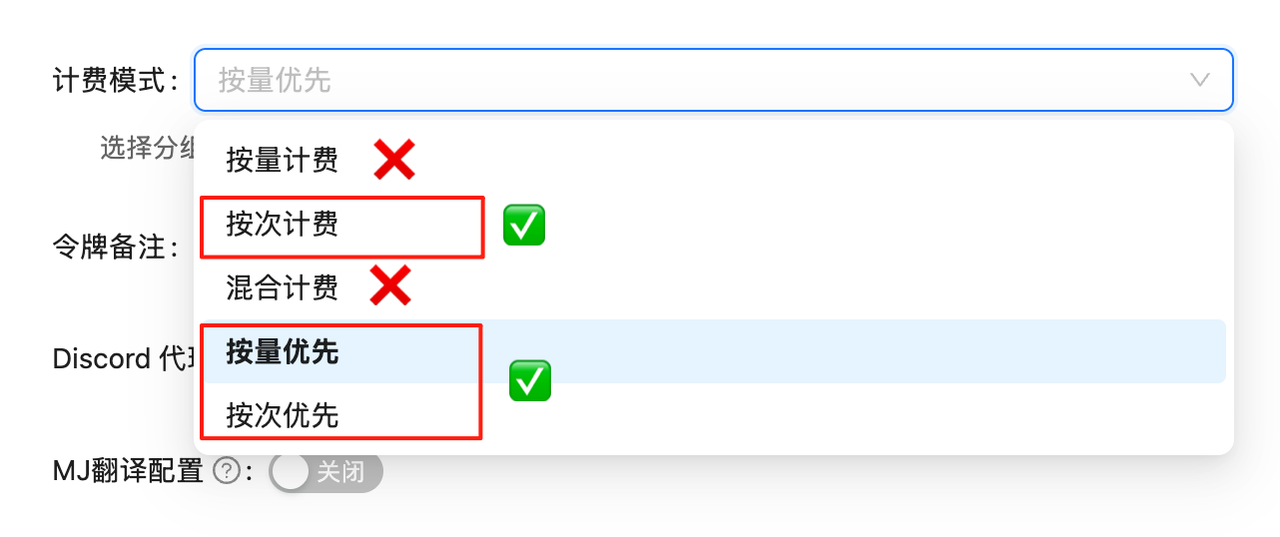 If billing mode is not configured, API calls will fail. You must complete this configuration first!
## Flux Image Generation API
Flux is an industry-leading image generation and editing model. Through LaoZhang API's `/v1/images/generations` endpoint, you can call Flux 2 for text-to-image generation. When `input_image` is present, the same endpoint becomes image editing; with `input_image_2` through `input_image_8`, it becomes multi-image fusion editing.
**🎯 High-Quality Generation**\
Flux 2 is recommended for new image generation and multi-reference editing workflows. Flux Kontext remains available for legacy integrations.
## 🌟 Core Features
* **📐 Concrete Sizing**: Flux 2 supports `size` and `width` / `height`
* **🎨 High-Quality Output**: Supports common sizes such as 1024×1024, 1792×1024, and 1024×1792
* **🧩 Multi-Image Editing**: Native Flux 2 uses `input_image` through `input_image_8` for multiple reference images
* **💰 Pricing Details**: Pricing is shown in the console for procurement review
* **🔧 JSON API**: Text-to-image, single-image editing, and multi-image editing all use `/v1/images/generations`
* **⏱️ URL Validity**: Generated result URLs valid for 10 minutes, download promptly
* **🔄 Reproducibility**: Supports seed parameter for consistent results
## 📋 Model Comparison
| Model | Model ID | Billing Type | Current Price | Notes |
| -------------------- | ------------------ | ------------------- | ------------- | ---------------------------------------------- |
| **Flux 2 Pro** | `flux-2-pro` | Pay-per-call - Chat | \$0.0300/call | Recommended default for generation and editing |
| **Flux 2 Flex** | `flux-2-flex` | Pay-per-call - Chat | \$0.0600/call | More controllable editing and design workflows |
| **Flux 2 Max** | `flux-2-max` | Pay-per-call - Chat | \$0.0700/call | Highest-quality final assets |
| **Flux Kontext Pro** | `flux-kontext-pro` | Pay-per-call - Chat | \$0.0350/call | Legacy Kontext-compatible model |
| **Flux Kontext Max** | `flux-kontext-max` | Pay-per-call - Chat | \$0.0700/call | Legacy high-quality Kontext model |
💡 **Pricing note**: Flux usage is billed by the model's current price. Check the console for real-time pricing and call logs.
## 📐 Size Parameters
Flux 2 and Flux Kontext use different parameter structures:
| Scenario | Endpoint | Size Parameter | Notes |
| --------------------------- | ------------------------ | ------------------------------------------------------- | -------------------------------------------- |
| Flux 2 text-to-image | `/v1/images/generations` | `size` or `width` + `height` | No `input_image` field |
| Flux 2 single-image editing | `/v1/images/generations` | `input_image` + `size` or `width` + `height` | `input_image` is a public URL or data URL |
| Flux 2 multi-image editing | `/v1/images/generations` | `input_image` through `input_image_8` + size parameters | Reference images are numbered by field order |
| Legacy Flux Kontext | `/v1/images/generations` | `extra_body.aspect_ratio` | Legacy aspect-ratio format |
Do not use multipart `-F "image=@..."` for Flux 2 image editing. Use a JSON request and place reference images in `input_image`, `input_image_2`, `input_image_3`, and so on.
### Flux 2 Common Sizes
| Parameter | Output Size | Use Case |
| --------------------- | ----------- | --------------------------------------------- |
| `"size": "1024x1024"` | 1024×1024 | Square images, avatars, product shots |
| `"size": "1792x1024"` | 1792×1024 | Landscape covers, banners, hero images |
| `"size": "1024x1792"` | 1024×1792 | Portrait posters, mobile covers, story images |
### Legacy Flux Kontext Ratios
Legacy `flux-kontext-pro` / `flux-kontext-max` support continuous aspect ratios from **3:7 to 7:3**, maintaining approximately 1 megapixel total:
| Ratio | Type | Approximate Size | Use Case |
| ------ | ------------------- | ---------------- | ------------------------------------ |
| `1:1` | Square | 1024×1024 | General use, social media avatars |
| `2:3` | Vertical | \~832×1248 | Phone wallpapers, portrait photos |
| `3:2` | Horizontal | \~1248×832 | Desktop wallpapers, landscape photos |
| `4:3` | Standard Horizontal | \~1182×886 | Traditional displays, presentations |
| `16:9` | Widescreen | \~1408×792 | Modern displays, video thumbnails |
| `9:16` | Vertical Screen | \~792×1408 | Mobile videos, vertical posters |
| `21:9` | Ultra-wide | \~1680×720 | Movie posters, ultra-wide displays |
| `3:7` | Narrowest Vertical | \~662×1544 | Bookmarks, vertical long images |
| `7:3` | Widest Horizontal | \~1544×662 | Website banners, panoramic images |
**📏 Custom Ratios**: Besides the examples above, you can use any ratio within the 3:7 to 7:3 range, such as `5:4`, `4:5`, `16:10`, etc. The system automatically adjusts size to maintain approximately 1 megapixel total area.
## 🚀 Quick Start
### Flux 2 Text-to-Image cURL
```bash theme={null}
curl -X POST "https://api2.laozhang.ai/v1/images/generations" \
-H "Authorization: Bearer YOUR_API_KEY" \
-H "Content-Type: application/json" \
-d '{
"model": "flux-2-pro",
"prompt": "A ruby red retro robot riding a yellow skateboard in front of a turquoise glass greenhouse, clean product illustration style",
"n": 1,
"size": "1792x1024"
}'
```
### Flux 2 Python Example
```python theme={null}
import requests
API_KEY = "YOUR_API_KEY"
def generate_flux_image(prompt, size="1024x1024", model="flux-2-pro"):
response = requests.post(
"https://api2.laozhang.ai/v1/images/generations",
headers={
"Authorization": f"Bearer {API_KEY}",
"Content-Type": "application/json",
},
json={
"model": model,
"prompt": prompt,
"n": 1,
"size": size,
},
timeout=240,
)
response.raise_for_status()
return response.json()["data"][0]["url"]
image_url = generate_flux_image(
"A cinematic product photo of a transparent smart speaker on a marble table",
size="1024x1024",
)
print(image_url)
```
## 📝 Parameter Details
### Flux 2 Text-to-Image Parameters
| Parameter | Type | Range/Options | Description | Default |
| --------------- | ------- | ------------------------------------------- | -------------------------------------------------------- | ----------- |
| `model` | string | `flux-2-pro` / `flux-2-flex` / `flux-2-max` | Model ID | - |
| `prompt` | string | - | Image prompt | - |
| `n` | integer | 1 | Number of images | 1 |
| `size` | string | e.g. `1024x1024` / `1792x1024` | OpenAI-style output size; use this or `width` / `height` | `1024x1024` |
| `width` | integer | 64-2048, preferably divisible by 16 | BFL-style output width; use this or `size` | 1024 |
| `height` | integer | 64-2048, preferably divisible by 16 | BFL-style output height; use this or `size` | 1024 |
| `output_format` | string | `jpeg` / `png` | Output image format | `jpeg` |
| `seed` | integer | - | Fixed seed for reproducibility | Random |
**Editing endpoint**: Single-image and multi-image editing also use `/v1/images/generations`; `input_image` triggers edit mode. See [Flux Image Editing](/en/api-capabilities/flux-image-edit).
## 💡 Best Practices
### 1. URL Management and Download Strategy
Since Flux generated image URLs are **only valid for 10 minutes**, proper download strategy is crucial:
```python theme={null}
import time
import requests
class FluxImageManager:
"""Flux image generation and download manager"""
def __init__(self, api_key):
self.api_key = api_key
def generate_and_save(self, prompt, **kwargs):
"""Generate image and save immediately"""
start_time = time.time()
# Generate image
image_url = generate_flux_image(prompt, **kwargs)
if not image_url:
return None
# Download immediately (avoid timeout)
elapsed = time.time() - start_time
if elapsed > 540: # Over 9 minutes
print("⚠️ Warning: Approaching URL expiration time!")
# Download and save
filename = f"flux_{int(time.time())}.png"
try:
response = requests.get(image_url, timeout=30)
response.raise_for_status()
with open(filename, 'wb') as f:
f.write(response.content)
print(f"✅ Saved: {filename} (elapsed: {elapsed:.1f}s)")
return filename
except Exception as e:
print(f"❌ Download failed: {e}")
return None
```
### 2. Model Selection Guide
**Flux 2 Pro**:
* ✅ Recommended default model
* ✅ Text-to-image and multi-image editing
* ✅ Cost-sensitive projects
* ✅ Product images, posters, and general design assets
**Flux 2 Flex**:
* ✅ More controllable editing workflows
* ✅ Complex design iteration
* ✅ Balanced quality and cost
**Flux 2 Max**:
* ✅ Highest quality requirements
* ✅ Final commercial assets
* ✅ Complex compositions and strong consistency needs
**Flux Kontext Pro / Max**:
* ✅ Legacy integrations
* ✅ Daily design needs
* ✅ Batch content generation
### 3. Prompt Optimization
Based on official documentation recommendations, detailed and descriptive prompts yield better results:
```python theme={null}
# ❌ Too simple
prompt = "cat"
# ✅ Detailed description
prompt = """
A majestic orange tabby cat sitting by a window,
golden hour lighting, soft focus background,
professional pet photography style,
warm and cozy atmosphere
"""
# ✅ Use prompt_upsampling to enhance simple prompts
enhanced_result = generate_flux_image(
prompt="cat by window",
prompt_upsampling=True # AI automatically expands and optimizes prompt
)
# ✅ Artistic style prompts
artistic_prompt = """
A surreal landscape painting in the style of Salvador Dali,
melting clocks draped over twisted trees,
vibrant sunset colors bleeding into a starry night sky,
hyper-detailed, dreamlike atmosphere
"""
```
## ⚠️ Important Notes
1. **URL Validity**:
* Generated image URLs are **only valid for 10 minutes**
* Must download before expiration
* Recommended to download immediately after generation
2. **Parameter Passing**:
* Flux 2 text-to-image: pass `size` or `width` / `height` as top-level JSON fields
* Flux 2 image editing: pass `input_image` and size parameters in JSON
* Legacy Flux Kontext: use `extra_body.aspect_ratio`
3. **Size Range**:
* Flux 2 common sizes: `1024x1024`, `1792x1024`, `1024x1792`
* For Flux 2 editing, use either `size` or `width` + `height`
* Legacy Flux Kontext supports continuous aspect ratios from 3:7 to 7:3
4. **Content Safety**:
* `safety_tolerance` parameter controls moderation strictness (0-6)
* 0 = strictest, 6 = most lenient
* Default value 2 suitable for most scenarios
5. **Output Format**:
* Default JPEG format, smaller files
* PNG format higher quality but larger files
* Choose appropriate format based on use case
6. **Prompt Processing**:
* `prompt_upsampling` auto-optimizes prompts
* May change original intent, recommended to test first
* Significant effect on simple prompts
## 🔍 FAQ
### Q: Why do image URLs expire?
A: This is Flux official's security design. All generated image URLs automatically expire after 10 minutes. Please download and save promptly.
### Q: How is Flux different from other models?
A: Flux focuses on high-quality image generation and editing. Flux 2 supports text-to-image, multi-image editing, and concrete size control; legacy Flux Kontext is best for existing `aspect_ratio` integrations.
### Q: How to choose between Pro, Flex, and Max?
A:
* **flux-2-pro**: \$0.0300/call, recommended default for most generation and editing
* **flux-2-flex**: \$0.0600/call, suitable for more controlled and complex edits
* **flux-2-max**: \$0.0700/call, suitable for highest-quality final commercial assets
* **flux-kontext-pro/max**: legacy Kontext-compatible models
### Q: Can I use any aspect ratio?
A: For Flux 2, use concrete sizes such as `1024x1024`, `1792x1024`, and `1024x1792`. Legacy Flux Kontext supports continuous aspect ratios from 3:7 to 7:3.
### Q: How to set safety\_tolerance?
A:
* 0-1: Corporate/commercial environment, strictest
* 2-3: General creation, balanced mode (recommended)
* 4-6: Artistic creation, more lenient
### Q: What does prompt\_upsampling do?
A: When enabled, AI automatically expands and optimizes your prompt, especially suitable for brief prompts. But may change original meaning, recommended to test first.
### Q: How to ensure reproducible results?
A: Use the same `seed` value and identical other parameters to generate consistent results. This is helpful for iterative design.
### Q: How to avoid URL expiration in batch generation?
A:
1. Download immediately after generation
2. Use concurrency control to avoid excessive processing time
3. Consider using async processing for efficiency
## 🎯 Multi-Image Processing Solution
Flux 2 supports multi-image editing. Use `/v1/images/generations` with JSON fields `input_image`, `input_image_2`, and `input_image_3`, up to `input_image_8`; repeated multipart `image` fields are not the multi-image structure.
### Use Cases
* **Pattern Transfer**: Transfer design patterns onto clothing models
* **Style Fusion**: Combine characteristic elements from multiple images
* **Product Composition**: Fuse product, background, and design references into one scene
### Technical Approach
1. **Multi-image fields**: Use `input_image`, `input_image_2`, and `input_image_3`
2. **Prompt references**: Use image 1, image 2, and image 3 in the prompt
3. **Size control**: Use `width` and `height`
4. **Result handling**: Download the returned URL immediately
* Supports automated processing of multiple image pairs
* Unified prompt control for processing effects
* Automatic result download and file management
* Complete error handling and logging
### Quick Start
```bash cURL Multi-Image Edit theme={null}
curl -X POST "https://api2.laozhang.ai/v1/images/generations" \
-H "Authorization: Bearer YOUR_API_KEY" \
-H "Content-Type: application/json" \
-d '{
"model": "flux-2-pro",
"prompt": "Use image 1 as the red robot, image 2 as the greenhouse background, and image 3 as the skateboard. Create one fused scene.",
"input_image": "https://example.com/source_1_red_robot.png",
"input_image_2": "https://example.com/source_2_glass_greenhouse.png",
"input_image_3": "https://example.com/source_3_yellow_skateboard.png",
"width": 1792,
"height": 1024,
"output_format": "png"
}'
```
```bash Local File cURL theme={null}
cd ~/Downloads
export LAOZHANG_API_KEY="YOUR_API_KEY"
IMG1=$(base64 < source_1_red_robot.png | tr -d '\n')
IMG2=$(base64 < source_2_glass_greenhouse.png | tr -d '\n')
IMG3=$(base64 < source_3_yellow_skateboard.png | tr -d '\n')
curl -X POST "https://api2.laozhang.ai/v1/images/generations" \
-H "Authorization: Bearer $LAOZHANG_API_KEY" \
-H "Content-Type: application/json" \
--data-binary @- \
-o flux_local_multi_response.json <
**Size requirement**: For Flux 2 editing, use `width` / `height`, for example `1792` × `1024` for landscape or `1024` × `1792` for portrait.
## 🔗 Related Resources
* [Complete Example Code](https://github.com/laozhang-api/ai-api-code-samples/tree/main/flux-Image-API)
* [Flux Image Edit API](/en/api-capabilities/flux-image-edit) - Edit existing images
* [Pricing Calculator](https://api2.laozhang.ai/account/pricing) - Real-time price query
* [Online Demo](https://yingtu.ai) - Test Flux effects
🎨 **Pro Tip**: Start with `flux-2-pro` for most tests, then move to `flux-2-max` for final high-quality assets when needed.
If billing mode is not configured, API calls will fail. You must complete this configuration first!
## Flux Image Generation API
Flux is an industry-leading image generation and editing model. Through LaoZhang API's `/v1/images/generations` endpoint, you can call Flux 2 for text-to-image generation. When `input_image` is present, the same endpoint becomes image editing; with `input_image_2` through `input_image_8`, it becomes multi-image fusion editing.
**🎯 High-Quality Generation**\
Flux 2 is recommended for new image generation and multi-reference editing workflows. Flux Kontext remains available for legacy integrations.
## 🌟 Core Features
* **📐 Concrete Sizing**: Flux 2 supports `size` and `width` / `height`
* **🎨 High-Quality Output**: Supports common sizes such as 1024×1024, 1792×1024, and 1024×1792
* **🧩 Multi-Image Editing**: Native Flux 2 uses `input_image` through `input_image_8` for multiple reference images
* **💰 Pricing Details**: Pricing is shown in the console for procurement review
* **🔧 JSON API**: Text-to-image, single-image editing, and multi-image editing all use `/v1/images/generations`
* **⏱️ URL Validity**: Generated result URLs valid for 10 minutes, download promptly
* **🔄 Reproducibility**: Supports seed parameter for consistent results
## 📋 Model Comparison
| Model | Model ID | Billing Type | Current Price | Notes |
| -------------------- | ------------------ | ------------------- | ------------- | ---------------------------------------------- |
| **Flux 2 Pro** | `flux-2-pro` | Pay-per-call - Chat | \$0.0300/call | Recommended default for generation and editing |
| **Flux 2 Flex** | `flux-2-flex` | Pay-per-call - Chat | \$0.0600/call | More controllable editing and design workflows |
| **Flux 2 Max** | `flux-2-max` | Pay-per-call - Chat | \$0.0700/call | Highest-quality final assets |
| **Flux Kontext Pro** | `flux-kontext-pro` | Pay-per-call - Chat | \$0.0350/call | Legacy Kontext-compatible model |
| **Flux Kontext Max** | `flux-kontext-max` | Pay-per-call - Chat | \$0.0700/call | Legacy high-quality Kontext model |
💡 **Pricing note**: Flux usage is billed by the model's current price. Check the console for real-time pricing and call logs.
## 📐 Size Parameters
Flux 2 and Flux Kontext use different parameter structures:
| Scenario | Endpoint | Size Parameter | Notes |
| --------------------------- | ------------------------ | ------------------------------------------------------- | -------------------------------------------- |
| Flux 2 text-to-image | `/v1/images/generations` | `size` or `width` + `height` | No `input_image` field |
| Flux 2 single-image editing | `/v1/images/generations` | `input_image` + `size` or `width` + `height` | `input_image` is a public URL or data URL |
| Flux 2 multi-image editing | `/v1/images/generations` | `input_image` through `input_image_8` + size parameters | Reference images are numbered by field order |
| Legacy Flux Kontext | `/v1/images/generations` | `extra_body.aspect_ratio` | Legacy aspect-ratio format |
Do not use multipart `-F "image=@..."` for Flux 2 image editing. Use a JSON request and place reference images in `input_image`, `input_image_2`, `input_image_3`, and so on.
### Flux 2 Common Sizes
| Parameter | Output Size | Use Case |
| --------------------- | ----------- | --------------------------------------------- |
| `"size": "1024x1024"` | 1024×1024 | Square images, avatars, product shots |
| `"size": "1792x1024"` | 1792×1024 | Landscape covers, banners, hero images |
| `"size": "1024x1792"` | 1024×1792 | Portrait posters, mobile covers, story images |
### Legacy Flux Kontext Ratios
Legacy `flux-kontext-pro` / `flux-kontext-max` support continuous aspect ratios from **3:7 to 7:3**, maintaining approximately 1 megapixel total:
| Ratio | Type | Approximate Size | Use Case |
| ------ | ------------------- | ---------------- | ------------------------------------ |
| `1:1` | Square | 1024×1024 | General use, social media avatars |
| `2:3` | Vertical | \~832×1248 | Phone wallpapers, portrait photos |
| `3:2` | Horizontal | \~1248×832 | Desktop wallpapers, landscape photos |
| `4:3` | Standard Horizontal | \~1182×886 | Traditional displays, presentations |
| `16:9` | Widescreen | \~1408×792 | Modern displays, video thumbnails |
| `9:16` | Vertical Screen | \~792×1408 | Mobile videos, vertical posters |
| `21:9` | Ultra-wide | \~1680×720 | Movie posters, ultra-wide displays |
| `3:7` | Narrowest Vertical | \~662×1544 | Bookmarks, vertical long images |
| `7:3` | Widest Horizontal | \~1544×662 | Website banners, panoramic images |
**📏 Custom Ratios**: Besides the examples above, you can use any ratio within the 3:7 to 7:3 range, such as `5:4`, `4:5`, `16:10`, etc. The system automatically adjusts size to maintain approximately 1 megapixel total area.
## 🚀 Quick Start
### Flux 2 Text-to-Image cURL
```bash theme={null}
curl -X POST "https://api2.laozhang.ai/v1/images/generations" \
-H "Authorization: Bearer YOUR_API_KEY" \
-H "Content-Type: application/json" \
-d '{
"model": "flux-2-pro",
"prompt": "A ruby red retro robot riding a yellow skateboard in front of a turquoise glass greenhouse, clean product illustration style",
"n": 1,
"size": "1792x1024"
}'
```
### Flux 2 Python Example
```python theme={null}
import requests
API_KEY = "YOUR_API_KEY"
def generate_flux_image(prompt, size="1024x1024", model="flux-2-pro"):
response = requests.post(
"https://api2.laozhang.ai/v1/images/generations",
headers={
"Authorization": f"Bearer {API_KEY}",
"Content-Type": "application/json",
},
json={
"model": model,
"prompt": prompt,
"n": 1,
"size": size,
},
timeout=240,
)
response.raise_for_status()
return response.json()["data"][0]["url"]
image_url = generate_flux_image(
"A cinematic product photo of a transparent smart speaker on a marble table",
size="1024x1024",
)
print(image_url)
```
## 📝 Parameter Details
### Flux 2 Text-to-Image Parameters
| Parameter | Type | Range/Options | Description | Default |
| --------------- | ------- | ------------------------------------------- | -------------------------------------------------------- | ----------- |
| `model` | string | `flux-2-pro` / `flux-2-flex` / `flux-2-max` | Model ID | - |
| `prompt` | string | - | Image prompt | - |
| `n` | integer | 1 | Number of images | 1 |
| `size` | string | e.g. `1024x1024` / `1792x1024` | OpenAI-style output size; use this or `width` / `height` | `1024x1024` |
| `width` | integer | 64-2048, preferably divisible by 16 | BFL-style output width; use this or `size` | 1024 |
| `height` | integer | 64-2048, preferably divisible by 16 | BFL-style output height; use this or `size` | 1024 |
| `output_format` | string | `jpeg` / `png` | Output image format | `jpeg` |
| `seed` | integer | - | Fixed seed for reproducibility | Random |
**Editing endpoint**: Single-image and multi-image editing also use `/v1/images/generations`; `input_image` triggers edit mode. See [Flux Image Editing](/en/api-capabilities/flux-image-edit).
## 💡 Best Practices
### 1. URL Management and Download Strategy
Since Flux generated image URLs are **only valid for 10 minutes**, proper download strategy is crucial:
```python theme={null}
import time
import requests
class FluxImageManager:
"""Flux image generation and download manager"""
def __init__(self, api_key):
self.api_key = api_key
def generate_and_save(self, prompt, **kwargs):
"""Generate image and save immediately"""
start_time = time.time()
# Generate image
image_url = generate_flux_image(prompt, **kwargs)
if not image_url:
return None
# Download immediately (avoid timeout)
elapsed = time.time() - start_time
if elapsed > 540: # Over 9 minutes
print("⚠️ Warning: Approaching URL expiration time!")
# Download and save
filename = f"flux_{int(time.time())}.png"
try:
response = requests.get(image_url, timeout=30)
response.raise_for_status()
with open(filename, 'wb') as f:
f.write(response.content)
print(f"✅ Saved: {filename} (elapsed: {elapsed:.1f}s)")
return filename
except Exception as e:
print(f"❌ Download failed: {e}")
return None
```
### 2. Model Selection Guide
**Flux 2 Pro**:
* ✅ Recommended default model
* ✅ Text-to-image and multi-image editing
* ✅ Cost-sensitive projects
* ✅ Product images, posters, and general design assets
**Flux 2 Flex**:
* ✅ More controllable editing workflows
* ✅ Complex design iteration
* ✅ Balanced quality and cost
**Flux 2 Max**:
* ✅ Highest quality requirements
* ✅ Final commercial assets
* ✅ Complex compositions and strong consistency needs
**Flux Kontext Pro / Max**:
* ✅ Legacy integrations
* ✅ Daily design needs
* ✅ Batch content generation
### 3. Prompt Optimization
Based on official documentation recommendations, detailed and descriptive prompts yield better results:
```python theme={null}
# ❌ Too simple
prompt = "cat"
# ✅ Detailed description
prompt = """
A majestic orange tabby cat sitting by a window,
golden hour lighting, soft focus background,
professional pet photography style,
warm and cozy atmosphere
"""
# ✅ Use prompt_upsampling to enhance simple prompts
enhanced_result = generate_flux_image(
prompt="cat by window",
prompt_upsampling=True # AI automatically expands and optimizes prompt
)
# ✅ Artistic style prompts
artistic_prompt = """
A surreal landscape painting in the style of Salvador Dali,
melting clocks draped over twisted trees,
vibrant sunset colors bleeding into a starry night sky,
hyper-detailed, dreamlike atmosphere
"""
```
## ⚠️ Important Notes
1. **URL Validity**:
* Generated image URLs are **only valid for 10 minutes**
* Must download before expiration
* Recommended to download immediately after generation
2. **Parameter Passing**:
* Flux 2 text-to-image: pass `size` or `width` / `height` as top-level JSON fields
* Flux 2 image editing: pass `input_image` and size parameters in JSON
* Legacy Flux Kontext: use `extra_body.aspect_ratio`
3. **Size Range**:
* Flux 2 common sizes: `1024x1024`, `1792x1024`, `1024x1792`
* For Flux 2 editing, use either `size` or `width` + `height`
* Legacy Flux Kontext supports continuous aspect ratios from 3:7 to 7:3
4. **Content Safety**:
* `safety_tolerance` parameter controls moderation strictness (0-6)
* 0 = strictest, 6 = most lenient
* Default value 2 suitable for most scenarios
5. **Output Format**:
* Default JPEG format, smaller files
* PNG format higher quality but larger files
* Choose appropriate format based on use case
6. **Prompt Processing**:
* `prompt_upsampling` auto-optimizes prompts
* May change original intent, recommended to test first
* Significant effect on simple prompts
## 🔍 FAQ
### Q: Why do image URLs expire?
A: This is Flux official's security design. All generated image URLs automatically expire after 10 minutes. Please download and save promptly.
### Q: How is Flux different from other models?
A: Flux focuses on high-quality image generation and editing. Flux 2 supports text-to-image, multi-image editing, and concrete size control; legacy Flux Kontext is best for existing `aspect_ratio` integrations.
### Q: How to choose between Pro, Flex, and Max?
A:
* **flux-2-pro**: \$0.0300/call, recommended default for most generation and editing
* **flux-2-flex**: \$0.0600/call, suitable for more controlled and complex edits
* **flux-2-max**: \$0.0700/call, suitable for highest-quality final commercial assets
* **flux-kontext-pro/max**: legacy Kontext-compatible models
### Q: Can I use any aspect ratio?
A: For Flux 2, use concrete sizes such as `1024x1024`, `1792x1024`, and `1024x1792`. Legacy Flux Kontext supports continuous aspect ratios from 3:7 to 7:3.
### Q: How to set safety\_tolerance?
A:
* 0-1: Corporate/commercial environment, strictest
* 2-3: General creation, balanced mode (recommended)
* 4-6: Artistic creation, more lenient
### Q: What does prompt\_upsampling do?
A: When enabled, AI automatically expands and optimizes your prompt, especially suitable for brief prompts. But may change original meaning, recommended to test first.
### Q: How to ensure reproducible results?
A: Use the same `seed` value and identical other parameters to generate consistent results. This is helpful for iterative design.
### Q: How to avoid URL expiration in batch generation?
A:
1. Download immediately after generation
2. Use concurrency control to avoid excessive processing time
3. Consider using async processing for efficiency
## 🎯 Multi-Image Processing Solution
Flux 2 supports multi-image editing. Use `/v1/images/generations` with JSON fields `input_image`, `input_image_2`, and `input_image_3`, up to `input_image_8`; repeated multipart `image` fields are not the multi-image structure.
### Use Cases
* **Pattern Transfer**: Transfer design patterns onto clothing models
* **Style Fusion**: Combine characteristic elements from multiple images
* **Product Composition**: Fuse product, background, and design references into one scene
### Technical Approach
1. **Multi-image fields**: Use `input_image`, `input_image_2`, and `input_image_3`
2. **Prompt references**: Use image 1, image 2, and image 3 in the prompt
3. **Size control**: Use `width` and `height`
4. **Result handling**: Download the returned URL immediately
* Supports automated processing of multiple image pairs
* Unified prompt control for processing effects
* Automatic result download and file management
* Complete error handling and logging
### Quick Start
```bash cURL Multi-Image Edit theme={null}
curl -X POST "https://api2.laozhang.ai/v1/images/generations" \
-H "Authorization: Bearer YOUR_API_KEY" \
-H "Content-Type: application/json" \
-d '{
"model": "flux-2-pro",
"prompt": "Use image 1 as the red robot, image 2 as the greenhouse background, and image 3 as the skateboard. Create one fused scene.",
"input_image": "https://example.com/source_1_red_robot.png",
"input_image_2": "https://example.com/source_2_glass_greenhouse.png",
"input_image_3": "https://example.com/source_3_yellow_skateboard.png",
"width": 1792,
"height": 1024,
"output_format": "png"
}'
```
```bash Local File cURL theme={null}
cd ~/Downloads
export LAOZHANG_API_KEY="YOUR_API_KEY"
IMG1=$(base64 < source_1_red_robot.png | tr -d '\n')
IMG2=$(base64 < source_2_glass_greenhouse.png | tr -d '\n')
IMG3=$(base64 < source_3_yellow_skateboard.png | tr -d '\n')
curl -X POST "https://api2.laozhang.ai/v1/images/generations" \
-H "Authorization: Bearer $LAOZHANG_API_KEY" \
-H "Content-Type: application/json" \
--data-binary @- \
-o flux_local_multi_response.json <
**Size requirement**: For Flux 2 editing, use `width` / `height`, for example `1792` × `1024` for landscape or `1024` × `1792` for portrait.
## 🔗 Related Resources
* [Complete Example Code](https://github.com/laozhang-api/ai-api-code-samples/tree/main/flux-Image-API)
* [Flux Image Edit API](/en/api-capabilities/flux-image-edit) - Edit existing images
* [Pricing Calculator](https://api2.laozhang.ai/account/pricing) - Real-time price query
* [Online Demo](https://yingtu.ai) - Test Flux effects
🎨 **Pro Tip**: Start with `flux-2-pro` for most tests, then move to `flux-2-max` for final high-quality assets when needed.