> ## Documentation Index
> Fetch the complete documentation index at: https://docs.laozhang.ai/llms.txt
> Use this file to discover all available pages before exploring further.
# Nano Banana API Text-to-Image (Standard)
> Nano Banana Standard API docs for gemini-2.5-flash-image: $0.025/call, 1K text-to-image, Base64 output, and OpenAI-compatible integration.
**Nano Banana Standard: the stable 1K legacy route**
* **Stable model ID**: `gemini-2.5-flash-image`
* **LaoZhang API price**: currently \$0.025/call; confirm price and charges in the console
* **Best for**: Existing 1K workflows, simple generation, and low-cost compatibility
* **For new projects**: Compare the newer, faster [Nano Banana 2 Lite](/en/api-capabilities/nano-banana-2-lite-api)
## Prerequisites
Log in to [laozhang.ai console](https://api2.laozhang.ai) to obtain your API key
Edit token settings and choose one of the following billing modes (same price for both):
* **Volume Priority** (Recommended): Uses balance billing first, automatically switches when balance is insufficient. Suitable for most users
* **Pay-per-call**: Direct deduction for each call. Suitable for strict budget control scenarios
Both modes have **exactly the same price** at \$0.025/image, only the billing method differs.
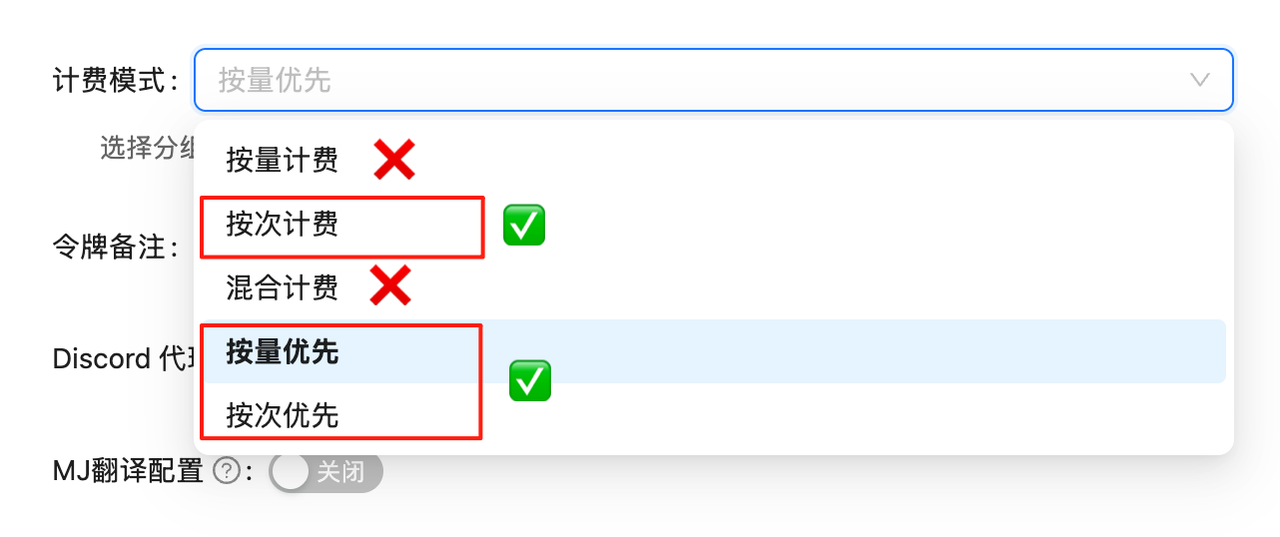 If billing mode is not configured, API calls will fail. You must complete this configuration first!
## Model Overview
Nano Banana Standard is the legacy market name for Google's stable `gemini-2.5-flash-image` model. It provides 1K text-to-image through the chat completions interface and remains useful for existing integrations. Google recommends Nano Banana 2 Lite for new low-cost, high-frequency projects.
**🚀 Lightning-Fast Generation**
Generates high-quality images in just 10 seconds on average, faster than OpenAI series! Returns base64 format data for direct use.
Create an API key, review balance, and inspect call logs
YingTu AI - Try instantly, no code required
This page remains the Nano Banana API and Standard integration owner, with pricing and capability comparisons for Lite, Nano Banana 2, and Pro. For new low-cost, high-frequency work, use [Nano Banana 2 Lite](/en/api-capabilities/nano-banana-2-lite-api). LaoZhang API does not impose a fixed low gateway concurrency plan; actual capacity still depends on upstream and account state.
## 🌟 Core Features
* **⚡ Ultra-Fast Response**: Generates in \~10 seconds on average, significantly faster than OpenAI series
* **💰 Cost-Controlled**: \$0.025/image, current price shown in console
* **🔄 Perfect Compatibility**: Completely consistent with `gpt-4o-image` and `sora_image` calling methods
* **📦 Base64 Output**: Returns base64 encoded image data directly, no secondary download needed
* **🎨 Google Technology**: Based on Google's latest image generation technology, outstanding quality
## 📋 Model Comparison
| Model | Model ID | Billing | LaoZhang AI Price | Official Price | Savings | Speed |
| ---------------------- | ----------------------------- | ----------- | ---------------------------- | ---------------------------------- | -------------------- | ------------------ |
| **Nano Banana 2 Lite** | `gemini-3.1-flash-lite-image` | Per-call | **\$0.025/image** | \$0.0336 at Google Standard | 1K high-volume route | Low-latency target |
| **Nano Banana** | `gemini-2.5-flash-image` | Pay-per-use | \$0.025/image | \$0.039/image | 35.9% | \~10s |
| **Nano Banana 2** | `gemini-3.1-flash-image` | Pay-per-use | \$0.055/image | \$0.045–\$0.151 at Google Standard | 0.5K–4K | \~10s |
| **Nano Banana Pro** | `gemini-3-pro-image` | Pay-per-use | \$0.09/image | \$0.134–\$0.24 at Google Standard | 1K–4K | \~12s |
| **GPT-Image-1** | `gpt-image-1` | Token-based | \$10 input/\$40 output per M | - | - | Medium |
| **Flux Kontext Pro** | `flux-kontext-pro` | Pay-per-use | \$0.035/image | \$0.04/image | 12.5% | Fast |
| **Sora Image** | `sora_image` | Pay-per-use | \$0.01/image | - | - | Slower |
💡 **Pricing Advantage**
* price shown in console price
* Transparent and predictable pricing, no need to worry about token consumption
## ⚠️ Important Notes
**API Endpoint Notice**
* ✅ Correct: `/v1/chat/completions` (chat completions endpoint)
* ❌ Wrong: `/v1/images/generations` (traditional image generation endpoint)
This model uses the chat completions interface, consistent with `gpt-4o-image` and `sora_image` calling methods!
**Return Format Differences**
* `gemini-2.5-flash-image`: Returns **base64 encoding**
* `sora_image`: Returns image URL
* Calling method is exactly the same, only return format differs
## 🚀 Quick Start
### Prerequisites
1. **Create Token**: Login to [LaoZhang API](https://api2.laozhang.ai/token) and create a **pay-per-use** type token
If billing mode is not configured, API calls will fail. You must complete this configuration first!
## Model Overview
Nano Banana Standard is the legacy market name for Google's stable `gemini-2.5-flash-image` model. It provides 1K text-to-image through the chat completions interface and remains useful for existing integrations. Google recommends Nano Banana 2 Lite for new low-cost, high-frequency projects.
**🚀 Lightning-Fast Generation**
Generates high-quality images in just 10 seconds on average, faster than OpenAI series! Returns base64 format data for direct use.
Create an API key, review balance, and inspect call logs
YingTu AI - Try instantly, no code required
This page remains the Nano Banana API and Standard integration owner, with pricing and capability comparisons for Lite, Nano Banana 2, and Pro. For new low-cost, high-frequency work, use [Nano Banana 2 Lite](/en/api-capabilities/nano-banana-2-lite-api). LaoZhang API does not impose a fixed low gateway concurrency plan; actual capacity still depends on upstream and account state.
## 🌟 Core Features
* **⚡ Ultra-Fast Response**: Generates in \~10 seconds on average, significantly faster than OpenAI series
* **💰 Cost-Controlled**: \$0.025/image, current price shown in console
* **🔄 Perfect Compatibility**: Completely consistent with `gpt-4o-image` and `sora_image` calling methods
* **📦 Base64 Output**: Returns base64 encoded image data directly, no secondary download needed
* **🎨 Google Technology**: Based on Google's latest image generation technology, outstanding quality
## 📋 Model Comparison
| Model | Model ID | Billing | LaoZhang AI Price | Official Price | Savings | Speed |
| ---------------------- | ----------------------------- | ----------- | ---------------------------- | ---------------------------------- | -------------------- | ------------------ |
| **Nano Banana 2 Lite** | `gemini-3.1-flash-lite-image` | Per-call | **\$0.025/image** | \$0.0336 at Google Standard | 1K high-volume route | Low-latency target |
| **Nano Banana** | `gemini-2.5-flash-image` | Pay-per-use | \$0.025/image | \$0.039/image | 35.9% | \~10s |
| **Nano Banana 2** | `gemini-3.1-flash-image` | Pay-per-use | \$0.055/image | \$0.045–\$0.151 at Google Standard | 0.5K–4K | \~10s |
| **Nano Banana Pro** | `gemini-3-pro-image` | Pay-per-use | \$0.09/image | \$0.134–\$0.24 at Google Standard | 1K–4K | \~12s |
| **GPT-Image-1** | `gpt-image-1` | Token-based | \$10 input/\$40 output per M | - | - | Medium |
| **Flux Kontext Pro** | `flux-kontext-pro` | Pay-per-use | \$0.035/image | \$0.04/image | 12.5% | Fast |
| **Sora Image** | `sora_image` | Pay-per-use | \$0.01/image | - | - | Slower |
💡 **Pricing Advantage**
* price shown in console price
* Transparent and predictable pricing, no need to worry about token consumption
## ⚠️ Important Notes
**API Endpoint Notice**
* ✅ Correct: `/v1/chat/completions` (chat completions endpoint)
* ❌ Wrong: `/v1/images/generations` (traditional image generation endpoint)
This model uses the chat completions interface, consistent with `gpt-4o-image` and `sora_image` calling methods!
**Return Format Differences**
* `gemini-2.5-flash-image`: Returns **base64 encoding**
* `sora_image`: Returns image URL
* Calling method is exactly the same, only return format differs
## 🚀 Quick Start
### Prerequisites
1. **Create Token**: Login to [LaoZhang API](https://api2.laozhang.ai/token) and create a **pay-per-use** type token
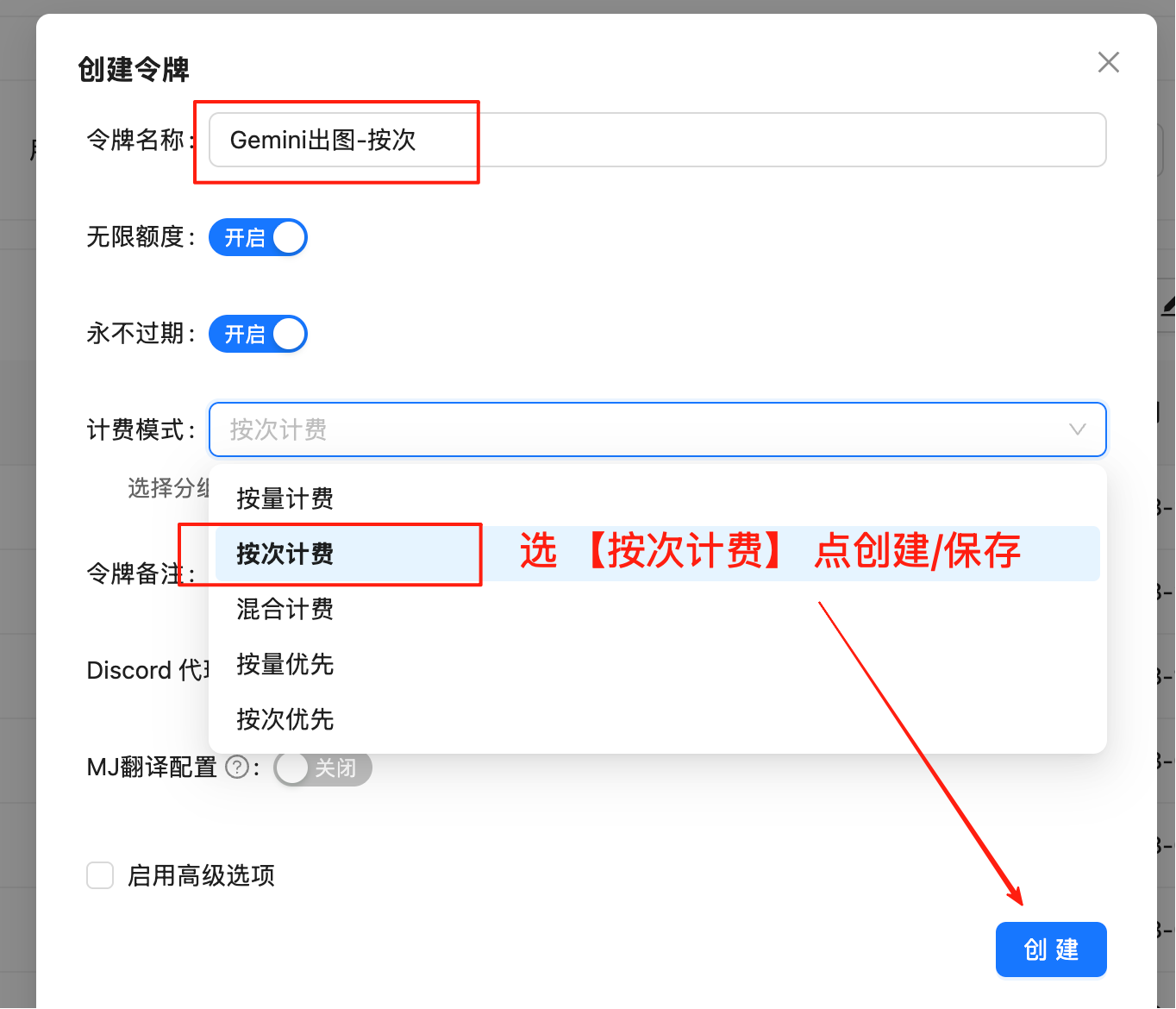 Visit [https://api2.laozhang.ai/token](https://api2.laozhang.ai/token) and login to your account
Click "Create New Token" button, **make sure to select "Pay-per-use" type**
Copy and securely save the generated token, format is `sk-xxxxxx`
💰 **Pricing Advantage Explained**
* **LaoZhang AI Price**: \$0.025/image (current price shown in console)
* **Google Standard reference**: \$0.039/image
* **Billing note**: Pay-per-use pricing, with actual charges visible in call logs
2. **Select Domain**: Recommended to use `https://api2.laozhang.ai` (globally accelerated). Overseas servers can directly connect to `https://api-vip.laozhang.ai`, but switch back to the primary domain if unstable
### Basic Example - Curl
```bash theme={null}
curl -X POST "https://api2.laozhang.ai/v1/chat/completions" \
-H "Authorization: Bearer $API_KEY" \
-H "Content-Type: application/json" \
-d '{
"model": "gemini-2.5-flash-image",
"stream": false,
"messages": [
{
"role": "user",
"content": "a beautiful sunset over mountains"
}
]
}'
```
### Complete Example - Python
```python theme={null}
#!/usr/bin/env python3
# -*- coding: utf-8 -*-
"""
Nano Banana (Gemini) Image Generation - Python Version
Supports non-streaming output and auto-saves base64 images locally
"""
import requests
import json
import base64
import re
import os
import datetime
from typing import Optional, Tuple
class GeminiImageGenerator:
def __init__(self, api_key: str, api_url: str = "https://api2.laozhang.ai/v1/chat/completions"):
"""
Initialize Gemini image generator
Args:
api_key: API key (pay-per-use type)
api_url: API endpoint
"""
self.api_key = api_key
self.api_url = api_url
self.headers = {
"Content-Type": "application/json",
"Authorization": f"Bearer {api_key}"
}
def generate_image(self, prompt: str, model: str = "gemini-2.5-flash-image",
output_dir: str = ".") -> Tuple[bool, str]:
"""
Generate image and save locally
Args:
prompt: Image description prompt
model: Model to use
output_dir: Output directory
Returns:
Tuple[success status, result message]
"""
print("🚀 Starting image generation...")
print(f"Prompt: {prompt}")
print(f"Model: {model}")
# Generate filename
timestamp = datetime.datetime.now().strftime("%Y%m%d_%H%M%S")
output_file = os.path.join(output_dir, f"gemini_generated_{timestamp}.png")
try:
# Prepare request data
payload = {
"model": model,
"stream": False,
"messages": [
{
"role": "user",
"content": prompt
}
]
}
print("📡 Sending API request...")
# Send non-streaming request
response = requests.post(
self.api_url,
headers=self.headers,
json=payload,
timeout=300
)
if response.status_code != 200:
error_msg = f"API request failed, status code: {response.status_code}"
try:
error_detail = response.json()
error_msg += f", error details: {error_detail}"
except:
error_msg += f", response content: {response.text[:500]}"
return False, error_msg
print("✅ API request successful, parsing response...")
# Parse JSON response
try:
result = response.json()
print("✅ Successfully parsed JSON response")
except json.JSONDecodeError as e:
return False, f"JSON parse failed: {str(e)}"
# Extract message content
full_content = ""
if "choices" in result and len(result["choices"]) > 0:
choice = result["choices"][0]
if "message" in choice and "content" in choice["message"]:
full_content = choice["message"]["content"]
if not full_content:
return False, "Message content not found"
print(f"📝 Got message content, length: {len(full_content)} characters")
print("🔍 Parsing image data...")
# Extract and save images
success, message = self._extract_and_save_images(full_content, output_file)
if success:
return True, message
else:
return False, f"Image save failed: {message}"
except requests.exceptions.Timeout:
return False, "Request timeout (300 seconds)"
except requests.exceptions.ConnectionError as e:
return False, f"Connection error: {str(e)}"
except Exception as e:
return False, f"Unknown error: {str(e)}"
def _extract_and_save_images(self, content: str, base_output_file: str) -> Tuple[bool, str]:
"""
Efficiently extract and save base64 image data
Args:
content: Content containing image data
base_output_file: Base output file path
Returns:
Tuple[success status, result message]
"""
try:
print(f"📄 Content preview (first 200 chars): {content[:200]}")
# Use precise regex to extract base64 image data
base64_pattern = r'data:image/([^;]+);base64,([A-Za-z0-9+/=]+)'
match = re.search(base64_pattern, content)
if not match:
print('⚠️ base64 image data not found')
return False, "Response does not contain base64 image data"
image_format = match.group(1) # png, jpg, etc.
b64_data = match.group(2)
print(f'🎨 Image format: {image_format}')
print(f'📏 Base64 data length: {len(b64_data)} characters')
# Decode and save image
image_data = base64.b64decode(b64_data)
if len(image_data) < 100:
return False, "Decoded image data too small, possibly invalid"
# Set file extension based on detected format
output_file = base_output_file.replace('.png', f'.{image_format}')
os.makedirs(os.path.dirname(output_file) if os.path.dirname(output_file) else ".", exist_ok=True)
with open(output_file, 'wb') as f:
f.write(image_data)
print(f'🖼️ Image saved successfully: {output_file}')
print(f'📊 File size: {len(image_data)} bytes')
return True, f"Image saved successfully: {output_file}"
except Exception as e:
return False, f"Error processing image: {str(e)}"
def main():
"""
Main function example
"""
# Configuration parameters
API_KEY = "sk-YOUR_API_KEY" # Replace with your actual API key (pay-per-use type)
PROMPT = "A cute cat playing in a garden with bright sunshine and blooming flowers"
print("="*60)
print("Nano Banana (Gemini) Image Generator")
print("="*60)
print(f"Start time: {datetime.datetime.now()}")
# Create generator instance
generator = GeminiImageGenerator(API_KEY)
# Generate image
success, message = generator.generate_image(PROMPT)
print("\n" + "="*60)
if success:
print("🎉 Execution successful!")
print(f"✅ {message}")
else:
print("❌ Execution failed!")
print(f"💥 {message}")
print(f"End time: {datetime.datetime.now()}")
print("="*60)
if __name__ == "__main__":
main()
```
### Bash Script - Auto Save
```bash theme={null}
#!/bin/bash
# Nano Banana (Gemini) Image Generation - Bash Version
# Supports non-streaming output and auto-saves base64 images locally
API_KEY="sk-YOUR_API_KEY" # Replace with your actual API key【pay-per-use】type
API_URL="https://api2.laozhang.ai/v1/chat/completions"
PROMPT="a handsome dog under the tree"
OUTPUT_DIR="."
# Generate timestamp filename
TIMESTAMP=$(date +"%Y%m%d_%H%M%S")
OUTPUT_FILE="gemini_generated_${TIMESTAMP}.png"
TEMP_FILE="temp_response_${TIMESTAMP}.json"
echo "🚀 Starting image generation..."
echo "Prompt: ${PROMPT}"
echo "Output file: ${OUTPUT_FILE}"
# Send API request and save response
curl -s https://api2.laozhang.ai/v1/chat/completions \
-H "Content-Type: application/json" \
-H "Authorization: Bearer ${API_KEY}" \
-d "{
\"model\": \"gemini-2.5-flash-image\",
\"stream\": false,
\"messages\": [
{
\"role\": \"user\",
\"content\": \"${PROMPT}\"
}
]
}" > "${TEMP_FILE}"
# Check if request was successful
if [ $? -eq 0 ]; then
echo "✅ API request successful"
echo "📄 Response saved to: ${TEMP_FILE}"
else
echo "❌ API request failed"
exit 1
fi
# Efficiently extract and save base64 image
echo "🔍 Parsing response data..."
# Use Python script to extract and save image
python3 -c "
import json
import base64
import re
import sys
# Read API response file
try:
with open('${TEMP_FILE}', 'r') as f:
data = json.load(f)
print('✅ Successfully parsed JSON response')
except Exception as e:
print(f'❌ JSON parse failed: {e}')
sys.exit(1)
# Extract message content
content = ''
if 'choices' in data and len(data['choices']) > 0:
choice = data['choices'][0]
if 'message' in choice and 'content' in choice['message']:
content = choice['message']['content']
if not content:
print('❌ Message content not found')
sys.exit(1)
print(f'📝 Got message content, length: {len(content)} characters')
# Efficiently extract base64 image data - supports multiple formats
base64_pattern = r'data:image/([^;]+);base64,([A-Za-z0-9+/=]+)'
match = re.search(base64_pattern, content)
if match:
image_format = match.group(1) # png, jpg, etc.
b64_data = match.group(2)
print(f'🎨 Image format: {image_format}')
print(f'📏 Base64 data length: {len(b64_data)} characters')
try:
# Decode and save image
image_data = base64.b64decode(b64_data)
# Set file extension based on detected format
output_file = '${OUTPUT_FILE}'.replace('.png', f'.{image_format}')
with open(output_file, 'wb') as f:
f.write(image_data)
print(f'🖼️ Image saved successfully: {output_file}')
print(f'📊 File size: {len(image_data)} bytes')
# Output success flag
print('SUCCESS:' + output_file)
except Exception as e:
print(f'❌ Image processing error: {e}')
sys.exit(1)
else:
print('⚠️ base64 image data not found')
print(f'📄 Content preview: {content[:300]}...')
sys.exit(1)
"
# Get Python script execution result
PYTHON_EXIT_CODE=$?
if [ $PYTHON_EXIT_CODE -eq 0 ]; then
echo "✅ Image extraction and save complete"
else
echo "❌ Image processing failed"
echo "🔍 Keeping temp file for debugging: ${TEMP_FILE}"
exit 1
fi
# Check generated image file
GENERATED_FILES=$(find . -name "gemini_generated_${TIMESTAMP}.*" -type f)
if [ ! -z "$GENERATED_FILES" ]; then
echo "🎉 Image generation complete!"
for file in $GENERATED_FILES; do
echo "📁 Save location: $(pwd)/${file}"
echo "📊 File info:"
ls -lh "${file}"
done
# Clean up temp file
rm -f "${TEMP_FILE}"
echo "🧹 Temp files cleaned up"
else
echo "❌ Image file not generated"
echo "🔍 Keeping temp file for debugging: ${TEMP_FILE}"
fi
echo "✨ Script execution complete"
```
## 🎯 Use Cases
### 1. Rapid Prototyping
```python theme={null}
# Generate product concept images
concept = generator.generate_image(
"Modern minimalist smartwatch design, white background, professional product photography"
)
# Generate UI interfaces
ui_design = generator.generate_image(
"Mobile app login interface design, dark theme, modern flat design style"
)
```
### 2. Content Creation
```python theme={null}
# Generate illustrations
illustration = generator.generate_image(
"Children's picture book style forest scene with cute animals playing"
)
# Generate social media graphics
social_media = generator.generate_image(
"Inspirational quote graphic, warm sunrise background, minimalist design"
)
```
## 💡 Best Practices
### 1. Prompt Optimization
```python theme={null}
# ❌ Too simple
prompt = "cat"
# ✅ Detailed description
prompt = """
An orange tabby cat sitting by the window,
golden sunset shining on it,
warm home environment in background,
professional pet photography style,
warm and soft atmosphere
"""
```
### 2. Base64 Processing
```python theme={null}
def save_base64_image(base64_str, output_path):
"""Safely save base64 image"""
try:
# Remove data URL prefix (if exists)
if "base64," in base64_str:
base64_str = base64_str.split("base64,")[1]
# Decode and save
image_data = base64.b64decode(base64_str)
with open(output_path, 'wb') as f:
f.write(image_data)
return True
except Exception as e:
print(f"Save failed: {e}")
return False
```
## 📊 Performance Comparison
| Metric | Nano Banana | GPT-4o Image | Sora Image |
| ---------------- | ---------------- | ------------ | ---------------- |
| Generation Speed | \~10s | \~20-30s | \~10-15s |
| Price | \$0.025/image | Token-based | \$0.01/image |
| Return Format | Base64 | Base64 | URL |
| Quality | High | High | Medium-High |
| Compatibility | Fully compatible | - | Fully compatible |
## ⚠️ Important Notes
1. **Token Type**: Must use **pay-per-use** type token
2. **API Endpoint**: Use `/v1/chat/completions`, not `/v1/images/generations`
3. **Return Format**: Returns base64 encoding, requires manual decoding and saving
4. **Model Name**: `gemini-2.5-flash-image` (case-sensitive)
5. **Request Format**: Use chat format, put prompt in user message content
## 🔍 FAQ
Base64 returns image data directly, no secondary download needed, avoids URL expiration issues. Especially suitable for scenarios requiring immediate image processing.
Simply change the model name from `sora_image` to `gemini-2.5-flash-image`, and modify result processing logic (from URL to base64).
No concurrency limits, but it's recommended to control concurrency for optimal performance.
## 🔗 Related Resources
Edit existing images, multi-image composition
4K HD, complex instruction understanding
Create and manage tokens
View detailed pricing
🎨 **Pro Tip**: Nano Banana model is particularly good at understanding complex scene descriptions and artistic styles. Utilizing detailed prompts can yield better results!
Visit [https://api2.laozhang.ai/token](https://api2.laozhang.ai/token) and login to your account
Click "Create New Token" button, **make sure to select "Pay-per-use" type**
Copy and securely save the generated token, format is `sk-xxxxxx`
💰 **Pricing Advantage Explained**
* **LaoZhang AI Price**: \$0.025/image (current price shown in console)
* **Google Standard reference**: \$0.039/image
* **Billing note**: Pay-per-use pricing, with actual charges visible in call logs
2. **Select Domain**: Recommended to use `https://api2.laozhang.ai` (globally accelerated). Overseas servers can directly connect to `https://api-vip.laozhang.ai`, but switch back to the primary domain if unstable
### Basic Example - Curl
```bash theme={null}
curl -X POST "https://api2.laozhang.ai/v1/chat/completions" \
-H "Authorization: Bearer $API_KEY" \
-H "Content-Type: application/json" \
-d '{
"model": "gemini-2.5-flash-image",
"stream": false,
"messages": [
{
"role": "user",
"content": "a beautiful sunset over mountains"
}
]
}'
```
### Complete Example - Python
```python theme={null}
#!/usr/bin/env python3
# -*- coding: utf-8 -*-
"""
Nano Banana (Gemini) Image Generation - Python Version
Supports non-streaming output and auto-saves base64 images locally
"""
import requests
import json
import base64
import re
import os
import datetime
from typing import Optional, Tuple
class GeminiImageGenerator:
def __init__(self, api_key: str, api_url: str = "https://api2.laozhang.ai/v1/chat/completions"):
"""
Initialize Gemini image generator
Args:
api_key: API key (pay-per-use type)
api_url: API endpoint
"""
self.api_key = api_key
self.api_url = api_url
self.headers = {
"Content-Type": "application/json",
"Authorization": f"Bearer {api_key}"
}
def generate_image(self, prompt: str, model: str = "gemini-2.5-flash-image",
output_dir: str = ".") -> Tuple[bool, str]:
"""
Generate image and save locally
Args:
prompt: Image description prompt
model: Model to use
output_dir: Output directory
Returns:
Tuple[success status, result message]
"""
print("🚀 Starting image generation...")
print(f"Prompt: {prompt}")
print(f"Model: {model}")
# Generate filename
timestamp = datetime.datetime.now().strftime("%Y%m%d_%H%M%S")
output_file = os.path.join(output_dir, f"gemini_generated_{timestamp}.png")
try:
# Prepare request data
payload = {
"model": model,
"stream": False,
"messages": [
{
"role": "user",
"content": prompt
}
]
}
print("📡 Sending API request...")
# Send non-streaming request
response = requests.post(
self.api_url,
headers=self.headers,
json=payload,
timeout=300
)
if response.status_code != 200:
error_msg = f"API request failed, status code: {response.status_code}"
try:
error_detail = response.json()
error_msg += f", error details: {error_detail}"
except:
error_msg += f", response content: {response.text[:500]}"
return False, error_msg
print("✅ API request successful, parsing response...")
# Parse JSON response
try:
result = response.json()
print("✅ Successfully parsed JSON response")
except json.JSONDecodeError as e:
return False, f"JSON parse failed: {str(e)}"
# Extract message content
full_content = ""
if "choices" in result and len(result["choices"]) > 0:
choice = result["choices"][0]
if "message" in choice and "content" in choice["message"]:
full_content = choice["message"]["content"]
if not full_content:
return False, "Message content not found"
print(f"📝 Got message content, length: {len(full_content)} characters")
print("🔍 Parsing image data...")
# Extract and save images
success, message = self._extract_and_save_images(full_content, output_file)
if success:
return True, message
else:
return False, f"Image save failed: {message}"
except requests.exceptions.Timeout:
return False, "Request timeout (300 seconds)"
except requests.exceptions.ConnectionError as e:
return False, f"Connection error: {str(e)}"
except Exception as e:
return False, f"Unknown error: {str(e)}"
def _extract_and_save_images(self, content: str, base_output_file: str) -> Tuple[bool, str]:
"""
Efficiently extract and save base64 image data
Args:
content: Content containing image data
base_output_file: Base output file path
Returns:
Tuple[success status, result message]
"""
try:
print(f"📄 Content preview (first 200 chars): {content[:200]}")
# Use precise regex to extract base64 image data
base64_pattern = r'data:image/([^;]+);base64,([A-Za-z0-9+/=]+)'
match = re.search(base64_pattern, content)
if not match:
print('⚠️ base64 image data not found')
return False, "Response does not contain base64 image data"
image_format = match.group(1) # png, jpg, etc.
b64_data = match.group(2)
print(f'🎨 Image format: {image_format}')
print(f'📏 Base64 data length: {len(b64_data)} characters')
# Decode and save image
image_data = base64.b64decode(b64_data)
if len(image_data) < 100:
return False, "Decoded image data too small, possibly invalid"
# Set file extension based on detected format
output_file = base_output_file.replace('.png', f'.{image_format}')
os.makedirs(os.path.dirname(output_file) if os.path.dirname(output_file) else ".", exist_ok=True)
with open(output_file, 'wb') as f:
f.write(image_data)
print(f'🖼️ Image saved successfully: {output_file}')
print(f'📊 File size: {len(image_data)} bytes')
return True, f"Image saved successfully: {output_file}"
except Exception as e:
return False, f"Error processing image: {str(e)}"
def main():
"""
Main function example
"""
# Configuration parameters
API_KEY = "sk-YOUR_API_KEY" # Replace with your actual API key (pay-per-use type)
PROMPT = "A cute cat playing in a garden with bright sunshine and blooming flowers"
print("="*60)
print("Nano Banana (Gemini) Image Generator")
print("="*60)
print(f"Start time: {datetime.datetime.now()}")
# Create generator instance
generator = GeminiImageGenerator(API_KEY)
# Generate image
success, message = generator.generate_image(PROMPT)
print("\n" + "="*60)
if success:
print("🎉 Execution successful!")
print(f"✅ {message}")
else:
print("❌ Execution failed!")
print(f"💥 {message}")
print(f"End time: {datetime.datetime.now()}")
print("="*60)
if __name__ == "__main__":
main()
```
### Bash Script - Auto Save
```bash theme={null}
#!/bin/bash
# Nano Banana (Gemini) Image Generation - Bash Version
# Supports non-streaming output and auto-saves base64 images locally
API_KEY="sk-YOUR_API_KEY" # Replace with your actual API key【pay-per-use】type
API_URL="https://api2.laozhang.ai/v1/chat/completions"
PROMPT="a handsome dog under the tree"
OUTPUT_DIR="."
# Generate timestamp filename
TIMESTAMP=$(date +"%Y%m%d_%H%M%S")
OUTPUT_FILE="gemini_generated_${TIMESTAMP}.png"
TEMP_FILE="temp_response_${TIMESTAMP}.json"
echo "🚀 Starting image generation..."
echo "Prompt: ${PROMPT}"
echo "Output file: ${OUTPUT_FILE}"
# Send API request and save response
curl -s https://api2.laozhang.ai/v1/chat/completions \
-H "Content-Type: application/json" \
-H "Authorization: Bearer ${API_KEY}" \
-d "{
\"model\": \"gemini-2.5-flash-image\",
\"stream\": false,
\"messages\": [
{
\"role\": \"user\",
\"content\": \"${PROMPT}\"
}
]
}" > "${TEMP_FILE}"
# Check if request was successful
if [ $? -eq 0 ]; then
echo "✅ API request successful"
echo "📄 Response saved to: ${TEMP_FILE}"
else
echo "❌ API request failed"
exit 1
fi
# Efficiently extract and save base64 image
echo "🔍 Parsing response data..."
# Use Python script to extract and save image
python3 -c "
import json
import base64
import re
import sys
# Read API response file
try:
with open('${TEMP_FILE}', 'r') as f:
data = json.load(f)
print('✅ Successfully parsed JSON response')
except Exception as e:
print(f'❌ JSON parse failed: {e}')
sys.exit(1)
# Extract message content
content = ''
if 'choices' in data and len(data['choices']) > 0:
choice = data['choices'][0]
if 'message' in choice and 'content' in choice['message']:
content = choice['message']['content']
if not content:
print('❌ Message content not found')
sys.exit(1)
print(f'📝 Got message content, length: {len(content)} characters')
# Efficiently extract base64 image data - supports multiple formats
base64_pattern = r'data:image/([^;]+);base64,([A-Za-z0-9+/=]+)'
match = re.search(base64_pattern, content)
if match:
image_format = match.group(1) # png, jpg, etc.
b64_data = match.group(2)
print(f'🎨 Image format: {image_format}')
print(f'📏 Base64 data length: {len(b64_data)} characters')
try:
# Decode and save image
image_data = base64.b64decode(b64_data)
# Set file extension based on detected format
output_file = '${OUTPUT_FILE}'.replace('.png', f'.{image_format}')
with open(output_file, 'wb') as f:
f.write(image_data)
print(f'🖼️ Image saved successfully: {output_file}')
print(f'📊 File size: {len(image_data)} bytes')
# Output success flag
print('SUCCESS:' + output_file)
except Exception as e:
print(f'❌ Image processing error: {e}')
sys.exit(1)
else:
print('⚠️ base64 image data not found')
print(f'📄 Content preview: {content[:300]}...')
sys.exit(1)
"
# Get Python script execution result
PYTHON_EXIT_CODE=$?
if [ $PYTHON_EXIT_CODE -eq 0 ]; then
echo "✅ Image extraction and save complete"
else
echo "❌ Image processing failed"
echo "🔍 Keeping temp file for debugging: ${TEMP_FILE}"
exit 1
fi
# Check generated image file
GENERATED_FILES=$(find . -name "gemini_generated_${TIMESTAMP}.*" -type f)
if [ ! -z "$GENERATED_FILES" ]; then
echo "🎉 Image generation complete!"
for file in $GENERATED_FILES; do
echo "📁 Save location: $(pwd)/${file}"
echo "📊 File info:"
ls -lh "${file}"
done
# Clean up temp file
rm -f "${TEMP_FILE}"
echo "🧹 Temp files cleaned up"
else
echo "❌ Image file not generated"
echo "🔍 Keeping temp file for debugging: ${TEMP_FILE}"
fi
echo "✨ Script execution complete"
```
## 🎯 Use Cases
### 1. Rapid Prototyping
```python theme={null}
# Generate product concept images
concept = generator.generate_image(
"Modern minimalist smartwatch design, white background, professional product photography"
)
# Generate UI interfaces
ui_design = generator.generate_image(
"Mobile app login interface design, dark theme, modern flat design style"
)
```
### 2. Content Creation
```python theme={null}
# Generate illustrations
illustration = generator.generate_image(
"Children's picture book style forest scene with cute animals playing"
)
# Generate social media graphics
social_media = generator.generate_image(
"Inspirational quote graphic, warm sunrise background, minimalist design"
)
```
## 💡 Best Practices
### 1. Prompt Optimization
```python theme={null}
# ❌ Too simple
prompt = "cat"
# ✅ Detailed description
prompt = """
An orange tabby cat sitting by the window,
golden sunset shining on it,
warm home environment in background,
professional pet photography style,
warm and soft atmosphere
"""
```
### 2. Base64 Processing
```python theme={null}
def save_base64_image(base64_str, output_path):
"""Safely save base64 image"""
try:
# Remove data URL prefix (if exists)
if "base64," in base64_str:
base64_str = base64_str.split("base64,")[1]
# Decode and save
image_data = base64.b64decode(base64_str)
with open(output_path, 'wb') as f:
f.write(image_data)
return True
except Exception as e:
print(f"Save failed: {e}")
return False
```
## 📊 Performance Comparison
| Metric | Nano Banana | GPT-4o Image | Sora Image |
| ---------------- | ---------------- | ------------ | ---------------- |
| Generation Speed | \~10s | \~20-30s | \~10-15s |
| Price | \$0.025/image | Token-based | \$0.01/image |
| Return Format | Base64 | Base64 | URL |
| Quality | High | High | Medium-High |
| Compatibility | Fully compatible | - | Fully compatible |
## ⚠️ Important Notes
1. **Token Type**: Must use **pay-per-use** type token
2. **API Endpoint**: Use `/v1/chat/completions`, not `/v1/images/generations`
3. **Return Format**: Returns base64 encoding, requires manual decoding and saving
4. **Model Name**: `gemini-2.5-flash-image` (case-sensitive)
5. **Request Format**: Use chat format, put prompt in user message content
## 🔍 FAQ
Base64 returns image data directly, no secondary download needed, avoids URL expiration issues. Especially suitable for scenarios requiring immediate image processing.
Simply change the model name from `sora_image` to `gemini-2.5-flash-image`, and modify result processing logic (from URL to base64).
No concurrency limits, but it's recommended to control concurrency for optimal performance.
## 🔗 Related Resources
Edit existing images, multi-image composition
4K HD, complex instruction understanding
Create and manage tokens
View detailed pricing
🎨 **Pro Tip**: Nano Banana model is particularly good at understanding complex scene descriptions and artistic styles. Utilizing detailed prompts can yield better results!