> ## Documentation Index
> Fetch the complete documentation index at: https://docs.laozhang.ai/llms.txt
> Use this file to discover all available pages before exploring further.
# Nano Banana Pro API Text-to-Image
> Nano Banana Pro API docs for gemini-3-pro-image: $0.09/call, 1K–4K output, complex prompts, Search grounding, multi-image input, and code.
**Nano Banana Pro: complex professional assets and 4K**
* **Stable model ID**: `gemini-3-pro-image`
* **LaoZhang API price**: currently **\$0.09/call**; confirm price and charges in the console
* **Professional capabilities**: 1K/2K/4K, complex layout, text rendering, thinking, and Search grounding
* **Multi-image workflows**: Brand assets, product images, posters, infographics, and precise editing
Create an API key, review balance, and inspect call logs
YingTu AI - Try instantly, no code required
LaoZhang API provides one global HTTPS endpoint, predictable per-call pricing, and call logs without a fixed low gateway concurrency plan. Final throughput still depends on Google upstream capacity, account state, and safety policy. For low-cost high-frequency 1K work, use [Nano Banana 2 Lite](/en/api-capabilities/nano-banana-2-lite-api); compare every route in the [image generation API guide](/en/api-capabilities/image-generation-guide).
## Prerequisites
Login to [laozhang.ai console](https://api2.laozhang.ai) to get your API key
Edit token settings and select one of these billing modes (same price):
* **Pay-per-use Priority** (Recommended): Use balance first, auto-switch when insufficient. Best for most users
* **Pay-per-use**: Direct charge per request. Best for strict budget control
Both modes have **identical pricing** at \$0.09/image, only the billing method differs.
**Pay-per-use billing note**: Nano Banana Pro is billed based on successful calls returned by Google. If the prompt does not explicitly ask to generate or return image data, or if the text/reference image triggers Google's official copyright, sensitive-person, or sensitive-content risk controls, the call may succeed without an image being returned. In that case, it is usually still charged as one successful call. Official 429/5xx errors, network timeouts, and parameter validation failures should be reviewed against console order status.
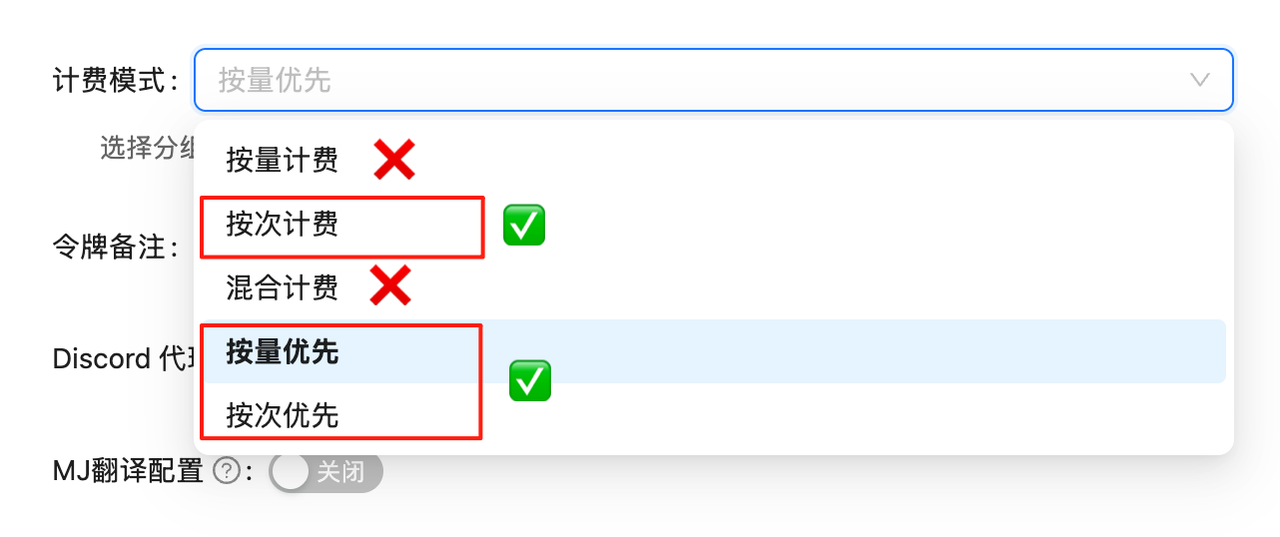 API calls will fail without proper billing configuration. Complete this setup first!
## Model Overview
**Nano Banana Pro** is the market name for Google's **Gemini 3 Pro Image** (`gemini-3-pro-image`). The current model ID is stable and designed for high-quality professional asset production and complex semantic control.
### Core Advantages
1. **🌟 Native 4K Resolution**: Generate up to 4096×4096 ultra-high-definition images.
2. **🧠 Gemini 3 Intelligence**: Built-in logical reasoning, understands abstract descriptions like "a cat looking at an empty bowl with disappointment after missing breakfast".
3. **💪 Complex Composition**: Precise control over object placement, quantity, and text rendering.
4. **💰 Best Price**: \$0.09/image for premium image generation use cases.
## 🌟 Core Features
* **⚡ Fast Response**: \~10 seconds average, significantly faster than OpenAI series
* **💰 Cost-Controlled**: \$0.09/image (current price shown in console)
* **🔄 Dual Compatibility**: Supports OpenAI SDK and Google native formats
* **📐 Flexible Sizes**: Google native format supports 14 aspect ratios
* **🖼️ High Resolution**: Supports 1K, 2K, 4K resolutions
* **🧠 Thinking Mode**: Built-in reasoning process, optimizes composition before generation (enabled by default)
* **🌐 Search Grounding**: Supports Google Search for fact verification and image generation
* **🎨 Multi-Image Reference**: Supports up to 14 reference images (6 objects + 5 characters, etc.)
* **📦 Base64 Output**: Returns base64 encoded image data directly, no secondary download needed
## 🔀 Two API Modes
Nano Banana Pro supports two endpoints, each with unique advantages:
| Feature | OpenAI Compatible Mode | Google Native Format |
| ----------------- | ----------------------------- | --------------------------------------------------- |
| **Endpoint** | `/v1/chat/completions` | `/v1beta/models/gemini-3-pro-image:generateContent` |
| **Model Name** | `gemini-3-pro-image` | Specified in URL |
| **Image Size** | Fixed 1:1 | 14 aspect ratios |
| **Resolution** | Fixed 1K | 1K/2K/4K |
| **Compatibility** | Perfect with OpenAI SDK | Requires native calls |
| **Return Format** | Base64 | Base64 |
| **Use Case** | Quick migration, simple needs | Custom sizes or high resolution |
💡 **How to Choose?**
* For square (1:1) images only, use **OpenAI Compatible Mode** - simpler
* For widescreen (16:9), portrait (9:16), or other specific ratios or high-res (2K/4K), use **Google Native Format**
## 📋 Model Comparison
### Comparison with Other Image Models
| Model | Model ID | Billing | LaoZhang API Price | Official Price | Savings | Resolution | Speed |
| ---------------------- | ----------------------------- | ----------- | ---------------------------- | ----------------------------- | ----------------------- | ------------- | ------------------ |
| **Nano Banana Pro** | `gemini-3-pro-image` | Per-use | \$0.09/image | \$0.134 (1K/2K) / \$0.24 (4K) | About 32.8%–62.5% lower | 1K/2K/4K | \~10s |
| **Nano Banana 2** | `gemini-3.1-flash-image` | Per-use | \$0.055/image | \$0.045–\$0.151 | Compare by resolution | 0.5K/1K/2K/4K | \~10s |
| **Nano Banana 2 Lite** | `gemini-3.1-flash-lite-image` | Per-use | \$0.025/image | \$0.0336 (1K) | About 25.6% lower | 1K | Low-latency target |
| **Nano Banana** | `gemini-2.5-flash-image` | Per-use | \$0.025/image | \$0.039/image | About 35.9% lower | 1K (fixed) | \~10s |
| **GPT-Image-1** | `gpt-image-1` | Token-based | \$10 input/\$40 output per M | - | - | - | Medium |
| **Flux Kontext Pro** | `flux-kontext-pro` | Per-use | \$0.035/image | \$0.04/image | 12.5% | - | Fast |
| **Sora Image** | `sora_image` | Per-use | \$0.01/image | - | - | - | Slower |
💰 **Pricing Details**
* **Nano Banana Pro**: LaoZhang API is currently \$0.09/image; Google Standard is currently \$0.134 at 1K/2K or \$0.24 at 4K
* **Transparent billing**: Review charges in call logs and confirm billing in the console
## 🚀 Quick Start
### Prerequisites
Login to [LaoZhang API Token Management](https://api2.laozhang.ai/token) and create a **pay-per-use** type token
API calls will fail without proper billing configuration. Complete this setup first!
## Model Overview
**Nano Banana Pro** is the market name for Google's **Gemini 3 Pro Image** (`gemini-3-pro-image`). The current model ID is stable and designed for high-quality professional asset production and complex semantic control.
### Core Advantages
1. **🌟 Native 4K Resolution**: Generate up to 4096×4096 ultra-high-definition images.
2. **🧠 Gemini 3 Intelligence**: Built-in logical reasoning, understands abstract descriptions like "a cat looking at an empty bowl with disappointment after missing breakfast".
3. **💪 Complex Composition**: Precise control over object placement, quantity, and text rendering.
4. **💰 Best Price**: \$0.09/image for premium image generation use cases.
## 🌟 Core Features
* **⚡ Fast Response**: \~10 seconds average, significantly faster than OpenAI series
* **💰 Cost-Controlled**: \$0.09/image (current price shown in console)
* **🔄 Dual Compatibility**: Supports OpenAI SDK and Google native formats
* **📐 Flexible Sizes**: Google native format supports 14 aspect ratios
* **🖼️ High Resolution**: Supports 1K, 2K, 4K resolutions
* **🧠 Thinking Mode**: Built-in reasoning process, optimizes composition before generation (enabled by default)
* **🌐 Search Grounding**: Supports Google Search for fact verification and image generation
* **🎨 Multi-Image Reference**: Supports up to 14 reference images (6 objects + 5 characters, etc.)
* **📦 Base64 Output**: Returns base64 encoded image data directly, no secondary download needed
## 🔀 Two API Modes
Nano Banana Pro supports two endpoints, each with unique advantages:
| Feature | OpenAI Compatible Mode | Google Native Format |
| ----------------- | ----------------------------- | --------------------------------------------------- |
| **Endpoint** | `/v1/chat/completions` | `/v1beta/models/gemini-3-pro-image:generateContent` |
| **Model Name** | `gemini-3-pro-image` | Specified in URL |
| **Image Size** | Fixed 1:1 | 14 aspect ratios |
| **Resolution** | Fixed 1K | 1K/2K/4K |
| **Compatibility** | Perfect with OpenAI SDK | Requires native calls |
| **Return Format** | Base64 | Base64 |
| **Use Case** | Quick migration, simple needs | Custom sizes or high resolution |
💡 **How to Choose?**
* For square (1:1) images only, use **OpenAI Compatible Mode** - simpler
* For widescreen (16:9), portrait (9:16), or other specific ratios or high-res (2K/4K), use **Google Native Format**
## 📋 Model Comparison
### Comparison with Other Image Models
| Model | Model ID | Billing | LaoZhang API Price | Official Price | Savings | Resolution | Speed |
| ---------------------- | ----------------------------- | ----------- | ---------------------------- | ----------------------------- | ----------------------- | ------------- | ------------------ |
| **Nano Banana Pro** | `gemini-3-pro-image` | Per-use | \$0.09/image | \$0.134 (1K/2K) / \$0.24 (4K) | About 32.8%–62.5% lower | 1K/2K/4K | \~10s |
| **Nano Banana 2** | `gemini-3.1-flash-image` | Per-use | \$0.055/image | \$0.045–\$0.151 | Compare by resolution | 0.5K/1K/2K/4K | \~10s |
| **Nano Banana 2 Lite** | `gemini-3.1-flash-lite-image` | Per-use | \$0.025/image | \$0.0336 (1K) | About 25.6% lower | 1K | Low-latency target |
| **Nano Banana** | `gemini-2.5-flash-image` | Per-use | \$0.025/image | \$0.039/image | About 35.9% lower | 1K (fixed) | \~10s |
| **GPT-Image-1** | `gpt-image-1` | Token-based | \$10 input/\$40 output per M | - | - | - | Medium |
| **Flux Kontext Pro** | `flux-kontext-pro` | Per-use | \$0.035/image | \$0.04/image | 12.5% | - | Fast |
| **Sora Image** | `sora_image` | Per-use | \$0.01/image | - | - | - | Slower |
💰 **Pricing Details**
* **Nano Banana Pro**: LaoZhang API is currently \$0.09/image; Google Standard is currently \$0.134 at 1K/2K or \$0.24 at 4K
* **Transparent billing**: Review charges in call logs and confirm billing in the console
## 🚀 Quick Start
### Prerequisites
Login to [LaoZhang API Token Management](https://api2.laozhang.ai/token) and create a **pay-per-use** type token
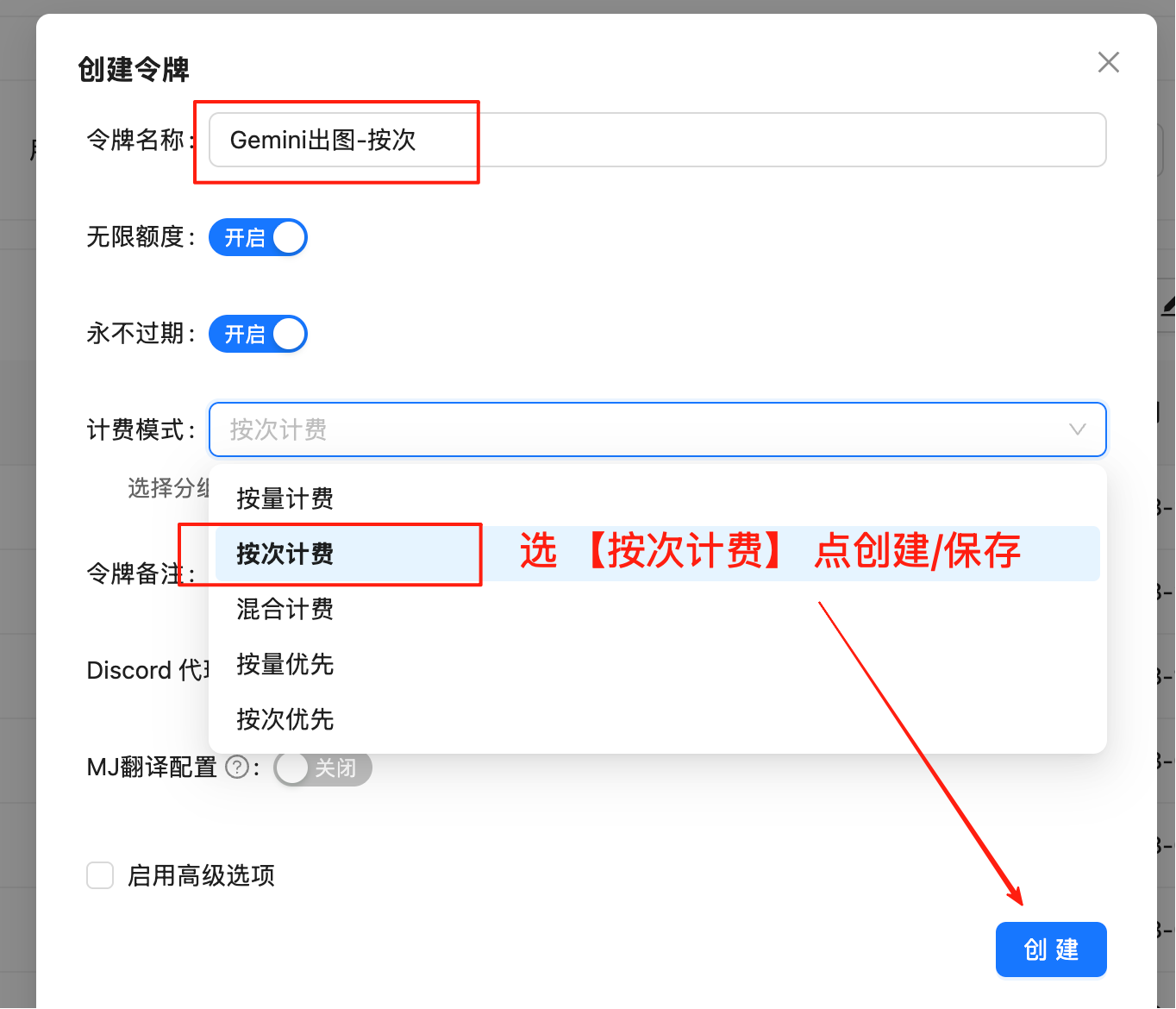 **Important**: Must select "Pay-per-use" type, not "Pay-as-you-go"
Copy the generated token in format `sk-xxxxxx`
## Method 1: OpenAI Compatible Mode (1:1 Images)
Best for quick integration, generates 1024x1024 (1K) images by default.
### Basic Example - Curl
```bash theme={null}
curl -X POST "https://api2.laozhang.ai/v1/chat/completions" \
-H "Authorization: Bearer $API_KEY" \
-H "Content-Type: application/json" \
-d '{
"model": "gemini-3-pro-image",
"stream": false,
"messages": [
{
"role": "user",
"content": "a beautiful sunset over mountains"
}
]
}'
```
### Python SDK Example
```python theme={null}
from openai import OpenAI
import base64
import re
client = OpenAI(
api_key="sk-YOUR_API_KEY",
base_url="https://api2.laozhang.ai/v1"
)
response = client.chat.completions.create(
model="gemini-3-pro-image",
messages=[
{
"role": "user",
"content": "a beautiful sunset over mountains"
}
]
)
# Extract base64 image data
content = response.choices[0].message.content
match = re.search(r'!\[.*?\]\((data:image/png;base64,.*?)\)', content)
if match:
base64_data = match.group(1).split(',')[1]
image_data = base64.b64decode(base64_data)
with open('output.png', 'wb') as f:
f.write(image_data)
print("✅ Image saved: output.png")
```
## Method 2: Google Native Format (Custom Aspect Ratio + 4K)
Best for **4K resolution** or **custom aspect ratio** needs.
### Supported Aspect Ratios
| Type | Aspect Ratio Options |
| ------------- | ---------------------------------------------- |
| **Landscape** | 21:9 (Ultra-wide), 16:9 (Widescreen), 4:3, 3:2 |
| **Square** | 1:1 |
| **Portrait** | 9:16 (Vertical), 3:4, 2:3 |
| **Other** | 5:4, 4:5 |
### Supported Resolutions
| Aspect Ratio | 1K Resolution | 2K Resolution | 4K Resolution |
| ------------ | ------------- | ------------- | ------------- |
| **1:1** | 1024×1024 | 2048×2048 | 4096×4096 |
| **16:9** | 1376×768 | 2752×1536 | 5504×3072 |
| **9:16** | 768×1376 | 1536×2752 | 3072×5504 |
| **4:3** | 1200×896 | 2400×1792 | 4800×3584 |
| **3:4** | 896×1200 | 1792×2400 | 3584×4800 |
| **21:9** | 1584×672 | 3168×1344 | 6336×2688 |
| **3:2** | 1248×832 | 2496×1664 | 4992×3328 |
| **2:3** | 832×1248 | 1664×2496 | 3328×4992 |
| **5:4** | 1152×896 | 2304×1792 | 4608×3584 |
| **4:5** | 896×1152 | 1792×2304 | 3584×4608 |
💡 **Resolution Selection Guide**
* **1K**: Best for web display, social media, quick previews
* **2K**: Best for high-quality printing, professional display
* **4K**: Best for large prints, professional design, extreme detail
### Complete Curl Example (Text-to-Image 4K)
```bash theme={null}
#!/bin/bash
# 1. Set API Key
export API_KEY="sk-YOUR_API_KEY"
# 2. Send request (Generate 4K image with Nano Banana Pro)
curl -s -X POST "https://api2.laozhang.ai/v1beta/models/gemini-3-pro-image:generateContent" \
-H "Authorization: Bearer $API_KEY" \
-H "Content-Type: application/json" \
-d '{
"contents": [{
"parts": [
{"text": "A futuristic city skyline at sunset, high detailed, 4k"}
]
}],
"generationConfig": {
"responseModalities": ["IMAGE"],
"imageConfig": {
"aspectRatio": "16:9",
"imageSize": "4K"
}
}
}' \
| jq -r '.candidates[0].content.parts[0].inlineData.data' \
| base64 --decode > output_4k.png
echo "✅ Image saved: output_4k.png"
```
### Python Code Examples
💡 **Progressive Examples**
Example 1 generates image → Example 2 transforms its style → Example 3 fuses both images. Clear progression!
```python theme={null}
import requests
import base64
# ========== Configuration ==========
API_KEY = "sk-YOUR_API_KEY"
API_URL = "https://api2.laozhang.ai/v1beta/models/gemini-3-pro-image:generateContent"
PROMPT = "A cute orange cat"
ASPECT_RATIO = "1:1"
IMAGE_SIZE = "2K" # Nano Banana Pro supports: 1K, 2K, 4K
# ============================
headers = {"Authorization": f"Bearer {API_KEY}", "Content-Type": "application/json"}
payload = {
"contents": [{"parts": [{"text": PROMPT}]}],
"generationConfig": {
"responseModalities": ["IMAGE"],
"imageConfig": {
"aspectRatio": ASPECT_RATIO,
"imageSize": IMAGE_SIZE
}
}
}
response = requests.post(API_URL, headers=headers, json=payload, timeout=180)
result = response.json()
# Save image
image_data = result["candidates"][0]["content"]["parts"][0]["inlineData"]["data"]
with open("output.png", "wb") as f:
f.write(base64.b64decode(image_data))
print("✅ Image saved: output.png")
```
```python theme={null}
import requests
import base64
# ========== Configuration ==========
API_KEY = "sk-YOUR_API_KEY"
API_URL = "https://api2.laozhang.ai/v1beta/models/gemini-3-pro-image:generateContent"
INPUT_IMAGE = "output.png" # Use image from Example 1
PROMPT = "Transform this image into Van Gogh Starry Night style oil painting"
ASPECT_RATIO = "1:1"
IMAGE_SIZE = "2K"
# ============================
# Read and encode image
with open(INPUT_IMAGE, "rb") as f:
image_b64 = base64.b64encode(f.read()).decode("utf-8")
headers = {"Authorization": f"Bearer {API_KEY}", "Content-Type": "application/json"}
payload = {
"contents": [{
"parts": [
{"text": PROMPT},
{"inline_data": {"mime_type": "image/jpeg", "data": image_b64}}
]
}],
"generationConfig": {
"responseModalities": ["IMAGE"],
"imageConfig": {
"aspectRatio": ASPECT_RATIO,
"imageSize": IMAGE_SIZE
}
}
}
response = requests.post(API_URL, headers=headers, json=payload, timeout=180)
result = response.json()
# Save image
output_data = result["candidates"][0]["content"]["parts"][0]["inlineData"]["data"]
with open("output_styled.png", "wb") as f:
f.write(base64.b64decode(output_data))
print("✅ Image saved: output_styled.png")
```
```python theme={null}
import requests
import base64
# ========== Configuration ==========
API_KEY = "sk-YOUR_API_KEY"
API_URL = "https://api2.laozhang.ai/v1beta/models/gemini-3-pro-image:generateContent"
# Use the two images from Example 1 and Example 2
IMAGES = ["output.png", "output_styled.png"]
PROMPT = "Fuse these two images into an artwork"
ASPECT_RATIO = "16:9"
IMAGE_SIZE = "2K"
# ============================
# Build parts: text + multiple images
parts = [{"text": PROMPT}]
for img_path in IMAGES:
with open(img_path, "rb") as f:
img_b64 = base64.b64encode(f.read()).decode("utf-8")
parts.append({"inline_data": {"mime_type": "image/png", "data": img_b64}})
headers = {"Authorization": f"Bearer {API_KEY}", "Content-Type": "application/json"}
payload = {
"contents": [{"parts": parts}],
"generationConfig": {
"responseModalities": ["IMAGE"],
"imageConfig": {
"aspectRatio": ASPECT_RATIO,
"imageSize": IMAGE_SIZE
}
}
}
response = requests.post(API_URL, headers=headers, json=payload, timeout=180)
result = response.json()
# Save image
output_data = result["candidates"][0]["content"]["parts"][0]["inlineData"]["data"]
with open("output_mixed.png", "wb") as f:
f.write(base64.b64decode(output_data))
print("✅ Image saved: output_mixed.png")
```
```python theme={null}
#!/usr/bin/env python3
# -*- coding: utf-8 -*-
"""
Nano Banana Pro Image Generation - Complete Demo Script
Includes three scenarios: text-to-image, single image-to-image, multi-image mix
"""
import requests
import base64
import os
from datetime import datetime
# ========== Configuration ==========
API_KEY = "sk-YOUR_API_KEY"
API_URL = "https://api2.laozhang.ai/v1beta/models/gemini-3-pro-image:generateContent"
# ============================
def generate_text_to_image(prompt, aspect_ratio="16:9", image_size="2K"):
"""Scenario 1: Text-to-Image"""
print(f"\n📸 Text-to-Image: {prompt}")
payload = {
"contents": [{"parts": [{"text": prompt}]}],
"generationConfig": {
"responseModalities": ["IMAGE"],
"imageConfig": {
"aspectRatio": aspect_ratio,
"imageSize": image_size
}
}
}
return call_api(payload, f"text_{image_size}")
def generate_image_to_image(input_image, prompt, aspect_ratio="1:1", image_size="2K"):
"""Scenario 2: Single Image-to-Image"""
print(f"\n🎨 Image-to-Image: {input_image}")
with open(input_image, "rb") as f:
img_b64 = base64.b64encode(f.read()).decode("utf-8")
payload = {
"contents": [{
"parts": [
{"text": prompt},
{"inline_data": {"mime_type": "image/jpeg", "data": img_b64}}
]
}],
"generationConfig": {
"responseModalities": ["IMAGE"],
"imageConfig": {
"aspectRatio": aspect_ratio,
"imageSize": image_size
}
}
}
return call_api(payload, f"styled_{image_size}")
def generate_multi_image_mix(images, prompt, aspect_ratio="16:9", image_size="2K"):
"""Scenario 3: Multi-Image Mix"""
print(f"\n🖼️ Multi-Image Mix: {len(images)} images")
parts = [{"text": prompt}]
for img in images:
with open(img, "rb") as f:
parts.append({"inline_data": {"mime_type": "image/jpeg", "data": base64.b64encode(f.read()).decode()}})
payload = {
"contents": [{"parts": parts}],
"generationConfig": {
"responseModalities": ["IMAGE"],
"imageConfig": {
"aspectRatio": aspect_ratio,
"imageSize": image_size
}
}
}
return call_api(payload, f"mixed_{image_size}")
def call_api(payload, prefix):
"""Call API"""
headers = {"Authorization": f"Bearer {API_KEY}", "Content-Type": "application/json"}
try:
response = requests.post(API_URL, headers=headers, json=payload, timeout=180)
result = response.json()
image_data = result["candidates"][0]["content"]["parts"][0]["inlineData"]["data"]
filename = f"{prefix}_{datetime.now().strftime('%Y%m%d_%H%M%S')}.png"
with open(filename, "wb") as f:
f.write(base64.b64decode(image_data))
print(f"✅ Saved: {filename}")
return filename
except Exception as e:
print(f"❌ Error: {e}")
return None
# ========== Main Program ==========
def main():
print("🎨 Nano Banana Pro Image Generation - Complete Demo")
# Scenario 1: Text-to-Image
img1 = generate_text_to_image(
"A futuristic cyberpunk city at night, 4k",
aspect_ratio="16:9",
image_size="4K"
)
# Scenario 2: Image-to-Image (requires test_cat.jpg)
if os.path.exists("test_cat.jpg"):
img2 = generate_image_to_image(
"test_cat.jpg",
"Van Gogh Starry Night style",
aspect_ratio="1:1",
image_size="2K"
)
# Scenario 3: Multi-Image Mix (requires test_cat.jpg, test_apple.jpg)
if os.path.exists("test_cat.jpg") and os.path.exists("test_apple.jpg"):
generate_multi_image_mix(
["test_cat.jpg", "test_apple.jpg"],
"A cat eating an apple",
aspect_ratio="16:9",
image_size="2K"
)
print("\n✅ Demo complete!")
if __name__ == "__main__":
main()
```
### Bash Script Example
```bash theme={null}
#!/bin/bash
# ============================================================
# Nano Banana Pro Image Generation Tool - Bash/Curl Version
# Supports 4K resolution and multiple aspect ratios
# ============================================================
# ========== Configuration ==========
API_KEY="sk-YOUR_API_KEY"
API_URL="https://api2.laozhang.ai/v1beta/models/gemini-3-pro-image:generateContent"
PROMPT="A futuristic cyberpunk city at night, neon lights, flying cars, highly detailed, 4k"
ASPECT_RATIO="16:9"
IMAGE_SIZE="4K" # 1K, 2K, 4K
OUTPUT_FILE="gemini_${IMAGE_SIZE}_$(date +%Y%m%d_%H%M%S).png"
# ============================
# Check dependencies
if ! command -v jq &> /dev/null; then
echo "❌ Error: jq tool required"
echo ""
echo "Installation:"
echo " macOS: brew install jq"
echo " Ubuntu: sudo apt-get install jq"
echo " CentOS: sudo yum install jq"
exit 1
fi
echo "============================================================"
echo "Nano Banana Pro Image Generation Tool"
echo "============================================================"
echo "⏰ Start time: $(date '+%Y-%m-%d %H:%M:%S')"
echo "🚀 Generating image..."
echo "📝 Prompt: ${PROMPT}"
echo "📐 Aspect Ratio: ${ASPECT_RATIO}"
echo "🖼️ Resolution: ${IMAGE_SIZE}"
# Build JSON request
REQUEST_JSON=$(jq -n \
--arg prompt "$PROMPT" \
--arg ratio "$ASPECT_RATIO" \
--arg size "$IMAGE_SIZE" \
'{
contents: [{
parts: [{text: $prompt}]
}],
generationConfig: {
responseModalities: ["IMAGE"],
imageConfig: {
aspectRatio: $ratio,
imageSize: $size
}
}
}')
# Send request
RESPONSE=$(curl -s -X POST "${API_URL}" \
-H "Authorization: Bearer ${API_KEY}" \
-H "Content-Type: application/json" \
-d "${REQUEST_JSON}")
# Check for errors
if echo "${RESPONSE}" | jq -e '.error' &> /dev/null; then
echo "❌ Generation failed"
echo "💥 Error message:"
echo "${RESPONSE}" | jq -r '.error.message // .error'
exit 1
fi
# Extract image data
echo "💾 Saving image..."
IMAGE_DATA=$(echo "${RESPONSE}" | jq -r '.candidates[0].content.parts[0].inlineData.data' 2>/dev/null)
if [ -z "$IMAGE_DATA" ] || [ "$IMAGE_DATA" = "null" ]; then
echo "❌ No image data found"
exit 1
fi
# Decode and save image
echo "${IMAGE_DATA}" | base64 --decode > "${OUTPUT_FILE}"
# Check result
if [ -f "${OUTPUT_FILE}" ]; then
FILE_SIZE=$(du -h "${OUTPUT_FILE}" | cut -f1)
echo "✅ Image saved: ${OUTPUT_FILE}"
echo "📊 File size: ${FILE_SIZE}"
echo "============================================================"
echo "🎉 Generation successful!"
echo "⏰ End time: $(date '+%Y-%m-%d %H:%M:%S')"
else
echo "❌ Image save failed"
exit 1
fi
```
## 🚀 Gemini 3 Pro Advanced Features (Nano Banana Pro Exclusive)
### 🧠 Thinking Mode
Nano Banana Pro has built-in **reasoning capability** that automatically optimizes composition and logic before generating images to ensure higher quality output. This feature is enabled by default, no extra configuration needed.
💡 **Thinking Mode Advantages**
* Automatically optimizes composition and layout
* Understands complex multi-step instructions
* Creates temporary "thinking images" during generation (backend only, no extra charge)
* Final output is higher quality and more aligned with expectations
### 🌐 Google Search Grounding
The model can use Google Search as a tool to generate images using real-time data (weather, stock prices, news).
```bash theme={null}
curl -s -X POST "https://api2.laozhang.ai/v1beta/models/gemini-3-pro-image:generateContent" \
-H "Authorization: Bearer $API_KEY" \
-H "Content-Type: application/json" \
-d '{
"contents": [{"parts": [{"text": "Visualize the current weather forecast for the next 5 days in San Francisco as a clean, modern weather chart."}]}],
"tools": [{"google_search": {}}],
"generationConfig": {
"responseModalities": ["TEXT", "IMAGE"],
"imageConfig": {"aspectRatio": "16:9"}
}
}'
```
**Note**: When using search grounding, `responseModalities` must include `"TEXT"` (i.e., `["TEXT", "IMAGE"]`). Pure image mode cannot return search results.
### 🎨 Multi-Image Reference (Reference Images)
Nano Banana Pro supports mixing up to **14 reference images**:
* **Up to 6** high-fidelity object images (for inclusion in final image)
* **Up to 5** person images (for maintaining character consistency)
```python theme={null}
# Multi-Image Reference Example (Python)
import requests
import base64
API_KEY = "sk-YOUR_API_KEY"
API_URL = "https://api2.laozhang.ai/v1beta/models/gemini-3-pro-image:generateContent"
# Prepare multiple reference images
image_paths = ["cat.jpg", "apple.jpg"]
parts = [{"text": "Combine these images: a cat eating an apple on a table"}]
for path in image_paths:
with open(path, "rb") as f:
image_data = base64.b64encode(f.read()).decode("utf-8")
parts.append({
"inline_data": {
"mime_type": "image/jpeg",
"data": image_data
}
})
# Send request
response = requests.post(
API_URL,
headers={
"Authorization": f"Bearer {API_KEY}",
"Content-Type": "application/json"
},
json={
"contents": [{"parts": parts}],
"generationConfig": {
"responseModalities": ["IMAGE"],
"imageConfig": {
"aspectRatio": "16:9",
"imageSize": "2K"
}
}
}
)
```
💡 **Multi-Image Reference Best Practices**
* Object images: For product composition, scene building
* Person images: Maintain character appearance consistency (for image series)
* Combined use: Create complex visual narratives
## 💡 Best Practices
### Prompt Optimization
Use specific, detailed descriptions including subject, style, color, lighting, etc.
Specify art styles: "oil painting style", "watercolor", "cyberpunk style", etc.
Avoid overly abstract or vague terms
English prompts typically work better, but Chinese is also supported
### Aspect Ratio Selection Guide
| Use Case | Recommended Ratio |
| ------------------------ | ----------------- |
| Social media landscape | 16:9 |
| Phone wallpaper/vertical | 9:16 |
| Instagram square | 1:1 |
| Print photos | 4:3 or 3:2 |
| Movie posters | 2:3 |
| Banner ads | 21:9 |
## ❓ FAQ
1. Visit [api2.laozhang.ai](https://api2.laozhang.ai) to register
2. Create token and select "Pay-per-use"
3. Call the `gemini-3-pro-image` model
4. Check actual charges in the console call logs
Actual charges are shown in the console call logs.
| Channel | Price | Notes |
| ---------------- | -------------------------------------------- | ---------------------- |
| **LaoZhang API** | **\$0.09/image** | price shown in console |
| Google Standard | \$0.134/image at 1K/2K or \$0.24/image at 4K | Resolution-dependent |
Check the console for the current price, balance, and any time-limited account activity before relying on it in a cost estimate.
**Method 1**: [API Playground](https://api2.laozhang.ai/playground) visual testing
**Method 2**: Curl command
```bash theme={null}
curl -X POST "https://api2.laozhang.ai/v1/chat/completions" \
-H "Authorization: Bearer YOUR_API_KEY" \
-d '{"model": "gemini-3-pro-image", "messages": [{"role": "user", "content": "a cute cat"}]}'
```
| Feature | Nano Banana Pro | Nano Banana |
| --------------------- | -------------------- | ------------------------ |
| Model | `gemini-3-pro-image` | `gemini-2.5-flash-image` |
| Technology | Gemini 3 | Gemini 2.5 |
| Resolution | 1K/2K/4K | 1K (fixed) |
| Price | \$0.09/image | \$0.025/image |
| Thinking Mode | ✅ Yes | ❌ No |
| Search Grounding | ✅ Yes | ❌ No |
| Multi-Image Reference | Up to 14 | Up to 3 |
* For 1:1 square images only, use **OpenAI Compatible Mode** - simpler
* For specific aspect ratios (like 16:9 widescreen) or high-res (2K/4K), use **Google Native Format**
Both Nano Banana Pro and Nano Banana 2 support 4K. This page uses Pro through the Gemini-native format with an `imageSize` parameter:
```json theme={null}
{
"generationConfig": {
"responseModalities": ["IMAGE"],
"imageConfig": {
"aspectRatio": "16:9",
"imageSize": "4K"
}
}
}
```
**Important**: Must use uppercase "K" (1K, 2K, 4K).
**Perfectly supported!** Gemini 3 Pro has top-tier multilingual understanding. You can describe scenes in Chinese directly, no translation needed.
1. **Detailed description**: Provide specific details (color, style, scene, etc.)
2. **English prompts**: English typically works better
3. **Reference style**: Specify art style (like "oil painting style", "watercolor")
4. **Multiple attempts**: Try different prompts, pricing is affordable
Base64 data can be displayed directly in web pages:
```html theme={null}
**Important**: Must select "Pay-per-use" type, not "Pay-as-you-go"
Copy the generated token in format `sk-xxxxxx`
## Method 1: OpenAI Compatible Mode (1:1 Images)
Best for quick integration, generates 1024x1024 (1K) images by default.
### Basic Example - Curl
```bash theme={null}
curl -X POST "https://api2.laozhang.ai/v1/chat/completions" \
-H "Authorization: Bearer $API_KEY" \
-H "Content-Type: application/json" \
-d '{
"model": "gemini-3-pro-image",
"stream": false,
"messages": [
{
"role": "user",
"content": "a beautiful sunset over mountains"
}
]
}'
```
### Python SDK Example
```python theme={null}
from openai import OpenAI
import base64
import re
client = OpenAI(
api_key="sk-YOUR_API_KEY",
base_url="https://api2.laozhang.ai/v1"
)
response = client.chat.completions.create(
model="gemini-3-pro-image",
messages=[
{
"role": "user",
"content": "a beautiful sunset over mountains"
}
]
)
# Extract base64 image data
content = response.choices[0].message.content
match = re.search(r'!\[.*?\]\((data:image/png;base64,.*?)\)', content)
if match:
base64_data = match.group(1).split(',')[1]
image_data = base64.b64decode(base64_data)
with open('output.png', 'wb') as f:
f.write(image_data)
print("✅ Image saved: output.png")
```
## Method 2: Google Native Format (Custom Aspect Ratio + 4K)
Best for **4K resolution** or **custom aspect ratio** needs.
### Supported Aspect Ratios
| Type | Aspect Ratio Options |
| ------------- | ---------------------------------------------- |
| **Landscape** | 21:9 (Ultra-wide), 16:9 (Widescreen), 4:3, 3:2 |
| **Square** | 1:1 |
| **Portrait** | 9:16 (Vertical), 3:4, 2:3 |
| **Other** | 5:4, 4:5 |
### Supported Resolutions
| Aspect Ratio | 1K Resolution | 2K Resolution | 4K Resolution |
| ------------ | ------------- | ------------- | ------------- |
| **1:1** | 1024×1024 | 2048×2048 | 4096×4096 |
| **16:9** | 1376×768 | 2752×1536 | 5504×3072 |
| **9:16** | 768×1376 | 1536×2752 | 3072×5504 |
| **4:3** | 1200×896 | 2400×1792 | 4800×3584 |
| **3:4** | 896×1200 | 1792×2400 | 3584×4800 |
| **21:9** | 1584×672 | 3168×1344 | 6336×2688 |
| **3:2** | 1248×832 | 2496×1664 | 4992×3328 |
| **2:3** | 832×1248 | 1664×2496 | 3328×4992 |
| **5:4** | 1152×896 | 2304×1792 | 4608×3584 |
| **4:5** | 896×1152 | 1792×2304 | 3584×4608 |
💡 **Resolution Selection Guide**
* **1K**: Best for web display, social media, quick previews
* **2K**: Best for high-quality printing, professional display
* **4K**: Best for large prints, professional design, extreme detail
### Complete Curl Example (Text-to-Image 4K)
```bash theme={null}
#!/bin/bash
# 1. Set API Key
export API_KEY="sk-YOUR_API_KEY"
# 2. Send request (Generate 4K image with Nano Banana Pro)
curl -s -X POST "https://api2.laozhang.ai/v1beta/models/gemini-3-pro-image:generateContent" \
-H "Authorization: Bearer $API_KEY" \
-H "Content-Type: application/json" \
-d '{
"contents": [{
"parts": [
{"text": "A futuristic city skyline at sunset, high detailed, 4k"}
]
}],
"generationConfig": {
"responseModalities": ["IMAGE"],
"imageConfig": {
"aspectRatio": "16:9",
"imageSize": "4K"
}
}
}' \
| jq -r '.candidates[0].content.parts[0].inlineData.data' \
| base64 --decode > output_4k.png
echo "✅ Image saved: output_4k.png"
```
### Python Code Examples
💡 **Progressive Examples**
Example 1 generates image → Example 2 transforms its style → Example 3 fuses both images. Clear progression!
```python theme={null}
import requests
import base64
# ========== Configuration ==========
API_KEY = "sk-YOUR_API_KEY"
API_URL = "https://api2.laozhang.ai/v1beta/models/gemini-3-pro-image:generateContent"
PROMPT = "A cute orange cat"
ASPECT_RATIO = "1:1"
IMAGE_SIZE = "2K" # Nano Banana Pro supports: 1K, 2K, 4K
# ============================
headers = {"Authorization": f"Bearer {API_KEY}", "Content-Type": "application/json"}
payload = {
"contents": [{"parts": [{"text": PROMPT}]}],
"generationConfig": {
"responseModalities": ["IMAGE"],
"imageConfig": {
"aspectRatio": ASPECT_RATIO,
"imageSize": IMAGE_SIZE
}
}
}
response = requests.post(API_URL, headers=headers, json=payload, timeout=180)
result = response.json()
# Save image
image_data = result["candidates"][0]["content"]["parts"][0]["inlineData"]["data"]
with open("output.png", "wb") as f:
f.write(base64.b64decode(image_data))
print("✅ Image saved: output.png")
```
```python theme={null}
import requests
import base64
# ========== Configuration ==========
API_KEY = "sk-YOUR_API_KEY"
API_URL = "https://api2.laozhang.ai/v1beta/models/gemini-3-pro-image:generateContent"
INPUT_IMAGE = "output.png" # Use image from Example 1
PROMPT = "Transform this image into Van Gogh Starry Night style oil painting"
ASPECT_RATIO = "1:1"
IMAGE_SIZE = "2K"
# ============================
# Read and encode image
with open(INPUT_IMAGE, "rb") as f:
image_b64 = base64.b64encode(f.read()).decode("utf-8")
headers = {"Authorization": f"Bearer {API_KEY}", "Content-Type": "application/json"}
payload = {
"contents": [{
"parts": [
{"text": PROMPT},
{"inline_data": {"mime_type": "image/jpeg", "data": image_b64}}
]
}],
"generationConfig": {
"responseModalities": ["IMAGE"],
"imageConfig": {
"aspectRatio": ASPECT_RATIO,
"imageSize": IMAGE_SIZE
}
}
}
response = requests.post(API_URL, headers=headers, json=payload, timeout=180)
result = response.json()
# Save image
output_data = result["candidates"][0]["content"]["parts"][0]["inlineData"]["data"]
with open("output_styled.png", "wb") as f:
f.write(base64.b64decode(output_data))
print("✅ Image saved: output_styled.png")
```
```python theme={null}
import requests
import base64
# ========== Configuration ==========
API_KEY = "sk-YOUR_API_KEY"
API_URL = "https://api2.laozhang.ai/v1beta/models/gemini-3-pro-image:generateContent"
# Use the two images from Example 1 and Example 2
IMAGES = ["output.png", "output_styled.png"]
PROMPT = "Fuse these two images into an artwork"
ASPECT_RATIO = "16:9"
IMAGE_SIZE = "2K"
# ============================
# Build parts: text + multiple images
parts = [{"text": PROMPT}]
for img_path in IMAGES:
with open(img_path, "rb") as f:
img_b64 = base64.b64encode(f.read()).decode("utf-8")
parts.append({"inline_data": {"mime_type": "image/png", "data": img_b64}})
headers = {"Authorization": f"Bearer {API_KEY}", "Content-Type": "application/json"}
payload = {
"contents": [{"parts": parts}],
"generationConfig": {
"responseModalities": ["IMAGE"],
"imageConfig": {
"aspectRatio": ASPECT_RATIO,
"imageSize": IMAGE_SIZE
}
}
}
response = requests.post(API_URL, headers=headers, json=payload, timeout=180)
result = response.json()
# Save image
output_data = result["candidates"][0]["content"]["parts"][0]["inlineData"]["data"]
with open("output_mixed.png", "wb") as f:
f.write(base64.b64decode(output_data))
print("✅ Image saved: output_mixed.png")
```
```python theme={null}
#!/usr/bin/env python3
# -*- coding: utf-8 -*-
"""
Nano Banana Pro Image Generation - Complete Demo Script
Includes three scenarios: text-to-image, single image-to-image, multi-image mix
"""
import requests
import base64
import os
from datetime import datetime
# ========== Configuration ==========
API_KEY = "sk-YOUR_API_KEY"
API_URL = "https://api2.laozhang.ai/v1beta/models/gemini-3-pro-image:generateContent"
# ============================
def generate_text_to_image(prompt, aspect_ratio="16:9", image_size="2K"):
"""Scenario 1: Text-to-Image"""
print(f"\n📸 Text-to-Image: {prompt}")
payload = {
"contents": [{"parts": [{"text": prompt}]}],
"generationConfig": {
"responseModalities": ["IMAGE"],
"imageConfig": {
"aspectRatio": aspect_ratio,
"imageSize": image_size
}
}
}
return call_api(payload, f"text_{image_size}")
def generate_image_to_image(input_image, prompt, aspect_ratio="1:1", image_size="2K"):
"""Scenario 2: Single Image-to-Image"""
print(f"\n🎨 Image-to-Image: {input_image}")
with open(input_image, "rb") as f:
img_b64 = base64.b64encode(f.read()).decode("utf-8")
payload = {
"contents": [{
"parts": [
{"text": prompt},
{"inline_data": {"mime_type": "image/jpeg", "data": img_b64}}
]
}],
"generationConfig": {
"responseModalities": ["IMAGE"],
"imageConfig": {
"aspectRatio": aspect_ratio,
"imageSize": image_size
}
}
}
return call_api(payload, f"styled_{image_size}")
def generate_multi_image_mix(images, prompt, aspect_ratio="16:9", image_size="2K"):
"""Scenario 3: Multi-Image Mix"""
print(f"\n🖼️ Multi-Image Mix: {len(images)} images")
parts = [{"text": prompt}]
for img in images:
with open(img, "rb") as f:
parts.append({"inline_data": {"mime_type": "image/jpeg", "data": base64.b64encode(f.read()).decode()}})
payload = {
"contents": [{"parts": parts}],
"generationConfig": {
"responseModalities": ["IMAGE"],
"imageConfig": {
"aspectRatio": aspect_ratio,
"imageSize": image_size
}
}
}
return call_api(payload, f"mixed_{image_size}")
def call_api(payload, prefix):
"""Call API"""
headers = {"Authorization": f"Bearer {API_KEY}", "Content-Type": "application/json"}
try:
response = requests.post(API_URL, headers=headers, json=payload, timeout=180)
result = response.json()
image_data = result["candidates"][0]["content"]["parts"][0]["inlineData"]["data"]
filename = f"{prefix}_{datetime.now().strftime('%Y%m%d_%H%M%S')}.png"
with open(filename, "wb") as f:
f.write(base64.b64decode(image_data))
print(f"✅ Saved: {filename}")
return filename
except Exception as e:
print(f"❌ Error: {e}")
return None
# ========== Main Program ==========
def main():
print("🎨 Nano Banana Pro Image Generation - Complete Demo")
# Scenario 1: Text-to-Image
img1 = generate_text_to_image(
"A futuristic cyberpunk city at night, 4k",
aspect_ratio="16:9",
image_size="4K"
)
# Scenario 2: Image-to-Image (requires test_cat.jpg)
if os.path.exists("test_cat.jpg"):
img2 = generate_image_to_image(
"test_cat.jpg",
"Van Gogh Starry Night style",
aspect_ratio="1:1",
image_size="2K"
)
# Scenario 3: Multi-Image Mix (requires test_cat.jpg, test_apple.jpg)
if os.path.exists("test_cat.jpg") and os.path.exists("test_apple.jpg"):
generate_multi_image_mix(
["test_cat.jpg", "test_apple.jpg"],
"A cat eating an apple",
aspect_ratio="16:9",
image_size="2K"
)
print("\n✅ Demo complete!")
if __name__ == "__main__":
main()
```
### Bash Script Example
```bash theme={null}
#!/bin/bash
# ============================================================
# Nano Banana Pro Image Generation Tool - Bash/Curl Version
# Supports 4K resolution and multiple aspect ratios
# ============================================================
# ========== Configuration ==========
API_KEY="sk-YOUR_API_KEY"
API_URL="https://api2.laozhang.ai/v1beta/models/gemini-3-pro-image:generateContent"
PROMPT="A futuristic cyberpunk city at night, neon lights, flying cars, highly detailed, 4k"
ASPECT_RATIO="16:9"
IMAGE_SIZE="4K" # 1K, 2K, 4K
OUTPUT_FILE="gemini_${IMAGE_SIZE}_$(date +%Y%m%d_%H%M%S).png"
# ============================
# Check dependencies
if ! command -v jq &> /dev/null; then
echo "❌ Error: jq tool required"
echo ""
echo "Installation:"
echo " macOS: brew install jq"
echo " Ubuntu: sudo apt-get install jq"
echo " CentOS: sudo yum install jq"
exit 1
fi
echo "============================================================"
echo "Nano Banana Pro Image Generation Tool"
echo "============================================================"
echo "⏰ Start time: $(date '+%Y-%m-%d %H:%M:%S')"
echo "🚀 Generating image..."
echo "📝 Prompt: ${PROMPT}"
echo "📐 Aspect Ratio: ${ASPECT_RATIO}"
echo "🖼️ Resolution: ${IMAGE_SIZE}"
# Build JSON request
REQUEST_JSON=$(jq -n \
--arg prompt "$PROMPT" \
--arg ratio "$ASPECT_RATIO" \
--arg size "$IMAGE_SIZE" \
'{
contents: [{
parts: [{text: $prompt}]
}],
generationConfig: {
responseModalities: ["IMAGE"],
imageConfig: {
aspectRatio: $ratio,
imageSize: $size
}
}
}')
# Send request
RESPONSE=$(curl -s -X POST "${API_URL}" \
-H "Authorization: Bearer ${API_KEY}" \
-H "Content-Type: application/json" \
-d "${REQUEST_JSON}")
# Check for errors
if echo "${RESPONSE}" | jq -e '.error' &> /dev/null; then
echo "❌ Generation failed"
echo "💥 Error message:"
echo "${RESPONSE}" | jq -r '.error.message // .error'
exit 1
fi
# Extract image data
echo "💾 Saving image..."
IMAGE_DATA=$(echo "${RESPONSE}" | jq -r '.candidates[0].content.parts[0].inlineData.data' 2>/dev/null)
if [ -z "$IMAGE_DATA" ] || [ "$IMAGE_DATA" = "null" ]; then
echo "❌ No image data found"
exit 1
fi
# Decode and save image
echo "${IMAGE_DATA}" | base64 --decode > "${OUTPUT_FILE}"
# Check result
if [ -f "${OUTPUT_FILE}" ]; then
FILE_SIZE=$(du -h "${OUTPUT_FILE}" | cut -f1)
echo "✅ Image saved: ${OUTPUT_FILE}"
echo "📊 File size: ${FILE_SIZE}"
echo "============================================================"
echo "🎉 Generation successful!"
echo "⏰ End time: $(date '+%Y-%m-%d %H:%M:%S')"
else
echo "❌ Image save failed"
exit 1
fi
```
## 🚀 Gemini 3 Pro Advanced Features (Nano Banana Pro Exclusive)
### 🧠 Thinking Mode
Nano Banana Pro has built-in **reasoning capability** that automatically optimizes composition and logic before generating images to ensure higher quality output. This feature is enabled by default, no extra configuration needed.
💡 **Thinking Mode Advantages**
* Automatically optimizes composition and layout
* Understands complex multi-step instructions
* Creates temporary "thinking images" during generation (backend only, no extra charge)
* Final output is higher quality and more aligned with expectations
### 🌐 Google Search Grounding
The model can use Google Search as a tool to generate images using real-time data (weather, stock prices, news).
```bash theme={null}
curl -s -X POST "https://api2.laozhang.ai/v1beta/models/gemini-3-pro-image:generateContent" \
-H "Authorization: Bearer $API_KEY" \
-H "Content-Type: application/json" \
-d '{
"contents": [{"parts": [{"text": "Visualize the current weather forecast for the next 5 days in San Francisco as a clean, modern weather chart."}]}],
"tools": [{"google_search": {}}],
"generationConfig": {
"responseModalities": ["TEXT", "IMAGE"],
"imageConfig": {"aspectRatio": "16:9"}
}
}'
```
**Note**: When using search grounding, `responseModalities` must include `"TEXT"` (i.e., `["TEXT", "IMAGE"]`). Pure image mode cannot return search results.
### 🎨 Multi-Image Reference (Reference Images)
Nano Banana Pro supports mixing up to **14 reference images**:
* **Up to 6** high-fidelity object images (for inclusion in final image)
* **Up to 5** person images (for maintaining character consistency)
```python theme={null}
# Multi-Image Reference Example (Python)
import requests
import base64
API_KEY = "sk-YOUR_API_KEY"
API_URL = "https://api2.laozhang.ai/v1beta/models/gemini-3-pro-image:generateContent"
# Prepare multiple reference images
image_paths = ["cat.jpg", "apple.jpg"]
parts = [{"text": "Combine these images: a cat eating an apple on a table"}]
for path in image_paths:
with open(path, "rb") as f:
image_data = base64.b64encode(f.read()).decode("utf-8")
parts.append({
"inline_data": {
"mime_type": "image/jpeg",
"data": image_data
}
})
# Send request
response = requests.post(
API_URL,
headers={
"Authorization": f"Bearer {API_KEY}",
"Content-Type": "application/json"
},
json={
"contents": [{"parts": parts}],
"generationConfig": {
"responseModalities": ["IMAGE"],
"imageConfig": {
"aspectRatio": "16:9",
"imageSize": "2K"
}
}
}
)
```
💡 **Multi-Image Reference Best Practices**
* Object images: For product composition, scene building
* Person images: Maintain character appearance consistency (for image series)
* Combined use: Create complex visual narratives
## 💡 Best Practices
### Prompt Optimization
Use specific, detailed descriptions including subject, style, color, lighting, etc.
Specify art styles: "oil painting style", "watercolor", "cyberpunk style", etc.
Avoid overly abstract or vague terms
English prompts typically work better, but Chinese is also supported
### Aspect Ratio Selection Guide
| Use Case | Recommended Ratio |
| ------------------------ | ----------------- |
| Social media landscape | 16:9 |
| Phone wallpaper/vertical | 9:16 |
| Instagram square | 1:1 |
| Print photos | 4:3 or 3:2 |
| Movie posters | 2:3 |
| Banner ads | 21:9 |
## ❓ FAQ
1. Visit [api2.laozhang.ai](https://api2.laozhang.ai) to register
2. Create token and select "Pay-per-use"
3. Call the `gemini-3-pro-image` model
4. Check actual charges in the console call logs
Actual charges are shown in the console call logs.
| Channel | Price | Notes |
| ---------------- | -------------------------------------------- | ---------------------- |
| **LaoZhang API** | **\$0.09/image** | price shown in console |
| Google Standard | \$0.134/image at 1K/2K or \$0.24/image at 4K | Resolution-dependent |
Check the console for the current price, balance, and any time-limited account activity before relying on it in a cost estimate.
**Method 1**: [API Playground](https://api2.laozhang.ai/playground) visual testing
**Method 2**: Curl command
```bash theme={null}
curl -X POST "https://api2.laozhang.ai/v1/chat/completions" \
-H "Authorization: Bearer YOUR_API_KEY" \
-d '{"model": "gemini-3-pro-image", "messages": [{"role": "user", "content": "a cute cat"}]}'
```
| Feature | Nano Banana Pro | Nano Banana |
| --------------------- | -------------------- | ------------------------ |
| Model | `gemini-3-pro-image` | `gemini-2.5-flash-image` |
| Technology | Gemini 3 | Gemini 2.5 |
| Resolution | 1K/2K/4K | 1K (fixed) |
| Price | \$0.09/image | \$0.025/image |
| Thinking Mode | ✅ Yes | ❌ No |
| Search Grounding | ✅ Yes | ❌ No |
| Multi-Image Reference | Up to 14 | Up to 3 |
* For 1:1 square images only, use **OpenAI Compatible Mode** - simpler
* For specific aspect ratios (like 16:9 widescreen) or high-res (2K/4K), use **Google Native Format**
Both Nano Banana Pro and Nano Banana 2 support 4K. This page uses Pro through the Gemini-native format with an `imageSize` parameter:
```json theme={null}
{
"generationConfig": {
"responseModalities": ["IMAGE"],
"imageConfig": {
"aspectRatio": "16:9",
"imageSize": "4K"
}
}
}
```
**Important**: Must use uppercase "K" (1K, 2K, 4K).
**Perfectly supported!** Gemini 3 Pro has top-tier multilingual understanding. You can describe scenes in Chinese directly, no translation needed.
1. **Detailed description**: Provide specific details (color, style, scene, etc.)
2. **English prompts**: English typically works better
3. **Reference style**: Specify art style (like "oil painting style", "watercolor")
4. **Multiple attempts**: Try different prompts, pricing is affordable
Base64 data can be displayed directly in web pages:
```html theme={null}
 ```
Or decode and save as file (see code examples above)
## 🔗 Related Resources
Learn how to edit and transform existing images with Nano Banana Pro
\$0.055/image, better value Banana 2 version
More affordable Nano Banana Standard version
Create and manage your API tokens
View detailed pricing and billing information
***
## 📝 Changelog
**🚀 Nano Banana Pro Dedicated Page**
* Split from combined documentation into dedicated Pro version
* Complete 4K resolution usage guide
* Detailed advanced features (thinking mode, search grounding, multi-image reference)
* Complete code examples and best practices
* Comparison with Nano Banana Standard
```
Or decode and save as file (see code examples above)
## 🔗 Related Resources
Learn how to edit and transform existing images with Nano Banana Pro
\$0.055/image, better value Banana 2 version
More affordable Nano Banana Standard version
Create and manage your API tokens
View detailed pricing and billing information
***
## 📝 Changelog
**🚀 Nano Banana Pro Dedicated Page**
* Split from combined documentation into dedicated Pro version
* Complete 4K resolution usage guide
* Detailed advanced features (thinking mode, search grounding, multi-image reference)
* Complete code examples and best practices
* Comparison with Nano Banana Standard