> ## Documentation Index
> Fetch the complete documentation index at: https://docs.laozhang.ai/llms.txt
> Use this file to discover all available pages before exploring further.
# Nano Banana2 Image Generation
> Nano Banana2 Image Generation API: Powered by Gemini 3.1 Flash. USD 0.055/image, supports text-to-image + image editing, 4K resolution, compatible with OpenAI SDK and Google native format.
**🆕 Nano Banana2 (Gemini 3.1 Flash) Now Available!**
The new benchmark for value. Usage is identical to Nano Banana Pro.
* **Cost-Controlled**: **\$0.055/image**, cost-controlled option
* **4K Quality**: Supports 1K, 2K, 4K resolutions
* **Full Features**: Text-to-image + image editing, compatible with OpenAI SDK and Google native format
Create an API key, review balance, and inspect call logs
YingTu AI - Try instantly, no code required
## Prerequisites
Login to [laozhang.ai console](https://api.laozhang.ai) to get your API key
Edit token settings and select one of these billing modes (same price):
* **Pay-per-use Priority** (Recommended): Use balance first, auto-switch when insufficient
* **Pay-per-use**: Direct charge per request, best for strict budget control
Both modes have **identical pricing** at \$0.055/image, only the billing method differs.
**Pay-per-use billing note**: Nano Banana2 is billed based on successful calls returned by Google. If the prompt does not explicitly ask to generate or return image data, or if the text/reference image triggers Google's official copyright, sensitive-person, or sensitive-content risk controls, the call may succeed without an image being returned. In that case, it is usually still charged as one successful call. Official 429/5xx errors, network timeouts, and parameter validation failures should be reviewed against console order status.
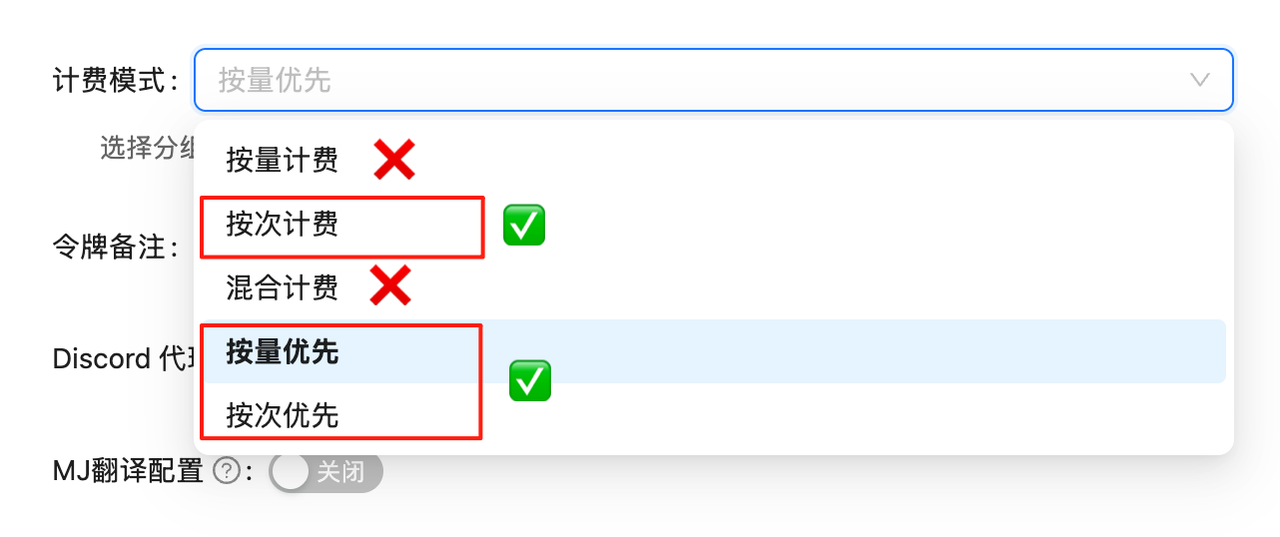 API calls will fail without proper billing configuration. Complete this setup first!
## Model Overview
**Nano Banana2** is LaoZhang API's custom name for Google's **Gemini 3.1 Flash Image Preview** (`gemini-3.1-flash-image-preview`) model. Built on the latest Gemini 3.1 Flash architecture, it delivers high-quality output with better value.
**Nano Banana2 usage is identical to [Nano Banana Pro](/en/api-capabilities/nano-banana-pro-image)** - just replace the model name with `gemini-3.1-flash-image-preview`.
## 📋 Nano Banana Model Comparison
| Model | Model ID | Billing | LaoZhang API Price | Resolution | Speed | Highlight |
| ------------------- | -------------------------------- | ------- | ------------------ | ---------- | ----- | -------------------------------------- |
| **Nano Banana Pro** | `gemini-3-pro-image-preview` | Per-use | \$0.09/image | 1K/2K/4K | \~10s | Most intelligent, complex instructions |
| **Nano Banana2** | `gemini-3.1-flash-image-preview` | Per-use | \$0.055/image | 1K/2K/4K | \~10s | Best value, high quality |
| **Nano Banana** | `gemini-2.5-flash-image` | Per-use | \$0.025/image | 1K (fixed) | \~10s | Basic, stable & reliable |
💡 **How to Choose?**
* **Ultimate quality & complex instructions**: Choose Nano Banana Pro (\$0.09/image)
* **Best value for advanced use**: Choose **Nano Banana2** (\$0.055/image)
* **Budget-conscious, basic needs**: Choose Nano Banana Standard (\$0.025/image)
## 🚀 Quick Start: OpenAI Compatible Mode
### Curl Example
```bash theme={null}
curl -X POST "https://api.laozhang.ai/v1/chat/completions" \
-H "Authorization: Bearer $API_KEY" \
-H "Content-Type: application/json" \
-d '{
"model": "gemini-3.1-flash-image-preview",
"stream": false,
"messages": [
{
"role": "user",
"content": "a beautiful sunset over mountains"
}
]
}'
```
### Python SDK Example
```python theme={null}
from openai import OpenAI
import base64
import re
client = OpenAI(
api_key="sk-YOUR_API_KEY",
base_url="https://api.laozhang.ai/v1"
)
response = client.chat.completions.create(
model="gemini-3.1-flash-image-preview",
messages=[
{
"role": "user",
"content": "a beautiful sunset over mountains"
}
]
)
# Extract base64 image data
content = response.choices[0].message.content
match = re.search(r'!\[.*?\]\((data:image/png;base64,.*?)\)', content)
if match:
base64_data = match.group(1).split(',')[1]
image_data = base64.b64decode(base64_data)
with open('output.png', 'wb') as f:
f.write(image_data)
print("✅ Image saved: output.png")
```
## 🎨 Image Editing
Nano Banana2 also supports image editing, with usage identical to Pro. Simply include reference images and editing instructions in your request, using model name `gemini-3.1-flash-image-preview`.
```python theme={null}
# Image editing example (OpenAI compatible mode)
response = client.chat.completions.create(
model="gemini-3.1-flash-image-preview",
messages=[{
"role": "user",
"content": [
{"type": "text", "text": "Transform this image into Van Gogh Starry Night style"},
{"type": "image_url", "image_url": {"url": "https://example.com/your-image.jpg"}}
]
}]
)
```
For more image editing features (multi-image fusion, 4K output, Google native format, etc.), see the [Nano Banana Pro Image Editing docs](/en/api-capabilities/nano-banana-pro-image-edit) and replace the model name with `gemini-3.1-flash-image-preview`.
## 📖 Complete Usage Guide
**Nano Banana2 API calls are identical to Nano Banana Pro**, including OpenAI compatible mode and Google native format. Simply replace the model name from `gemini-3-pro-image-preview` to `gemini-3.1-flash-image-preview` - no other code changes needed.
4K resolution, Google native format, multiple aspect ratios, complete code examples
Style transfer, multi-image fusion, 4K HD editing, URL input method
Create and manage your API tokens
View detailed pricing and billing information
## ❓ FAQ
| Feature | Nano Banana Pro | Nano Banana2 |
| ---------- | ---------------------------- | -------------------------------- |
| Model | `gemini-3-pro-image-preview` | `gemini-3.1-flash-image-preview` |
| Technology | Gemini 3 Pro | Gemini 3.1 Flash |
| Resolution | 1K/2K/4K | 1K/2K/4K |
| Price | \$0.09/image | \$0.055/image |
| API Usage | Identical | Identical |
Both share the same API interface. Banana2 is based on Gemini 3.1 Flash architecture with a more affordable price point.
Just change one line of code: replace the model name from `gemini-3-pro-image-preview` to `gemini-3.1-flash-image-preview`. Everything else stays the same.
**Yes, fully supported!** Use this endpoint:
```
https://api.laozhang.ai/v1beta/models/gemini-3.1-flash-image-preview:generateContent
```
Supports custom aspect ratios (10 options) and resolutions (1K/2K/4K), same usage as Pro.
**Yes!** Full text-to-image and image editing features. See the [Pro Image Editing docs](/en/api-capabilities/nano-banana-pro-image-edit) for details.
***
## 📝 Changelog
**🆕 Nano Banana2 Released**
* Based on Gemini 3.1 Flash architecture
* Pricing has been synced to the current page rate while keeping the same value positioning
* Usage identical to Nano Banana Pro
* Supports text-to-image, image editing, 4K resolution
API calls will fail without proper billing configuration. Complete this setup first!
## Model Overview
**Nano Banana2** is LaoZhang API's custom name for Google's **Gemini 3.1 Flash Image Preview** (`gemini-3.1-flash-image-preview`) model. Built on the latest Gemini 3.1 Flash architecture, it delivers high-quality output with better value.
**Nano Banana2 usage is identical to [Nano Banana Pro](/en/api-capabilities/nano-banana-pro-image)** - just replace the model name with `gemini-3.1-flash-image-preview`.
## 📋 Nano Banana Model Comparison
| Model | Model ID | Billing | LaoZhang API Price | Resolution | Speed | Highlight |
| ------------------- | -------------------------------- | ------- | ------------------ | ---------- | ----- | -------------------------------------- |
| **Nano Banana Pro** | `gemini-3-pro-image-preview` | Per-use | \$0.09/image | 1K/2K/4K | \~10s | Most intelligent, complex instructions |
| **Nano Banana2** | `gemini-3.1-flash-image-preview` | Per-use | \$0.055/image | 1K/2K/4K | \~10s | Best value, high quality |
| **Nano Banana** | `gemini-2.5-flash-image` | Per-use | \$0.025/image | 1K (fixed) | \~10s | Basic, stable & reliable |
💡 **How to Choose?**
* **Ultimate quality & complex instructions**: Choose Nano Banana Pro (\$0.09/image)
* **Best value for advanced use**: Choose **Nano Banana2** (\$0.055/image)
* **Budget-conscious, basic needs**: Choose Nano Banana Standard (\$0.025/image)
## 🚀 Quick Start: OpenAI Compatible Mode
### Curl Example
```bash theme={null}
curl -X POST "https://api.laozhang.ai/v1/chat/completions" \
-H "Authorization: Bearer $API_KEY" \
-H "Content-Type: application/json" \
-d '{
"model": "gemini-3.1-flash-image-preview",
"stream": false,
"messages": [
{
"role": "user",
"content": "a beautiful sunset over mountains"
}
]
}'
```
### Python SDK Example
```python theme={null}
from openai import OpenAI
import base64
import re
client = OpenAI(
api_key="sk-YOUR_API_KEY",
base_url="https://api.laozhang.ai/v1"
)
response = client.chat.completions.create(
model="gemini-3.1-flash-image-preview",
messages=[
{
"role": "user",
"content": "a beautiful sunset over mountains"
}
]
)
# Extract base64 image data
content = response.choices[0].message.content
match = re.search(r'!\[.*?\]\((data:image/png;base64,.*?)\)', content)
if match:
base64_data = match.group(1).split(',')[1]
image_data = base64.b64decode(base64_data)
with open('output.png', 'wb') as f:
f.write(image_data)
print("✅ Image saved: output.png")
```
## 🎨 Image Editing
Nano Banana2 also supports image editing, with usage identical to Pro. Simply include reference images and editing instructions in your request, using model name `gemini-3.1-flash-image-preview`.
```python theme={null}
# Image editing example (OpenAI compatible mode)
response = client.chat.completions.create(
model="gemini-3.1-flash-image-preview",
messages=[{
"role": "user",
"content": [
{"type": "text", "text": "Transform this image into Van Gogh Starry Night style"},
{"type": "image_url", "image_url": {"url": "https://example.com/your-image.jpg"}}
]
}]
)
```
For more image editing features (multi-image fusion, 4K output, Google native format, etc.), see the [Nano Banana Pro Image Editing docs](/en/api-capabilities/nano-banana-pro-image-edit) and replace the model name with `gemini-3.1-flash-image-preview`.
## 📖 Complete Usage Guide
**Nano Banana2 API calls are identical to Nano Banana Pro**, including OpenAI compatible mode and Google native format. Simply replace the model name from `gemini-3-pro-image-preview` to `gemini-3.1-flash-image-preview` - no other code changes needed.
4K resolution, Google native format, multiple aspect ratios, complete code examples
Style transfer, multi-image fusion, 4K HD editing, URL input method
Create and manage your API tokens
View detailed pricing and billing information
## ❓ FAQ
| Feature | Nano Banana Pro | Nano Banana2 |
| ---------- | ---------------------------- | -------------------------------- |
| Model | `gemini-3-pro-image-preview` | `gemini-3.1-flash-image-preview` |
| Technology | Gemini 3 Pro | Gemini 3.1 Flash |
| Resolution | 1K/2K/4K | 1K/2K/4K |
| Price | \$0.09/image | \$0.055/image |
| API Usage | Identical | Identical |
Both share the same API interface. Banana2 is based on Gemini 3.1 Flash architecture with a more affordable price point.
Just change one line of code: replace the model name from `gemini-3-pro-image-preview` to `gemini-3.1-flash-image-preview`. Everything else stays the same.
**Yes, fully supported!** Use this endpoint:
```
https://api.laozhang.ai/v1beta/models/gemini-3.1-flash-image-preview:generateContent
```
Supports custom aspect ratios (10 options) and resolutions (1K/2K/4K), same usage as Pro.
**Yes!** Full text-to-image and image editing features. See the [Pro Image Editing docs](/en/api-capabilities/nano-banana-pro-image-edit) for details.
***
## 📝 Changelog
**🆕 Nano Banana2 Released**
* Based on Gemini 3.1 Flash architecture
* Pricing has been synced to the current page rate while keeping the same value positioning
* Usage identical to Nano Banana Pro
* Supports text-to-image, image editing, 4K resolution