> ## Documentation Index
> Fetch the complete documentation index at: https://docs.laozhang.ai/llms.txt
> Use this file to discover all available pages before exploring further.
# SeeDream Image Generation/Editing
> SeeDream API: BytePlus Ark image model. Supports 4.0 (USD 0.035/image) and 4.5 (USD 0.045/image) versions, text-to-image and image-to-image, up to 10 reference images.
**API Endpoint:** `https://api2.laozhang.ai/v1/images/generations`
**Available Models:**
* `seedream-4-0-250828` - \$0.035/image
* `seedream-4-5-251128` - \$0.045/image (Latest version)
**Billing:** Pay-per-use
**Pricing Update Notice (January 2026)**
Official subsidy has ended, SeeDream prices have been adjusted:
* SeeDream 4.0: \$0.025/image → **\$0.035/image**
* SeeDream 4.5 (New version): **\$0.045/image**
## Prerequisites
Log in to [laozhang.ai console](https://api2.laozhang.ai) to obtain your API key
Edit token settings and choose one of the following billing modes (same price for both):
* **Volume Priority** (Recommended): Uses balance billing first, automatically switches when balance is insufficient. Suitable for most users
* **Pay-per-call**: Direct deduction for each call. Suitable for strict budget control scenarios
Both modes have **exactly the same price**, only the billing method differs. SeeDream 4.0 is \$0.035/image, 4.5 is \$0.045/image.
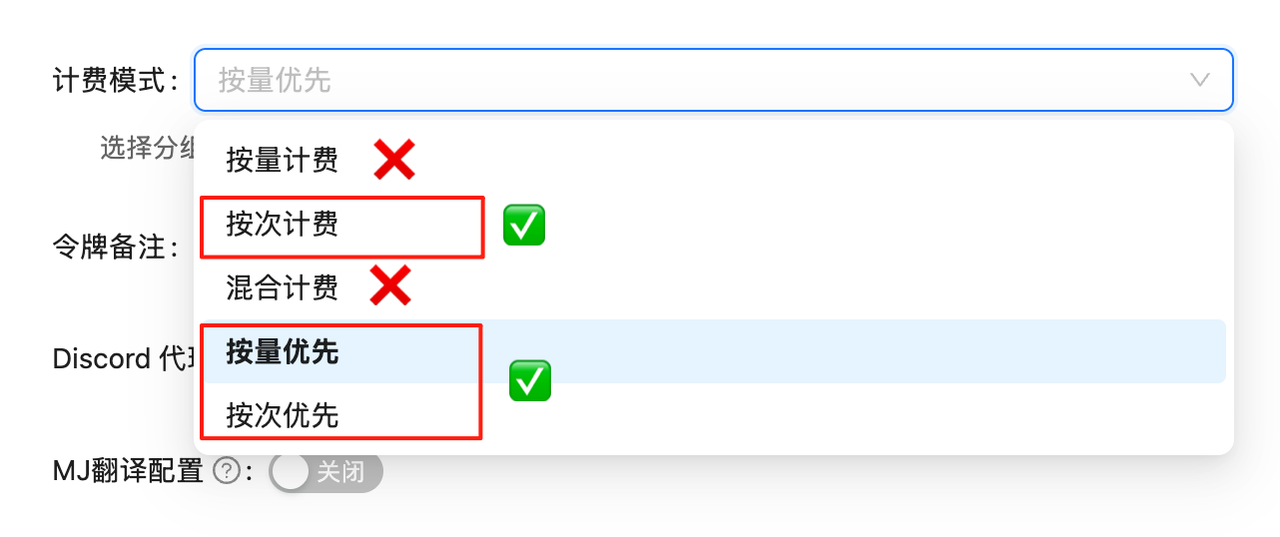 If billing mode is not configured, API calls will fail. You must complete this configuration first!
## Changelog
**September 11, 2025** - SeeDream 4.0 API launched officially, integrated by LaoZhang AI on the same day
## Core Features
Generate high-quality images from text descriptions
AI editing and redrawing based on source images
Supports up to 10 reference images
Customizable image resolution and size
Fully compatible with OpenAI Image API format
4.0 at \$0.035/image, 4.5 at \$0.045/image
## Key Information
### Source
**Strategic Partnership**
SeeDream 4.0 is powered by **BytePlus Ark** (international version). LaoZhang AI has established a strategic partnership to provide you with stable and reliable service.
### Technical Specifications
| Item | Description |
| ------------------------ | --------------------------------------------- |
| **API Format** | OpenAI Image API compatible |
| **Request Endpoint** | `/v1/images/generations` |
| **Model Name** | `seedream-4-0-250828` / `seedream-4-5-251128` |
| **Max Reference Images** | 10 images |
| **Size Support** | Customizable resolution |
| **Watermark** | Optional (can be disabled) |
### Versions & Pricing
| Version | Model ID | Price | Description |
| ---------------- | --------------------- | ------------- | ------------------------------ |
| **SeeDream 4.0** | `seedream-4-0-250828` | \$0.035/image | Stable version |
| **SeeDream 4.5** | `seedream-4-5-251128` | \$0.045/image | Latest version, higher quality |
💰 **Pricing Details**
* **SeeDream 4.0**: \$0.035/image
* **SeeDream 4.5**: \$0.045/image
* **Billing note**: Pay-per-use pricing, with actual charges visible in call logs
## Getting Started
Login to [LaoZhang API Token Management](https://api2.laozhang.ai/token) and create a **pay-per-use** token
If billing mode is not configured, API calls will fail. You must complete this configuration first!
## Changelog
**September 11, 2025** - SeeDream 4.0 API launched officially, integrated by LaoZhang AI on the same day
## Core Features
Generate high-quality images from text descriptions
AI editing and redrawing based on source images
Supports up to 10 reference images
Customizable image resolution and size
Fully compatible with OpenAI Image API format
4.0 at \$0.035/image, 4.5 at \$0.045/image
## Key Information
### Source
**Strategic Partnership**
SeeDream 4.0 is powered by **BytePlus Ark** (international version). LaoZhang AI has established a strategic partnership to provide you with stable and reliable service.
### Technical Specifications
| Item | Description |
| ------------------------ | --------------------------------------------- |
| **API Format** | OpenAI Image API compatible |
| **Request Endpoint** | `/v1/images/generations` |
| **Model Name** | `seedream-4-0-250828` / `seedream-4-5-251128` |
| **Max Reference Images** | 10 images |
| **Size Support** | Customizable resolution |
| **Watermark** | Optional (can be disabled) |
### Versions & Pricing
| Version | Model ID | Price | Description |
| ---------------- | --------------------- | ------------- | ------------------------------ |
| **SeeDream 4.0** | `seedream-4-0-250828` | \$0.035/image | Stable version |
| **SeeDream 4.5** | `seedream-4-5-251128` | \$0.045/image | Latest version, higher quality |
💰 **Pricing Details**
* **SeeDream 4.0**: \$0.035/image
* **SeeDream 4.5**: \$0.045/image
* **Billing note**: Pay-per-use pricing, with actual charges visible in call logs
## Getting Started
Login to [LaoZhang API Token Management](https://api2.laozhang.ai/token) and create a **pay-per-use** token
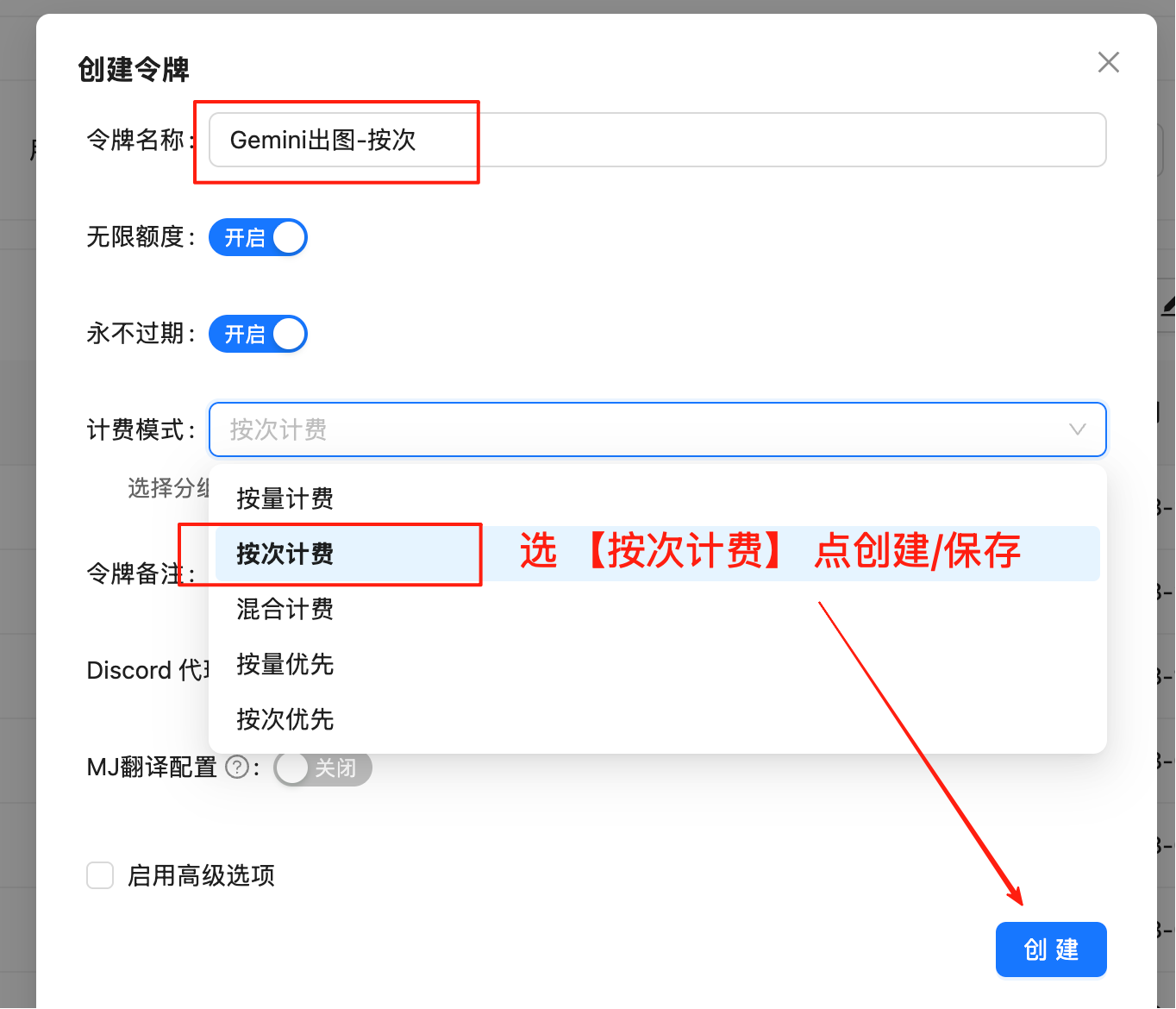 **Important**: Must select "Pay-per-use" type
Copy the generated token (format: `sk-xxxxxx`) and replace `API_KEY` in the code
## Text-to-Image
### Python Version
```python theme={null}
#!/usr/bin/env python3
# -*- coding: utf-8 -*-
"""
Seedream API Image Generator - Pure Python Version
Just modify API_KEY to use
"""
# =================== Configuration Section ===================
API_KEY = "sk-" # Replace with your API key
API_URL = "https://api2.laozhang.ai/v1/images/generations" # API endpoint
PROMPT = "A beautiful sunset over mountains, realistic style" # Image description
MODEL = "seedream-4-0-250828" # Model name
OUTPUT_DIR = "." # Output directory
# ==============================================
import requests
import os
import datetime
def generate_image(prompt, output_dir="."):
"""Generate image and save to local"""
print(f"🎨 Seedream Image Generator")
print(f"📝 Prompt: {prompt}")
print("=" * 50)
# API request parameters
headers = {
"Content-Type": "application/json",
"Authorization": f"Bearer {API_KEY}"
}
payload = {
"model": MODEL,
"prompt": prompt,
"response_format": "url",
"size": "2K",
"watermark": False
}
try:
print("⏳ Generating image...")
# Call API
response = requests.post(API_URL, headers=headers, json=payload, timeout=60)
if response.status_code != 200:
return False, f"API Error ({response.status_code}): {response.text}"
# Parse response
result = response.json()
if "data" not in result or len(result["data"]) == 0:
return False, "API returned no image data"
# Get image URL
image_url = result["data"][0]["url"]
print(f"🌐 Got image URL successfully")
# Download image
print("⬇️ Downloading image...")
img_response = requests.get(image_url, timeout=30)
img_response.raise_for_status()
# Generate filename with timestamp
timestamp = datetime.datetime.now().strftime("%Y%m%d_%H%M%S")
filename = os.path.join(output_dir, f"generated_{timestamp}.jpg")
# Save image
os.makedirs(output_dir, exist_ok=True)
with open(filename, 'wb') as f:
f.write(img_response.content)
file_size = len(img_response.content)
return True, f"✅ Generated successfully: {filename} ({file_size // 1024}KB)"
except Exception as e:
return False, f"Generation failed: {str(e)}"
def main():
"""Main function"""
print("🚀 Seedream API Image Generator - Python Version")
print("=" * 50)
# Check API key
if API_KEY == "sk-" or not API_KEY:
print("⚠️ Please modify API_KEY at the top of the code")
print(" Replace 'sk-' with your actual API key")
print()
print("📋 Instructions:")
print("1. Modify API_KEY to your actual key")
print("2. Optional: Modify PROMPT to generate different images")
print("3. Run: python3 seedream-text-to-image.py")
return
# Execute image generation
success, message = generate_image(PROMPT, OUTPUT_DIR)
print(message)
if success:
print()
print("🎉 Task completed!")
print("💡 Tip: Modify PROMPT to generate different images")
if __name__ == "__main__":
main()
```
### Curl Simple Version
```bash theme={null}
curl -X POST https://api2.laozhang.ai/v1/images/generations \
-H "Content-Type: application/json" \
-H "Authorization: Bearer sk-YOUR_API_KEY" \
-d '{
"model": "seedream-4-0-250828",
"prompt": "A beautiful sunset over mountains, realistic style",
"response_format": "url",
"size": "2K",
"watermark": false
}'
```
### Curl One-Line Version (with Auto Download)
Requires python3 installation, automatically parses response and downloads image
```bash theme={null}
curl -X POST https://api2.laozhang.ai/v1/images/generations \
-H "Content-Type: application/json" \
-H "Authorization: Bearer sk-YOUR_API_KEY" \
-d '{"model": "seedream-4-0-250828","prompt": "A beautiful sunset over mountains, realistic style","response_format": "url","size": "2K","watermark": false}' \
| python3 -c "import json,sys,os; data=json.loads(sys.stdin.read()); os.system(f'curl -L -o generated_\$(date +%Y%m%d_%H%M%S).jpg \"{data[\"data\"][0][\"url\"]}\"') if 'data' in data else print('Error')"
```
## Image-to-Image
AI editing and redrawing based on source images, supports up to 10 reference images.
### Python Version
```python theme={null}
#!/usr/bin/env python3
# -*- coding: utf-8 -*-
"""
Seedream API Image Editor - Python Version
Generate new images based on source image, just modify API_KEY to use
"""
# =================== Configuration Section ===================
API_KEY = "sk-" # Replace with your API key
API_URL = "https://api2.laozhang.ai/v1/images/generations" # Image editing API endpoint
PROMPT = "Generate a close-up image of a dog lying on lush grass." # Editing prompt
IMAGE_URL = "https://ark-doc.tos-ap-southeast-1.bytepluses.com/doc_image/seedream4_imageToimage.png" # Source image URL
MODEL = "seedream-4-0-250828" # Model to use
OUTPUT_DIR = "." # Output directory
# ==============================================
import requests
import os
import datetime
def edit_image(prompt, image_url, output_dir="."):
"""Generate edited image based on source image"""
print(f"🎨 Seedream Image Editor")
print(f"📝 Edit Prompt: {prompt}")
print(f"🖼️ Source URL: {image_url[:50]}...")
print("=" * 50)
# API request parameters
headers = {
"Content-Type": "application/json",
"Authorization": f"Bearer {API_KEY}"
}
payload = {
"model": MODEL,
"prompt": prompt,
"image": image_url,
"sequential_image_generation": "disabled",
"response_format": "url",
"size": "2K",
"stream": False,
"watermark": False
}
try:
print("⏳ Editing image...")
# Call API
response = requests.post(API_URL, headers=headers, json=payload, timeout=60)
if response.status_code != 200:
return False, f"API Error ({response.status_code}): {response.text}"
# Parse response
result = response.json()
if "data" not in result or len(result["data"]) == 0:
return False, "API returned no image data"
# Get image URL
edited_image_url = result["data"][0]["url"]
print(f"🌐 Got edited image URL successfully")
# Download image
print("⬇️ Downloading edited image...")
img_response = requests.get(edited_image_url, timeout=30)
img_response.raise_for_status()
# Generate filename with timestamp
timestamp = datetime.datetime.now().strftime("%Y%m%d_%H%M%S")
filename = os.path.join(output_dir, f"edited_{timestamp}.jpg")
# Save image
os.makedirs(output_dir, exist_ok=True)
with open(filename, 'wb') as f:
f.write(img_response.content)
file_size = len(img_response.content)
return True, f"✅ Edit successful: {filename} ({file_size // 1024}KB)"
except Exception as e:
return False, f"Edit failed: {str(e)}"
def main():
"""Main function"""
print("🚀 Seedream API Image Editor - Python Version")
print("=" * 50)
# Check API key
if API_KEY == "sk-" or not API_KEY:
print("⚠️ Please modify API_KEY at the top of the code")
print(" Replace 'sk-' with your actual API key")
print()
print("📋 Instructions:")
print("1. Modify API_KEY to your actual key")
print("2. Modify IMAGE_URL to the image you want to edit")
print("3. Modify PROMPT to describe the desired editing effect")
print("4. Run: python3 seedream-image-edit.py")
return
# Execute image editing
success, message = edit_image(PROMPT, IMAGE_URL, OUTPUT_DIR)
print(message)
if success:
print()
print("🎉 Edit completed!")
print("💡 Tip: Modify PROMPT and IMAGE_URL to edit different images")
if __name__ == "__main__":
main()
```
### Curl Version
```bash theme={null}
#!/bin/bash
# Seedream API Image Editor - Curl Version
# Generate new images based on source image, modify API_KEY to use
# =============== Configuration Section ===============
API_KEY="sk-YOUR_API_KEY" # Replace with your API key
API_URL="https://api2.laozhang.ai/v1/images/generations" # Image editing API endpoint
PROMPT="Generate a close-up image of a dog lying on lush grass." # Editing prompt
IMAGE_URL="https://ark-doc.tos-ap-southeast-1.bytepluses.com/doc_image/seedream4_imageToimage.png" # Source image URL
MODEL="seedream-4-0-250828" # Model name
# ====================================
# Check API key
if [ "$API_KEY" = "sk-YOUR_API_KEY" ]; then
echo "⚠️ Please modify API_KEY in the script"
echo " Replace 'sk-YOUR_API_KEY' with your actual API key"
echo ""
echo "📋 Instructions:"
echo "1. Modify API_KEY to your actual key"
echo "2. Modify IMAGE_URL to the image you want to edit"
echo "3. Modify PROMPT to describe the desired editing effect"
echo "4. Run: ./seedream-image-edit.sh"
exit 1
fi
# Generate output filename
TIMESTAMP=$(date +"%Y%m%d_%H%M%S")
OUTPUT_FILE="edited_${TIMESTAMP}.jpg"
echo "🎨 Seedream API Image Editor - Curl Version"
echo "========================================"
echo "📝 Edit Prompt: $PROMPT"
echo "🖼️ Source URL: ${IMAGE_URL:0:50}..."
echo "📁 Output File: $OUTPUT_FILE"
echo "========================================"
# Step 1: Call API to get JSON response
echo "⏳ Editing image..."
# Build JSON request body
JSON_DATA=$(cat < 0:
url = data['data'][0]['url']
print(url)
else:
print('ERROR: Image URL not found')
sys.exit(1)
except Exception as e:
print(f'ERROR: {e}')
sys.exit(1)
")
# Check URL parsing result
if [[ "$EDITED_IMAGE_URL" == ERROR* ]]; then
echo "❌ URL parsing failed: $EDITED_IMAGE_URL"
echo "📄 Original API response:"
echo "$RESPONSE"
exit 1
fi
echo "🌐 Edited image URL retrieved successfully"
# Step 3: Download edited image
echo "⬇️ Downloading edited image..."
curl -s -L -o "$OUTPUT_FILE" "$EDITED_IMAGE_URL"
# Check download result
if [ -f "$OUTPUT_FILE" ] && [ -s "$OUTPUT_FILE" ]; then
FILE_SIZE=$(du -h "$OUTPUT_FILE" | cut -f1)
echo "✅ Image edited successfully!"
echo "📁 File: $OUTPUT_FILE"
echo "📊 Size: $FILE_SIZE"
echo ""
echo "🎉 Complete! Check the edited image file"
echo "💡 Tip: Modify PROMPT and IMAGE_URL to edit different images"
else
echo "❌ Image download failed"
echo "🔗 You can manually access: $EDITED_IMAGE_URL"
fi
```
## Resources
### Official Documentation
BytePlus ModelArk official technical documentation
Seedream 4.0 User Manual
Seedream 4.0 User Guide
Prompting and style keyword guide
### Common Questions
Supports custom image dimensions via `size` parameter:
* `2K`: 2048 pixels (recommended)
* Also supports custom resolutions
See official documentation for parameter details.
* Text-to-Image: No reference images needed
* Image-to-Image: Supports 1-10 reference images
* Pass via `image` parameter as URL or Base64
Control via `watermark` parameter:
* `false`: No watermark (recommended)
* `true`: With watermark
Supports two response formats (`response_format`):
* `url`: Returns image link (recommended, convenient for download)
* `b64_json`: Returns Base64 encoding
Control via `sequential_image_generation` parameter:
* `disabled`: Standard generation mode (recommended)
* `enabled`: Sequential generation mode
## API Parameter Reference
### Request Parameters
| Parameter | Type | Required | Description |
| ----------------------------- | ------- | -------- | --------------------------------------------------- |
| `model` | string | ✓ | Model name: `seedream-4-0-250828` |
| `prompt` | string | ✓ | Image description or editing prompt |
| `image` | string | ✗ | Reference image URL (for image-to-image) |
| `size` | string | ✗ | Image size, default `2K` |
| `response_format` | string | ✗ | Response format: `url` or `b64_json`, default `url` |
| `watermark` | boolean | ✗ | Whether to add watermark, default `false` |
| `sequential_image_generation` | string | ✗ | Generation mode, default `disabled` |
| `stream` | boolean | ✗ | Whether to stream response, default `false` |
### Response Format
```json theme={null}
{
"created": 1726051200,
"data": [
{
"url": "https://example.com/generated_image.jpg",
"revised_prompt": "..."
}
]
}
```
## Next Steps
\$0.025/image Gemini image generation
Check out FLUX image generation API
Create API token
Review balance, account credit updates, and call logs
**Important**: Must select "Pay-per-use" type
Copy the generated token (format: `sk-xxxxxx`) and replace `API_KEY` in the code
## Text-to-Image
### Python Version
```python theme={null}
#!/usr/bin/env python3
# -*- coding: utf-8 -*-
"""
Seedream API Image Generator - Pure Python Version
Just modify API_KEY to use
"""
# =================== Configuration Section ===================
API_KEY = "sk-" # Replace with your API key
API_URL = "https://api2.laozhang.ai/v1/images/generations" # API endpoint
PROMPT = "A beautiful sunset over mountains, realistic style" # Image description
MODEL = "seedream-4-0-250828" # Model name
OUTPUT_DIR = "." # Output directory
# ==============================================
import requests
import os
import datetime
def generate_image(prompt, output_dir="."):
"""Generate image and save to local"""
print(f"🎨 Seedream Image Generator")
print(f"📝 Prompt: {prompt}")
print("=" * 50)
# API request parameters
headers = {
"Content-Type": "application/json",
"Authorization": f"Bearer {API_KEY}"
}
payload = {
"model": MODEL,
"prompt": prompt,
"response_format": "url",
"size": "2K",
"watermark": False
}
try:
print("⏳ Generating image...")
# Call API
response = requests.post(API_URL, headers=headers, json=payload, timeout=60)
if response.status_code != 200:
return False, f"API Error ({response.status_code}): {response.text}"
# Parse response
result = response.json()
if "data" not in result or len(result["data"]) == 0:
return False, "API returned no image data"
# Get image URL
image_url = result["data"][0]["url"]
print(f"🌐 Got image URL successfully")
# Download image
print("⬇️ Downloading image...")
img_response = requests.get(image_url, timeout=30)
img_response.raise_for_status()
# Generate filename with timestamp
timestamp = datetime.datetime.now().strftime("%Y%m%d_%H%M%S")
filename = os.path.join(output_dir, f"generated_{timestamp}.jpg")
# Save image
os.makedirs(output_dir, exist_ok=True)
with open(filename, 'wb') as f:
f.write(img_response.content)
file_size = len(img_response.content)
return True, f"✅ Generated successfully: {filename} ({file_size // 1024}KB)"
except Exception as e:
return False, f"Generation failed: {str(e)}"
def main():
"""Main function"""
print("🚀 Seedream API Image Generator - Python Version")
print("=" * 50)
# Check API key
if API_KEY == "sk-" or not API_KEY:
print("⚠️ Please modify API_KEY at the top of the code")
print(" Replace 'sk-' with your actual API key")
print()
print("📋 Instructions:")
print("1. Modify API_KEY to your actual key")
print("2. Optional: Modify PROMPT to generate different images")
print("3. Run: python3 seedream-text-to-image.py")
return
# Execute image generation
success, message = generate_image(PROMPT, OUTPUT_DIR)
print(message)
if success:
print()
print("🎉 Task completed!")
print("💡 Tip: Modify PROMPT to generate different images")
if __name__ == "__main__":
main()
```
### Curl Simple Version
```bash theme={null}
curl -X POST https://api2.laozhang.ai/v1/images/generations \
-H "Content-Type: application/json" \
-H "Authorization: Bearer sk-YOUR_API_KEY" \
-d '{
"model": "seedream-4-0-250828",
"prompt": "A beautiful sunset over mountains, realistic style",
"response_format": "url",
"size": "2K",
"watermark": false
}'
```
### Curl One-Line Version (with Auto Download)
Requires python3 installation, automatically parses response and downloads image
```bash theme={null}
curl -X POST https://api2.laozhang.ai/v1/images/generations \
-H "Content-Type: application/json" \
-H "Authorization: Bearer sk-YOUR_API_KEY" \
-d '{"model": "seedream-4-0-250828","prompt": "A beautiful sunset over mountains, realistic style","response_format": "url","size": "2K","watermark": false}' \
| python3 -c "import json,sys,os; data=json.loads(sys.stdin.read()); os.system(f'curl -L -o generated_\$(date +%Y%m%d_%H%M%S).jpg \"{data[\"data\"][0][\"url\"]}\"') if 'data' in data else print('Error')"
```
## Image-to-Image
AI editing and redrawing based on source images, supports up to 10 reference images.
### Python Version
```python theme={null}
#!/usr/bin/env python3
# -*- coding: utf-8 -*-
"""
Seedream API Image Editor - Python Version
Generate new images based on source image, just modify API_KEY to use
"""
# =================== Configuration Section ===================
API_KEY = "sk-" # Replace with your API key
API_URL = "https://api2.laozhang.ai/v1/images/generations" # Image editing API endpoint
PROMPT = "Generate a close-up image of a dog lying on lush grass." # Editing prompt
IMAGE_URL = "https://ark-doc.tos-ap-southeast-1.bytepluses.com/doc_image/seedream4_imageToimage.png" # Source image URL
MODEL = "seedream-4-0-250828" # Model to use
OUTPUT_DIR = "." # Output directory
# ==============================================
import requests
import os
import datetime
def edit_image(prompt, image_url, output_dir="."):
"""Generate edited image based on source image"""
print(f"🎨 Seedream Image Editor")
print(f"📝 Edit Prompt: {prompt}")
print(f"🖼️ Source URL: {image_url[:50]}...")
print("=" * 50)
# API request parameters
headers = {
"Content-Type": "application/json",
"Authorization": f"Bearer {API_KEY}"
}
payload = {
"model": MODEL,
"prompt": prompt,
"image": image_url,
"sequential_image_generation": "disabled",
"response_format": "url",
"size": "2K",
"stream": False,
"watermark": False
}
try:
print("⏳ Editing image...")
# Call API
response = requests.post(API_URL, headers=headers, json=payload, timeout=60)
if response.status_code != 200:
return False, f"API Error ({response.status_code}): {response.text}"
# Parse response
result = response.json()
if "data" not in result or len(result["data"]) == 0:
return False, "API returned no image data"
# Get image URL
edited_image_url = result["data"][0]["url"]
print(f"🌐 Got edited image URL successfully")
# Download image
print("⬇️ Downloading edited image...")
img_response = requests.get(edited_image_url, timeout=30)
img_response.raise_for_status()
# Generate filename with timestamp
timestamp = datetime.datetime.now().strftime("%Y%m%d_%H%M%S")
filename = os.path.join(output_dir, f"edited_{timestamp}.jpg")
# Save image
os.makedirs(output_dir, exist_ok=True)
with open(filename, 'wb') as f:
f.write(img_response.content)
file_size = len(img_response.content)
return True, f"✅ Edit successful: {filename} ({file_size // 1024}KB)"
except Exception as e:
return False, f"Edit failed: {str(e)}"
def main():
"""Main function"""
print("🚀 Seedream API Image Editor - Python Version")
print("=" * 50)
# Check API key
if API_KEY == "sk-" or not API_KEY:
print("⚠️ Please modify API_KEY at the top of the code")
print(" Replace 'sk-' with your actual API key")
print()
print("📋 Instructions:")
print("1. Modify API_KEY to your actual key")
print("2. Modify IMAGE_URL to the image you want to edit")
print("3. Modify PROMPT to describe the desired editing effect")
print("4. Run: python3 seedream-image-edit.py")
return
# Execute image editing
success, message = edit_image(PROMPT, IMAGE_URL, OUTPUT_DIR)
print(message)
if success:
print()
print("🎉 Edit completed!")
print("💡 Tip: Modify PROMPT and IMAGE_URL to edit different images")
if __name__ == "__main__":
main()
```
### Curl Version
```bash theme={null}
#!/bin/bash
# Seedream API Image Editor - Curl Version
# Generate new images based on source image, modify API_KEY to use
# =============== Configuration Section ===============
API_KEY="sk-YOUR_API_KEY" # Replace with your API key
API_URL="https://api2.laozhang.ai/v1/images/generations" # Image editing API endpoint
PROMPT="Generate a close-up image of a dog lying on lush grass." # Editing prompt
IMAGE_URL="https://ark-doc.tos-ap-southeast-1.bytepluses.com/doc_image/seedream4_imageToimage.png" # Source image URL
MODEL="seedream-4-0-250828" # Model name
# ====================================
# Check API key
if [ "$API_KEY" = "sk-YOUR_API_KEY" ]; then
echo "⚠️ Please modify API_KEY in the script"
echo " Replace 'sk-YOUR_API_KEY' with your actual API key"
echo ""
echo "📋 Instructions:"
echo "1. Modify API_KEY to your actual key"
echo "2. Modify IMAGE_URL to the image you want to edit"
echo "3. Modify PROMPT to describe the desired editing effect"
echo "4. Run: ./seedream-image-edit.sh"
exit 1
fi
# Generate output filename
TIMESTAMP=$(date +"%Y%m%d_%H%M%S")
OUTPUT_FILE="edited_${TIMESTAMP}.jpg"
echo "🎨 Seedream API Image Editor - Curl Version"
echo "========================================"
echo "📝 Edit Prompt: $PROMPT"
echo "🖼️ Source URL: ${IMAGE_URL:0:50}..."
echo "📁 Output File: $OUTPUT_FILE"
echo "========================================"
# Step 1: Call API to get JSON response
echo "⏳ Editing image..."
# Build JSON request body
JSON_DATA=$(cat < 0:
url = data['data'][0]['url']
print(url)
else:
print('ERROR: Image URL not found')
sys.exit(1)
except Exception as e:
print(f'ERROR: {e}')
sys.exit(1)
")
# Check URL parsing result
if [[ "$EDITED_IMAGE_URL" == ERROR* ]]; then
echo "❌ URL parsing failed: $EDITED_IMAGE_URL"
echo "📄 Original API response:"
echo "$RESPONSE"
exit 1
fi
echo "🌐 Edited image URL retrieved successfully"
# Step 3: Download edited image
echo "⬇️ Downloading edited image..."
curl -s -L -o "$OUTPUT_FILE" "$EDITED_IMAGE_URL"
# Check download result
if [ -f "$OUTPUT_FILE" ] && [ -s "$OUTPUT_FILE" ]; then
FILE_SIZE=$(du -h "$OUTPUT_FILE" | cut -f1)
echo "✅ Image edited successfully!"
echo "📁 File: $OUTPUT_FILE"
echo "📊 Size: $FILE_SIZE"
echo ""
echo "🎉 Complete! Check the edited image file"
echo "💡 Tip: Modify PROMPT and IMAGE_URL to edit different images"
else
echo "❌ Image download failed"
echo "🔗 You can manually access: $EDITED_IMAGE_URL"
fi
```
## Resources
### Official Documentation
BytePlus ModelArk official technical documentation
Seedream 4.0 User Manual
Seedream 4.0 User Guide
Prompting and style keyword guide
### Common Questions
Supports custom image dimensions via `size` parameter:
* `2K`: 2048 pixels (recommended)
* Also supports custom resolutions
See official documentation for parameter details.
* Text-to-Image: No reference images needed
* Image-to-Image: Supports 1-10 reference images
* Pass via `image` parameter as URL or Base64
Control via `watermark` parameter:
* `false`: No watermark (recommended)
* `true`: With watermark
Supports two response formats (`response_format`):
* `url`: Returns image link (recommended, convenient for download)
* `b64_json`: Returns Base64 encoding
Control via `sequential_image_generation` parameter:
* `disabled`: Standard generation mode (recommended)
* `enabled`: Sequential generation mode
## API Parameter Reference
### Request Parameters
| Parameter | Type | Required | Description |
| ----------------------------- | ------- | -------- | --------------------------------------------------- |
| `model` | string | ✓ | Model name: `seedream-4-0-250828` |
| `prompt` | string | ✓ | Image description or editing prompt |
| `image` | string | ✗ | Reference image URL (for image-to-image) |
| `size` | string | ✗ | Image size, default `2K` |
| `response_format` | string | ✗ | Response format: `url` or `b64_json`, default `url` |
| `watermark` | boolean | ✗ | Whether to add watermark, default `false` |
| `sequential_image_generation` | string | ✗ | Generation mode, default `disabled` |
| `stream` | boolean | ✗ | Whether to stream response, default `false` |
### Response Format
```json theme={null}
{
"created": 1726051200,
"data": [
{
"url": "https://example.com/generated_image.jpg",
"revised_prompt": "..."
}
]
}
```
## Next Steps
\$0.025/image Gemini image generation
Check out FLUX image generation API
Create API token
Review balance, account credit updates, and call logs