> ## Documentation Index
> Fetch the complete documentation index at: https://docs.laozhang.ai/llms.txt
> Use this file to discover all available pages before exploring further.
# Sora Image Generation (Legacy Integration)
> Legacy Sora Image integration documentation covering request format, model IDs, aspect-ratio parameters, and response parsing. New integrations should start with GPT-Image-2.
This page documents the legacy Sora Image integration for existing projects that still need troubleshooting, migration, or compatibility maintenance. For new image-generation integrations, start with [GPT-Image-2](/en/api-capabilities/gpt-image-2) and the [Image Generation API Guide](/en/api-capabilities/image-generation-guide). Legacy-route availability, pricing, and parameter support are subject to the current console configuration.
## Prerequisites
Log in to [laozhang.ai console](https://api2.laozhang.ai) to obtain your API key
Edit token settings and choose one of the following billing modes. Actual billing rules are determined by the current console configuration:
* **Volume Priority** (Recommended): Uses balance billing first, automatically switches when balance is insufficient. Suitable for most users
* **Pay-per-call**: Direct deduction for each call. Suitable for strict budget control scenarios
The two modes differ by billing path: volume priority uses balance first, while pay-per-call deducts per request. Always confirm the current price in the console.
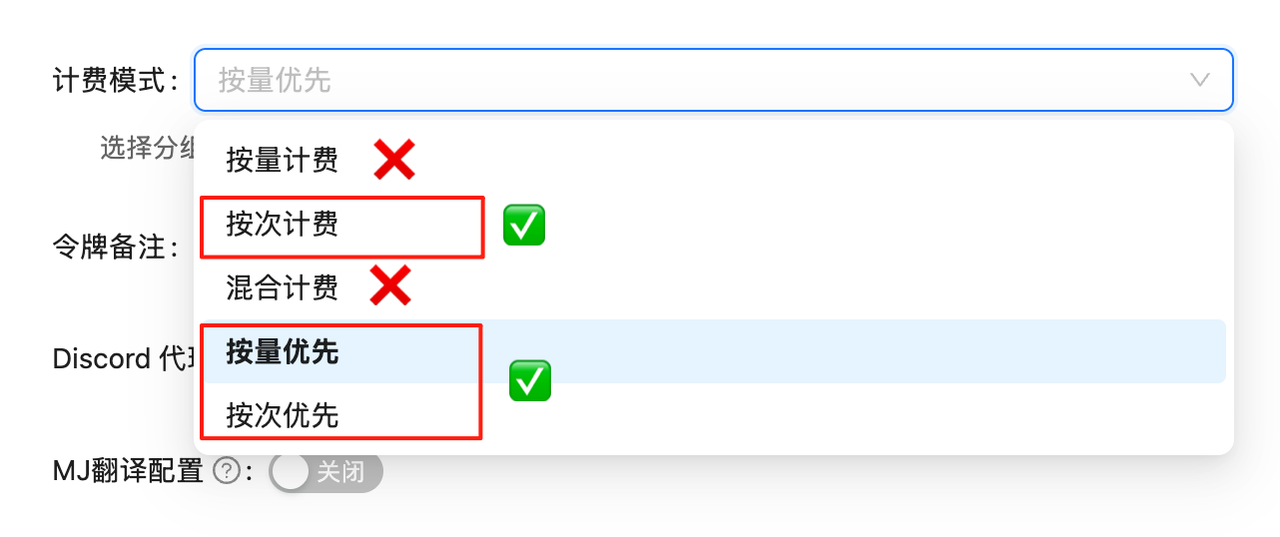 If billing mode is not configured, API calls will fail. You must complete this configuration first!
## Model Overview
The legacy Sora Image integration returns image URLs through the chat completions interface. It is intended for projects that still maintain the legacy model IDs. New projects should evaluate the currently recommended image-generation APIs first, and availability and billing are determined by the console.
**Billing is console-driven**\
The legacy route may continue to serve existing integrations, but do not hardcode per-image prices in code or public docs. Confirm token group, billing mode, and model status before use.
## Interface Capabilities
* **Legacy model ID compatibility**: For existing projects that still use `sora_image` or `gpt-4o-image`
* **Chat completions interface**: Submit prompts through `/v1/chat/completions` and parse the returned image URL
* **Aspect-ratio parameters**: Supports 2:3, 3:2, and 1:1
* **URL return**: Responses include downloadable image links
* **Console-controlled status**: Availability, pricing, and parameter support may change with route configuration
## Model Information
| Model | Model ID | Billing Method | Price | Features |
| ---------------- | -------------- | --------------- | --------------- | ----------------------------- |
| **Sora Image** | `sora_image` | Console-defined | Console-defined | Legacy text-to-image model |
| **GPT-4o Image** | `gpt-4o-image` | Console-defined | Console-defined | Legacy image-generation model |
**Migration guidance**\
If you are building a new image-generation integration, read the [Image Generation API Guide](/en/api-capabilities/image-generation-guide) first. If you are maintaining legacy-route code, confirm that your current token group still supports the model ID.
## 🚀 Quick Start
### Basic Example
```python theme={null}
import requests
import re
# API Configuration
API_KEY = "YOUR_API_KEY"
API_URL = "https://api2.laozhang.ai/v1/chat/completions"
def generate_image(prompt, ratio="2:3"):
"""
Generate image using Sora Image
Args:
prompt: Image description text
ratio: Image ratio, supports "2:3", "3:2", "1:1"
"""
# Add ratio marker at end of prompt
if ratio and ratio in ["2:3", "3:2", "1:1"]:
prompt = f"{prompt}【{ratio}】"
headers = {
"Authorization": f"Bearer {API_KEY}",
"Content-Type": "application/json"
}
payload = {
"model": "sora_image",
"messages": [
{
"role": "user",
"content": prompt
}
]
}
response = requests.post(API_URL, headers=headers, json=payload)
result = response.json()
# Extract image URLs
content = result['choices'][0]['message']['content']
image_urls = re.findall(r'!\[.*?\]\((https?://[^)]+)\)', content)
return image_urls
# Usage example
urls = generate_image("A cute cat playing in a garden", "2:3")
print(f"Generated image: {urls[0]}")
```
### Batch Generation Example
```python theme={null}
def batch_generate_images(prompts, ratio="2:3"):
"""Batch generate images"""
results = []
for prompt in prompts:
try:
urls = generate_image(prompt, ratio)
results.append({
"prompt": prompt,
"url": urls[0] if urls else None,
"success": bool(urls)
})
print(f"✅ Generated successfully: {prompt}")
except Exception as e:
results.append({
"prompt": prompt,
"url": None,
"success": False,
"error": str(e)
})
print(f"❌ Generation failed: {prompt} - {e}")
return results
# Batch generation example
prompts = [
"Beach at sunset",
"Futuristic tech city",
"Fairy in a magical forest"
]
results = batch_generate_images(prompts, "3:2")
```
## 📐 Aspect Ratio Guide
Sora Image supports three preset ratios, specified by adding ratio markers at the end of prompts:
| Ratio Marker | Aspect Ratio | Use Case | Example |
| ------------ | ------------ | -------------------------- | ---------------------------- |
| **【2:3】** | Vertical | Portrait, phone wallpaper | `Beautiful flowers【2:3】` |
| **【3:2】** | Horizontal | Landscape, banner images | `Magnificent mountains【3:2】` |
| **【1:1】** | Square | Social media avatar, icons | `Cute puppy【1:1】` |
### Size Usage Examples
```python theme={null}
# Vertical portrait
portrait = generate_image("Elegant woman portrait, professional photography style【2:3】")
# Horizontal landscape
landscape = generate_image("Mountain valley at sunrise, soft lighting【3:2】")
# Square icon
icon = generate_image("Minimalist modern app icon design【1:1】")
```
## 🎯 Best Practices
### 1. Prompt Optimization
```python theme={null}
# ❌ Not recommended: Too simple
prompt = "cat"
# ✅ Recommended: Detailed description
prompt = """
A fluffy orange cat,
sitting on a sunny windowsill,
background shows blurred city scenery,
photography style, high-definition details
【2:3】
"""
```
### 2. Error Handling
```python theme={null}
import time
def generate_with_retry(prompt, max_retries=3):
"""Image generation with retry mechanism"""
for attempt in range(max_retries):
try:
urls = generate_image(prompt)
if urls:
return urls[0]
except Exception as e:
if attempt < max_retries - 1:
wait_time = 2 ** attempt # Exponential backoff
print(f"Retry {attempt + 1}/{max_retries}, waiting {wait_time}s...")
time.sleep(wait_time)
else:
raise e
return None
```
### 3. Result Saving
```python theme={null}
import requests
from datetime import datetime
def save_generated_image(url, prompt):
"""Save generated image locally"""
timestamp = datetime.now().strftime("%Y%m%d_%H%M%S")
filename = f"sora_{timestamp}.png"
response = requests.get(url)
with open(filename, 'wb') as f:
f.write(response.content)
# Save prompt information
with open(f"sora_{timestamp}_prompt.txt", 'w', encoding='utf-8') as f:
f.write(f"Prompt: {prompt}\n")
f.write(f"URL: {url}\n")
f.write(f"Time: {datetime.now()}\n")
return filename
```
## 💡 Advanced Tips
### 1. Stylized Generation
```python theme={null}
# Art style templates
art_styles = {
"Oil Painting": "Oil painting style, thick brushstrokes, rich color layers",
"Watercolor": "Watercolor style, transparency, flowing colors",
"Sketch": "Pencil sketch style, black and white, delicate lines",
"Anime": "Japanese anime style, large eyes, vibrant colors",
"Photorealistic": "Hyper-realistic photography, high-definition details, professional photography"
}
def generate_with_style(subject, style_name):
"""Generate image with preset style"""
style = art_styles.get(style_name, "")
prompt = f"{subject}, {style}【2:3】"
return generate_image(prompt)
# Usage example
url = generate_with_style("Beautiful rose flower", "Watercolor")
```
### 2. Scene Templates
```python theme={null}
# Scene generation template
def generate_scene(subject, time="Sunset", weather="Clear", mood="Peaceful"):
"""Generate scene image based on parameters"""
prompt = f"""
{subject}
Time: {time}
Weather: {weather}
Mood: {mood}
Professional photography, cinematic quality
【3:2】
"""
return generate_image(prompt)
# Scene examples
beach = generate_scene("Tropical beach", "Golden hour", "Clear", "Relaxed")
city = generate_scene("Modern cityscape", "Night", "Rainy", "Dramatic")
```
## ⚠️ Important Notes
1. **Model Selection**:
* `sora_image`: Legacy Sora Image route
* `gpt-4o-image`: Legacy image-generation model ID
* Confirm availability, billing mode, and current price in the console
2. **Ratio Markers**:
* Add ratio marker at end of prompt: `【2:3】`, `【3:2】`, or `【1:1】`
* Markers must use Chinese brackets `【】`
* Without marker, uses default ratio
3. **URL Extraction**:
* Response contains image URLs in Markdown format
* Use regex to extract: `!\[.*?\]\((https?://[^)]+)\)`
* Download images promptly after generation
4. **Prompt Language**:
* Chinese and English prompts are supported
* Validate important production prompts with a fixed test set
* Keep prompts concise and explicit for more stable outputs
## 🔍 FAQ
### Q: How is Sora Image different from GPT-Image-1?
A:
* **Sora Image**: Legacy route through the chat completions interface
* **GPT-Image-1**: Current image-generation model family with its own billing model
* Confirm current pricing and availability in the console before choosing a route
### Q: Can I use English prompts?
A: Yes. Chinese and English prompts are supported, but production prompts should be validated with your own test set.
### Q: How to specify aspect ratio?
A: Add ratio marker at end of prompt: `Your prompt【2:3】`
### Q: Are generated images downloadable?
A: Yes, extract URLs from response and download immediately. URLs may expire after some time.
### Q: What's the maximum prompt length?
A: No strict limit, but recommended to keep prompts concise and descriptive for best results.
## 🔗 Related Resources
* [Sora Image Editing](/en/api-capabilities/sora-image-edit) - Edit existing images
* [GPT-4o Image Documentation](/en/api-capabilities/gpt-image-1) - Alternative model
* [Pricing Calculator](https://api2.laozhang.ai/account/pricing) - Real-time pricing
* [API Key Management](https://api2.laozhang.ai/token) - Create and manage tokens
🎨 **Pro Tip**: Add detailed descriptions, artistic styles, and lighting conditions to your prompts for better results. The model excels at understanding natural language!
If billing mode is not configured, API calls will fail. You must complete this configuration first!
## Model Overview
The legacy Sora Image integration returns image URLs through the chat completions interface. It is intended for projects that still maintain the legacy model IDs. New projects should evaluate the currently recommended image-generation APIs first, and availability and billing are determined by the console.
**Billing is console-driven**\
The legacy route may continue to serve existing integrations, but do not hardcode per-image prices in code or public docs. Confirm token group, billing mode, and model status before use.
## Interface Capabilities
* **Legacy model ID compatibility**: For existing projects that still use `sora_image` or `gpt-4o-image`
* **Chat completions interface**: Submit prompts through `/v1/chat/completions` and parse the returned image URL
* **Aspect-ratio parameters**: Supports 2:3, 3:2, and 1:1
* **URL return**: Responses include downloadable image links
* **Console-controlled status**: Availability, pricing, and parameter support may change with route configuration
## Model Information
| Model | Model ID | Billing Method | Price | Features |
| ---------------- | -------------- | --------------- | --------------- | ----------------------------- |
| **Sora Image** | `sora_image` | Console-defined | Console-defined | Legacy text-to-image model |
| **GPT-4o Image** | `gpt-4o-image` | Console-defined | Console-defined | Legacy image-generation model |
**Migration guidance**\
If you are building a new image-generation integration, read the [Image Generation API Guide](/en/api-capabilities/image-generation-guide) first. If you are maintaining legacy-route code, confirm that your current token group still supports the model ID.
## 🚀 Quick Start
### Basic Example
```python theme={null}
import requests
import re
# API Configuration
API_KEY = "YOUR_API_KEY"
API_URL = "https://api2.laozhang.ai/v1/chat/completions"
def generate_image(prompt, ratio="2:3"):
"""
Generate image using Sora Image
Args:
prompt: Image description text
ratio: Image ratio, supports "2:3", "3:2", "1:1"
"""
# Add ratio marker at end of prompt
if ratio and ratio in ["2:3", "3:2", "1:1"]:
prompt = f"{prompt}【{ratio}】"
headers = {
"Authorization": f"Bearer {API_KEY}",
"Content-Type": "application/json"
}
payload = {
"model": "sora_image",
"messages": [
{
"role": "user",
"content": prompt
}
]
}
response = requests.post(API_URL, headers=headers, json=payload)
result = response.json()
# Extract image URLs
content = result['choices'][0]['message']['content']
image_urls = re.findall(r'!\[.*?\]\((https?://[^)]+)\)', content)
return image_urls
# Usage example
urls = generate_image("A cute cat playing in a garden", "2:3")
print(f"Generated image: {urls[0]}")
```
### Batch Generation Example
```python theme={null}
def batch_generate_images(prompts, ratio="2:3"):
"""Batch generate images"""
results = []
for prompt in prompts:
try:
urls = generate_image(prompt, ratio)
results.append({
"prompt": prompt,
"url": urls[0] if urls else None,
"success": bool(urls)
})
print(f"✅ Generated successfully: {prompt}")
except Exception as e:
results.append({
"prompt": prompt,
"url": None,
"success": False,
"error": str(e)
})
print(f"❌ Generation failed: {prompt} - {e}")
return results
# Batch generation example
prompts = [
"Beach at sunset",
"Futuristic tech city",
"Fairy in a magical forest"
]
results = batch_generate_images(prompts, "3:2")
```
## 📐 Aspect Ratio Guide
Sora Image supports three preset ratios, specified by adding ratio markers at the end of prompts:
| Ratio Marker | Aspect Ratio | Use Case | Example |
| ------------ | ------------ | -------------------------- | ---------------------------- |
| **【2:3】** | Vertical | Portrait, phone wallpaper | `Beautiful flowers【2:3】` |
| **【3:2】** | Horizontal | Landscape, banner images | `Magnificent mountains【3:2】` |
| **【1:1】** | Square | Social media avatar, icons | `Cute puppy【1:1】` |
### Size Usage Examples
```python theme={null}
# Vertical portrait
portrait = generate_image("Elegant woman portrait, professional photography style【2:3】")
# Horizontal landscape
landscape = generate_image("Mountain valley at sunrise, soft lighting【3:2】")
# Square icon
icon = generate_image("Minimalist modern app icon design【1:1】")
```
## 🎯 Best Practices
### 1. Prompt Optimization
```python theme={null}
# ❌ Not recommended: Too simple
prompt = "cat"
# ✅ Recommended: Detailed description
prompt = """
A fluffy orange cat,
sitting on a sunny windowsill,
background shows blurred city scenery,
photography style, high-definition details
【2:3】
"""
```
### 2. Error Handling
```python theme={null}
import time
def generate_with_retry(prompt, max_retries=3):
"""Image generation with retry mechanism"""
for attempt in range(max_retries):
try:
urls = generate_image(prompt)
if urls:
return urls[0]
except Exception as e:
if attempt < max_retries - 1:
wait_time = 2 ** attempt # Exponential backoff
print(f"Retry {attempt + 1}/{max_retries}, waiting {wait_time}s...")
time.sleep(wait_time)
else:
raise e
return None
```
### 3. Result Saving
```python theme={null}
import requests
from datetime import datetime
def save_generated_image(url, prompt):
"""Save generated image locally"""
timestamp = datetime.now().strftime("%Y%m%d_%H%M%S")
filename = f"sora_{timestamp}.png"
response = requests.get(url)
with open(filename, 'wb') as f:
f.write(response.content)
# Save prompt information
with open(f"sora_{timestamp}_prompt.txt", 'w', encoding='utf-8') as f:
f.write(f"Prompt: {prompt}\n")
f.write(f"URL: {url}\n")
f.write(f"Time: {datetime.now()}\n")
return filename
```
## 💡 Advanced Tips
### 1. Stylized Generation
```python theme={null}
# Art style templates
art_styles = {
"Oil Painting": "Oil painting style, thick brushstrokes, rich color layers",
"Watercolor": "Watercolor style, transparency, flowing colors",
"Sketch": "Pencil sketch style, black and white, delicate lines",
"Anime": "Japanese anime style, large eyes, vibrant colors",
"Photorealistic": "Hyper-realistic photography, high-definition details, professional photography"
}
def generate_with_style(subject, style_name):
"""Generate image with preset style"""
style = art_styles.get(style_name, "")
prompt = f"{subject}, {style}【2:3】"
return generate_image(prompt)
# Usage example
url = generate_with_style("Beautiful rose flower", "Watercolor")
```
### 2. Scene Templates
```python theme={null}
# Scene generation template
def generate_scene(subject, time="Sunset", weather="Clear", mood="Peaceful"):
"""Generate scene image based on parameters"""
prompt = f"""
{subject}
Time: {time}
Weather: {weather}
Mood: {mood}
Professional photography, cinematic quality
【3:2】
"""
return generate_image(prompt)
# Scene examples
beach = generate_scene("Tropical beach", "Golden hour", "Clear", "Relaxed")
city = generate_scene("Modern cityscape", "Night", "Rainy", "Dramatic")
```
## ⚠️ Important Notes
1. **Model Selection**:
* `sora_image`: Legacy Sora Image route
* `gpt-4o-image`: Legacy image-generation model ID
* Confirm availability, billing mode, and current price in the console
2. **Ratio Markers**:
* Add ratio marker at end of prompt: `【2:3】`, `【3:2】`, or `【1:1】`
* Markers must use Chinese brackets `【】`
* Without marker, uses default ratio
3. **URL Extraction**:
* Response contains image URLs in Markdown format
* Use regex to extract: `!\[.*?\]\((https?://[^)]+)\)`
* Download images promptly after generation
4. **Prompt Language**:
* Chinese and English prompts are supported
* Validate important production prompts with a fixed test set
* Keep prompts concise and explicit for more stable outputs
## 🔍 FAQ
### Q: How is Sora Image different from GPT-Image-1?
A:
* **Sora Image**: Legacy route through the chat completions interface
* **GPT-Image-1**: Current image-generation model family with its own billing model
* Confirm current pricing and availability in the console before choosing a route
### Q: Can I use English prompts?
A: Yes. Chinese and English prompts are supported, but production prompts should be validated with your own test set.
### Q: How to specify aspect ratio?
A: Add ratio marker at end of prompt: `Your prompt【2:3】`
### Q: Are generated images downloadable?
A: Yes, extract URLs from response and download immediately. URLs may expire after some time.
### Q: What's the maximum prompt length?
A: No strict limit, but recommended to keep prompts concise and descriptive for best results.
## 🔗 Related Resources
* [Sora Image Editing](/en/api-capabilities/sora-image-edit) - Edit existing images
* [GPT-4o Image Documentation](/en/api-capabilities/gpt-image-1) - Alternative model
* [Pricing Calculator](https://api2.laozhang.ai/account/pricing) - Real-time pricing
* [API Key Management](https://api2.laozhang.ai/token) - Create and manage tokens
🎨 **Pro Tip**: Add detailed descriptions, artistic styles, and lighting conditions to your prompts for better results. The model excels at understanding natural language!