> ## Documentation Index
> Fetch the complete documentation index at: https://docs.laozhang.ai/llms.txt
> Use this file to discover all available pages before exploring further.
# Quick Start (Sync API, Outdated)
> Legacy Sora 2 Sync API documentation for historical troubleshooting only; use Sora Official API Forwarding for current video generation.
This is legacy Sora2 route documentation and is now outdated. Use [Sora Official API Forwarding](/en/api-capabilities/sora2/official-forward) for the currently available video route.
**Looking for a more stable solution?**
This page describes the outdated **Sync API** and is kept only for historical troubleshooting. Use [Sora Official API Forwarding](/en/api-capabilities/sora2/official-forward) for the currently available route.
## Prerequisites
Login to [laozhang.ai console](https://api2.laozhang.ai) to get your API key
Edit token settings, choose either billing mode (both have same price):
* **Pay-as-you-go** (Recommended): Uses balance first, auto-switches when low. Suitable for most users
* **Pay-per-call**: Direct charge per call. Suitable for strict budget control
Both modes have **exactly the same price**: \$0.15/call (10s or 15s), only billing method differs.
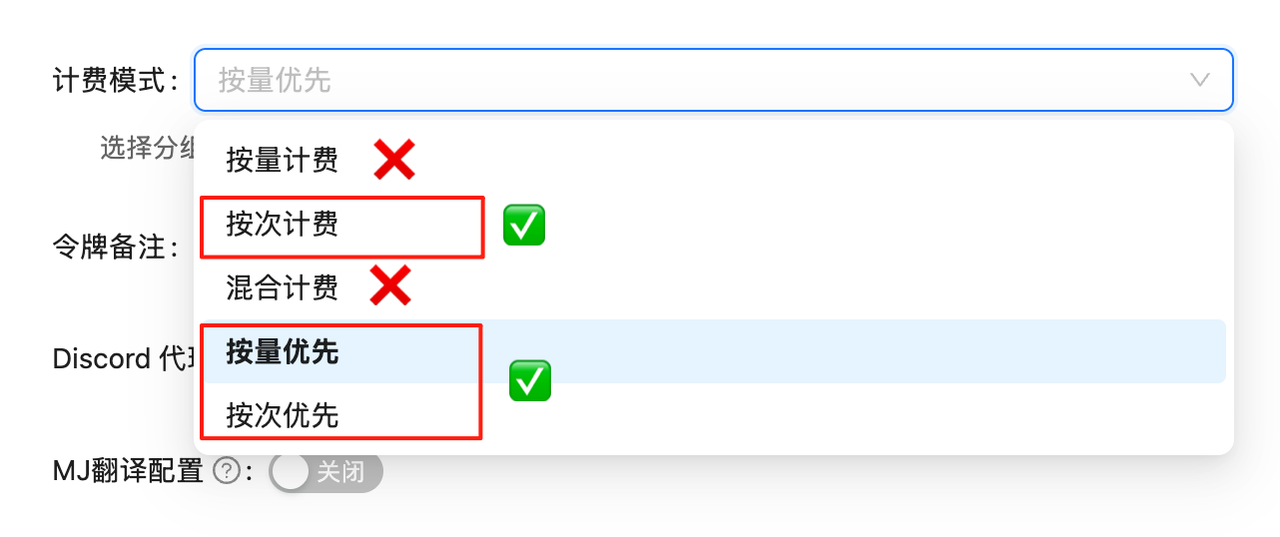 API calls will fail if billing mode is not set. Must complete this configuration first!
## Text-to-Video Example
**About `@sama` in Examples**
You may notice `@sama` used in examples. This is OpenAI CEO Sam Altman's authorized ID, allowing his likeness to appear in videos.
**This is optional**:
* ✓ Can use `@sama` or other verified IDs
* ✓ Can skip it and use normal scene descriptions (e.g., "a cat in a garden")
* ✗ Cannot upload real person photos (will be rejected and charged)
**Want yourself in the video?** Requires Cameo certification in Sora iOS app. See [FAQ](/en/api-capabilities/sora2/troubleshooting)
The simplest usage method - generate videos using only text descriptions.
```bash cURL theme={null}
curl -X POST "https://api2.laozhang.ai/v1/chat/completions" \
-H "Authorization: Bearer YOUR_API_KEY" \
-H "Content-Type: application/json" \
-d '{
"model": "sora_video2",
"messages": [
{
"role": "user",
"content": [
{
"type": "text",
"text": "A happy cat playing with a ball in a sunny garden"
}
]
}
]
}'
```
```python Python theme={null}
import openai
client = openai.OpenAI(
api_key="YOUR_API_KEY",
base_url="https://api2.laozhang.ai/v1"
)
response = client.chat.completions.create(
model="sora_video2",
messages=[
{
"role": "user",
"content": [
{
"type": "text",
"text": "A happy cat playing with a ball in a sunny garden"
}
]
}
]
)
print(response.choices[0].message.content)
```
```javascript JavaScript theme={null}
const OpenAI = require('openai');
const client = new OpenAI({
apiKey: 'YOUR_API_KEY',
baseURL: 'https://api2.laozhang.ai/v1'
});
async function generateVideo() {
const response = await client.chat.completions.create({
model: 'sora_video2',
messages: [
{
role: 'user',
content: [
{
type: 'text',
text: 'A happy cat playing with a ball in a sunny garden'
}
]
}
]
});
console.log(response.choices[0].message.content);
}
generateVideo();
```
## Image-to-Video Example
Supports uploading reference images (up to 1 image), supports both URL and Base64 methods.
```bash cURL (URL) theme={null}
curl -X POST "https://api2.laozhang.ai/v1/chat/completions" \
-H "Authorization: Bearer YOUR_API_KEY" \
-H "Content-Type: application/json" \
-d '{
"model": "sora_video2",
"messages": [
{
"role": "user",
"content": [
{
"type": "text",
"text": "Make this character jump off the desk and come to life"
},
{
"type": "image_url",
"image_url": {
"url": "https://filesystem.site/cdn/download/20250407/OhFd8JofOAJCsNOCsM1Y794qnkNO3L.png"
}
}
]
}
]
}'
```
```python Python (URL) theme={null}
import openai
client = openai.OpenAI(
api_key="YOUR_API_KEY",
base_url="https://api2.laozhang.ai/v1"
)
response = client.chat.completions.create(
model="sora_video2",
messages=[
{
"role": "user",
"content": [
{
"type": "text",
"text": "Make this character jump off the desk and come to life"
},
{
"type": "image_url",
"image_url": {
"url": "https://filesystem.site/cdn/download/20250407/OhFd8JofOAJCsNOCsM1Y794qnkNO3L.png"
}
}
]
}
]
)
print(response.choices[0].message.content)
```
```bash cURL (Base64) theme={null}
curl -X POST "https://api2.laozhang.ai/v1/chat/completions" \
-H "Authorization: Bearer YOUR_API_KEY" \
-H "Content-Type: application/json" \
-d '{
"model": "sora_video2",
"messages": [
{
"role": "user",
"content": [
{
"type": "text",
"text": "Make this character jump off the desk and come to life"
},
{
"type": "image_url",
"image_url": {
"url": "data:image/png;base64,iVBORw0KGgoAAAANS..."
}
}
]
}
]
}'
```
## Streaming Output Example
Enable streaming output to view generation progress in real-time.
```python Python (Streaming) theme={null}
import openai
import re
client = openai.OpenAI(
api_key="YOUR_API_KEY",
base_url="https://api2.laozhang.ai/v1"
)
stream = client.chat.completions.create(
model="sora_video2",
messages=[
{
"role": "user",
"content": [
{
"type": "text",
"text": "A cute cat playing with a ball in a sunny garden"
}
]
}
],
stream=True
)
# Store full content to extract video link
full_content = ""
print("Generation progress:\n")
for chunk in stream:
if chunk.choices[0].delta.content:
content = chunk.choices[0].delta.content
print(content, end='', flush=True)
full_content += content
print("\n")
# Extract video link
video_url_match = re.search(r'https://[^\s\)]+\.mp4', full_content)
if video_url_match:
video_url = video_url_match.group(0)
print(f"\n✅ Video link: {video_url}")
print("⚠️ Video valid for 1 day, download immediately!")
else:
print("\n❌ Video link not found, generation may have failed")
```
```javascript JavaScript (Streaming) theme={null}
const OpenAI = require('openai');
const client = new OpenAI({
apiKey: 'YOUR_API_KEY',
baseURL: 'https://api2.laozhang.ai/v1'
});
async function generateVideoStream() {
const stream = await client.chat.completions.create({
model: 'sora_video2',
messages: [
{
role: 'user',
content: [
{
type: 'text',
text: 'A cute cat playing with a ball in a sunny garden'
}
]
}
],
stream: true
});
for await (const chunk of stream) {
if (chunk.choices[0]?.delta?.content) {
process.stdout.write(chunk.choices[0].delta.content);
}
}
}
generateVideoStream();
```
## Output Interpretation
### Streaming Output Format
When `"stream": true` is enabled, API returns SSE (Server-Sent Events) format:
````text theme={null}
data: {"id":"foaicmpl-xxx","object":"chat.completion.chunk","created":1759759480,"model":"sora_video2","choices":[{"index":0,"delta":{"role":"assistant"},"finish_reason":null}]}
data: {"id":"foaicmpl-xxx","object":"chat.completion.chunk","created":1759759480,"model":"sora_video2","choices":[{"index":0,"delta":{"content":"```json\n{\n \"prompt\": \"A happy cat playing with a ball in a sunny garden\",\n \"mode\": \"Vertical Mode\"\n}\n```\n\n"},"finish_reason":null}]}
data: {"id":"foaicmpl-xxx","object":"chat.completion.chunk","created":1759759480,"model":"sora_video2","choices":[{"index":0,"delta":{"content":"> ⌛️ Task is in queue, please wait patiently...\n\n"},"finish_reason":null}]}
data: {"id":"foaicmpl-xxx","object":"chat.completion.chunk","created":1759759480,"model":"sora_video2","choices":[{"index":0,"delta":{"content":"> 🏃 Progress: 36.0%\n\n"},"finish_reason":null}]}
data: {"id":"foaicmpl-xxx","object":"chat.completion.chunk","created":1759759480,"model":"sora_video2","choices":[{"index":0,"delta":{"content":"> ✅ Video generated successfully, [Click here](https://sora.gptkey.asia/assets/sora/xxx.mp4) to view video~~~\n\n"},"finish_reason":null}]}
data: {"id":"foaicmpl-xxx","object":"chat.completion.chunk","created":1759759480,"model":"sora_video2","choices":[{"index":0,"delta":{},"finish_reason":"stop"}],"usage":{"prompt_tokens":17,"completion_tokens":244,"total_tokens":261}}
data: [DONE]
````
### Key Field Descriptions
* `choices[0].delta.content`: Contains progress information or final video link
* `finish_reason`: When `"stop"`, generation is complete
* `usage`: Last message contains token usage
* Video link: Provided as Markdown link in success message
### Generation Time
* **Queue Wait:** Depends on peak hours
* **Video Generation:** About 2-3 minutes (for 10-second video)
* **Total:** 2-5 minutes on average
## Next Steps
Use the currently available Sora2 video route
View legacy API documentation
View more usage examples
Common issues and solutions
## Important Notes
**Remember to download videos immediately!**
Generated video URLs are valid for only **1 day**. Please download to local storage after generation to avoid losing videos.
**Model Selection**
* `sora_video2`: Vertical screen (704×1280), suitable for mobile viewing
* `sora_video2-landscape`: Horizontal screen (1280×704), suitable for widescreen displays
API calls will fail if billing mode is not set. Must complete this configuration first!
## Text-to-Video Example
**About `@sama` in Examples**
You may notice `@sama` used in examples. This is OpenAI CEO Sam Altman's authorized ID, allowing his likeness to appear in videos.
**This is optional**:
* ✓ Can use `@sama` or other verified IDs
* ✓ Can skip it and use normal scene descriptions (e.g., "a cat in a garden")
* ✗ Cannot upload real person photos (will be rejected and charged)
**Want yourself in the video?** Requires Cameo certification in Sora iOS app. See [FAQ](/en/api-capabilities/sora2/troubleshooting)
The simplest usage method - generate videos using only text descriptions.
```bash cURL theme={null}
curl -X POST "https://api2.laozhang.ai/v1/chat/completions" \
-H "Authorization: Bearer YOUR_API_KEY" \
-H "Content-Type: application/json" \
-d '{
"model": "sora_video2",
"messages": [
{
"role": "user",
"content": [
{
"type": "text",
"text": "A happy cat playing with a ball in a sunny garden"
}
]
}
]
}'
```
```python Python theme={null}
import openai
client = openai.OpenAI(
api_key="YOUR_API_KEY",
base_url="https://api2.laozhang.ai/v1"
)
response = client.chat.completions.create(
model="sora_video2",
messages=[
{
"role": "user",
"content": [
{
"type": "text",
"text": "A happy cat playing with a ball in a sunny garden"
}
]
}
]
)
print(response.choices[0].message.content)
```
```javascript JavaScript theme={null}
const OpenAI = require('openai');
const client = new OpenAI({
apiKey: 'YOUR_API_KEY',
baseURL: 'https://api2.laozhang.ai/v1'
});
async function generateVideo() {
const response = await client.chat.completions.create({
model: 'sora_video2',
messages: [
{
role: 'user',
content: [
{
type: 'text',
text: 'A happy cat playing with a ball in a sunny garden'
}
]
}
]
});
console.log(response.choices[0].message.content);
}
generateVideo();
```
## Image-to-Video Example
Supports uploading reference images (up to 1 image), supports both URL and Base64 methods.
```bash cURL (URL) theme={null}
curl -X POST "https://api2.laozhang.ai/v1/chat/completions" \
-H "Authorization: Bearer YOUR_API_KEY" \
-H "Content-Type: application/json" \
-d '{
"model": "sora_video2",
"messages": [
{
"role": "user",
"content": [
{
"type": "text",
"text": "Make this character jump off the desk and come to life"
},
{
"type": "image_url",
"image_url": {
"url": "https://filesystem.site/cdn/download/20250407/OhFd8JofOAJCsNOCsM1Y794qnkNO3L.png"
}
}
]
}
]
}'
```
```python Python (URL) theme={null}
import openai
client = openai.OpenAI(
api_key="YOUR_API_KEY",
base_url="https://api2.laozhang.ai/v1"
)
response = client.chat.completions.create(
model="sora_video2",
messages=[
{
"role": "user",
"content": [
{
"type": "text",
"text": "Make this character jump off the desk and come to life"
},
{
"type": "image_url",
"image_url": {
"url": "https://filesystem.site/cdn/download/20250407/OhFd8JofOAJCsNOCsM1Y794qnkNO3L.png"
}
}
]
}
]
)
print(response.choices[0].message.content)
```
```bash cURL (Base64) theme={null}
curl -X POST "https://api2.laozhang.ai/v1/chat/completions" \
-H "Authorization: Bearer YOUR_API_KEY" \
-H "Content-Type: application/json" \
-d '{
"model": "sora_video2",
"messages": [
{
"role": "user",
"content": [
{
"type": "text",
"text": "Make this character jump off the desk and come to life"
},
{
"type": "image_url",
"image_url": {
"url": "data:image/png;base64,iVBORw0KGgoAAAANS..."
}
}
]
}
]
}'
```
## Streaming Output Example
Enable streaming output to view generation progress in real-time.
```python Python (Streaming) theme={null}
import openai
import re
client = openai.OpenAI(
api_key="YOUR_API_KEY",
base_url="https://api2.laozhang.ai/v1"
)
stream = client.chat.completions.create(
model="sora_video2",
messages=[
{
"role": "user",
"content": [
{
"type": "text",
"text": "A cute cat playing with a ball in a sunny garden"
}
]
}
],
stream=True
)
# Store full content to extract video link
full_content = ""
print("Generation progress:\n")
for chunk in stream:
if chunk.choices[0].delta.content:
content = chunk.choices[0].delta.content
print(content, end='', flush=True)
full_content += content
print("\n")
# Extract video link
video_url_match = re.search(r'https://[^\s\)]+\.mp4', full_content)
if video_url_match:
video_url = video_url_match.group(0)
print(f"\n✅ Video link: {video_url}")
print("⚠️ Video valid for 1 day, download immediately!")
else:
print("\n❌ Video link not found, generation may have failed")
```
```javascript JavaScript (Streaming) theme={null}
const OpenAI = require('openai');
const client = new OpenAI({
apiKey: 'YOUR_API_KEY',
baseURL: 'https://api2.laozhang.ai/v1'
});
async function generateVideoStream() {
const stream = await client.chat.completions.create({
model: 'sora_video2',
messages: [
{
role: 'user',
content: [
{
type: 'text',
text: 'A cute cat playing with a ball in a sunny garden'
}
]
}
],
stream: true
});
for await (const chunk of stream) {
if (chunk.choices[0]?.delta?.content) {
process.stdout.write(chunk.choices[0].delta.content);
}
}
}
generateVideoStream();
```
## Output Interpretation
### Streaming Output Format
When `"stream": true` is enabled, API returns SSE (Server-Sent Events) format:
````text theme={null}
data: {"id":"foaicmpl-xxx","object":"chat.completion.chunk","created":1759759480,"model":"sora_video2","choices":[{"index":0,"delta":{"role":"assistant"},"finish_reason":null}]}
data: {"id":"foaicmpl-xxx","object":"chat.completion.chunk","created":1759759480,"model":"sora_video2","choices":[{"index":0,"delta":{"content":"```json\n{\n \"prompt\": \"A happy cat playing with a ball in a sunny garden\",\n \"mode\": \"Vertical Mode\"\n}\n```\n\n"},"finish_reason":null}]}
data: {"id":"foaicmpl-xxx","object":"chat.completion.chunk","created":1759759480,"model":"sora_video2","choices":[{"index":0,"delta":{"content":"> ⌛️ Task is in queue, please wait patiently...\n\n"},"finish_reason":null}]}
data: {"id":"foaicmpl-xxx","object":"chat.completion.chunk","created":1759759480,"model":"sora_video2","choices":[{"index":0,"delta":{"content":"> 🏃 Progress: 36.0%\n\n"},"finish_reason":null}]}
data: {"id":"foaicmpl-xxx","object":"chat.completion.chunk","created":1759759480,"model":"sora_video2","choices":[{"index":0,"delta":{"content":"> ✅ Video generated successfully, [Click here](https://sora.gptkey.asia/assets/sora/xxx.mp4) to view video~~~\n\n"},"finish_reason":null}]}
data: {"id":"foaicmpl-xxx","object":"chat.completion.chunk","created":1759759480,"model":"sora_video2","choices":[{"index":0,"delta":{},"finish_reason":"stop"}],"usage":{"prompt_tokens":17,"completion_tokens":244,"total_tokens":261}}
data: [DONE]
````
### Key Field Descriptions
* `choices[0].delta.content`: Contains progress information or final video link
* `finish_reason`: When `"stop"`, generation is complete
* `usage`: Last message contains token usage
* Video link: Provided as Markdown link in success message
### Generation Time
* **Queue Wait:** Depends on peak hours
* **Video Generation:** About 2-3 minutes (for 10-second video)
* **Total:** 2-5 minutes on average
## Next Steps
Use the currently available Sora2 video route
View legacy API documentation
View more usage examples
Common issues and solutions
## Important Notes
**Remember to download videos immediately!**
Generated video URLs are valid for only **1 day**. Please download to local storage after generation to avoid losing videos.
**Model Selection**
* `sora_video2`: Vertical screen (704×1280), suitable for mobile viewing
* `sora_video2-landscape`: Horizontal screen (1280×704), suitable for widescreen displays