> ## Documentation Index
> Fetch the complete documentation index at: https://docs.laozhang.ai/llms.txt
> Use this file to discover all available pages before exploring further.
# FAQ (Outdated Legacy Route)
> Legacy Sora 2 FAQ for historical troubleshooting only; use Sora Official API Forwarding for current video generation.
This is legacy Sora2 route documentation and is now outdated. Use [Sora Official API Forwarding](/en/api-capabilities/sora2/official-forward) for the currently available video route.
## Video Generation Related
**Control via model name**, not parameters.
* **Portrait:** `sora_video2`
* **Landscape:** `sora_video2-landscape`
Example:
```python theme={null}
# Portrait video
model = "sora_video2"
# Landscape video
model = "sora_video2-landscape"
```
See [Models and Pricing](/en/api-capabilities/sora2/models-pricing) page for details.
**No watermarks!**
Videos generated by Sora 2 API provided by our site are **watermark behavior depends on the selected route**, while videos generated on the official site still have Sora watermarks.
The original watermark behavior depends on the selected route solution became invalid after OpenAI's upgrade, and has now been updated to a new watermark behavior depends on the selected route solution.
**Restriction reasons:**
1. **Real face reference images will be rejected** - Real person photo uploads not supported
2. **Only authorized real persons supported** - Use via `@ID` method
**Available authorized real persons:**
* `@sama` - OpenAI CEO Sam Altman
**Correct example:**
```python theme={null}
prompt = "@sama talking happily on the Great Wall" # ✓ OK
```
**Incorrect example:**
```python theme={null}
# ✗ Not OK - Uploading real person photos will be rejected
# Uploaded a real person photo + prompt
```
**Normal generation time:**
* Queue: Depends on peak hours
* Generation: 2-3 minutes
* Total: 2.5-4 minutes
**Optimization suggestions:**
1. **Set reasonable timeout:** Recommend 5 minutes (300 seconds)
```python theme={null}
import httpx
client = openai.OpenAI(
api_key="YOUR_API_KEY",
base_url="https://api2.laozhang.ai/v1",
http_client=httpx.Client(timeout=300.0)
)
```
2. **Use streaming output:** View progress in real-time
```python theme={null}
response = client.chat.completions.create(
model="sora_video2",
messages=[...],
stream=True # Enable streaming output
)
```
3. **Avoid peak hours:** Choose times with fewer users
**Reason:** OpenAI official load too high
**Solutions:**
1. Wait a few minutes and retry
2. Add retry logic
```python theme={null}
import time
max_retries = 3
for i in range(max_retries):
try:
response = client.chat.completions.create(...)
break
except Exception as e:
if "heavy load" in str(e) and i < max_retries - 1:
print(f"Service busy, retrying in 30 seconds...")
time.sleep(30)
else:
raise
```
## API Calling Related
**Required setting:**
Token needs to be set to **token-priority** or **per-call billing** mode.
**Configuration steps:**
1. Log in to [laozhang.ai console](https://api2.laozhang.ai)
2. Enter API management
3. Edit token settings
4. Select "token-priority" or "per-call billing"
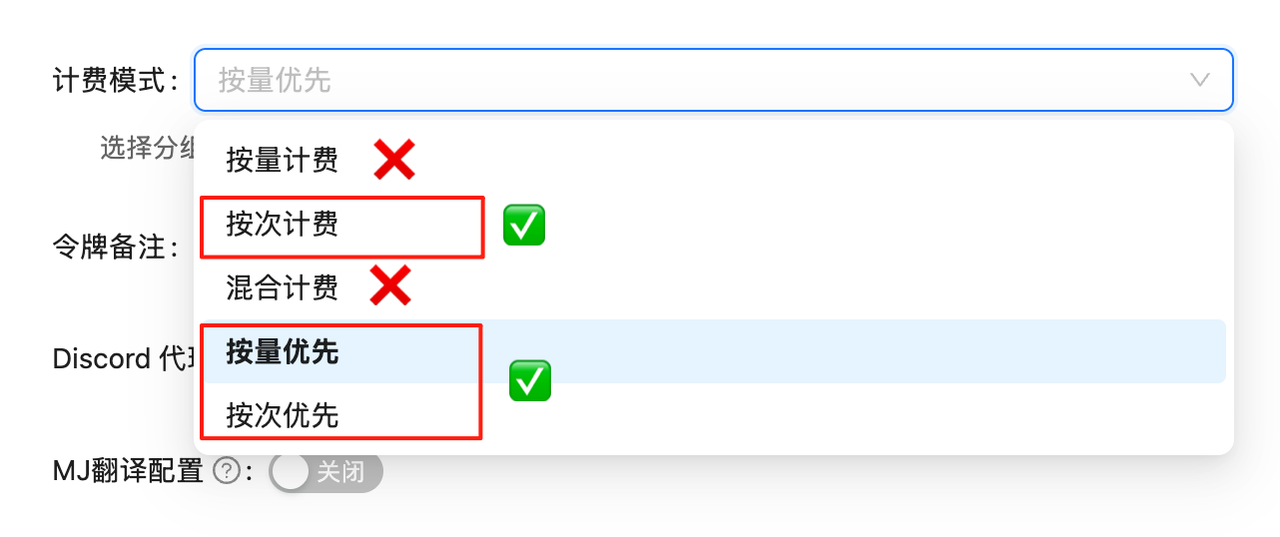 If billing mode is not set correctly, calls will fail.
**Use streaming output:**
```python theme={null}
stream = client.chat.completions.create(
model="sora_video2",
messages=[...],
stream=True # Enable streaming output
)
for chunk in stream:
if chunk.choices[0].delta.content:
print(chunk.choices[0].delta.content, end='', flush=True)
```
**Progress information example:**
```
> ⌛️ Task is in queue, please wait patiently...
> 🏃 Progress: 36.0%
> 🏃 Progress: 68.5%
> ✅ Video generated successfully, [click here](https://xxx.mp4) to view video~~~
```
**Increase timeout:**
```python theme={null}
import httpx
import openai
# Set 5 minute timeout
client = openai.OpenAI(
api_key="YOUR_API_KEY",
base_url="https://api2.laozhang.ai/v1",
http_client=httpx.Client(timeout=300.0)
)
```
**Recommended timeout:**
* Minimum: 5 minutes (300 seconds)
* Recommended: 10 minutes (600 seconds)
**Image-to-video supports:**
1. **URL images**
```python theme={null}
{
"type": "image_url",
"image_url": {
"url": "https://example.com/image.png"
}
}
```
2. **Base64 encoding**
```python theme={null}
{
"type": "image_url",
"image_url": {
"url": "data:image/png;base64,iVBORw0KG..."
}
}
```
**Supported formats:**
* PNG
* JPEG/JPG
* WebP
* GIF (first frame will be used)
**Limitations:**
* Maximum 1 image
* Recommended resolution not exceeding 2048×2048
## Video Download Related
**Validity: Only 1 day**
Videos are returned through temporary CDN links, **storage validity is only 1 day**. Please **download immediately** after generation and save locally!
**Best practice:**
```python theme={null}
import requests
def download_video(url, save_path):
"""Download video to local"""
response = requests.get(url, stream=True)
with open(save_path, 'wb') as f:
for chunk in response.iter_content(chunk_size=8192):
f.write(chunk)
print(f"Saved: {save_path}")
# Download immediately after generation
video_url = extract_video_url(result)
download_video(video_url, "my_video.mp4")
```
**Extract from response:**
```python theme={null}
import re
def extract_video_url(content):
"""Extract video link from response content"""
match = re.search(r'https://[^\s\)]+\.mp4', content)
return match.group(0) if match else None
# Usage example
response = client.chat.completions.create(...)
content = response.choices[0].message.content
video_url = extract_video_url(content)
```
**Link format example:**
```
https://sora.gptkey.asia/assets/sora/xxx.mp4
```
**Optimization suggestions:**
1. **Use a stable network** - Keep the connection stable while downloading
2. **Streaming download** - Avoid loading all into memory at once
```python theme={null}
import requests
response = requests.get(video_url, stream=True)
with open('video.mp4', 'wb') as f:
for chunk in response.iter_content(chunk_size=8192):
f.write(chunk)
```
3. **Resume support** - Use download tools that support resume
## Billing Related
**Billing Method:** Pay-per-call
**Sync API Billing Rules** (/v1/chat/completions):
* ✓ Charged when video **successfully generated**
* ⚠️ **Also charged for content violations** - Request succeeded (HTTP 200), resources consumed
* ✗ Network errors and timeouts should be checked in console order status
**Async API Billing Rules** (/v1/videos) - Recommended:
* ✓ Only charged when status = "completed"
* ✗ **No charge for any failure**:
* Content violation (status = "failed") → Not charged
* Queue timeout → Not charged
* Generation failure → Not charged
**Pricing (10/20 Update):**
* 10s/15s videos (portrait/landscape): **\$0.15/call** (unified pricing)
* HD video (sora-2-pro): \$0.8/call ([Async API](/en/api-capabilities/sora2/async-api) only)
**Major Price Drop!** 15s models reduced from \$0.25 to \$0.15/call, same as 10s models. Recommend choosing 15s version for better results!
**Recommend Async API for production**: No charge on failure, better cost control, higher stability. View [Async API docs](/en/api-capabilities/sora2/async-api)
**About Content Violation Charges (Sync API only):**
If prompts or images violate OpenAI content policy, Sync API returns success (HTTP 200) with error message, **charges still apply**. Reasons:
* Request successfully submitted to OpenAI platform
* Platform resources consumed for content review
* Async API doesn't charge (status = "failed")
**Recommendations:**
1. Test prompts and images on [sora.chatgpt.com](https://sora.chatgpt.com) first
2. Batch generate via API after confirmation
3. Or use Async API (billing follows console order status)
4. Avoid real person photos, copyrighted content
**laozhang.ai vs OpenAI Official:**
| Item | laozhang.ai | OpenAI Official |
| --------------- | ---------------------- | -------------------------- |
| Invitation code | Not required | Required |
| Price | \$0.15/call | Expensive with rate limits |
| Watermark | None | Yes |
| Integration | Unified API forwarding | Official API direct access |
| Stability | High | - |
OpenAI official has launched `sora-2` and `sora-2-pro` models, but prices are high, with rate limits, and generated videos have watermarks.
Log in to [laozhang.ai console](https://api2.laozhang.ai) and open the billing or call logs page. Actual charges are based on the model, request result, and current console pricing.
**Payment methods:** Use the currently available methods shown in the console.
## Client Usage
**Configuration steps:**
1. Add laozhang.ai API configuration in Cherry Studio
* See: [Cherry Studio Configuration Documentation](https://docs.laozhang.ai/scenarios/chat/cherry-studio)
2. Enable video feature
* Find `sora_video2` in model settings
* Turn on video generation switch
3. Use
* Text-to-video: Enter prompt directly
* Image-to-video: Upload image + prompt
**Tested and supported:**
* **Cherry Studio** ✓ - Full support, recommended
* **ChatBox** ✓ - Supported
* **OpenWebUI** ✓ - Supported
* **ChatGPT Next Web** ✓ - Supported
**Any client compatible with OpenAI API can be used**
Configuration method:
* API endpoint: `https://api2.laozhang.ai/v1`
* Model: Select `sora_video2` series
## Technical Support
**Contact methods:**
1. **Email:** [hi@laozhang.ai](mailto:hi@laozhang.ai)
2. **Telegram:** [https://t.me/laozhang\_cn](https://t.me/laozhang_cn)
3. **Documentation:** [https://docs.laozhang.ai](https://docs.laozhang.ai)
**When submitting issues, please provide:**
* Error message screenshots
* Request parameters (hide API Key)
* Problem occurrence time
* Model name used
**Update records:**
* **10/07** Added Python example code
* **10/01** Launched Sora 2 model, supports text-to-video and image-to-video
View complete updates: [Overview page](/en/api-capabilities/sora2/overview)
## Best Practice Recommendations
* ✓ Describe specific scenes and actions
* ✓ Include details like lighting, atmosphere, emotions
* ✓ Use authorized real person IDs (e.g., `@sama`)
* ✗ Avoid describing real human faces
* ✗ Avoid overly brief descriptions
* Portrait video: `sora_video2` (mobile short videos, social media)
* Landscape video: `sora_video2-landscape` (widescreen display, computer playback)
* Both models have extremely high stability, choose with confidence
* Set reasonable timeout (recommend 5 minutes)
* Add retry logic (maximum 2-3 times)
* Use streaming output to monitor progress
* Record error logs
* Both models have extremely high stability, reducing retry costs
* Control concurrency when batch generating
* No charge for failures, retry with confidence
* Download videos promptly (storage validity 1 day)
## Related Links
View example code and usage methods
Learn detailed model comparison and pricing
View application examples for various scenarios
View complete API documentation
If billing mode is not set correctly, calls will fail.
**Use streaming output:**
```python theme={null}
stream = client.chat.completions.create(
model="sora_video2",
messages=[...],
stream=True # Enable streaming output
)
for chunk in stream:
if chunk.choices[0].delta.content:
print(chunk.choices[0].delta.content, end='', flush=True)
```
**Progress information example:**
```
> ⌛️ Task is in queue, please wait patiently...
> 🏃 Progress: 36.0%
> 🏃 Progress: 68.5%
> ✅ Video generated successfully, [click here](https://xxx.mp4) to view video~~~
```
**Increase timeout:**
```python theme={null}
import httpx
import openai
# Set 5 minute timeout
client = openai.OpenAI(
api_key="YOUR_API_KEY",
base_url="https://api2.laozhang.ai/v1",
http_client=httpx.Client(timeout=300.0)
)
```
**Recommended timeout:**
* Minimum: 5 minutes (300 seconds)
* Recommended: 10 minutes (600 seconds)
**Image-to-video supports:**
1. **URL images**
```python theme={null}
{
"type": "image_url",
"image_url": {
"url": "https://example.com/image.png"
}
}
```
2. **Base64 encoding**
```python theme={null}
{
"type": "image_url",
"image_url": {
"url": "data:image/png;base64,iVBORw0KG..."
}
}
```
**Supported formats:**
* PNG
* JPEG/JPG
* WebP
* GIF (first frame will be used)
**Limitations:**
* Maximum 1 image
* Recommended resolution not exceeding 2048×2048
## Video Download Related
**Validity: Only 1 day**
Videos are returned through temporary CDN links, **storage validity is only 1 day**. Please **download immediately** after generation and save locally!
**Best practice:**
```python theme={null}
import requests
def download_video(url, save_path):
"""Download video to local"""
response = requests.get(url, stream=True)
with open(save_path, 'wb') as f:
for chunk in response.iter_content(chunk_size=8192):
f.write(chunk)
print(f"Saved: {save_path}")
# Download immediately after generation
video_url = extract_video_url(result)
download_video(video_url, "my_video.mp4")
```
**Extract from response:**
```python theme={null}
import re
def extract_video_url(content):
"""Extract video link from response content"""
match = re.search(r'https://[^\s\)]+\.mp4', content)
return match.group(0) if match else None
# Usage example
response = client.chat.completions.create(...)
content = response.choices[0].message.content
video_url = extract_video_url(content)
```
**Link format example:**
```
https://sora.gptkey.asia/assets/sora/xxx.mp4
```
**Optimization suggestions:**
1. **Use a stable network** - Keep the connection stable while downloading
2. **Streaming download** - Avoid loading all into memory at once
```python theme={null}
import requests
response = requests.get(video_url, stream=True)
with open('video.mp4', 'wb') as f:
for chunk in response.iter_content(chunk_size=8192):
f.write(chunk)
```
3. **Resume support** - Use download tools that support resume
## Billing Related
**Billing Method:** Pay-per-call
**Sync API Billing Rules** (/v1/chat/completions):
* ✓ Charged when video **successfully generated**
* ⚠️ **Also charged for content violations** - Request succeeded (HTTP 200), resources consumed
* ✗ Network errors and timeouts should be checked in console order status
**Async API Billing Rules** (/v1/videos) - Recommended:
* ✓ Only charged when status = "completed"
* ✗ **No charge for any failure**:
* Content violation (status = "failed") → Not charged
* Queue timeout → Not charged
* Generation failure → Not charged
**Pricing (10/20 Update):**
* 10s/15s videos (portrait/landscape): **\$0.15/call** (unified pricing)
* HD video (sora-2-pro): \$0.8/call ([Async API](/en/api-capabilities/sora2/async-api) only)
**Major Price Drop!** 15s models reduced from \$0.25 to \$0.15/call, same as 10s models. Recommend choosing 15s version for better results!
**Recommend Async API for production**: No charge on failure, better cost control, higher stability. View [Async API docs](/en/api-capabilities/sora2/async-api)
**About Content Violation Charges (Sync API only):**
If prompts or images violate OpenAI content policy, Sync API returns success (HTTP 200) with error message, **charges still apply**. Reasons:
* Request successfully submitted to OpenAI platform
* Platform resources consumed for content review
* Async API doesn't charge (status = "failed")
**Recommendations:**
1. Test prompts and images on [sora.chatgpt.com](https://sora.chatgpt.com) first
2. Batch generate via API after confirmation
3. Or use Async API (billing follows console order status)
4. Avoid real person photos, copyrighted content
**laozhang.ai vs OpenAI Official:**
| Item | laozhang.ai | OpenAI Official |
| --------------- | ---------------------- | -------------------------- |
| Invitation code | Not required | Required |
| Price | \$0.15/call | Expensive with rate limits |
| Watermark | None | Yes |
| Integration | Unified API forwarding | Official API direct access |
| Stability | High | - |
OpenAI official has launched `sora-2` and `sora-2-pro` models, but prices are high, with rate limits, and generated videos have watermarks.
Log in to [laozhang.ai console](https://api2.laozhang.ai) and open the billing or call logs page. Actual charges are based on the model, request result, and current console pricing.
**Payment methods:** Use the currently available methods shown in the console.
## Client Usage
**Configuration steps:**
1. Add laozhang.ai API configuration in Cherry Studio
* See: [Cherry Studio Configuration Documentation](https://docs.laozhang.ai/scenarios/chat/cherry-studio)
2. Enable video feature
* Find `sora_video2` in model settings
* Turn on video generation switch
3. Use
* Text-to-video: Enter prompt directly
* Image-to-video: Upload image + prompt
**Tested and supported:**
* **Cherry Studio** ✓ - Full support, recommended
* **ChatBox** ✓ - Supported
* **OpenWebUI** ✓ - Supported
* **ChatGPT Next Web** ✓ - Supported
**Any client compatible with OpenAI API can be used**
Configuration method:
* API endpoint: `https://api2.laozhang.ai/v1`
* Model: Select `sora_video2` series
## Technical Support
**Contact methods:**
1. **Email:** [hi@laozhang.ai](mailto:hi@laozhang.ai)
2. **Telegram:** [https://t.me/laozhang\_cn](https://t.me/laozhang_cn)
3. **Documentation:** [https://docs.laozhang.ai](https://docs.laozhang.ai)
**When submitting issues, please provide:**
* Error message screenshots
* Request parameters (hide API Key)
* Problem occurrence time
* Model name used
**Update records:**
* **10/07** Added Python example code
* **10/01** Launched Sora 2 model, supports text-to-video and image-to-video
View complete updates: [Overview page](/en/api-capabilities/sora2/overview)
## Best Practice Recommendations
* ✓ Describe specific scenes and actions
* ✓ Include details like lighting, atmosphere, emotions
* ✓ Use authorized real person IDs (e.g., `@sama`)
* ✗ Avoid describing real human faces
* ✗ Avoid overly brief descriptions
* Portrait video: `sora_video2` (mobile short videos, social media)
* Landscape video: `sora_video2-landscape` (widescreen display, computer playback)
* Both models have extremely high stability, choose with confidence
* Set reasonable timeout (recommend 5 minutes)
* Add retry logic (maximum 2-3 times)
* Use streaming output to monitor progress
* Record error logs
* Both models have extremely high stability, reducing retry costs
* Control concurrency when batch generating
* No charge for failures, retry with confidence
* Download videos promptly (storage validity 1 day)
## Related Links
View example code and usage methods
Learn detailed model comparison and pricing
View application examples for various scenarios
View complete API documentation