> ## Documentation Index
> Fetch the complete documentation index at: https://docs.laozhang.ai/llms.txt
> Use this file to discover all available pages before exploring further.
# Veo-3.1 Overview (Temporarily Unavailable)
> The Veo-3.1 legacy route has been temporarily unavailable since May 14, 2026; this page is kept for historical configuration, pre-recovery troubleshooting, and existing integrations.
**Veo-3.1 legacy route incident notice**
The `veo-3.1` series legacy route began experiencing failures on May 14, 2026 and is temporarily unavailable. Pause new calls and production integrations until recovery is announced on this site or in the console.
## Prerequisites
Log in to [laozhang.ai console](https://api2.laozhang.ai) to obtain your API key
Edit token settings and choose one of the following billing modes (same price for both):
* **Volume Priority** (Recommended): Uses balance billing first, automatically switches when balance is insufficient. Suitable for most users
* **Pay-per-call**: Direct deduction for each call. Suitable for strict budget control scenarios
Both modes have **exactly the same price**, Veo-3.1 series \$0.15-\$0.25/call, only the billing method differs.
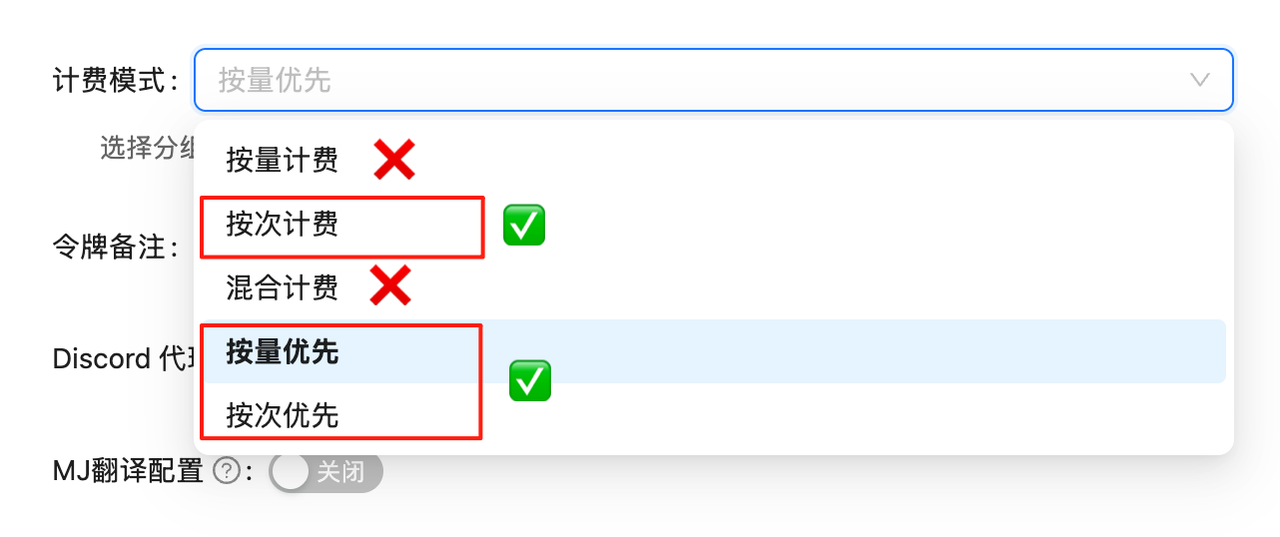 If billing mode is not configured, API calls will fail. You must complete this configuration first!
## Introduction
Veo-3.1 is Google's latest generation video generation model series, supporting high-quality video content generation through text descriptions or image inputs. The entire series is fully compatible with OpenAI Chat Completions API format, making it easy for developers to integrate quickly.
## Core Features
Generate videos from pure text descriptions, supporting complex scenes and action descriptions
Generate transition videos or animation effects based on 1-2 reference images
Uses standard Chat Completions API format, no need to learn new interfaces
Supports streaming returns for real-time generation progress and results
## Model Series
Veo-3.1 provides multiple model variants to meet different scenario requirements:
### Standard Models
**Price:** \$0.25 / request
**Features:**
* Excellent overall performance
* Suitable for most scenarios
* Stable generation quality
**Use Cases:** General video generation, content creation
**Price:** \$0.15 / request
**Features:**
* Faster generation speed
* High cost-effectiveness
* Suitable for rapid iteration
**Use Cases:** Batch generation, quick testing
### Image-to-Video Models (Support Image Input)
**Price:** \$0.25 / request
**Features:**
* Supports 1-2 image inputs
* Can generate image transition animations
* Bring static images to life
**Use Cases:** Image animation, image transition videos
**Price:** \$0.15 / request
**Features:**
* Fast image-to-video generation
* Supports image input
* High cost-effectiveness
**Use Cases:** Batch image animation production
### Landscape Models
**Price:** \$0.25 / request
**Features:**
* Optimized for landscape scenarios
* 16:9 or wider aspect ratio
* Suitable for professional production
**Use Cases:** Film production, commercial videos
**Price:** \$0.15 / request
**Features:**
* Fast landscape video generation
* Maintains picture quality
* Efficient batch processing
**Use Cases:** Batch landscape content production
**Price:** \$0.25 / request
**Features:**
* Landscape + image input support
* Professional-grade output
* Excellent detail preservation
**Use Cases:** Landscape image animation, professional landscape production
**Price:** \$0.15 / request
**Features:**
* Fast + image input + landscape
* Triple feature combination
* Extremely high cost-effectiveness
**Use Cases:** Large-scale landscape image animation production
## Price Comparison
| Model Name | Price | Speed | Aspect Ratio | Image Support | Recommended Use |
| ------------------------- | ------ | -------- | ------------ | ------------- | ------------------------------- |
| veo-3.1 | \$0.25 | Standard | General | ❌ | Text-to-video general scenarios |
| veo-3.1-fast | \$0.15 | Fast | General | ❌ | Text-to-video quick testing |
| veo-3.1-fl | \$0.25 | Standard | General | ✅ | Image-to-video standard quality |
| veo-3.1-fast-fl | \$0.15 | Fast | General | ✅ | Image-to-video fast processing |
| veo-3.1-landscape | \$0.25 | Standard | Landscape | ❌ | Landscape text-to-video |
| veo-3.1-landscape-fast | \$0.15 | Fast | Landscape | ❌ | Landscape text-to-video fast |
| veo-3.1-landscape-fl | \$0.25 | Standard | Landscape | ✅ | Landscape image-to-video |
| veo-3.1-landscape-fast-fl | \$0.15 | Fast | Landscape | ✅ | Landscape image-to-video fast |
## Generation Methods
### Text-to-Video
Generate video content through natural language descriptions:
```json theme={null}
{
"messages": [{
"role": "user",
"content": [
{
"type": "text",
"text": "Generate a video of two cats and a dog fighting"
}
]
}],
"model": "veo-3.1",
"stream": true,
"n": 2
}
```
### Image-to-Video
Generate video content based on reference images:
```json theme={null}
{
"messages": [{
"role": "user",
"content": [
{
"type": "text",
"text": "Generate a smooth transition video based on two images"
},
{
"type": "image_url",
"image_url": {
"url": "Start frame image URL or base64"
}
},
{
"type": "image_url",
"image_url": {
"url": "End frame image URL or base64 (optional)"
}
}
]
}],
"model": "veo-3.1-fl",
"stream": true
}
```
## Core Parameters
Select the Veo-3.1 model variant to use
Message array containing user input, supporting text and image types
Whether to enable streaming response, recommended to set to `true` for real-time progress
Number of videos to generate, range 1-4, can generate multiple different results simultaneously
## Billing Information
**Important:** Veo-3.1 models require **pay-per-use tokens**, not pay-as-you-go tokens. Please create a "pay-per-use" type token in the [Console](https://api2.laozhang.ai/token).
**Pay-per-request:** Billing follows the selected model, console order status, and billing records
### Billing Rules
* **Single Request:** Charged at model price (\$0.15 or \$0.25)
* **Multiple Results:** Setting `n=2` generates 2 videos, charged for 2 requests
* **Failed Retries:** Check console order status before retrying failed generations
* **Streaming Response:** No additional charge
## Technical Advantages
Advanced video generation algorithms ensure smooth and natural footage
Fast series models can return results in seconds
Supports text and image combination input for precise content control
Fully compatible with OpenAI API, zero learning curve
Supports generating multiple results simultaneously through n parameter
Streaming response provides real-time generation status feedback
## Quick Start
View complete quick start tutorial with detailed code examples
## Use Cases
* Social media short videos
* Marketing clips
* Product showcase animations
* Educational training content
* Film visual effects preview
* Ad creative testing
* Animation prototyping
* Concept validation videos
* Automated content production
* A/B testing materials
* Multi-version rapid iteration
* Dataset generation
## Next Steps
Get started with Veo-3.1 API in 5 minutes
View complete example code in various languages
Learn how to write better prompts
Check common issues and errors
If billing mode is not configured, API calls will fail. You must complete this configuration first!
## Introduction
Veo-3.1 is Google's latest generation video generation model series, supporting high-quality video content generation through text descriptions or image inputs. The entire series is fully compatible with OpenAI Chat Completions API format, making it easy for developers to integrate quickly.
## Core Features
Generate videos from pure text descriptions, supporting complex scenes and action descriptions
Generate transition videos or animation effects based on 1-2 reference images
Uses standard Chat Completions API format, no need to learn new interfaces
Supports streaming returns for real-time generation progress and results
## Model Series
Veo-3.1 provides multiple model variants to meet different scenario requirements:
### Standard Models
**Price:** \$0.25 / request
**Features:**
* Excellent overall performance
* Suitable for most scenarios
* Stable generation quality
**Use Cases:** General video generation, content creation
**Price:** \$0.15 / request
**Features:**
* Faster generation speed
* High cost-effectiveness
* Suitable for rapid iteration
**Use Cases:** Batch generation, quick testing
### Image-to-Video Models (Support Image Input)
**Price:** \$0.25 / request
**Features:**
* Supports 1-2 image inputs
* Can generate image transition animations
* Bring static images to life
**Use Cases:** Image animation, image transition videos
**Price:** \$0.15 / request
**Features:**
* Fast image-to-video generation
* Supports image input
* High cost-effectiveness
**Use Cases:** Batch image animation production
### Landscape Models
**Price:** \$0.25 / request
**Features:**
* Optimized for landscape scenarios
* 16:9 or wider aspect ratio
* Suitable for professional production
**Use Cases:** Film production, commercial videos
**Price:** \$0.15 / request
**Features:**
* Fast landscape video generation
* Maintains picture quality
* Efficient batch processing
**Use Cases:** Batch landscape content production
**Price:** \$0.25 / request
**Features:**
* Landscape + image input support
* Professional-grade output
* Excellent detail preservation
**Use Cases:** Landscape image animation, professional landscape production
**Price:** \$0.15 / request
**Features:**
* Fast + image input + landscape
* Triple feature combination
* Extremely high cost-effectiveness
**Use Cases:** Large-scale landscape image animation production
## Price Comparison
| Model Name | Price | Speed | Aspect Ratio | Image Support | Recommended Use |
| ------------------------- | ------ | -------- | ------------ | ------------- | ------------------------------- |
| veo-3.1 | \$0.25 | Standard | General | ❌ | Text-to-video general scenarios |
| veo-3.1-fast | \$0.15 | Fast | General | ❌ | Text-to-video quick testing |
| veo-3.1-fl | \$0.25 | Standard | General | ✅ | Image-to-video standard quality |
| veo-3.1-fast-fl | \$0.15 | Fast | General | ✅ | Image-to-video fast processing |
| veo-3.1-landscape | \$0.25 | Standard | Landscape | ❌ | Landscape text-to-video |
| veo-3.1-landscape-fast | \$0.15 | Fast | Landscape | ❌ | Landscape text-to-video fast |
| veo-3.1-landscape-fl | \$0.25 | Standard | Landscape | ✅ | Landscape image-to-video |
| veo-3.1-landscape-fast-fl | \$0.15 | Fast | Landscape | ✅ | Landscape image-to-video fast |
## Generation Methods
### Text-to-Video
Generate video content through natural language descriptions:
```json theme={null}
{
"messages": [{
"role": "user",
"content": [
{
"type": "text",
"text": "Generate a video of two cats and a dog fighting"
}
]
}],
"model": "veo-3.1",
"stream": true,
"n": 2
}
```
### Image-to-Video
Generate video content based on reference images:
```json theme={null}
{
"messages": [{
"role": "user",
"content": [
{
"type": "text",
"text": "Generate a smooth transition video based on two images"
},
{
"type": "image_url",
"image_url": {
"url": "Start frame image URL or base64"
}
},
{
"type": "image_url",
"image_url": {
"url": "End frame image URL or base64 (optional)"
}
}
]
}],
"model": "veo-3.1-fl",
"stream": true
}
```
## Core Parameters
Select the Veo-3.1 model variant to use
Message array containing user input, supporting text and image types
Whether to enable streaming response, recommended to set to `true` for real-time progress
Number of videos to generate, range 1-4, can generate multiple different results simultaneously
## Billing Information
**Important:** Veo-3.1 models require **pay-per-use tokens**, not pay-as-you-go tokens. Please create a "pay-per-use" type token in the [Console](https://api2.laozhang.ai/token).
**Pay-per-request:** Billing follows the selected model, console order status, and billing records
### Billing Rules
* **Single Request:** Charged at model price (\$0.15 or \$0.25)
* **Multiple Results:** Setting `n=2` generates 2 videos, charged for 2 requests
* **Failed Retries:** Check console order status before retrying failed generations
* **Streaming Response:** No additional charge
## Technical Advantages
Advanced video generation algorithms ensure smooth and natural footage
Fast series models can return results in seconds
Supports text and image combination input for precise content control
Fully compatible with OpenAI API, zero learning curve
Supports generating multiple results simultaneously through n parameter
Streaming response provides real-time generation status feedback
## Quick Start
View complete quick start tutorial with detailed code examples
## Use Cases
* Social media short videos
* Marketing clips
* Product showcase animations
* Educational training content
* Film visual effects preview
* Ad creative testing
* Animation prototyping
* Concept validation videos
* Automated content production
* A/B testing materials
* Multi-version rapid iteration
* Dataset generation
## Next Steps
Get started with Veo-3.1 API in 5 minutes
View complete example code in various languages
Learn how to write better prompts
Check common issues and errors