> ## Documentation Index
> Fetch the complete documentation index at: https://docs.laozhang.ai/llms.txt
> Use this file to discover all available pages before exploring further.
# API Developer Manual
> OpenAI-compatible API documentation for GPT-5.6, Claude Sonnet 5, Gemini 3.6 Flash, and 200+ AI models, with Python, Node.js, Java, and Go examples.
## Why Choose LaoZhang API?
**LaoZhang API is a unified AI API gateway** that provides seamless access to 200+ AI models through a single OpenAI-compatible interface. Access GPT-5.6, Claude Sonnet 5, Gemini 3.6 Flash, DeepSeek V4, and more with one API key.
## Platform Features
### OpenAI Compatible Mode
LaoZhang API uses **OpenAI-compatible format**, allowing you to easily call GPT, Claude, and 200+ AI models through a unified interface:
**Supported Model Providers:**
* 🤖 **OpenAI**: gpt-5.6, gpt-5.6-terra, gpt-5.6-luna, gpt-5.1-codex, etc.
* 🧠 **Anthropic**: claude-sonnet-5, claude-opus-4-8, claude-fable-5, etc.
* 💎 **Google**: gemini-3.6-flash, gemini-3.5-flash-lite, gemini-3.1-pro-preview, etc.
* 🚀 **xAI**: grok-4.5, grok-4.3, Grok 4.20 series, etc.
* 🔍 **DeepSeek**: deepseek-v4-pro, deepseek-v4-flash, etc.
* 🌟 **Alibaba**: Qwen series models
* 💬 **Moonshot**: Kimi models, etc.
Availability depends on the account, token group, and current route. Before production use, confirm the exact model ID, live gateway price, and access status on the [console model and pricing page](https://api2.laozhang.ai/account/pricing).
### Feature Support
**✅ Supported Features:**
* 💬 **Chat Completions**: Chat Completions interface
* 🖼️ **Image Generation**: gpt-image-2, flux-kontext-pro, flux-kontext-max, etc.
* 🔊 **Audio Processing**: Whisper transcription
* 📊 **Embeddings**: Text vectorization
* ⚡ **Function Calling**: Function Calling
* 📡 **Streaming**: Real-time responses
* 🔧 **OpenAI Parameters**: temperature, top\_p, max\_tokens, etc.
* 🆕 **Responses Endpoint**: Latest OpenAI features
**❌ Unsupported Features:**
* 🔧 Fine-tuning interface
* 📁 Files management interface
* 🏢 Organization management interface
* 💳 Billing management interface
### Easy Model Switching
**Core Advantage: One Codebase, Multiple Models**
After running with OpenAI format, simply **change the model name** to switch to other large models:
```python theme={null}
# Use GPT-5.6
response = client.chat.completions.create(
model="gpt-5.6", # OpenAI model
messages=[...]
)
# Switch to Claude, everything else stays the same!
response = client.chat.completions.create(
model="claude-sonnet-5", # Just change model name
messages=[...]
)
# Switch to Gemini
response = client.chat.completions.create(
model="gemini-3.6-flash", # Just change model name
messages=[...]
)
```
This design allows you to easily compare different model effects, or flexibly switch models based on cost and performance needs, without rewriting code!
## Quick Start
### Get API Key
1. Visit [LaoZhang API Console](https://api2.laozhang.ai/token)
2. Log in to your account
3. Click "Add" on the token management page to create an API Key
4. Copy the generated API Key for interface calls
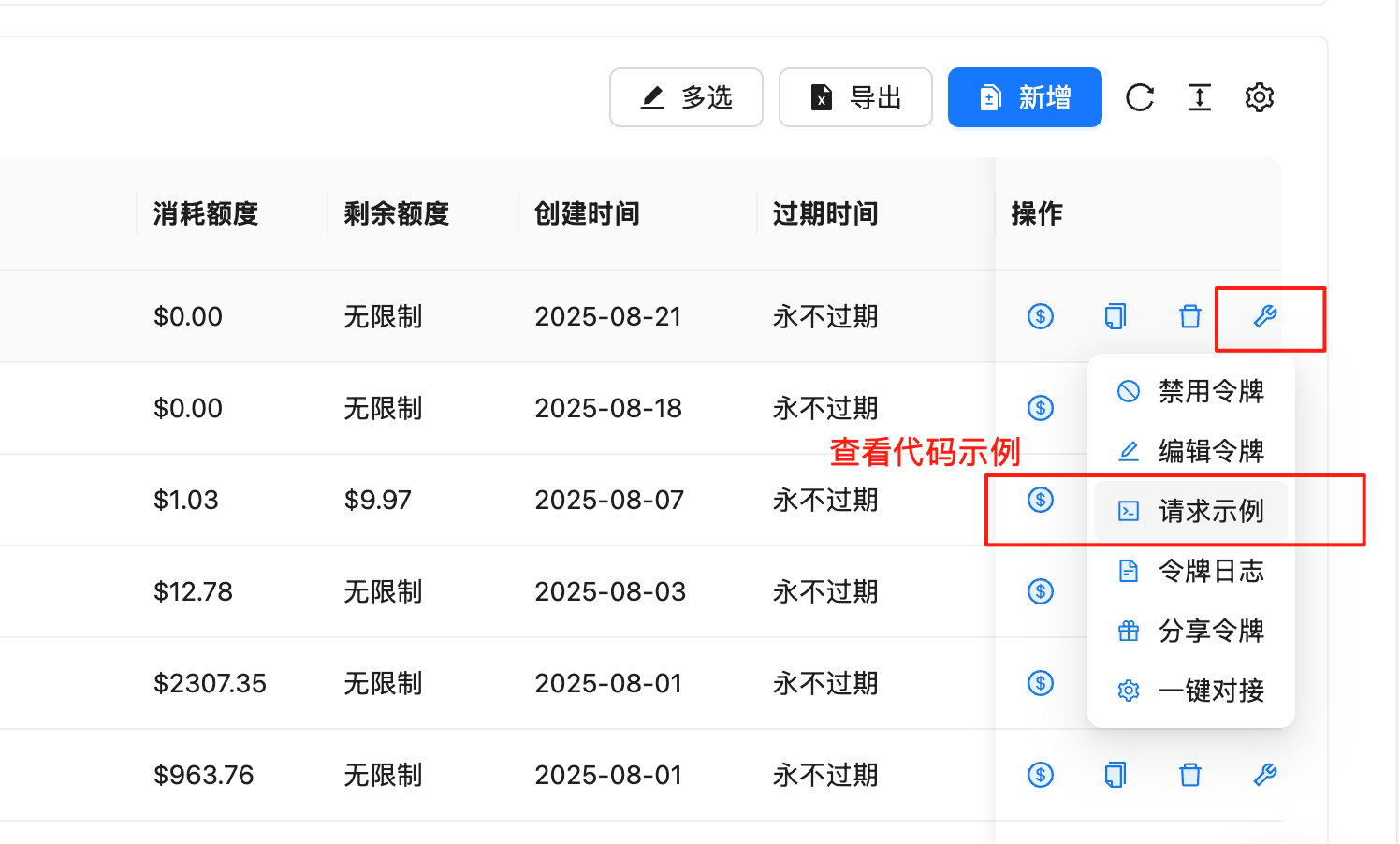
### View Request Examples
On the token management page, you can quickly get code examples in various programming languages:
**Steps:**
1. Go to [Token Management Page](https://api2.laozhang.ai/token)
2. Find the row with the API Key you want to use
3. Click the 🔧**wrench icon** (tool icon) in the "Actions" column
4. Select "**Request Example**" from the pop-up menu
5. View complete code examples in the following languages:
 **Supported Programming Languages:**
* **cURL** - Command-line testing
* **Python (SDK)** - Using official OpenAI library
* **Python (requests)** - Using requests library
* **Node.js** - JavaScript/TypeScript
* **Java** - Java application development
* **C#** - .NET application development
* **Go** - Go language development
* **PHP** - Web development
* **Ruby** - Ruby application development
* And more languages...
**Code Example Features:**
* ✅ **Complete and runnable**: Copy and paste to use
* ✅ **Parameter descriptions**: Detailed parameter configuration
* ✅ **Error handling**: Includes exception handling logic
* ✅ **Best practices**: Follows development standards for each language
Developers are encouraged to check the backend request examples first. These examples are updated in real-time based on the latest API versions, ensuring code accuracy and usability.
## Basic Information
### API Endpoints
* **Primary endpoint**: `https://api2.laozhang.ai/v1` (Recommended, globally accelerated)
* **Backup endpoint**: `https://api-vip.laozhang.ai/v1` (Direct access for overseas servers)
`api2.laozhang.ai` is configured with globally accelerated bandwidth nodes, recommended for primary use. `api-vip.laozhang.ai` is a backup domain suitable for direct connection from overseas servers. Switch back to the primary domain if you experience instability.
### Authentication Method
All API requests need to include authentication information in the Header:
```http theme={null}
Authorization: Bearer YOUR_API_KEY
```
### Request Format
* **Content-Type**: `application/json`
* **Encoding**: UTF-8
* **Request Method**: POST (for most interfaces)
## Core Interfaces
### 1. Chat Completions
Create a chat completion request, supports multi-turn conversations.
**Request Endpoint**
```
POST /v1/chat/completions
```
**Request Parameters**
| Parameter | Type | Required | Description |
| ------------------ | ------------ | -------- | -------------------------------------------- |
| model | string | Yes | Model name, e.g., `gemini-3.6-flash` |
| messages | array | Yes | Array of conversation messages |
| temperature | number | No | Sampling temperature, between 0-2, default 1 |
| max\_tokens | integer | No | Maximum tokens to generate |
| stream | boolean | No | Whether to return streaming, default false |
| top\_p | number | No | Nucleus sampling parameter, between 0-1 |
| n | integer | No | Number of generations, default 1 |
| stop | string/array | No | Stop sequences |
| presence\_penalty | number | No | Presence penalty, between -2 to 2 |
| frequency\_penalty | number | No | Frequency penalty, between -2 to 2 |
**Message Format**
```json theme={null}
{
"role": "system|user|assistant",
"content": "Message content"
}
```
**Complete Code Examples**
```bash theme={null}
curl -X POST "https://api2.laozhang.ai/v1/chat/completions" \
-H "Authorization: Bearer YOUR_API_KEY" \
-H "Content-Type: application/json" \
-d '{
"model": "gemini-3.6-flash",
"messages": [
{"role": "system", "content": "You are a helpful AI assistant."},
{"role": "user", "content": "Hello! Please introduce yourself."}
],
"temperature": 0.7,
"max_tokens": 1000
}'
```
```python theme={null}
from openai import OpenAI
# Initialize client
client = OpenAI(
api_key="YOUR_API_KEY",
base_url="https://api2.laozhang.ai/v1"
)
# Send chat request
response = client.chat.completions.create(
model="gemini-3.6-flash",
messages=[
{"role": "system", "content": "You are a helpful AI assistant."},
{"role": "user", "content": "Hello! Please introduce yourself."}
],
temperature=0.7,
max_tokens=1000
)
print(response.choices[0].message.content)
```
```python theme={null}
import requests
import json
url = "https://api2.laozhang.ai/v1/chat/completions"
headers = {
"Authorization": "Bearer YOUR_API_KEY",
"Content-Type": "application/json"
}
data = {
"model": "gemini-3.6-flash",
"messages": [
{"role": "system", "content": "You are a helpful AI assistant."},
{"role": "user", "content": "Hello! Please introduce yourself."}
],
"temperature": 0.7,
"max_tokens": 1000
}
response = requests.post(url, headers=headers, json=data)
result = response.json()
if response.status_code == 200:
print(result["choices"][0]["message"]["content"])
else:
print(f"Error: {result}")
```
```javascript theme={null}
const OpenAI = require('openai');
const client = new OpenAI({
apiKey: 'YOUR_API_KEY',
baseURL: 'https://api2.laozhang.ai/v1'
});
async function chatCompletion() {
try {
const response = await client.chat.completions.create({
model: 'gemini-3.6-flash',
messages: [
{"role": "system", "content": "You are a helpful AI assistant."},
{"role": "user", "content": "Hello! Please introduce yourself."}
],
temperature: 0.7,
max_tokens: 1000
});
console.log(response.choices[0].message.content);
} catch (error) {
console.error('API call error:', error);
}
}
chatCompletion();
```
```java theme={null}
import okhttp3.*;
import com.google.gson.Gson;
import java.io.IOException;
import java.util.*;
public class LaoZhangExample {
private static final String API_KEY = "YOUR_API_KEY";
private static final String BASE_URL = "https://api2.laozhang.ai/v1";
public static void main(String[] args) throws IOException {
OkHttpClient client = new OkHttpClient();
Gson gson = new Gson();
// Build request body
Map requestBody = new HashMap<>();
requestBody.put("model", "gemini-3.6-flash");
requestBody.put("temperature", 0.7);
requestBody.put("max_tokens", 1000);
List> messages = Arrays.asList(
Map.of("role", "system", "content", "You are a helpful AI assistant."),
Map.of("role", "user", "content", "Hello! Please introduce yourself.")
);
requestBody.put("messages", messages);
RequestBody body = RequestBody.create(
gson.toJson(requestBody),
MediaType.parse("application/json")
);
Request request = new Request.Builder()
.url(BASE_URL + "/chat/completions")
.addHeader("Authorization", "Bearer " + API_KEY)
.addHeader("Content-Type", "application/json")
.post(body)
.build();
try (Response response = client.newCall(request).execute()) {
System.out.println(response.body().string());
}
}
}
```
```csharp theme={null}
using System;
using System.Net.Http;
using System.Text;
using System.Threading.Tasks;
using Newtonsoft.Json;
class Program
{
private static readonly string API_KEY = "YOUR_API_KEY";
private static readonly string BASE_URL = "https://api2.laozhang.ai/v1";
static async Task Main(string[] args)
{
using var client = new HttpClient();
client.DefaultRequestHeaders.Add("Authorization", $"Bearer {API_KEY}");
var requestBody = new
{
model = "gemini-3.6-flash",
messages = new[]
{
new { role = "system", content = "You are a helpful AI assistant." },
new { role = "user", content = "Hello! Please introduce yourself." }
},
temperature = 0.7,
max_tokens = 1000
};
var json = JsonConvert.SerializeObject(requestBody);
var content = new StringContent(json, Encoding.UTF8, "application/json");
try
{
var response = await client.PostAsync($"{BASE_URL}/chat/completions", content);
var result = await response.Content.ReadAsStringAsync();
Console.WriteLine(result);
}
catch (Exception ex)
{
Console.WriteLine($"Error: {ex.Message}");
}
}
}
```
```go theme={null}
package main
import (
"bytes"
"encoding/json"
"fmt"
"io/ioutil"
"net/http"
)
type Message struct {
Role string `json:"role"`
Content string `json:"content"`
}
type ChatRequest struct {
Model string `json:"model"`
Messages []Message `json:"messages"`
Temperature float64 `json:"temperature"`
MaxTokens int `json:"max_tokens"`
}
func main() {
apiKey := "YOUR_API_KEY"
baseURL := "https://api2.laozhang.ai/v1"
reqData := ChatRequest{
Model: "gemini-3.6-flash",
Messages: []Message{
{Role: "system", Content: "You are a helpful AI assistant."},
{Role: "user", Content: "Hello! Please introduce yourself."},
},
Temperature: 0.7,
MaxTokens: 1000,
}
jsonData, _ := json.Marshal(reqData)
req, _ := http.NewRequest("POST", baseURL+"/chat/completions", bytes.NewBuffer(jsonData))
req.Header.Set("Authorization", "Bearer "+apiKey)
req.Header.Set("Content-Type", "application/json")
client := &http.Client{}
resp, err := client.Do(req)
if err != nil {
fmt.Printf("Request error: %v\n", err)
return
}
defer resp.Body.Close()
body, _ := ioutil.ReadAll(resp.Body)
fmt.Println(string(body))
}
```
```php theme={null}
'gemini-3.6-flash',
'messages' => array(
array('role' => 'system', 'content' => 'You are a helpful AI assistant.'),
array('role' => 'user', 'content' => 'Hello! Please introduce yourself.')
),
'temperature' => 0.7,
'max_tokens' => 1000
);
$ch = curl_init();
curl_setopt($ch, CURLOPT_URL, $base_url . '/chat/completions');
curl_setopt($ch, CURLOPT_POST, 1);
curl_setopt($ch, CURLOPT_POSTFIELDS, json_encode($data));
curl_setopt($ch, CURLOPT_HTTPHEADER, array(
'Authorization: Bearer ' . $api_key,
'Content-Type: application/json'
));
curl_setopt($ch, CURLOPT_RETURNTRANSFER, true);
$response = curl_exec($ch);
$http_code = curl_getinfo($ch, CURLINFO_HTTP_CODE);
curl_close($ch);
if ($http_code == 200) {
$result = json_decode($response, true);
echo $result['choices'][0]['message']['content'];
} else {
echo "Error: " . $response;
}
?>
```
```ruby theme={null}
require 'net/http'
require 'json'
api_key = 'YOUR_API_KEY'
base_url = 'https://api2.laozhang.ai/v1'
uri = URI("#{base_url}/chat/completions")
http = Net::HTTP.new(uri.host, uri.port)
http.use_ssl = true
request = Net::HTTP::Post.new(uri)
request['Authorization'] = "Bearer #{api_key}"
request['Content-Type'] = 'application/json'
request.body = {
model: 'gemini-3.6-flash',
messages: [
{ role: 'system', content: 'You are a helpful AI assistant.' },
{ role: 'user', content: 'Hello! Please introduce yourself.' }
],
temperature: 0.7,
max_tokens: 1000
}.to_json
response = http.request(request)
if response.code == '200'
result = JSON.parse(response.body)
puts result['choices'][0]['message']['content']
else
puts "Error: #{response.body}"
end
```
**Response Example**
```json theme={null}
{
"id": "chatcmpl-123",
"object": "chat.completion",
"created": 1699000000,
"model": "gemini-3.6-flash",
"choices": [{
"index": 0,
"message": {
"role": "assistant",
"content": "Hello! How can I help you today?"
},
"finish_reason": "stop"
}],
"usage": {
"prompt_tokens": 20,
"completion_tokens": 10,
"total_tokens": 30
}
}
```
### 2. Text Completions
Kept for compatibility with legacy interfaces, Chat Completions is recommended.
**Request Endpoint**
```
POST /v1/completions
```
**Request Parameters**
| Parameter | Type | Required | Description |
| ----------- | ------------ | -------- | -------------------------- |
| model | string | Yes | Model name |
| prompt | string/array | Yes | Prompt text |
| max\_tokens | integer | No | Maximum generation length |
| temperature | number | No | Sampling temperature |
| top\_p | number | No | Nucleus sampling parameter |
| n | integer | No | Number of generations |
| stream | boolean | No | Streaming output |
| stop | string/array | No | Stop sequences |
### 3. Embeddings
Convert text to vector representation.
**Request Endpoint**
```
POST /v1/embeddings
```
**Request Parameters**
| Parameter | Type | Required | Description |
| ---------------- | ------------ | -------- | ------------------------------------------ |
| model | string | Yes | Model name, e.g., `text-embedding-3-small` |
| input | string/array | Yes | Input text |
| encoding\_format | string | No | Encoding format, `float` or `base64` |
**Complete Code Examples**
```bash theme={null}
curl -X POST "https://api2.laozhang.ai/v1/embeddings" \
-H "Authorization: Bearer YOUR_API_KEY" \
-H "Content-Type: application/json" \
-d '{
"model": "text-embedding-3-small",
"input": "This is a text example that needs to be vectorized"
}'
```
```python theme={null}
from openai import OpenAI
client = OpenAI(
api_key="YOUR_API_KEY",
base_url="https://api2.laozhang.ai/v1"
)
response = client.embeddings.create(
model="text-embedding-3-small",
input="This is a text example that needs to be vectorized"
)
# Get vector
embedding = response.data[0].embedding
print(f"Vector dimension: {len(embedding)}")
print(f"First 5 values: {embedding[:5]}")
```
```python theme={null}
import requests
import json
url = "https://api2.laozhang.ai/v1/embeddings"
headers = {
"Authorization": "Bearer YOUR_API_KEY",
"Content-Type": "application/json"
}
data = {
"model": "text-embedding-3-small",
"input": "This is a text example that needs to be vectorized"
}
response = requests.post(url, headers=headers, json=data)
result = response.json()
if response.status_code == 200:
embedding = result["data"][0]["embedding"]
print(f"Vector dimension: {len(embedding)}")
print(f"Vector values: {embedding[:5]}") # Show first 5 values
else:
print(f"Error: {result}")
```
```javascript theme={null}
const OpenAI = require('openai');
const client = new OpenAI({
apiKey: 'YOUR_API_KEY',
baseURL: 'https://api2.laozhang.ai/v1'
});
async function getEmbedding() {
try {
const response = await client.embeddings.create({
model: 'text-embedding-3-small',
input: 'This is a text example that needs to be vectorized'
});
const embedding = response.data[0].embedding;
console.log(`Vector dimension: ${embedding.length}`);
console.log(`First 5 values: ${embedding.slice(0, 5)}`);
} catch (error) {
console.error('API call error:', error);
}
}
getEmbedding();
```
### 4. Images
Generate, edit, or transform images.
**Generate Images**
```
POST /v1/images/generations
```
**Request Parameters**
| Parameter | Type | Required | Description |
| --------- | ------- | -------- | ------------------------------------------------- |
| model | string | Yes | Model name, recommended `gpt-image-2` |
| prompt | string | Yes | Image description prompt |
| n | integer | No | Number to generate, default 1 |
| size | string | No | Image size: `1024x1024`, `1792x1024`, `1024x1792` |
| quality | string | No | Quality: `standard` or `hd` |
| style | string | No | Style: `vivid` or `natural` |
Recommended to use `gpt-image-2` model for image generation. For more image generation features and parameter descriptions, please see [GPT Image Generation detailed documentation](/en/api-capabilities/gpt-image-2).
**Complete Code Examples**
```bash theme={null}
curl -X POST "https://api2.laozhang.ai/v1/images/generations" \
-H "Authorization: Bearer YOUR_API_KEY" \
-H "Content-Type: application/json" \
-d '{
"model": "gpt-image-2",
"prompt": "A cute orange kitten sitting in a sunny garden",
"n": 1,
"size": "1024x1024",
"quality": "hd"
}'
```
```python theme={null}
from openai import OpenAI
client = OpenAI(
api_key="YOUR_API_KEY",
base_url="https://api2.laozhang.ai/v1"
)
response = client.images.generate(
model="gpt-image-2", # Recommended to use gpt-image-2
prompt="A cute orange kitten sitting in a sunny garden",
n=1,
size="1024x1024",
quality="hd"
)
# Get image URL
image_url = response.data[0].url
print(f"Generated image: {image_url}")
# Download image
import requests
img_response = requests.get(image_url)
with open("generated_image.png", "wb") as f:
f.write(img_response.content)
print("Image saved as generated_image.png")
```
```javascript theme={null}
const OpenAI = require('openai');
const fs = require('fs');
const client = new OpenAI({
apiKey: 'YOUR_API_KEY',
baseURL: 'https://api2.laozhang.ai/v1'
});
async function generateImage() {
try {
const response = await client.images.generate({
model: 'gpt-image-2', // Recommended to use gpt-image-2
prompt: 'A cute orange kitten sitting in a sunny garden',
n: 1,
size: '1024x1024',
quality: 'hd'
});
const imageUrl = response.data[0].url;
console.log('Generated image:', imageUrl);
// Download image
const fetch = require('node-fetch');
const imgResponse = await fetch(imageUrl);
const buffer = await imgResponse.buffer();
fs.writeFileSync('generated_image.png', buffer);
console.log('Image saved');
} catch (error) {
console.error('Image generation error:', error);
}
}
generateImage();
```
### 5. Audio
Speech recognition and transcription.
**Transcribe Audio**
```
POST /v1/audio/transcriptions
```
**Request Parameters** (Form-Data)
| Parameter | Type | Required | Description |
| ---------------- | ------ | -------- | ----------------------------- |
| file | file | Yes | Audio file |
| model | string | Yes | Model name, e.g., `whisper-1` |
| language | string | No | Language code |
| prompt | string | No | Guidance prompt |
| response\_format | string | No | Response format |
| temperature | number | No | Sampling temperature |
### 6. Model List
Get list of available models.
**Request Endpoint**
```
GET /v1/models
```
**Response Example**
```json theme={null}
{
"object": "list",
"data": [
{
"id": "gemini-3.6-flash",
"object": "model",
"created": 1677610602,
"owned_by": "google"
},
{
"id": "claude-sonnet-5",
"object": "model",
"created": 1687882411,
"owned_by": "anthropic"
}
]
}
```
## Streaming Responses
### Enable Streaming Output
Set `stream: true` in the request:
```json theme={null}
{
"model": "gemini-3.6-flash",
"messages": [{"role": "user", "content": "Hello"}],
"stream": true
}
```
### Streaming Response Format
Response will be returned in Server-Sent Events (SSE) format:
```
data: {"id":"chatcmpl-123","object":"chat.completion.chunk","created":1699000000,"model":"gemini-3.6-flash","choices":[{"delta":{"content":"Hello"},"index":0}]}
data: {"id":"chatcmpl-123","object":"chat.completion.chunk","created":1699000000,"model":"gemini-3.6-flash","choices":[{"delta":{"content":" there"},"index":0}]}
data: [DONE]
```
### Handling Streaming Responses
```python theme={null}
import requests
import json
response = requests.post(
'https://api2.laozhang.ai/v1/chat/completions',
headers={
'Authorization': f'Bearer {api_key}',
'Content-Type': 'application/json'
},
json={
'model': 'gemini-3.6-flash',
'messages': [{'role': 'user', 'content': 'Hello'}],
'stream': True
},
stream=True
)
for line in response.iter_lines():
if line:
line = line.decode('utf-8')
if line.startswith('data: '):
data = line[6:]
if data != '[DONE]':
chunk = json.loads(data)
content = chunk['choices'][0]['delta'].get('content', '')
print(content, end='')
```
```javascript theme={null}
const response = await fetch('https://api2.laozhang.ai/v1/chat/completions', {
method: 'POST',
headers: {
'Authorization': `Bearer ${apiKey}`,
'Content-Type': 'application/json'
},
body: JSON.stringify({
model: 'gemini-3.6-flash',
messages: [{role: 'user', content: 'Hello'}],
stream: true
})
});
const reader = response.body.getReader();
const decoder = new TextDecoder();
while (true) {
const {done, value} = await reader.read();
if (done) break;
const chunk = decoder.decode(value);
const lines = chunk.split('\n');
for (const line of lines) {
if (line.startsWith('data: ')) {
const data = line.slice(6);
if (data !== '[DONE]') {
const json = JSON.parse(data);
const content = json.choices[0].delta.content || '';
process.stdout.write(content);
}
}
}
}
```
## Error Handling
### Error Response Format
```json theme={null}
{
"error": {
"message": "Invalid API key provided",
"type": "invalid_request_error",
"param": null,
"code": "invalid_api_key"
}
}
```
### Common Error Codes
| Error Code | HTTP Status | Description |
| ----------------------- | ----------- | -------------------------- |
| invalid\_api\_key | 401 | Invalid API key |
| insufficient\_quota | 429 | Insufficient quota |
| model\_not\_found | 404 | Model does not exist |
| invalid\_request\_error | 400 | Invalid request parameters |
| server\_error | 500 | Internal server error |
| rate\_limit\_exceeded | 429 | Request rate too high |
### Error Handling Example
```python theme={null}
try:
response = client.chat.completions.create(
model="gemini-3.6-flash",
messages=[{"role": "user", "content": "Hello"}]
)
except Exception as e:
if hasattr(e, 'status_code'):
if e.status_code == 401:
print("Invalid API key")
elif e.status_code == 429:
print("Requests too frequent or insufficient quota")
elif e.status_code == 500:
print("Server error, please try again later")
else:
print(f"Unknown error: {str(e)}")
```
## Best Practices
### 1. Request Optimization
* **Set max\_tokens reasonably**: Avoid unnecessarily long outputs
* **Use temperature**: Control output randomness
* **Batch processing**: Combine multiple requests to reduce call count
### 2. Error Retry
Implement exponential backoff retry mechanism:
```python theme={null}
import time
import random
def retry_with_backoff(func, max_retries=3):
for i in range(max_retries):
try:
return func()
except Exception as e:
if i == max_retries - 1:
raise e
wait_time = (2 ** i) + random.uniform(0, 1)
time.sleep(wait_time)
```
### 3. Security Recommendations
* **Protect API keys**: Store in environment variables
* **Limit permissions**: Create different keys for different applications
* **Monitor usage**: Regularly check API usage logs
### 4. Performance Optimization
* **Use streaming output**: Improve user experience
* **Cache responses**: Cache results for identical requests
* **Concurrency control**: Reasonably control concurrent request count
## Rate Limits
RPM, TPM, and concurrency limits vary by model, token group, route, and account configuration; there is no single fixed limit for every request. Confirm the current limit in the console and increase production traffic gradually.
Requests above the active limit usually return 429. Read the error details, use bounded exponential backoff, and do not retry indefinitely before confirming model access and account credit.
## Need Help?
* Visit [LaoZhang API Official Site](https://api2.laozhang.ai)
* Check [Supported Models](/en/api-capabilities/model-info)
* Contact technical support: [hi@laozhang.ai](mailto:hi@laozhang.ai)
This manual is continuously updated. Please follow the latest version for new features and improvements.
**Supported Programming Languages:**
* **cURL** - Command-line testing
* **Python (SDK)** - Using official OpenAI library
* **Python (requests)** - Using requests library
* **Node.js** - JavaScript/TypeScript
* **Java** - Java application development
* **C#** - .NET application development
* **Go** - Go language development
* **PHP** - Web development
* **Ruby** - Ruby application development
* And more languages...
**Code Example Features:**
* ✅ **Complete and runnable**: Copy and paste to use
* ✅ **Parameter descriptions**: Detailed parameter configuration
* ✅ **Error handling**: Includes exception handling logic
* ✅ **Best practices**: Follows development standards for each language
Developers are encouraged to check the backend request examples first. These examples are updated in real-time based on the latest API versions, ensuring code accuracy and usability.
## Basic Information
### API Endpoints
* **Primary endpoint**: `https://api2.laozhang.ai/v1` (Recommended, globally accelerated)
* **Backup endpoint**: `https://api-vip.laozhang.ai/v1` (Direct access for overseas servers)
`api2.laozhang.ai` is configured with globally accelerated bandwidth nodes, recommended for primary use. `api-vip.laozhang.ai` is a backup domain suitable for direct connection from overseas servers. Switch back to the primary domain if you experience instability.
### Authentication Method
All API requests need to include authentication information in the Header:
```http theme={null}
Authorization: Bearer YOUR_API_KEY
```
### Request Format
* **Content-Type**: `application/json`
* **Encoding**: UTF-8
* **Request Method**: POST (for most interfaces)
## Core Interfaces
### 1. Chat Completions
Create a chat completion request, supports multi-turn conversations.
**Request Endpoint**
```
POST /v1/chat/completions
```
**Request Parameters**
| Parameter | Type | Required | Description |
| ------------------ | ------------ | -------- | -------------------------------------------- |
| model | string | Yes | Model name, e.g., `gemini-3.6-flash` |
| messages | array | Yes | Array of conversation messages |
| temperature | number | No | Sampling temperature, between 0-2, default 1 |
| max\_tokens | integer | No | Maximum tokens to generate |
| stream | boolean | No | Whether to return streaming, default false |
| top\_p | number | No | Nucleus sampling parameter, between 0-1 |
| n | integer | No | Number of generations, default 1 |
| stop | string/array | No | Stop sequences |
| presence\_penalty | number | No | Presence penalty, between -2 to 2 |
| frequency\_penalty | number | No | Frequency penalty, between -2 to 2 |
**Message Format**
```json theme={null}
{
"role": "system|user|assistant",
"content": "Message content"
}
```
**Complete Code Examples**
```bash theme={null}
curl -X POST "https://api2.laozhang.ai/v1/chat/completions" \
-H "Authorization: Bearer YOUR_API_KEY" \
-H "Content-Type: application/json" \
-d '{
"model": "gemini-3.6-flash",
"messages": [
{"role": "system", "content": "You are a helpful AI assistant."},
{"role": "user", "content": "Hello! Please introduce yourself."}
],
"temperature": 0.7,
"max_tokens": 1000
}'
```
```python theme={null}
from openai import OpenAI
# Initialize client
client = OpenAI(
api_key="YOUR_API_KEY",
base_url="https://api2.laozhang.ai/v1"
)
# Send chat request
response = client.chat.completions.create(
model="gemini-3.6-flash",
messages=[
{"role": "system", "content": "You are a helpful AI assistant."},
{"role": "user", "content": "Hello! Please introduce yourself."}
],
temperature=0.7,
max_tokens=1000
)
print(response.choices[0].message.content)
```
```python theme={null}
import requests
import json
url = "https://api2.laozhang.ai/v1/chat/completions"
headers = {
"Authorization": "Bearer YOUR_API_KEY",
"Content-Type": "application/json"
}
data = {
"model": "gemini-3.6-flash",
"messages": [
{"role": "system", "content": "You are a helpful AI assistant."},
{"role": "user", "content": "Hello! Please introduce yourself."}
],
"temperature": 0.7,
"max_tokens": 1000
}
response = requests.post(url, headers=headers, json=data)
result = response.json()
if response.status_code == 200:
print(result["choices"][0]["message"]["content"])
else:
print(f"Error: {result}")
```
```javascript theme={null}
const OpenAI = require('openai');
const client = new OpenAI({
apiKey: 'YOUR_API_KEY',
baseURL: 'https://api2.laozhang.ai/v1'
});
async function chatCompletion() {
try {
const response = await client.chat.completions.create({
model: 'gemini-3.6-flash',
messages: [
{"role": "system", "content": "You are a helpful AI assistant."},
{"role": "user", "content": "Hello! Please introduce yourself."}
],
temperature: 0.7,
max_tokens: 1000
});
console.log(response.choices[0].message.content);
} catch (error) {
console.error('API call error:', error);
}
}
chatCompletion();
```
```java theme={null}
import okhttp3.*;
import com.google.gson.Gson;
import java.io.IOException;
import java.util.*;
public class LaoZhangExample {
private static final String API_KEY = "YOUR_API_KEY";
private static final String BASE_URL = "https://api2.laozhang.ai/v1";
public static void main(String[] args) throws IOException {
OkHttpClient client = new OkHttpClient();
Gson gson = new Gson();
// Build request body
Map requestBody = new HashMap<>();
requestBody.put("model", "gemini-3.6-flash");
requestBody.put("temperature", 0.7);
requestBody.put("max_tokens", 1000);
List> messages = Arrays.asList(
Map.of("role", "system", "content", "You are a helpful AI assistant."),
Map.of("role", "user", "content", "Hello! Please introduce yourself.")
);
requestBody.put("messages", messages);
RequestBody body = RequestBody.create(
gson.toJson(requestBody),
MediaType.parse("application/json")
);
Request request = new Request.Builder()
.url(BASE_URL + "/chat/completions")
.addHeader("Authorization", "Bearer " + API_KEY)
.addHeader("Content-Type", "application/json")
.post(body)
.build();
try (Response response = client.newCall(request).execute()) {
System.out.println(response.body().string());
}
}
}
```
```csharp theme={null}
using System;
using System.Net.Http;
using System.Text;
using System.Threading.Tasks;
using Newtonsoft.Json;
class Program
{
private static readonly string API_KEY = "YOUR_API_KEY";
private static readonly string BASE_URL = "https://api2.laozhang.ai/v1";
static async Task Main(string[] args)
{
using var client = new HttpClient();
client.DefaultRequestHeaders.Add("Authorization", $"Bearer {API_KEY}");
var requestBody = new
{
model = "gemini-3.6-flash",
messages = new[]
{
new { role = "system", content = "You are a helpful AI assistant." },
new { role = "user", content = "Hello! Please introduce yourself." }
},
temperature = 0.7,
max_tokens = 1000
};
var json = JsonConvert.SerializeObject(requestBody);
var content = new StringContent(json, Encoding.UTF8, "application/json");
try
{
var response = await client.PostAsync($"{BASE_URL}/chat/completions", content);
var result = await response.Content.ReadAsStringAsync();
Console.WriteLine(result);
}
catch (Exception ex)
{
Console.WriteLine($"Error: {ex.Message}");
}
}
}
```
```go theme={null}
package main
import (
"bytes"
"encoding/json"
"fmt"
"io/ioutil"
"net/http"
)
type Message struct {
Role string `json:"role"`
Content string `json:"content"`
}
type ChatRequest struct {
Model string `json:"model"`
Messages []Message `json:"messages"`
Temperature float64 `json:"temperature"`
MaxTokens int `json:"max_tokens"`
}
func main() {
apiKey := "YOUR_API_KEY"
baseURL := "https://api2.laozhang.ai/v1"
reqData := ChatRequest{
Model: "gemini-3.6-flash",
Messages: []Message{
{Role: "system", Content: "You are a helpful AI assistant."},
{Role: "user", Content: "Hello! Please introduce yourself."},
},
Temperature: 0.7,
MaxTokens: 1000,
}
jsonData, _ := json.Marshal(reqData)
req, _ := http.NewRequest("POST", baseURL+"/chat/completions", bytes.NewBuffer(jsonData))
req.Header.Set("Authorization", "Bearer "+apiKey)
req.Header.Set("Content-Type", "application/json")
client := &http.Client{}
resp, err := client.Do(req)
if err != nil {
fmt.Printf("Request error: %v\n", err)
return
}
defer resp.Body.Close()
body, _ := ioutil.ReadAll(resp.Body)
fmt.Println(string(body))
}
```
```php theme={null}
'gemini-3.6-flash',
'messages' => array(
array('role' => 'system', 'content' => 'You are a helpful AI assistant.'),
array('role' => 'user', 'content' => 'Hello! Please introduce yourself.')
),
'temperature' => 0.7,
'max_tokens' => 1000
);
$ch = curl_init();
curl_setopt($ch, CURLOPT_URL, $base_url . '/chat/completions');
curl_setopt($ch, CURLOPT_POST, 1);
curl_setopt($ch, CURLOPT_POSTFIELDS, json_encode($data));
curl_setopt($ch, CURLOPT_HTTPHEADER, array(
'Authorization: Bearer ' . $api_key,
'Content-Type: application/json'
));
curl_setopt($ch, CURLOPT_RETURNTRANSFER, true);
$response = curl_exec($ch);
$http_code = curl_getinfo($ch, CURLINFO_HTTP_CODE);
curl_close($ch);
if ($http_code == 200) {
$result = json_decode($response, true);
echo $result['choices'][0]['message']['content'];
} else {
echo "Error: " . $response;
}
?>
```
```ruby theme={null}
require 'net/http'
require 'json'
api_key = 'YOUR_API_KEY'
base_url = 'https://api2.laozhang.ai/v1'
uri = URI("#{base_url}/chat/completions")
http = Net::HTTP.new(uri.host, uri.port)
http.use_ssl = true
request = Net::HTTP::Post.new(uri)
request['Authorization'] = "Bearer #{api_key}"
request['Content-Type'] = 'application/json'
request.body = {
model: 'gemini-3.6-flash',
messages: [
{ role: 'system', content: 'You are a helpful AI assistant.' },
{ role: 'user', content: 'Hello! Please introduce yourself.' }
],
temperature: 0.7,
max_tokens: 1000
}.to_json
response = http.request(request)
if response.code == '200'
result = JSON.parse(response.body)
puts result['choices'][0]['message']['content']
else
puts "Error: #{response.body}"
end
```
**Response Example**
```json theme={null}
{
"id": "chatcmpl-123",
"object": "chat.completion",
"created": 1699000000,
"model": "gemini-3.6-flash",
"choices": [{
"index": 0,
"message": {
"role": "assistant",
"content": "Hello! How can I help you today?"
},
"finish_reason": "stop"
}],
"usage": {
"prompt_tokens": 20,
"completion_tokens": 10,
"total_tokens": 30
}
}
```
### 2. Text Completions
Kept for compatibility with legacy interfaces, Chat Completions is recommended.
**Request Endpoint**
```
POST /v1/completions
```
**Request Parameters**
| Parameter | Type | Required | Description |
| ----------- | ------------ | -------- | -------------------------- |
| model | string | Yes | Model name |
| prompt | string/array | Yes | Prompt text |
| max\_tokens | integer | No | Maximum generation length |
| temperature | number | No | Sampling temperature |
| top\_p | number | No | Nucleus sampling parameter |
| n | integer | No | Number of generations |
| stream | boolean | No | Streaming output |
| stop | string/array | No | Stop sequences |
### 3. Embeddings
Convert text to vector representation.
**Request Endpoint**
```
POST /v1/embeddings
```
**Request Parameters**
| Parameter | Type | Required | Description |
| ---------------- | ------------ | -------- | ------------------------------------------ |
| model | string | Yes | Model name, e.g., `text-embedding-3-small` |
| input | string/array | Yes | Input text |
| encoding\_format | string | No | Encoding format, `float` or `base64` |
**Complete Code Examples**
```bash theme={null}
curl -X POST "https://api2.laozhang.ai/v1/embeddings" \
-H "Authorization: Bearer YOUR_API_KEY" \
-H "Content-Type: application/json" \
-d '{
"model": "text-embedding-3-small",
"input": "This is a text example that needs to be vectorized"
}'
```
```python theme={null}
from openai import OpenAI
client = OpenAI(
api_key="YOUR_API_KEY",
base_url="https://api2.laozhang.ai/v1"
)
response = client.embeddings.create(
model="text-embedding-3-small",
input="This is a text example that needs to be vectorized"
)
# Get vector
embedding = response.data[0].embedding
print(f"Vector dimension: {len(embedding)}")
print(f"First 5 values: {embedding[:5]}")
```
```python theme={null}
import requests
import json
url = "https://api2.laozhang.ai/v1/embeddings"
headers = {
"Authorization": "Bearer YOUR_API_KEY",
"Content-Type": "application/json"
}
data = {
"model": "text-embedding-3-small",
"input": "This is a text example that needs to be vectorized"
}
response = requests.post(url, headers=headers, json=data)
result = response.json()
if response.status_code == 200:
embedding = result["data"][0]["embedding"]
print(f"Vector dimension: {len(embedding)}")
print(f"Vector values: {embedding[:5]}") # Show first 5 values
else:
print(f"Error: {result}")
```
```javascript theme={null}
const OpenAI = require('openai');
const client = new OpenAI({
apiKey: 'YOUR_API_KEY',
baseURL: 'https://api2.laozhang.ai/v1'
});
async function getEmbedding() {
try {
const response = await client.embeddings.create({
model: 'text-embedding-3-small',
input: 'This is a text example that needs to be vectorized'
});
const embedding = response.data[0].embedding;
console.log(`Vector dimension: ${embedding.length}`);
console.log(`First 5 values: ${embedding.slice(0, 5)}`);
} catch (error) {
console.error('API call error:', error);
}
}
getEmbedding();
```
### 4. Images
Generate, edit, or transform images.
**Generate Images**
```
POST /v1/images/generations
```
**Request Parameters**
| Parameter | Type | Required | Description |
| --------- | ------- | -------- | ------------------------------------------------- |
| model | string | Yes | Model name, recommended `gpt-image-2` |
| prompt | string | Yes | Image description prompt |
| n | integer | No | Number to generate, default 1 |
| size | string | No | Image size: `1024x1024`, `1792x1024`, `1024x1792` |
| quality | string | No | Quality: `standard` or `hd` |
| style | string | No | Style: `vivid` or `natural` |
Recommended to use `gpt-image-2` model for image generation. For more image generation features and parameter descriptions, please see [GPT Image Generation detailed documentation](/en/api-capabilities/gpt-image-2).
**Complete Code Examples**
```bash theme={null}
curl -X POST "https://api2.laozhang.ai/v1/images/generations" \
-H "Authorization: Bearer YOUR_API_KEY" \
-H "Content-Type: application/json" \
-d '{
"model": "gpt-image-2",
"prompt": "A cute orange kitten sitting in a sunny garden",
"n": 1,
"size": "1024x1024",
"quality": "hd"
}'
```
```python theme={null}
from openai import OpenAI
client = OpenAI(
api_key="YOUR_API_KEY",
base_url="https://api2.laozhang.ai/v1"
)
response = client.images.generate(
model="gpt-image-2", # Recommended to use gpt-image-2
prompt="A cute orange kitten sitting in a sunny garden",
n=1,
size="1024x1024",
quality="hd"
)
# Get image URL
image_url = response.data[0].url
print(f"Generated image: {image_url}")
# Download image
import requests
img_response = requests.get(image_url)
with open("generated_image.png", "wb") as f:
f.write(img_response.content)
print("Image saved as generated_image.png")
```
```javascript theme={null}
const OpenAI = require('openai');
const fs = require('fs');
const client = new OpenAI({
apiKey: 'YOUR_API_KEY',
baseURL: 'https://api2.laozhang.ai/v1'
});
async function generateImage() {
try {
const response = await client.images.generate({
model: 'gpt-image-2', // Recommended to use gpt-image-2
prompt: 'A cute orange kitten sitting in a sunny garden',
n: 1,
size: '1024x1024',
quality: 'hd'
});
const imageUrl = response.data[0].url;
console.log('Generated image:', imageUrl);
// Download image
const fetch = require('node-fetch');
const imgResponse = await fetch(imageUrl);
const buffer = await imgResponse.buffer();
fs.writeFileSync('generated_image.png', buffer);
console.log('Image saved');
} catch (error) {
console.error('Image generation error:', error);
}
}
generateImage();
```
### 5. Audio
Speech recognition and transcription.
**Transcribe Audio**
```
POST /v1/audio/transcriptions
```
**Request Parameters** (Form-Data)
| Parameter | Type | Required | Description |
| ---------------- | ------ | -------- | ----------------------------- |
| file | file | Yes | Audio file |
| model | string | Yes | Model name, e.g., `whisper-1` |
| language | string | No | Language code |
| prompt | string | No | Guidance prompt |
| response\_format | string | No | Response format |
| temperature | number | No | Sampling temperature |
### 6. Model List
Get list of available models.
**Request Endpoint**
```
GET /v1/models
```
**Response Example**
```json theme={null}
{
"object": "list",
"data": [
{
"id": "gemini-3.6-flash",
"object": "model",
"created": 1677610602,
"owned_by": "google"
},
{
"id": "claude-sonnet-5",
"object": "model",
"created": 1687882411,
"owned_by": "anthropic"
}
]
}
```
## Streaming Responses
### Enable Streaming Output
Set `stream: true` in the request:
```json theme={null}
{
"model": "gemini-3.6-flash",
"messages": [{"role": "user", "content": "Hello"}],
"stream": true
}
```
### Streaming Response Format
Response will be returned in Server-Sent Events (SSE) format:
```
data: {"id":"chatcmpl-123","object":"chat.completion.chunk","created":1699000000,"model":"gemini-3.6-flash","choices":[{"delta":{"content":"Hello"},"index":0}]}
data: {"id":"chatcmpl-123","object":"chat.completion.chunk","created":1699000000,"model":"gemini-3.6-flash","choices":[{"delta":{"content":" there"},"index":0}]}
data: [DONE]
```
### Handling Streaming Responses
```python theme={null}
import requests
import json
response = requests.post(
'https://api2.laozhang.ai/v1/chat/completions',
headers={
'Authorization': f'Bearer {api_key}',
'Content-Type': 'application/json'
},
json={
'model': 'gemini-3.6-flash',
'messages': [{'role': 'user', 'content': 'Hello'}],
'stream': True
},
stream=True
)
for line in response.iter_lines():
if line:
line = line.decode('utf-8')
if line.startswith('data: '):
data = line[6:]
if data != '[DONE]':
chunk = json.loads(data)
content = chunk['choices'][0]['delta'].get('content', '')
print(content, end='')
```
```javascript theme={null}
const response = await fetch('https://api2.laozhang.ai/v1/chat/completions', {
method: 'POST',
headers: {
'Authorization': `Bearer ${apiKey}`,
'Content-Type': 'application/json'
},
body: JSON.stringify({
model: 'gemini-3.6-flash',
messages: [{role: 'user', content: 'Hello'}],
stream: true
})
});
const reader = response.body.getReader();
const decoder = new TextDecoder();
while (true) {
const {done, value} = await reader.read();
if (done) break;
const chunk = decoder.decode(value);
const lines = chunk.split('\n');
for (const line of lines) {
if (line.startsWith('data: ')) {
const data = line.slice(6);
if (data !== '[DONE]') {
const json = JSON.parse(data);
const content = json.choices[0].delta.content || '';
process.stdout.write(content);
}
}
}
}
```
## Error Handling
### Error Response Format
```json theme={null}
{
"error": {
"message": "Invalid API key provided",
"type": "invalid_request_error",
"param": null,
"code": "invalid_api_key"
}
}
```
### Common Error Codes
| Error Code | HTTP Status | Description |
| ----------------------- | ----------- | -------------------------- |
| invalid\_api\_key | 401 | Invalid API key |
| insufficient\_quota | 429 | Insufficient quota |
| model\_not\_found | 404 | Model does not exist |
| invalid\_request\_error | 400 | Invalid request parameters |
| server\_error | 500 | Internal server error |
| rate\_limit\_exceeded | 429 | Request rate too high |
### Error Handling Example
```python theme={null}
try:
response = client.chat.completions.create(
model="gemini-3.6-flash",
messages=[{"role": "user", "content": "Hello"}]
)
except Exception as e:
if hasattr(e, 'status_code'):
if e.status_code == 401:
print("Invalid API key")
elif e.status_code == 429:
print("Requests too frequent or insufficient quota")
elif e.status_code == 500:
print("Server error, please try again later")
else:
print(f"Unknown error: {str(e)}")
```
## Best Practices
### 1. Request Optimization
* **Set max\_tokens reasonably**: Avoid unnecessarily long outputs
* **Use temperature**: Control output randomness
* **Batch processing**: Combine multiple requests to reduce call count
### 2. Error Retry
Implement exponential backoff retry mechanism:
```python theme={null}
import time
import random
def retry_with_backoff(func, max_retries=3):
for i in range(max_retries):
try:
return func()
except Exception as e:
if i == max_retries - 1:
raise e
wait_time = (2 ** i) + random.uniform(0, 1)
time.sleep(wait_time)
```
### 3. Security Recommendations
* **Protect API keys**: Store in environment variables
* **Limit permissions**: Create different keys for different applications
* **Monitor usage**: Regularly check API usage logs
### 4. Performance Optimization
* **Use streaming output**: Improve user experience
* **Cache responses**: Cache results for identical requests
* **Concurrency control**: Reasonably control concurrent request count
## Rate Limits
RPM, TPM, and concurrency limits vary by model, token group, route, and account configuration; there is no single fixed limit for every request. Confirm the current limit in the console and increase production traffic gradually.
Requests above the active limit usually return 429. Read the error details, use bounded exponential backoff, and do not retry indefinitely before confirming model access and account credit.
## Need Help?
* Visit [LaoZhang API Official Site](https://api2.laozhang.ai)
* Check [Supported Models](/en/api-capabilities/model-info)
* Contact technical support: [hi@laozhang.ai](mailto:hi@laozhang.ai)
This manual is continuously updated. Please follow the latest version for new features and improvements.