> ## Documentation Index
> Fetch the complete documentation index at: https://docs.laozhang.ai/llms.txt
> Use this file to discover all available pages before exploring further.
# How to Query Account Balance via API
> Learn how to obtain a LaoZhang API system AccessToken and query quota, used_quota, request count, and user group through the balance query API.
## Short Answer
Use `https://api2.laozhang.ai/api/user/self` to query your LaoZhang API account balance. Generate a system AccessToken in account settings, pass it in the `Authorization` header, and add `--compressed` when using cURL so gzip responses are decoded correctly.
For production monitoring, complete response fields, error handling, and code examples, use the developer API reference.
## Get System Token (AccessToken)
Before calling the balance query API, you need to obtain a system token (AccessToken).
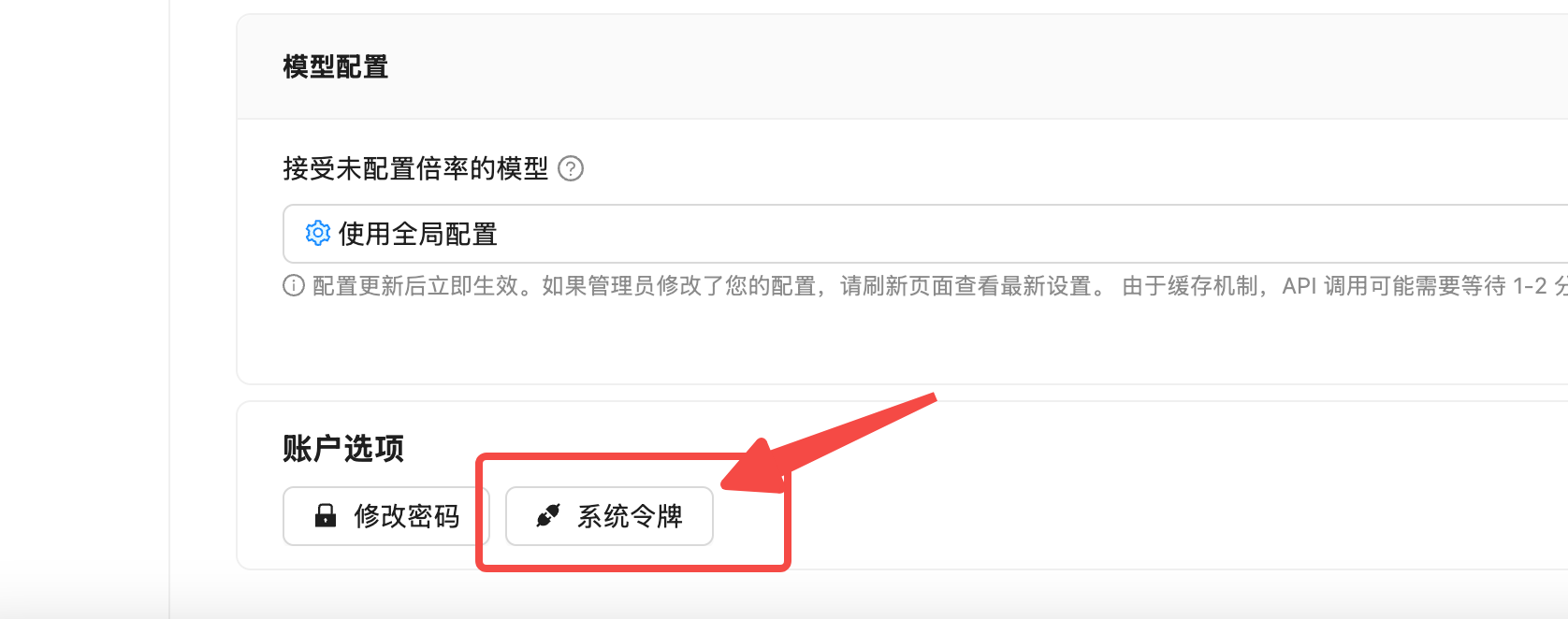
After logging in, visit the [Account Settings page](https://api2.laozhang.ai/account/profile) and click on "System Token".
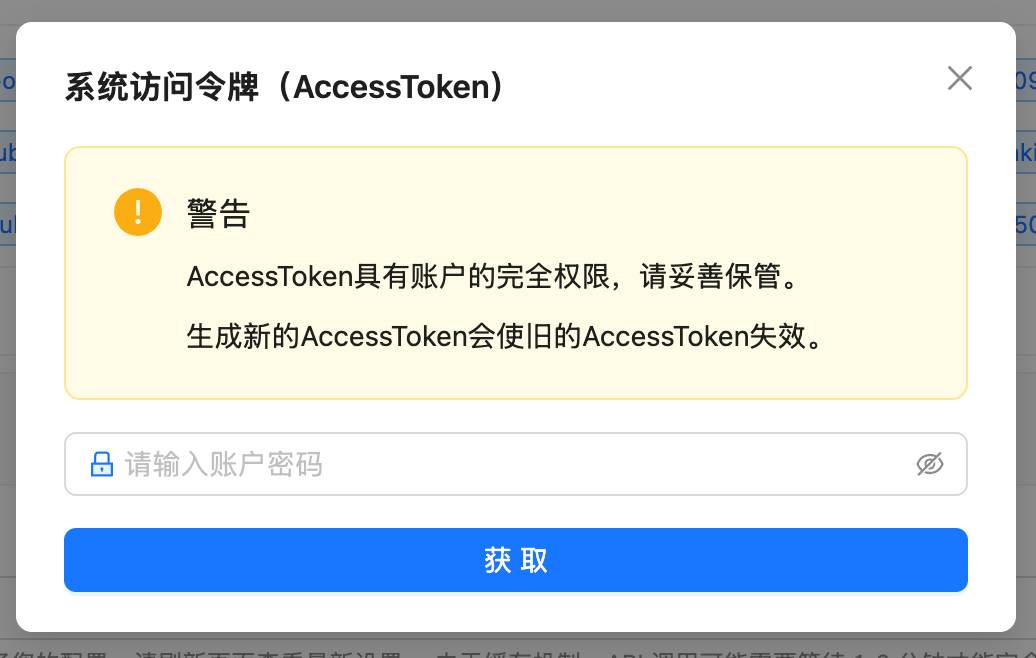
 Enter your account password in the popup dialog for identity verification.
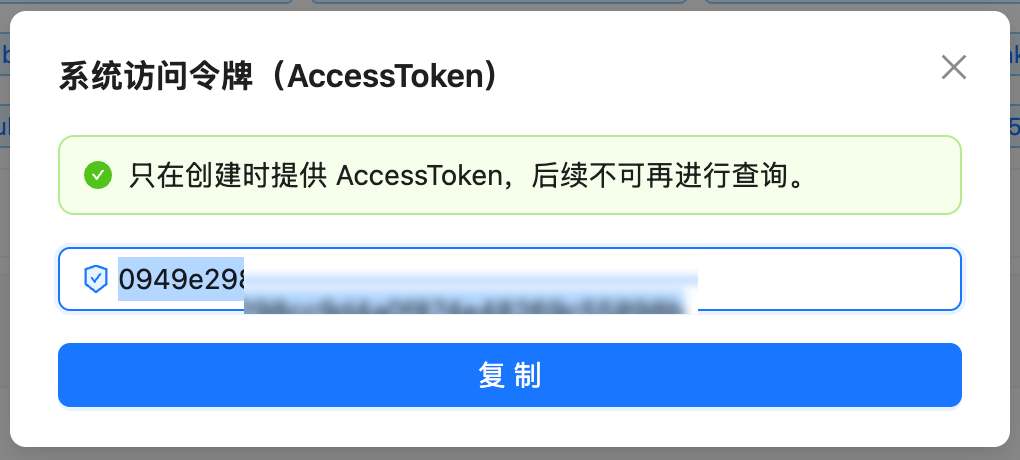
 After successful verification, the system will display your AccessToken. Copy and save it immediately.
 **Security Warning**:
* AccessToken has full account permissions, keep it safe
* Token is only displayed once when created, cannot be retrieved later
* Generating a new Token will immediately invalidate the old one
* Never hardcode in source code or commit to public repositories
## API Reference
### Endpoint Information
| Item | Description |
| --------------- | ---------------------------------------- |
| Endpoint URL | `https://api2.laozhang.ai/api/user/self` |
| Method | GET |
| Authentication | Authorization Header |
| Response Format | JSON (gzip compressed) |
### Request Headers
| Header Name | Required | Description |
| ------------- | -------- | ------------------------------------------- |
| Authorization | Yes | System token, directly use the Token string |
| Accept | No | Recommended: `application/json` |
| Content-Type | No | Recommended: `application/json` |
### Response Fields
Successful response example:
```json theme={null}
{
"success": true,
"message": null,
"data": {
"username": "your_username",
"display_name": "Your Name",
"quota": 24997909,
"used_quota": 10027091,
"request_count": 339,
"group": "svip"
}
}
```
Core fields:
| Field Name | Type | Description |
| -------------------- | ------- | ------------------------------------------------------------- |
| success | Boolean | Whether the request was successful |
| message | String | Error message (null on success) |
| data.quota | Integer | Remaining quota (current available balance) |
| data.used\_quota | Integer | Used quota |
| data.request\_count | Integer | Total request count |
| data.group | String | User group |
| data.ModelFixedPrice | Array | Model pricing list; can be ignored when only checking balance |
| data.access\_token | String | Sensitive field; do not write it to normal logs if returned |
The response may include additional fields depending on account state. Depend only on the fields your integration needs, such as `quota`, `used_quota`, `request_count`, and `group`, and allow unknown fields. If `access_token` or another sensitive field is returned, do not include it in regular logs or alert messages.
### Quota And Amount Display
`quota` and `used_quota` are returned in quota units. For balance display, use `500K` quota as approximately `1 USD`:
* Remaining USD balance: `quota ÷ 500K`
* Used USD amount: `used_quota ÷ 500K`
* Historical total amount: `(quota + used_quota) ÷ 500K`
For example, if the API returns `quota: 24997909`, the remaining balance is `24997909 ÷ 500K = 49.995818`, approximately `50.00 USD`.
For alerts, store both the raw `quota` value and the converted USD amount. Actual model charges still depend on current model pricing, account group, usage logs, and console display.
## Code Examples
**Basic Request** (must add `--compressed` option):
```bash theme={null}
curl --compressed 'https://api2.laozhang.ai/api/user/self' \
-H 'Accept: application/json' \
-H 'Authorization: YOUR_ACCESS_TOKEN' \
-H 'Content-Type: application/json'
```
**Important**: You must add `--compressed` option because the API returns gzip compressed content, otherwise you'll get garbled output.
Using environment variables and jq to extract core info:
```bash theme={null}
export LAOZHANG_TOKEN='YOUR_ACCESS_TOKEN'
curl --compressed -s 'https://api2.laozhang.ai/api/user/self' \
-H 'Accept: application/json' \
-H "Authorization: $LAOZHANG_TOKEN" \
-H 'Content-Type: application/json' | \
jq '.data | {
quota,
remaining_usd: (.quota / (50 * 10000)),
used_quota,
used_usd: (.used_quota / (50 * 10000)),
request_count
}'
```
`-s` option hides progress bar, `--compressed` auto-decompresses gzip response.
```python theme={null}
import requests
# Configuration
url = "https://api2.laozhang.ai/api/user/self"
access_token = "YOUR_ACCESS_TOKEN" # Replace with your token
# Headers
headers = {
'Accept': 'application/json',
'Authorization': access_token,
'Content-Type': 'application/json'
}
# Send request
response = requests.get(url, headers=headers, timeout=10)
# Check response
if response.status_code == 200:
data = response.json()
user_data = data['data']
# Extract core info
quota = user_data['quota']
used_quota = user_data['used_quota']
request_count = user_data['request_count']
quota_unit_per_usd = 50 * 10000
# Print results
print(f"Remaining quota: {quota:,}")
print(f"Remaining balance: {quota / quota_unit_per_usd:.2f} USD")
print(f"Used quota: {used_quota:,}")
print(f"Used amount: {used_quota / quota_unit_per_usd:.2f} USD")
print(f"Request count: {request_count:,}")
else:
print(f"Request failed: HTTP {response.status_code}")
print(response.text)
```
Python's `requests` library automatically handles gzip decompression, no extra configuration needed.
## Error Handling
### HTTP 401 - Authentication Failed
```json theme={null}
{
"success": false,
"message": "Unauthorized"
}
```
**Cause**: Authorization token is invalid or expired
**Solution**: Check and update your system token
### HTTP 403 - Permission Denied
```json theme={null}
{
"success": false,
"message": "Forbidden"
}
```
**Cause**: Current token doesn't have permission to access this endpoint
**Solution**: Contact admin to verify permission settings
## FAQ
The `quota` field represents your current remaining balance (available quota). If `quota` is 0 or near 0, your account balance is insufficient and needs to be updated.
Use `500K` quota as approximately `1 USD` for balance display. The formula is: remaining USD balance = `quota ÷ 500K`; used USD amount = `used_quota ÷ 500K`.
For example, `quota: 24997909` means `24997909 ÷ 500K = 49.995818`, approximately `50.00 USD`. For production alerts, store both the raw `quota` value and the converted USD amount; actual model charges still follow the console pricing page, usage logs, and current account rules.
**Cause**: API returns gzip compressed content, curl doesn't auto-decompress.
**Solution**: Add `--compressed` option:
```bash theme={null}
# Correct
curl --compressed 'https://api2.laozhang.ai/api/user/self' -H 'Authorization: YOUR_TOKEN'
# Wrong (will be garbled)
curl 'https://api2.laozhang.ai/api/user/self' -H 'Authorization: YOUR_TOKEN'
```
This usually happens because curl didn't decompress the gzip content. Add `--compressed` option to fix it.
This field returns pricing information for various AI models. If you only care about balance info, you can ignore this field.
You can write a scheduled script to periodically query the balance, and send alert notifications (email, Slack, etc.) when `quota` falls below a threshold.
## Related Questions
* For the full endpoint reference and integration examples, see [Balance Query API](/en/api-capabilities/balance-query)
* If requests fail even with remaining quota, see [Insufficient Balance](/en/faq/balance-insufficient)
* To inspect per-request model, token, and billing records, see [Usage Logs](/en/faq/call-logs)
* To create or rotate an API key, see [API Key Management](/en/faq/token-management)
## Notes
* Use environment variables for Token
* Don't commit to public repos
* Rotate Token regularly
* Set reasonable timeout (10s recommended)
* Avoid too frequent queries
* Recommended interval ≥ 1 minute
* Handle network errors and timeouts
* Handle authentication failures
* Log errors for troubleshooting
* API returns gzip compressed content
* curl must add `--compressed`
* requests library handles automatically
**Security Warning**:
* AccessToken has full account permissions, keep it safe
* Token is only displayed once when created, cannot be retrieved later
* Generating a new Token will immediately invalidate the old one
* Never hardcode in source code or commit to public repositories
## API Reference
### Endpoint Information
| Item | Description |
| --------------- | ---------------------------------------- |
| Endpoint URL | `https://api2.laozhang.ai/api/user/self` |
| Method | GET |
| Authentication | Authorization Header |
| Response Format | JSON (gzip compressed) |
### Request Headers
| Header Name | Required | Description |
| ------------- | -------- | ------------------------------------------- |
| Authorization | Yes | System token, directly use the Token string |
| Accept | No | Recommended: `application/json` |
| Content-Type | No | Recommended: `application/json` |
### Response Fields
Successful response example:
```json theme={null}
{
"success": true,
"message": null,
"data": {
"username": "your_username",
"display_name": "Your Name",
"quota": 24997909,
"used_quota": 10027091,
"request_count": 339,
"group": "svip"
}
}
```
Core fields:
| Field Name | Type | Description |
| -------------------- | ------- | ------------------------------------------------------------- |
| success | Boolean | Whether the request was successful |
| message | String | Error message (null on success) |
| data.quota | Integer | Remaining quota (current available balance) |
| data.used\_quota | Integer | Used quota |
| data.request\_count | Integer | Total request count |
| data.group | String | User group |
| data.ModelFixedPrice | Array | Model pricing list; can be ignored when only checking balance |
| data.access\_token | String | Sensitive field; do not write it to normal logs if returned |
The response may include additional fields depending on account state. Depend only on the fields your integration needs, such as `quota`, `used_quota`, `request_count`, and `group`, and allow unknown fields. If `access_token` or another sensitive field is returned, do not include it in regular logs or alert messages.
### Quota And Amount Display
`quota` and `used_quota` are returned in quota units. For balance display, use `500K` quota as approximately `1 USD`:
* Remaining USD balance: `quota ÷ 500K`
* Used USD amount: `used_quota ÷ 500K`
* Historical total amount: `(quota + used_quota) ÷ 500K`
For example, if the API returns `quota: 24997909`, the remaining balance is `24997909 ÷ 500K = 49.995818`, approximately `50.00 USD`.
For alerts, store both the raw `quota` value and the converted USD amount. Actual model charges still depend on current model pricing, account group, usage logs, and console display.
## Code Examples
**Basic Request** (must add `--compressed` option):
```bash theme={null}
curl --compressed 'https://api2.laozhang.ai/api/user/self' \
-H 'Accept: application/json' \
-H 'Authorization: YOUR_ACCESS_TOKEN' \
-H 'Content-Type: application/json'
```
**Important**: You must add `--compressed` option because the API returns gzip compressed content, otherwise you'll get garbled output.
Using environment variables and jq to extract core info:
```bash theme={null}
export LAOZHANG_TOKEN='YOUR_ACCESS_TOKEN'
curl --compressed -s 'https://api2.laozhang.ai/api/user/self' \
-H 'Accept: application/json' \
-H "Authorization: $LAOZHANG_TOKEN" \
-H 'Content-Type: application/json' | \
jq '.data | {
quota,
remaining_usd: (.quota / (50 * 10000)),
used_quota,
used_usd: (.used_quota / (50 * 10000)),
request_count
}'
```
`-s` option hides progress bar, `--compressed` auto-decompresses gzip response.
```python theme={null}
import requests
# Configuration
url = "https://api2.laozhang.ai/api/user/self"
access_token = "YOUR_ACCESS_TOKEN" # Replace with your token
# Headers
headers = {
'Accept': 'application/json',
'Authorization': access_token,
'Content-Type': 'application/json'
}
# Send request
response = requests.get(url, headers=headers, timeout=10)
# Check response
if response.status_code == 200:
data = response.json()
user_data = data['data']
# Extract core info
quota = user_data['quota']
used_quota = user_data['used_quota']
request_count = user_data['request_count']
quota_unit_per_usd = 50 * 10000
# Print results
print(f"Remaining quota: {quota:,}")
print(f"Remaining balance: {quota / quota_unit_per_usd:.2f} USD")
print(f"Used quota: {used_quota:,}")
print(f"Used amount: {used_quota / quota_unit_per_usd:.2f} USD")
print(f"Request count: {request_count:,}")
else:
print(f"Request failed: HTTP {response.status_code}")
print(response.text)
```
Python's `requests` library automatically handles gzip decompression, no extra configuration needed.
## Error Handling
### HTTP 401 - Authentication Failed
```json theme={null}
{
"success": false,
"message": "Unauthorized"
}
```
**Cause**: Authorization token is invalid or expired
**Solution**: Check and update your system token
### HTTP 403 - Permission Denied
```json theme={null}
{
"success": false,
"message": "Forbidden"
}
```
**Cause**: Current token doesn't have permission to access this endpoint
**Solution**: Contact admin to verify permission settings
## FAQ
The `quota` field represents your current remaining balance (available quota). If `quota` is 0 or near 0, your account balance is insufficient and needs to be updated.
Use `500K` quota as approximately `1 USD` for balance display. The formula is: remaining USD balance = `quota ÷ 500K`; used USD amount = `used_quota ÷ 500K`.
For example, `quota: 24997909` means `24997909 ÷ 500K = 49.995818`, approximately `50.00 USD`. For production alerts, store both the raw `quota` value and the converted USD amount; actual model charges still follow the console pricing page, usage logs, and current account rules.
**Cause**: API returns gzip compressed content, curl doesn't auto-decompress.
**Solution**: Add `--compressed` option:
```bash theme={null}
# Correct
curl --compressed 'https://api2.laozhang.ai/api/user/self' -H 'Authorization: YOUR_TOKEN'
# Wrong (will be garbled)
curl 'https://api2.laozhang.ai/api/user/self' -H 'Authorization: YOUR_TOKEN'
```
This usually happens because curl didn't decompress the gzip content. Add `--compressed` option to fix it.
This field returns pricing information for various AI models. If you only care about balance info, you can ignore this field.
You can write a scheduled script to periodically query the balance, and send alert notifications (email, Slack, etc.) when `quota` falls below a threshold.
## Related Questions
* For the full endpoint reference and integration examples, see [Balance Query API](/en/api-capabilities/balance-query)
* If requests fail even with remaining quota, see [Insufficient Balance](/en/faq/balance-insufficient)
* To inspect per-request model, token, and billing records, see [Usage Logs](/en/faq/call-logs)
* To create or rotate an API key, see [API Key Management](/en/faq/token-management)
## Notes
* Use environment variables for Token
* Don't commit to public repos
* Rotate Token regularly
* Set reasonable timeout (10s recommended)
* Avoid too frequent queries
* Recommended interval ≥ 1 minute
* Handle network errors and timeouts
* Handle authentication failures
* Log errors for troubleshooting
* API returns gzip compressed content
* curl must add `--compressed`
* requests library handles automatically