> ## Documentation Index
> Fetch the complete documentation index at: https://docs.laozhang.ai/llms.txt
> Use this file to discover all available pages before exploring further.
# Token Management
> API Key creation, management, security best practices
## Token Overview
API Token (API Key) is your credential for calling Laozhang API. Like a password, it's used to verify your identity and record usage.
**Security Alert**
API Token is like your account password. If leaked, others can use your quota. Please keep it safe!
## Create Token
### Standard Token
Visit [Laozhang API Console](https://api.laozhang.ai) and log in
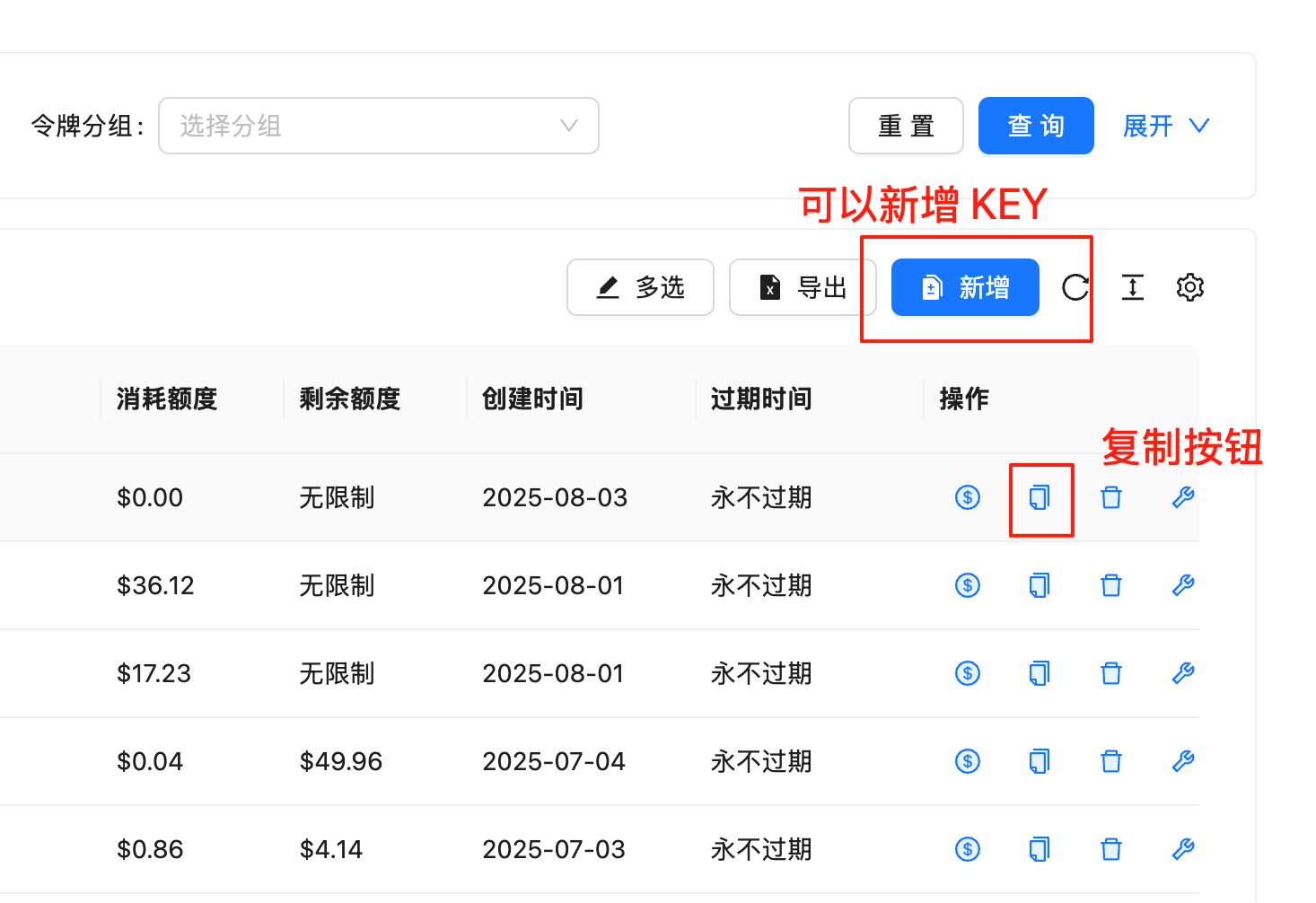 Click "API Keys" in the left menu
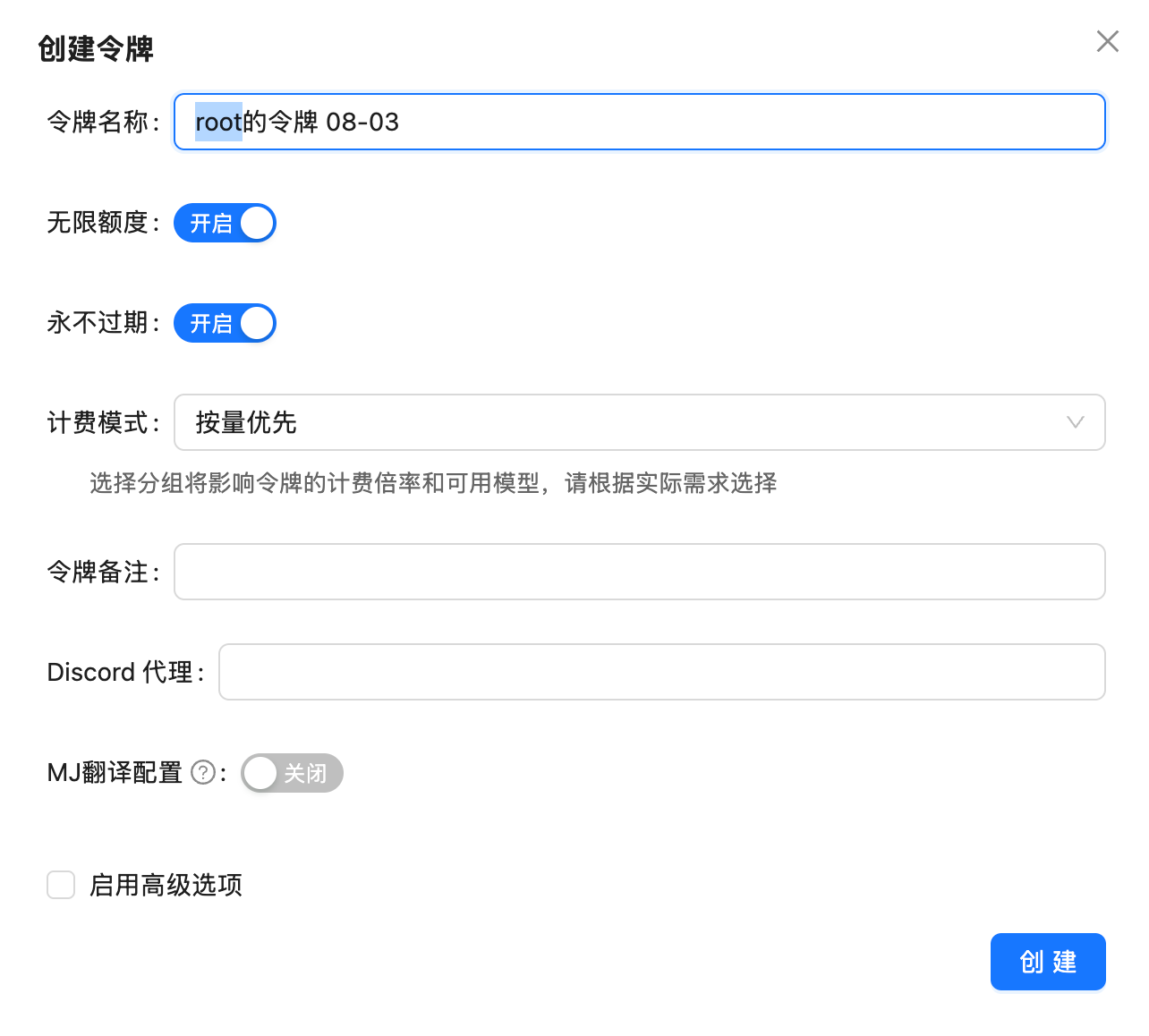 Click "Create New Token" button
Fill in token information:
* **Token Name**: For identifying token purpose (e.g., "Production Environment", "Testing")
* **Billing Method**: Choose billing method
* Usage-based billing (pay per token)
* Pay-per-use (pay per request)
* **Permissions**: Set API permissions (optional)
* **Expiration Time**: Set token validity period (optional)
Click "Create" button and **immediately save** the generated Token
**Important**: Token only displays once. If lost, need to recreate.
### Special Purpose Tokens
**Suitable For:**
* High-frequency API calls
* Chat applications
* Text processing
* Code generation
**Billing Method:**
* Billed by tokens consumed
* More economical for high usage
* Support all text models
**How to Create:**
Select "Usage-based billing" when creating token
**Suitable For:**
* Image generation
* Video generation
* Occasional use
* Predictable costs
**Billing Method:**
* Fixed price per successful request
* No need to worry about token counts
* Clearer pricing
**How to Create:**
Select "Pay-per-use" when creating token
**Suitable For:**
* Monitoring and statistics
* Audit logs
* Non-sensitive operations
**Permissions:**
* View usage data
* Query model list
* View account information
* Cannot call AI models
**How to Create:**
Select "Read-only" permission when creating token
**Suitable For:**
* Demonstration and testing
* Third-party integration
* Short-term projects
**Features:**
* Set expiration time
* Auto revoke after expiration
* Enhanced security
**How to Create:**
Set "Expiration Time" when creating token
## Manage Tokens
### View Token List
View all your tokens in console:
| Token Name | Created | Last Used | Status | Operations |
| ---------- | ---------- | ------------- | ----------- | -------------- |
| Production | 2024-01-01 | 2 minutes ago | 🟢 Active | Edit \| Revoke |
| Testing | 2024-01-05 | Yesterday | 🟢 Active | Edit \| Revoke |
| Demo | 2024-01-10 | Never | 🟡 Not Used | Edit \| Revoke |
| Old Token | 2023-12-01 | Last month | 🔴 Revoked | Delete |
### Edit Token
Can modify token configuration:
Click "Edit" button next to token
Modifiable items:
* Token name
* Permissions
* Expiration time
* Usage limits
Click "Save" button
Cannot modify the token value itself. If need new Token value, must recreate.
### Revoke Token
When need to invalidate a Token:
Find token to revoke in token list
Click "Revoke" button
Confirm revocation in popup dialog
After revocation, all applications using this Token will fail. Ensure alternatives are prepared.
### Rotate Tokens
Regularly rotating Tokens enhances security:
Create new token as replacement
Update all applications to use new Token
Confirm new Token works properly
Revoke old Token
**Recommended Rotation Frequency**
* Production environment: Every 3 months
* Development environment: Every 6 months
* Temporary Token: Set expiration time
## Security Best Practices
### 1. Token Storage
```python Python theme={null}
# ❌ Bad Practice: Hardcode in code
api_key = "sk-rHcKJkgO4y3e5CTdDd1a..."
# ✅ Good Practice: Use environment variables
import os
api_key = os.getenv("LAOZHANG_API_KEY")
# ✅ Good Practice: Use configuration files
import json
with open('config.json') as f:
config = json.load(f)
api_key = config['api_key']
```
```javascript JavaScript theme={null}
// ❌ Bad Practice: Hardcode in code
const apiKey = "sk-rHcKJkgO4y3e5CTdDd1a...";
// ✅ Good Practice: Use environment variables
const apiKey = process.env.LAOZHANG_API_KEY;
// ✅ Good Practice: Use dotenv
require('dotenv').config();
const apiKey = process.env.LAOZHANG_API_KEY;
```
```bash Bash theme={null}
# Set environment variable
export LAOZHANG_API_KEY="your_api_key"
# Or add to .bashrc/.zshrc
echo 'export LAOZHANG_API_KEY="your_api_key"' >> ~/.bashrc
```
### 2. Version Control
**Never Commit API Key**
Never commit API Keys to version control systems (Git, SVN, etc.)
```bash theme={null}
# .gitignore file
.env
config.json
secrets/
*.key
```
### 3. Permission Control
Set minimum necessary permissions:
| Scenario | Recommended Permissions |
| --------------------------- | --------------------------------------- |
| **Production Environment** | Full permissions, strict access control |
| **Development Environment** | Full permissions, local use only |
| **Testing Environment** | Limited permissions, low quotas |
| **Demo Applications** | Read-only or limited calls |
| **Third-party Integration** | Minimum necessary permissions |
### 4. IP Whitelist
Limit Token to specific IP addresses:
Edit Token settings and enable "IP Whitelist"
Add IPs allowed to use this Token:
* Single IP: `192.168.1.100`
* IP Range: `192.168.1.0/24`
* Multiple IPs: Add multiple rules
Test from allowed IPs to ensure normal access
### 5. Usage Monitoring
Regularly check Token usage:
```python theme={null}
import requests
# Query Token usage
response = requests.get(
"https://api.laozhang.ai/v1/usage",
headers={"Authorization": "Bearer your_api_key"}
)
usage = response.json()
print(f"Today's usage: {usage['today_usage']}")
print(f"This month's usage: {usage['month_usage']}")
# Set alert threshold
if usage['today_usage'] > DAILY_LIMIT:
send_alert("Usage abnormal!")
```
## Token Leakage Handling
### If Token Leaked
Immediately revoke leaked Token in console
Check recent usage records for unusual activities
Click "Create New Token" button
Fill in token information:
* **Token Name**: For identifying token purpose (e.g., "Production Environment", "Testing")
* **Billing Method**: Choose billing method
* Usage-based billing (pay per token)
* Pay-per-use (pay per request)
* **Permissions**: Set API permissions (optional)
* **Expiration Time**: Set token validity period (optional)
Click "Create" button and **immediately save** the generated Token
**Important**: Token only displays once. If lost, need to recreate.
### Special Purpose Tokens
**Suitable For:**
* High-frequency API calls
* Chat applications
* Text processing
* Code generation
**Billing Method:**
* Billed by tokens consumed
* More economical for high usage
* Support all text models
**How to Create:**
Select "Usage-based billing" when creating token
**Suitable For:**
* Image generation
* Video generation
* Occasional use
* Predictable costs
**Billing Method:**
* Fixed price per successful request
* No need to worry about token counts
* Clearer pricing
**How to Create:**
Select "Pay-per-use" when creating token
**Suitable For:**
* Monitoring and statistics
* Audit logs
* Non-sensitive operations
**Permissions:**
* View usage data
* Query model list
* View account information
* Cannot call AI models
**How to Create:**
Select "Read-only" permission when creating token
**Suitable For:**
* Demonstration and testing
* Third-party integration
* Short-term projects
**Features:**
* Set expiration time
* Auto revoke after expiration
* Enhanced security
**How to Create:**
Set "Expiration Time" when creating token
## Manage Tokens
### View Token List
View all your tokens in console:
| Token Name | Created | Last Used | Status | Operations |
| ---------- | ---------- | ------------- | ----------- | -------------- |
| Production | 2024-01-01 | 2 minutes ago | 🟢 Active | Edit \| Revoke |
| Testing | 2024-01-05 | Yesterday | 🟢 Active | Edit \| Revoke |
| Demo | 2024-01-10 | Never | 🟡 Not Used | Edit \| Revoke |
| Old Token | 2023-12-01 | Last month | 🔴 Revoked | Delete |
### Edit Token
Can modify token configuration:
Click "Edit" button next to token
Modifiable items:
* Token name
* Permissions
* Expiration time
* Usage limits
Click "Save" button
Cannot modify the token value itself. If need new Token value, must recreate.
### Revoke Token
When need to invalidate a Token:
Find token to revoke in token list
Click "Revoke" button
Confirm revocation in popup dialog
After revocation, all applications using this Token will fail. Ensure alternatives are prepared.
### Rotate Tokens
Regularly rotating Tokens enhances security:
Create new token as replacement
Update all applications to use new Token
Confirm new Token works properly
Revoke old Token
**Recommended Rotation Frequency**
* Production environment: Every 3 months
* Development environment: Every 6 months
* Temporary Token: Set expiration time
## Security Best Practices
### 1. Token Storage
```python Python theme={null}
# ❌ Bad Practice: Hardcode in code
api_key = "sk-rHcKJkgO4y3e5CTdDd1a..."
# ✅ Good Practice: Use environment variables
import os
api_key = os.getenv("LAOZHANG_API_KEY")
# ✅ Good Practice: Use configuration files
import json
with open('config.json') as f:
config = json.load(f)
api_key = config['api_key']
```
```javascript JavaScript theme={null}
// ❌ Bad Practice: Hardcode in code
const apiKey = "sk-rHcKJkgO4y3e5CTdDd1a...";
// ✅ Good Practice: Use environment variables
const apiKey = process.env.LAOZHANG_API_KEY;
// ✅ Good Practice: Use dotenv
require('dotenv').config();
const apiKey = process.env.LAOZHANG_API_KEY;
```
```bash Bash theme={null}
# Set environment variable
export LAOZHANG_API_KEY="your_api_key"
# Or add to .bashrc/.zshrc
echo 'export LAOZHANG_API_KEY="your_api_key"' >> ~/.bashrc
```
### 2. Version Control
**Never Commit API Key**
Never commit API Keys to version control systems (Git, SVN, etc.)
```bash theme={null}
# .gitignore file
.env
config.json
secrets/
*.key
```
### 3. Permission Control
Set minimum necessary permissions:
| Scenario | Recommended Permissions |
| --------------------------- | --------------------------------------- |
| **Production Environment** | Full permissions, strict access control |
| **Development Environment** | Full permissions, local use only |
| **Testing Environment** | Limited permissions, low quotas |
| **Demo Applications** | Read-only or limited calls |
| **Third-party Integration** | Minimum necessary permissions |
### 4. IP Whitelist
Limit Token to specific IP addresses:
Edit Token settings and enable "IP Whitelist"
Add IPs allowed to use this Token:
* Single IP: `192.168.1.100`
* IP Range: `192.168.1.0/24`
* Multiple IPs: Add multiple rules
Test from allowed IPs to ensure normal access
### 5. Usage Monitoring
Regularly check Token usage:
```python theme={null}
import requests
# Query Token usage
response = requests.get(
"https://api.laozhang.ai/v1/usage",
headers={"Authorization": "Bearer your_api_key"}
)
usage = response.json()
print(f"Today's usage: {usage['today_usage']}")
print(f"This month's usage: {usage['month_usage']}")
# Set alert threshold
if usage['today_usage'] > DAILY_LIMIT:
send_alert("Usage abnormal!")
```
## Token Leakage Handling
### If Token Leaked
Immediately revoke leaked Token in console
Check recent usage records for unusual activities
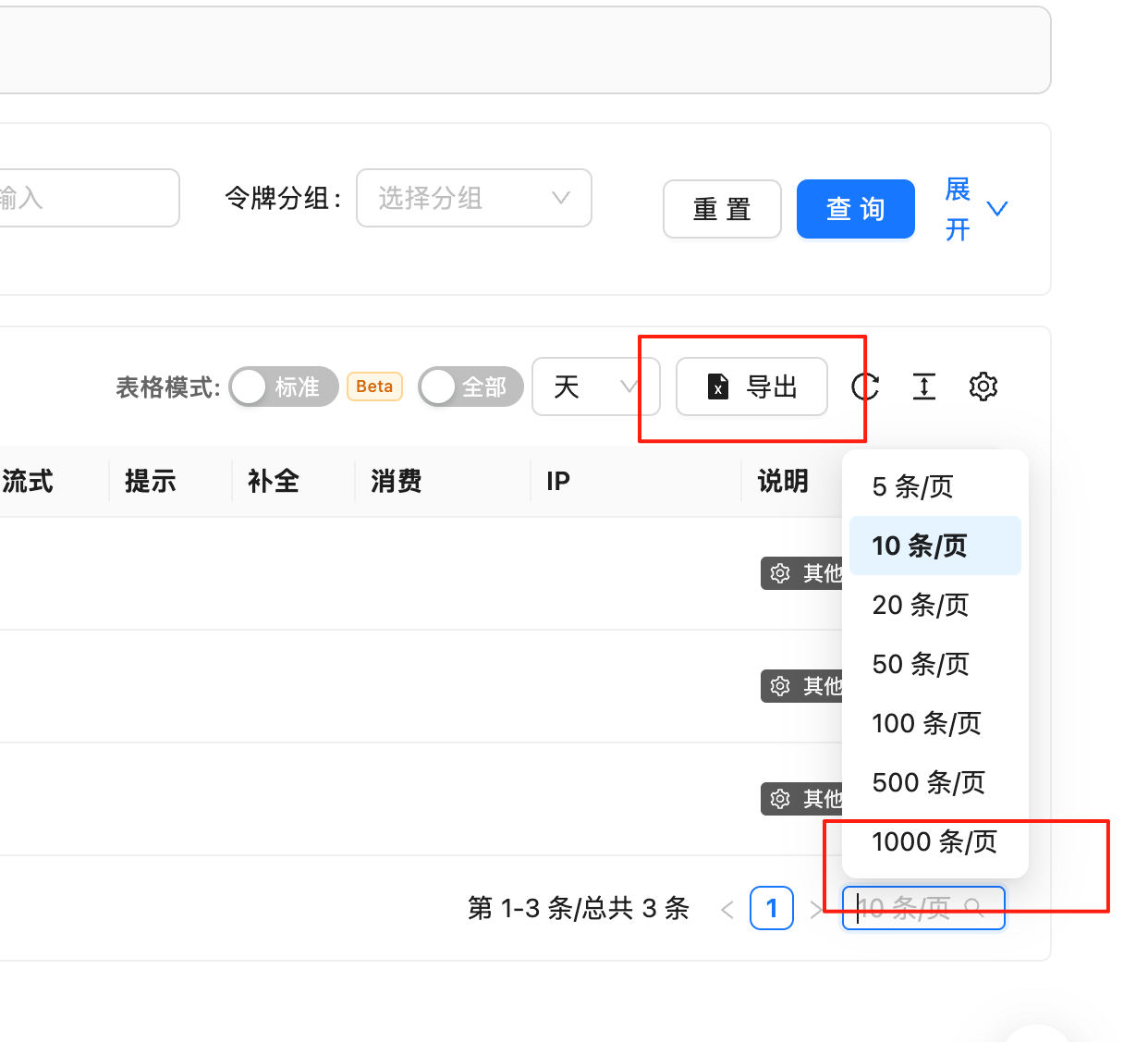 Evaluate potential losses:
* Unusual API calls?
* Abnormal cost increases?
* Sensitive data leaks?
Create new replacement Token
Update all applications to use new Token
If unusual usage found, contact support:
* Email: [hi@laozhang.ai](mailto:hi@laozhang.ai)
* Request balance freeze or refund
* Report security incident
### Prevent Leakage
**Prevention Measures**
1. ✅ Use environment variables
2. ✅ Add keys to .gitignore
3. ✅ Do not share keys in chat/email
4. ✅ Use different keys for different environments
5. ✅ Enable IP whitelist
6. ✅ Regularly rotate keys
7. ✅ Monitor usage logs
8. ✅ Set usage limits
## Programmatic Management
### Create Token via API
```python theme={null}
import requests
# Create new Token
response = requests.post(
"https://api.laozhang.ai/v1/api-keys",
headers={
"Authorization": "Bearer your_admin_token",
"Content-Type": "application/json"
},
json={
"name": "New Production Token",
"billing_method": "usage_based",
"permissions": ["chat", "completion"],
"expires_at": "2025-12-31T23:59:59Z"
}
)
new_token = response.json()
print(f"New Token: {new_token['key']}")
```
### List Tokens
```python theme={null}
# Get all Tokens
response = requests.get(
"https://api.laozhang.ai/v1/api-keys",
headers={"Authorization": "Bearer your_admin_token"}
)
tokens = response.json()
for token in tokens['data']:
print(f"Name: {token['name']}, Status: {token['status']}")
```
### Revoke Token
```python theme={null}
# Revoke specified Token
token_id = "key_123456"
response = requests.delete(
f"https://api.laozhang.ai/v1/api-keys/{token_id}",
headers={"Authorization": "Bearer your_admin_token"}
)
if response.status_code == 200:
print("Token successfully revoked")
```
## Common Issues
**Possible Causes:**
1. **Token Incorrect**
* Check for extra spaces or newlines when copying
* Ensure complete Token copied
* Check for character confusion (0/O, 1/l, etc.)
2. **Token Revoked**
* Check Token status in console
* May have been manually revoked
* May have reached expiration time
3. **Token Expired**
* Check Token expiration time
* Recreate if expired
**Solutions:**
```python theme={null}
# Test Token validity
import requests
response = requests.get(
"https://api.laozhang.ai/v1/models",
headers={"Authorization": f"Bearer {api_key}"}
)
if response.status_code == 200:
print("Token valid")
else:
print(f"Token invalid: {response.json()}")
```
**Yes, can create multiple Tokens**
**Use Cases:**
* Different environments (development/testing/production)
* Different projects
* Different billing methods
* Different permission levels
**Limits:**
* Standard users: Up to 10 Tokens
* Professional users: Up to 50 Tokens
* Enterprise users: Unlimited
**Cannot directly change billing method**
**Solutions:**
1. Create new Token with desired billing method
2. Update applications to use new Token
3. Revoke old Token
**Note:**
* Usage records remain independent
* Balance is shared (same account)
**Set Usage Limits:**
Click "Edit" next to Token
Configure:
* Daily limit (calls or amount)
* Monthly limit
* Single request maximum tokens
* Allowed models
Click "Save" button
**Example:**
```json theme={null}
{
"daily_limit": {
"requests": 1000,
"amount": 10
},
"monthly_limit": {
"amount": 300
},
"max_tokens_per_request": 4000,
"allowed_models": ["gpt-3.5-turbo", "gpt-4"]
}
```
**Cannot Retrieve Lost Token**
Token only displays once when created, cannot be retrieved later for security.
**Solutions:**
1. Create new Token as replacement
2. Update all applications to use new Token
3. Revoke old Token (optional)
**Prevention:**
* Immediately save Token after creation
* Use password manager to store
* Save to secure configuration management system
## Best Practices
### 1. Environment Isolation
Use different Tokens for different environments:
```
Development Environment
├── Token: dev_token
├── Budget: $10/month
└── Models: gpt-3.5-turbo only
Testing Environment
├── Token: test_token
├── Budget: $50/month
└── Models: All models
Production Environment
├── Token: prod_token
├── Budget: $500/month
├── IP Whitelist: Server IPs only
└── Monitoring: Alert enabled
```
### 2. Token Naming
Use clear naming conventions:
```
[Environment]-[Project]-[Purpose]-[Date]
Examples:
- prod-webapp-api-2024-01
- dev-mobile-testing-2024-01
- test-integration-demo-2024-01
```
### 3. Regular Audits
Establish regular audit mechanisms:
```
Weekly:
- Check Token usage
- Review unusual activities
- Verify IP whitelist
Monthly:
- Review all Tokens necessity
- Revoke unused Tokens
- Update Token permissions
- Rotate high-risk Tokens
Quarterly:
- Comprehensive security audit
- Update security policies
- Staff security training
```
## Related Resources
* [Insufficient Balance](/en/faq/balance-insufficient) - Handle balance issues
* [Usage Logs](/en/faq/call-logs) - View API usage records
* [Data Security](/en/faq/data-security) - Understand data protection
* [API Reference](/en/api-reference/chat-completions) - View API documentation
Evaluate potential losses:
* Unusual API calls?
* Abnormal cost increases?
* Sensitive data leaks?
Create new replacement Token
Update all applications to use new Token
If unusual usage found, contact support:
* Email: [hi@laozhang.ai](mailto:hi@laozhang.ai)
* Request balance freeze or refund
* Report security incident
### Prevent Leakage
**Prevention Measures**
1. ✅ Use environment variables
2. ✅ Add keys to .gitignore
3. ✅ Do not share keys in chat/email
4. ✅ Use different keys for different environments
5. ✅ Enable IP whitelist
6. ✅ Regularly rotate keys
7. ✅ Monitor usage logs
8. ✅ Set usage limits
## Programmatic Management
### Create Token via API
```python theme={null}
import requests
# Create new Token
response = requests.post(
"https://api.laozhang.ai/v1/api-keys",
headers={
"Authorization": "Bearer your_admin_token",
"Content-Type": "application/json"
},
json={
"name": "New Production Token",
"billing_method": "usage_based",
"permissions": ["chat", "completion"],
"expires_at": "2025-12-31T23:59:59Z"
}
)
new_token = response.json()
print(f"New Token: {new_token['key']}")
```
### List Tokens
```python theme={null}
# Get all Tokens
response = requests.get(
"https://api.laozhang.ai/v1/api-keys",
headers={"Authorization": "Bearer your_admin_token"}
)
tokens = response.json()
for token in tokens['data']:
print(f"Name: {token['name']}, Status: {token['status']}")
```
### Revoke Token
```python theme={null}
# Revoke specified Token
token_id = "key_123456"
response = requests.delete(
f"https://api.laozhang.ai/v1/api-keys/{token_id}",
headers={"Authorization": "Bearer your_admin_token"}
)
if response.status_code == 200:
print("Token successfully revoked")
```
## Common Issues
**Possible Causes:**
1. **Token Incorrect**
* Check for extra spaces or newlines when copying
* Ensure complete Token copied
* Check for character confusion (0/O, 1/l, etc.)
2. **Token Revoked**
* Check Token status in console
* May have been manually revoked
* May have reached expiration time
3. **Token Expired**
* Check Token expiration time
* Recreate if expired
**Solutions:**
```python theme={null}
# Test Token validity
import requests
response = requests.get(
"https://api.laozhang.ai/v1/models",
headers={"Authorization": f"Bearer {api_key}"}
)
if response.status_code == 200:
print("Token valid")
else:
print(f"Token invalid: {response.json()}")
```
**Yes, can create multiple Tokens**
**Use Cases:**
* Different environments (development/testing/production)
* Different projects
* Different billing methods
* Different permission levels
**Limits:**
* Standard users: Up to 10 Tokens
* Professional users: Up to 50 Tokens
* Enterprise users: Unlimited
**Cannot directly change billing method**
**Solutions:**
1. Create new Token with desired billing method
2. Update applications to use new Token
3. Revoke old Token
**Note:**
* Usage records remain independent
* Balance is shared (same account)
**Set Usage Limits:**
Click "Edit" next to Token
Configure:
* Daily limit (calls or amount)
* Monthly limit
* Single request maximum tokens
* Allowed models
Click "Save" button
**Example:**
```json theme={null}
{
"daily_limit": {
"requests": 1000,
"amount": 10
},
"monthly_limit": {
"amount": 300
},
"max_tokens_per_request": 4000,
"allowed_models": ["gpt-3.5-turbo", "gpt-4"]
}
```
**Cannot Retrieve Lost Token**
Token only displays once when created, cannot be retrieved later for security.
**Solutions:**
1. Create new Token as replacement
2. Update all applications to use new Token
3. Revoke old Token (optional)
**Prevention:**
* Immediately save Token after creation
* Use password manager to store
* Save to secure configuration management system
## Best Practices
### 1. Environment Isolation
Use different Tokens for different environments:
```
Development Environment
├── Token: dev_token
├── Budget: $10/month
└── Models: gpt-3.5-turbo only
Testing Environment
├── Token: test_token
├── Budget: $50/month
└── Models: All models
Production Environment
├── Token: prod_token
├── Budget: $500/month
├── IP Whitelist: Server IPs only
└── Monitoring: Alert enabled
```
### 2. Token Naming
Use clear naming conventions:
```
[Environment]-[Project]-[Purpose]-[Date]
Examples:
- prod-webapp-api-2024-01
- dev-mobile-testing-2024-01
- test-integration-demo-2024-01
```
### 3. Regular Audits
Establish regular audit mechanisms:
```
Weekly:
- Check Token usage
- Review unusual activities
- Verify IP whitelist
Monthly:
- Review all Tokens necessity
- Revoke unused Tokens
- Update Token permissions
- Rotate high-risk Tokens
Quarterly:
- Comprehensive security audit
- Update security policies
- Staff security training
```
## Related Resources
* [Insufficient Balance](/en/faq/balance-insufficient) - Handle balance issues
* [Usage Logs](/en/faq/call-logs) - View API usage records
* [Data Security](/en/faq/data-security) - Understand data protection
* [API Reference](/en/api-reference/chat-completions) - View API documentation