> ## Documentation Index
> Fetch the complete documentation index at: https://docs.laozhang.ai/llms.txt
> Use this file to discover all available pages before exploring further.
# Cherry Studio AI Chat Client Configuration Guide
> Cherry Studio tutorial for configuring LaoZhang API to use GPT, Claude, Gemini and 200+ AI models
## Application Introduction
Cherry Studio is a powerful AI conversation client that supports multiple large language models. Through Laozhang API, you can use various mainstream AI models in Cherry Studio.
## Quick Integration
### 1. Get API Key
Visit [Laozhang API Console](https://api2.laozhang.ai) to get your API key.
### 2. Configuration Steps
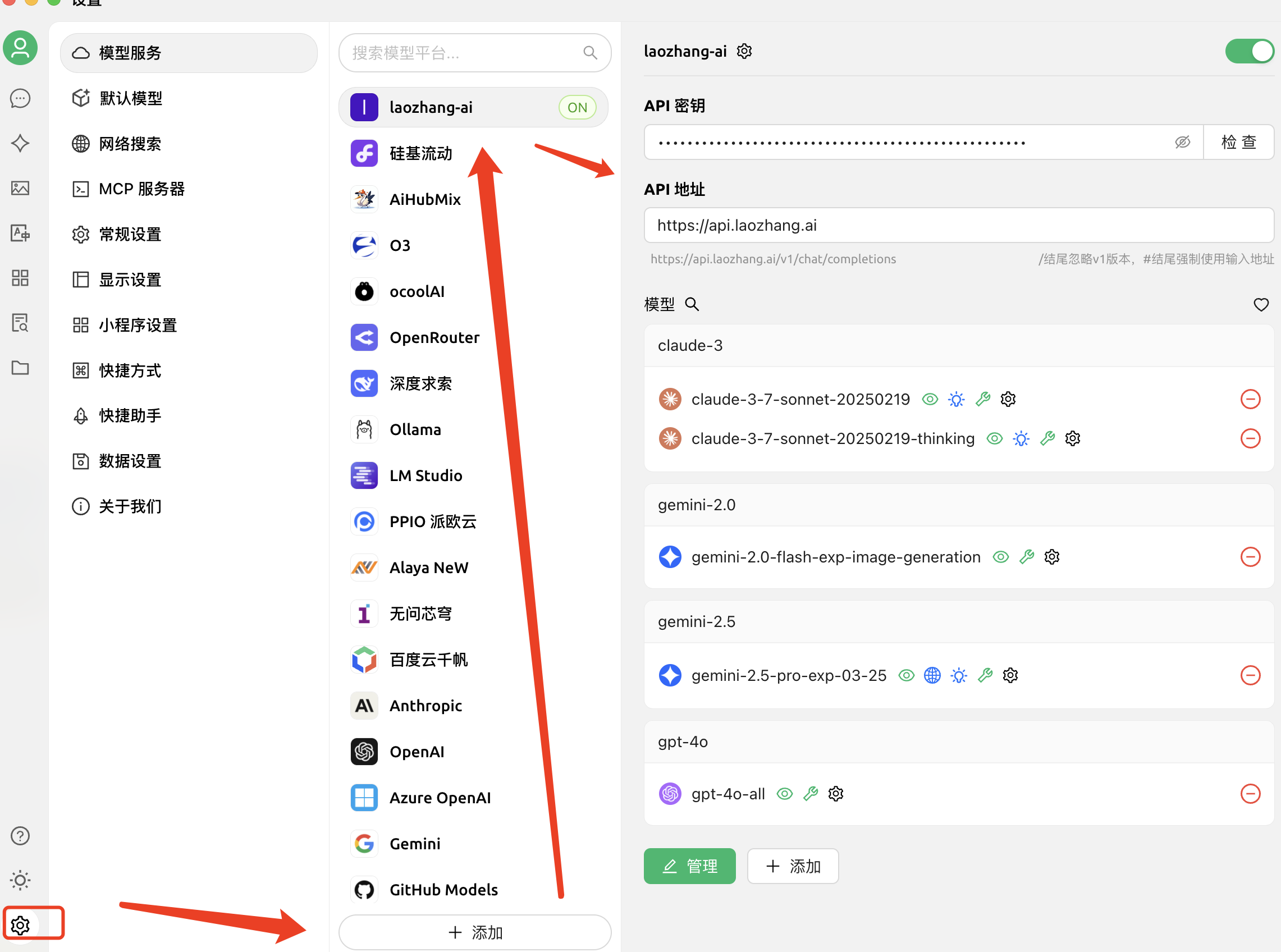 Following the diagram above, complete the following configuration steps:
1. Open Cherry Studio application
2. Click the settings icon on the left to enter settings page
3. Select "Model Services" option
4. Create a custom channel \[Laozhang API] in the model provider list
5. Fill in configuration information:
* **API Address**: `https://api2.laozhang.ai` (the one marked in red box also works)
* **API Key**: Enter the key you obtained from Laozhang API console
6. Click the "➕ Add" button at the bottom to save configuration
**Configuration Key Points**
* API address must use: `https://api2.laozhang.ai`
* API key can be obtained from the "API Keys" page in Laozhang API console
* It's recommended to test the connection first to ensure correct configuration
### 3. Add Models
After completing basic configuration, add required models following the model selection interface on the right side of the diagram:
1. Search for the required model in the model search box (e.g., `claude-opus-4-7`, `gpt-5.5`, or `gemini-3.1-pro-preview`)
2. Click the icon next to the model name to select or configure the model
3. Enable or disable different model variants as needed:
* Standard version (e.g., `gpt-5.5`, `claude-sonnet-4-6`)
* Thinking version (e.g., `claude-opus-4-7-thinking`)
4. Can be configured in detail through the button on the right
## Supported Models
According to the diagram, Cherry Studio supports the following mainstream models through Laozhang API:
### Latest Recommended Models
| Model Series | Model ID | Features |
| -------------------------- | ------------------------ | ---------------------------------------------------------------------- |
| **OpenAI GPT-5.5** | `gpt-5.5` | OpenAI's latest flagship for complex professional work |
| **Claude Opus 4.7** | `claude-opus-4-7` | Anthropic's most capable model for coding agents and complex reasoning |
| **Claude Sonnet 4.6** | `claude-sonnet-4-6` | Balanced performance and cost for daily development and long text |
| **Gemini 3.1 Pro Preview** | `gemini-3.1-pro-preview` | Google's latest Pro preview model for multimodal and long-context work |
| **Gemini 3 Flash Preview** | `gemini-3-flash-preview` | Fast response model for daily chat and batch tasks |
### Classic Stable Models
| Model Series | Model ID | Use Case |
| ------------------------ | -------------------------- | ------------------------------------------ |
| **Claude Opus Thinking** | `claude-opus-4-7-thinking` | Complex reasoning and deep analysis |
| **Gemini 2.5 Pro** | `gemini-2.5-pro` | Stable production, multimodal long context |
| **GPT-4.1 Mini** | `gpt-4.1-mini` | Lightweight and cost-sensitive tasks |
**Model Selection Recommendations**
* Multimodal tasks: Recommend Gemini 2.5 Pro
* Daily conversation: Recommend GPT-5.5 or Claude Sonnet 4.6
* Long text processing: Recommend Gemini 3.1 Pro Preview or Claude Opus 4.7
* Complex reasoning: Recommend Claude models with the `-thinking` suffix
## Advanced Features
### Image Support
If using models that support images (like GPT-4V):
1. Enable "Images" option in settings
2. Select models that support vision
3. Upload images in conversation
### Streaming Output
Cherry Studio supports streaming output by default, providing a better experience.
## Troubleshooting
### Connection Failed
* Check if API key is correct
* Confirm API address: `https://api2.laozhang.ai`
* Verify network connection status
### Model Unavailable
* Confirm account balance is sufficient
* Check if model is in subscription plan
* Try other models
## Usage Tips
1. **Choose Models Wisely**: Select appropriate models based on task requirements
2. **Regular Updates**: Pay attention to new model releases
3. **Monitor Usage**: Check usage through Laozhang API console
Need more help? Please visit [Laozhang API Official Website](https://api2.laozhang.ai).
Following the diagram above, complete the following configuration steps:
1. Open Cherry Studio application
2. Click the settings icon on the left to enter settings page
3. Select "Model Services" option
4. Create a custom channel \[Laozhang API] in the model provider list
5. Fill in configuration information:
* **API Address**: `https://api2.laozhang.ai` (the one marked in red box also works)
* **API Key**: Enter the key you obtained from Laozhang API console
6. Click the "➕ Add" button at the bottom to save configuration
**Configuration Key Points**
* API address must use: `https://api2.laozhang.ai`
* API key can be obtained from the "API Keys" page in Laozhang API console
* It's recommended to test the connection first to ensure correct configuration
### 3. Add Models
After completing basic configuration, add required models following the model selection interface on the right side of the diagram:
1. Search for the required model in the model search box (e.g., `claude-opus-4-7`, `gpt-5.5`, or `gemini-3.1-pro-preview`)
2. Click the icon next to the model name to select or configure the model
3. Enable or disable different model variants as needed:
* Standard version (e.g., `gpt-5.5`, `claude-sonnet-4-6`)
* Thinking version (e.g., `claude-opus-4-7-thinking`)
4. Can be configured in detail through the button on the right
## Supported Models
According to the diagram, Cherry Studio supports the following mainstream models through Laozhang API:
### Latest Recommended Models
| Model Series | Model ID | Features |
| -------------------------- | ------------------------ | ---------------------------------------------------------------------- |
| **OpenAI GPT-5.5** | `gpt-5.5` | OpenAI's latest flagship for complex professional work |
| **Claude Opus 4.7** | `claude-opus-4-7` | Anthropic's most capable model for coding agents and complex reasoning |
| **Claude Sonnet 4.6** | `claude-sonnet-4-6` | Balanced performance and cost for daily development and long text |
| **Gemini 3.1 Pro Preview** | `gemini-3.1-pro-preview` | Google's latest Pro preview model for multimodal and long-context work |
| **Gemini 3 Flash Preview** | `gemini-3-flash-preview` | Fast response model for daily chat and batch tasks |
### Classic Stable Models
| Model Series | Model ID | Use Case |
| ------------------------ | -------------------------- | ------------------------------------------ |
| **Claude Opus Thinking** | `claude-opus-4-7-thinking` | Complex reasoning and deep analysis |
| **Gemini 2.5 Pro** | `gemini-2.5-pro` | Stable production, multimodal long context |
| **GPT-4.1 Mini** | `gpt-4.1-mini` | Lightweight and cost-sensitive tasks |
**Model Selection Recommendations**
* Multimodal tasks: Recommend Gemini 2.5 Pro
* Daily conversation: Recommend GPT-5.5 or Claude Sonnet 4.6
* Long text processing: Recommend Gemini 3.1 Pro Preview or Claude Opus 4.7
* Complex reasoning: Recommend Claude models with the `-thinking` suffix
## Advanced Features
### Image Support
If using models that support images (like GPT-4V):
1. Enable "Images" option in settings
2. Select models that support vision
3. Upload images in conversation
### Streaming Output
Cherry Studio supports streaming output by default, providing a better experience.
## Troubleshooting
### Connection Failed
* Check if API key is correct
* Confirm API address: `https://api2.laozhang.ai`
* Verify network connection status
### Model Unavailable
* Confirm account balance is sufficient
* Check if model is in subscription plan
* Try other models
## Usage Tips
1. **Choose Models Wisely**: Select appropriate models based on task requirements
2. **Regular Updates**: Pay attention to new model releases
3. **Monitor Usage**: Check usage through Laozhang API console
Need more help? Please visit [Laozhang API Official Website](https://api2.laozhang.ai).