> ## Documentation Index
> Fetch the complete documentation index at: https://docs.laozhang.ai/llms.txt
> Use this file to discover all available pages before exploring further.
# Dify
> Dify LLMOps platform integration guide for rapidly building AI applications
Dify is an open-source LLMOps (Large Language Model Operations) platform that allows you to quickly build and deploy AI applications. Through Laozhang API, you can use various powerful large language models in Dify.
## Platform Introduction
Dify provides a complete AI application development platform, featuring:
* 🎨 **Visual Workflow Editor** - Build complex AI applications via drag-and-drop
* 🔌 **Multi-model Support** - Support for OpenAI, Anthropic, Google and other providers
* 📝 **Prompt Engineering** - Built-in powerful prompt template system
* 💬 **Conversation Management** - Complete conversation history and context management
* 🔄 **RAG Support** - Integrated retrieval-augmented generation capability
* 🚀 **Quick Deployment** - Support for API and Web applications
* 📊 **Data Analysis** - Comprehensive application usage analysis
## Quick Integration
### Step 1: Log in to Dify Platform
Visit your Dify instance (self-hosted or cloud version), log in to your account.
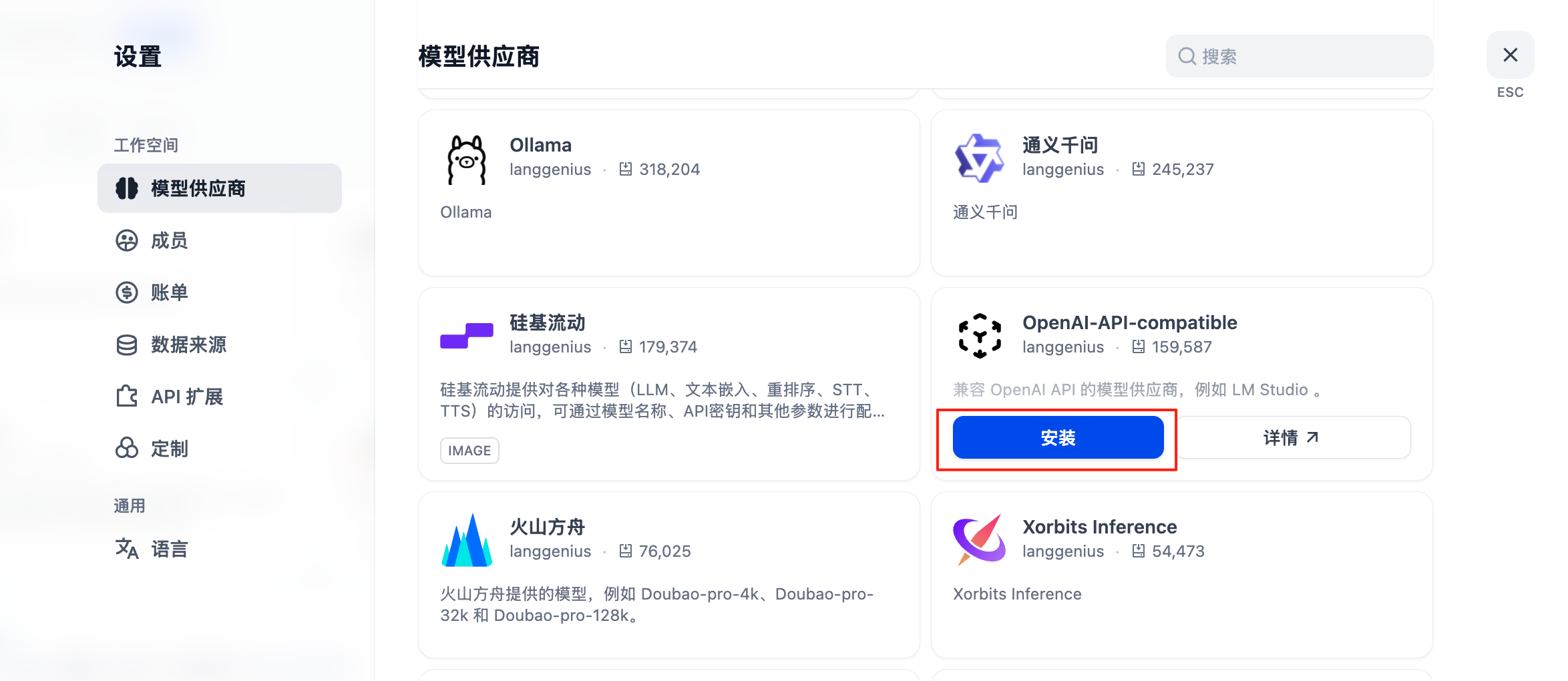
### Step 2: Add Model Provider
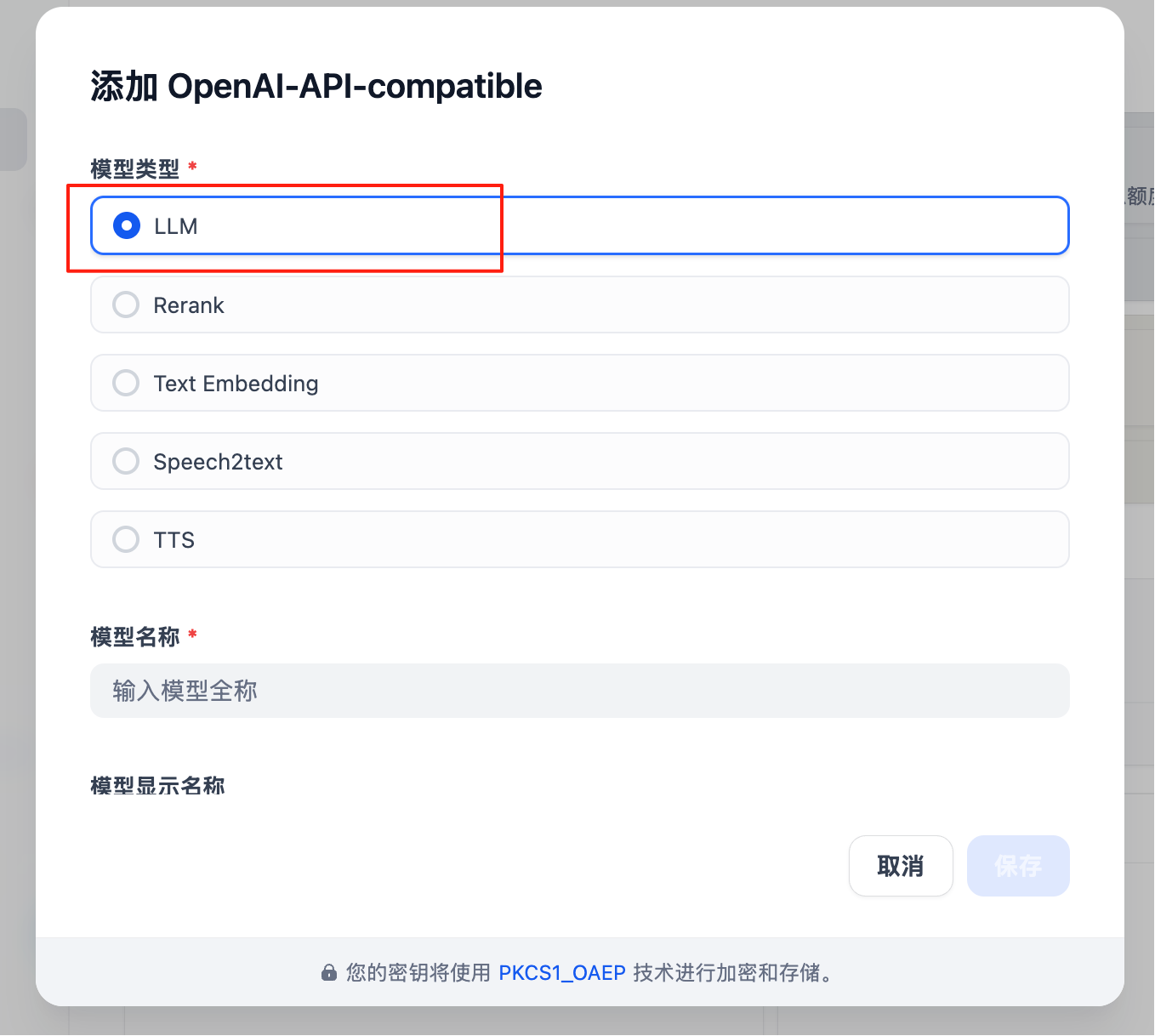 Click the user icon in the upper right corner, select "Settings"
 In the left sidebar, click "Model Provider"
 Find "OpenAI-API-compatible" in the model provider list, click "Add"
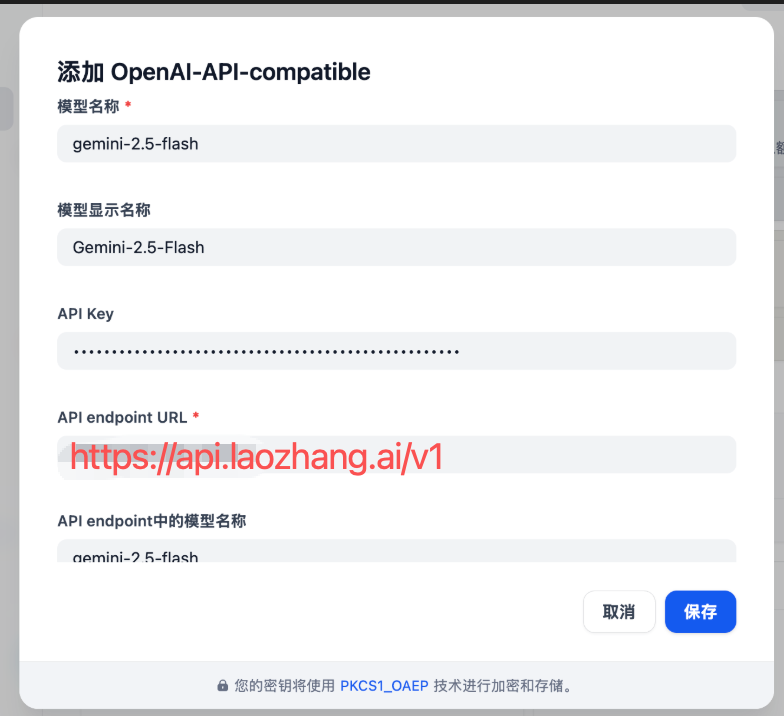
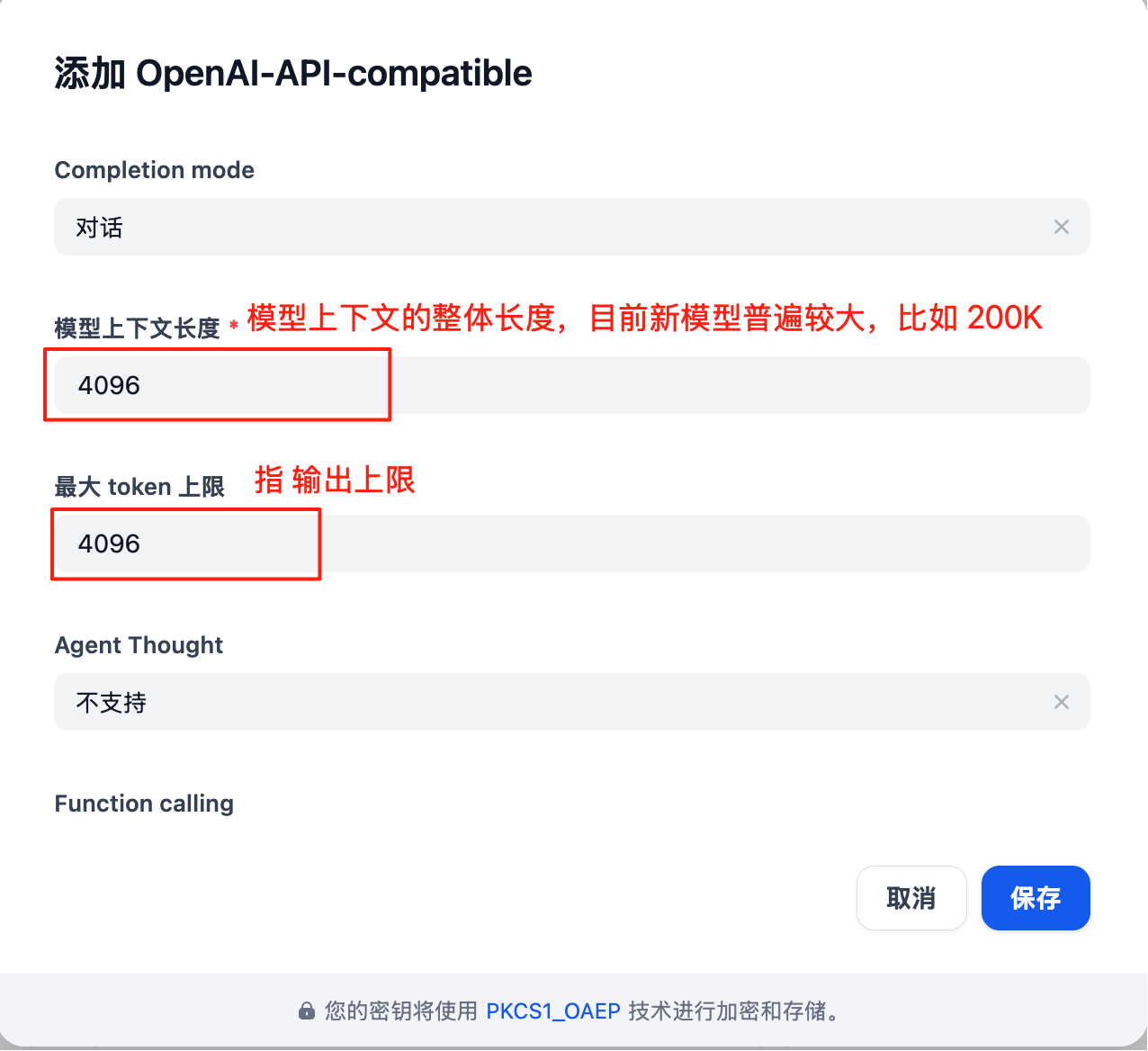
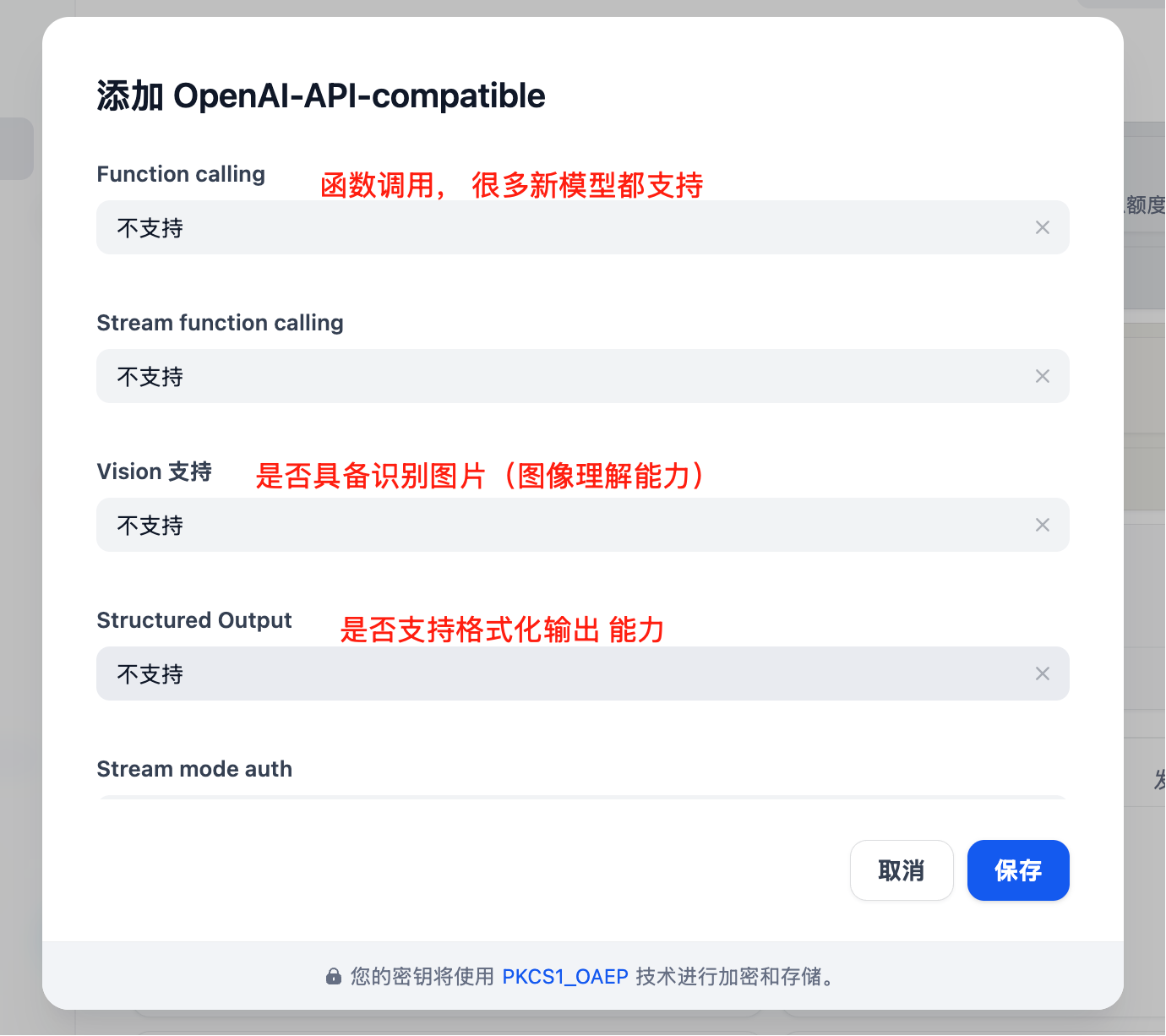 Fill in the following configuration:
* **Provider Name**: Laozhang API (custom name)
* **API Base URL**: `https://api2.laozhang.ai/v1`
* **API Key**: Enter your Laozhang API key
* **Model Type**: Select models you need (completion/chat/embedding)
Click "Test" button to ensure connection is successful
Click "Save" button to complete configuration
**Obtaining API Key**
Visit [Laozhang API Console](https://api2.laozhang.ai/token) to create and obtain your API key.
### Step 3: Select Model
Fill in the following configuration:
* **Provider Name**: Laozhang API (custom name)
* **API Base URL**: `https://api2.laozhang.ai/v1`
* **API Key**: Enter your Laozhang API key
* **Model Type**: Select models you need (completion/chat/embedding)
Click "Test" button to ensure connection is successful
Click "Save" button to complete configuration
**Obtaining API Key**
Visit [Laozhang API Console](https://api2.laozhang.ai/token) to create and obtain your API key.
### Step 3: Select Model
 After successfully adding the provider, you can select Laozhang API models in the following scenarios:
* Creating new applications
* Configuring workflows
* Setting Agent models
## Supported Models
Dify supports the following model types through Laozhang API:
### Text Generation Models (Chat/Completion)
| Model Series | Model ID | Features | Recommended Scenarios |
| ----------------- | ----------------- | -------------------------- | ------------------------------------------- |
| **GPT-4 Turbo** | `gpt-4-turbo` | Powerful reasoning ability | Complex business logic, code generation |
| **GPT-3.5 Turbo** | `gpt-3.5-turbo` | Fast response, economical | Chatbots, quick queries |
| **Claude Sonnet** | `claude-sonnet-4` | Long context support | Document processing, content creation |
| **Gemini Pro** | `gemini-2.5-pro` | Multimodal support | Image understanding, comprehensive analysis |
### Embedding Models
| Model | Dimension | Features |
| ------------------------ | --------- | ----------------------------------- |
| `text-embedding-ada-002` | 1536 | High-quality semantic understanding |
| `text-embedding-3-small` | 512 | Lightweight, fast |
| `text-embedding-3-large` | 3072 | Highest precision |
## Application Scenarios
### 1. Intelligent Customer Service Chatbot
Build an intelligent customer service system capable of:
* 24/7 automated responses
* Multi-turn context conversation
* Knowledge base integration
* Intent recognition and routing
**Configuration Suggestions:**
* Model: `gpt-3.5-turbo` (economical and fast)
* RAG: Enable knowledge base retrieval
* Temperature: 0.7
* Max Tokens: 1000
### 2. Document Analysis Assistant
Process and analyze large documents:
* Automatic document summarization
* Key information extraction
* Q\&A based on documents
* Multi-document comparison
**Configuration Suggestions:**
* Model: `claude-sonnet-4` (long context support)
* RAG: Enable vector database
* Temperature: 0.3 (more accurate)
* Max Tokens: 2000
### 3. Code Generation Tool
Help developers write code:
* Automatic code generation
* Code explanation and annotation
* Code review
* Bug fixing suggestions
**Configuration Suggestions:**
* Model: `gpt-4-turbo` (strong code capability)
* Temperature: 0.2 (more deterministic)
* Max Tokens: 2000
### 4. Content Creation Platform
Assist in creating various content:
* Article writing
* Marketing copy
* Product descriptions
* SEO optimization
**Configuration Suggestions:**
* Model: `gpt-4-turbo` or `claude-sonnet-4`
* Temperature: 0.8 (more creative)
* Max Tokens: 2000
## Advanced Features
### RAG (Retrieval Augmented Generation)
Integrate your private knowledge base:
1. **Create Knowledge Base**
* Upload documents (PDF, Word, Markdown, etc.)
* Automatic chunking and vectorization
* Choose appropriate embedding model
2. **Configure Retrieval Strategy**
* Set retrieval quantity (Top K)
* Set similarity threshold
* Choose reranking strategy
3. **Integration into Application**
* Associate knowledge base in workflow
* Configure retrieval parameters
* Test retrieval effectiveness
### Workflow Orchestration
Build complex AI workflows:
```
User Input
↓
Intent Recognition (GPT-3.5)
↓
Knowledge Base Retrieval (Embedding)
↓
Answer Generation (GPT-4)
↓
Quality Check (GPT-3.5)
↓
Return Result
```
### Agent Capabilities
Create autonomous AI agents:
* **Tool Calling** - Call external APIs
* **Multi-step Reasoning** - Decompose complex tasks
* **Self-reflection** - Evaluate and improve outputs
* **Memory Management** - Maintain long-term memory
## API Integration
Dify provides comprehensive APIs to integrate your applications:
### Python Example
```python theme={null}
import requests
# Dify API endpoint
api_url = "https://your-dify-instance.com/v1/chat-messages"
# Request configuration
headers = {
"Authorization": "Bearer Your Dify API key",
"Content-Type": "application/json"
}
data = {
"inputs": {},
"query": "Hello, please introduce yourself",
"response_mode": "blocking",
"user": "user-123"
}
# Send request
response = requests.post(api_url, headers=headers, json=data)
result = response.json()
print(result["answer"])
```
### JavaScript Example
```javascript theme={null}
const apiUrl = 'https://your-dify-instance.com/v1/chat-messages';
const requestData = {
inputs: {},
query: 'Hello, please introduce yourself',
response_mode: 'blocking',
user: 'user-123'
};
fetch(apiUrl, {
method: 'POST',
headers: {
'Authorization': 'Bearer Your Dify API key',
'Content-Type': 'application/json'
},
body: JSON.stringify(requestData)
})
.then(response => response.json())
.then(data => {
console.log(data.answer);
});
```
### Streaming Response
Support streaming output for better user experience:
```python theme={null}
import requests
url = "https://your-dify-instance.com/v1/chat-messages"
headers = {
"Authorization": "Bearer Your Dify API key",
"Content-Type": "application/json"
}
data = {
"inputs": {},
"query": "Write a short story",
"response_mode": "streaming",
"user": "user-123"
}
response = requests.post(url, headers=headers, json=data, stream=True)
for line in response.iter_lines():
if line:
print(line.decode('utf-8'))
```
## Deployment Guide
### Docker Deployment
```bash theme={null}
# Clone repository
git clone https://github.com/langgenius/dify.git
cd dify/docker
# Copy configuration file
cp .env.example .env
# Edit .env file, add Laozhang API configuration
# OPENAI_API_BASE=https://api2.laozhang.ai/v1
# OPENAI_API_KEY=Your Laozhang API key
# Start services
docker-compose up -d
```
### Environment Variables
```bash theme={null}
# Database configuration
DB_USERNAME=postgres
DB_PASSWORD=your_password
DB_HOST=db
DB_PORT=5432
DB_DATABASE=dify
# Redis configuration
REDIS_HOST=redis
REDIS_PORT=6379
REDIS_PASSWORD=your_redis_password
# LLM configuration
OPENAI_API_BASE=https://api2.laozhang.ai/v1
OPENAI_API_KEY=Your Laozhang API key
# Vector database configuration
VECTOR_STORE=qdrant
QDRANT_URL=http://qdrant:6333
```
## Troubleshooting
### Connection Issues
**Problem**: Unable to connect to Laozhang API
**Solutions**:
1. Check if API Base URL is correct: `https://api2.laozhang.ai/v1`
2. Verify API Key validity
3. Ensure network connection is normal
4. Check firewall settings
### Model Unavailable
**Problem**: Selected model cannot be used
**Solutions**:
1. Verify model ID is correct
2. Check account balance
3. Confirm model is in service scope
4. Try other models
### RAG Performance Issues
**Problem**: Retrieval results are inaccurate
**Solutions**:
1. Optimize document chunking strategy
2. Adjust retrieval parameters (Top K, similarity threshold)
3. Try different embedding models
4. Add more relevant documents
### High Latency
**Problem**: Response speed is slow
**Solutions**:
1. Switch to a faster model (e.g., GPT-3.5 Turbo)
2. Reduce Max Tokens setting
3. Optimize prompt length
4. Enable caching mechanism
## Best Practices
### 1. Prompt Engineering
Write effective prompts:
```markdown theme={null}
❌ Bad example:
"Write an article"
✅ Good example:
"You are a professional tech blogger. Please write an article about AI applications, requirements:
- Word count: 800-1000 words
- Audience: Technical professionals
- Style: Professional yet approachable
- Include: 3 practical case studies
- End with: Actionable suggestions"
```
### 2. Cost Optimization
Control usage costs:
* Use lighter models for simple tasks (GPT-3.5 Turbo)
* Set reasonable Max Tokens limits
* Enable result caching
* Batch process requests
* Regularly review usage
### 3. Security Configuration
Protect sensitive data:
* Use environment variables to store API keys
* Enable API rate limiting
* Implement user authentication
* Audit logs
* Data encryption
### 4. Performance Optimization
Improve application performance:
* Enable caching mechanism
* Use CDN to distribute static resources
* Optimize database queries
* Implement load balancing
* Monitor system performance
## Further Learning
### Official Resources
* [Dify Official Documentation](https://docs.dify.ai)
* [Dify GitHub Repository](https://github.com/langgenius/dify)
* [Dify Community Forum](https://community.dify.ai)
### Learning Resources
* [Dify Quick Start Guide](https://docs.dify.ai/getting-started)
* [Dify Best Practices](https://docs.dify.ai/guides/best-practices)
* [Dify API Documentation](https://docs.dify.ai/api-reference)
### Community Support
* [Dify Discord Community](https://discord.gg/dify)
* [Dify GitHub Discussions](https://github.com/langgenius/dify/discussions)
Need more help? Please visit [Laozhang API Official Website](https://api2.laozhang.ai) or contact our support team.
After successfully adding the provider, you can select Laozhang API models in the following scenarios:
* Creating new applications
* Configuring workflows
* Setting Agent models
## Supported Models
Dify supports the following model types through Laozhang API:
### Text Generation Models (Chat/Completion)
| Model Series | Model ID | Features | Recommended Scenarios |
| ----------------- | ----------------- | -------------------------- | ------------------------------------------- |
| **GPT-4 Turbo** | `gpt-4-turbo` | Powerful reasoning ability | Complex business logic, code generation |
| **GPT-3.5 Turbo** | `gpt-3.5-turbo` | Fast response, economical | Chatbots, quick queries |
| **Claude Sonnet** | `claude-sonnet-4` | Long context support | Document processing, content creation |
| **Gemini Pro** | `gemini-2.5-pro` | Multimodal support | Image understanding, comprehensive analysis |
### Embedding Models
| Model | Dimension | Features |
| ------------------------ | --------- | ----------------------------------- |
| `text-embedding-ada-002` | 1536 | High-quality semantic understanding |
| `text-embedding-3-small` | 512 | Lightweight, fast |
| `text-embedding-3-large` | 3072 | Highest precision |
## Application Scenarios
### 1. Intelligent Customer Service Chatbot
Build an intelligent customer service system capable of:
* 24/7 automated responses
* Multi-turn context conversation
* Knowledge base integration
* Intent recognition and routing
**Configuration Suggestions:**
* Model: `gpt-3.5-turbo` (economical and fast)
* RAG: Enable knowledge base retrieval
* Temperature: 0.7
* Max Tokens: 1000
### 2. Document Analysis Assistant
Process and analyze large documents:
* Automatic document summarization
* Key information extraction
* Q\&A based on documents
* Multi-document comparison
**Configuration Suggestions:**
* Model: `claude-sonnet-4` (long context support)
* RAG: Enable vector database
* Temperature: 0.3 (more accurate)
* Max Tokens: 2000
### 3. Code Generation Tool
Help developers write code:
* Automatic code generation
* Code explanation and annotation
* Code review
* Bug fixing suggestions
**Configuration Suggestions:**
* Model: `gpt-4-turbo` (strong code capability)
* Temperature: 0.2 (more deterministic)
* Max Tokens: 2000
### 4. Content Creation Platform
Assist in creating various content:
* Article writing
* Marketing copy
* Product descriptions
* SEO optimization
**Configuration Suggestions:**
* Model: `gpt-4-turbo` or `claude-sonnet-4`
* Temperature: 0.8 (more creative)
* Max Tokens: 2000
## Advanced Features
### RAG (Retrieval Augmented Generation)
Integrate your private knowledge base:
1. **Create Knowledge Base**
* Upload documents (PDF, Word, Markdown, etc.)
* Automatic chunking and vectorization
* Choose appropriate embedding model
2. **Configure Retrieval Strategy**
* Set retrieval quantity (Top K)
* Set similarity threshold
* Choose reranking strategy
3. **Integration into Application**
* Associate knowledge base in workflow
* Configure retrieval parameters
* Test retrieval effectiveness
### Workflow Orchestration
Build complex AI workflows:
```
User Input
↓
Intent Recognition (GPT-3.5)
↓
Knowledge Base Retrieval (Embedding)
↓
Answer Generation (GPT-4)
↓
Quality Check (GPT-3.5)
↓
Return Result
```
### Agent Capabilities
Create autonomous AI agents:
* **Tool Calling** - Call external APIs
* **Multi-step Reasoning** - Decompose complex tasks
* **Self-reflection** - Evaluate and improve outputs
* **Memory Management** - Maintain long-term memory
## API Integration
Dify provides comprehensive APIs to integrate your applications:
### Python Example
```python theme={null}
import requests
# Dify API endpoint
api_url = "https://your-dify-instance.com/v1/chat-messages"
# Request configuration
headers = {
"Authorization": "Bearer Your Dify API key",
"Content-Type": "application/json"
}
data = {
"inputs": {},
"query": "Hello, please introduce yourself",
"response_mode": "blocking",
"user": "user-123"
}
# Send request
response = requests.post(api_url, headers=headers, json=data)
result = response.json()
print(result["answer"])
```
### JavaScript Example
```javascript theme={null}
const apiUrl = 'https://your-dify-instance.com/v1/chat-messages';
const requestData = {
inputs: {},
query: 'Hello, please introduce yourself',
response_mode: 'blocking',
user: 'user-123'
};
fetch(apiUrl, {
method: 'POST',
headers: {
'Authorization': 'Bearer Your Dify API key',
'Content-Type': 'application/json'
},
body: JSON.stringify(requestData)
})
.then(response => response.json())
.then(data => {
console.log(data.answer);
});
```
### Streaming Response
Support streaming output for better user experience:
```python theme={null}
import requests
url = "https://your-dify-instance.com/v1/chat-messages"
headers = {
"Authorization": "Bearer Your Dify API key",
"Content-Type": "application/json"
}
data = {
"inputs": {},
"query": "Write a short story",
"response_mode": "streaming",
"user": "user-123"
}
response = requests.post(url, headers=headers, json=data, stream=True)
for line in response.iter_lines():
if line:
print(line.decode('utf-8'))
```
## Deployment Guide
### Docker Deployment
```bash theme={null}
# Clone repository
git clone https://github.com/langgenius/dify.git
cd dify/docker
# Copy configuration file
cp .env.example .env
# Edit .env file, add Laozhang API configuration
# OPENAI_API_BASE=https://api2.laozhang.ai/v1
# OPENAI_API_KEY=Your Laozhang API key
# Start services
docker-compose up -d
```
### Environment Variables
```bash theme={null}
# Database configuration
DB_USERNAME=postgres
DB_PASSWORD=your_password
DB_HOST=db
DB_PORT=5432
DB_DATABASE=dify
# Redis configuration
REDIS_HOST=redis
REDIS_PORT=6379
REDIS_PASSWORD=your_redis_password
# LLM configuration
OPENAI_API_BASE=https://api2.laozhang.ai/v1
OPENAI_API_KEY=Your Laozhang API key
# Vector database configuration
VECTOR_STORE=qdrant
QDRANT_URL=http://qdrant:6333
```
## Troubleshooting
### Connection Issues
**Problem**: Unable to connect to Laozhang API
**Solutions**:
1. Check if API Base URL is correct: `https://api2.laozhang.ai/v1`
2. Verify API Key validity
3. Ensure network connection is normal
4. Check firewall settings
### Model Unavailable
**Problem**: Selected model cannot be used
**Solutions**:
1. Verify model ID is correct
2. Check account balance
3. Confirm model is in service scope
4. Try other models
### RAG Performance Issues
**Problem**: Retrieval results are inaccurate
**Solutions**:
1. Optimize document chunking strategy
2. Adjust retrieval parameters (Top K, similarity threshold)
3. Try different embedding models
4. Add more relevant documents
### High Latency
**Problem**: Response speed is slow
**Solutions**:
1. Switch to a faster model (e.g., GPT-3.5 Turbo)
2. Reduce Max Tokens setting
3. Optimize prompt length
4. Enable caching mechanism
## Best Practices
### 1. Prompt Engineering
Write effective prompts:
```markdown theme={null}
❌ Bad example:
"Write an article"
✅ Good example:
"You are a professional tech blogger. Please write an article about AI applications, requirements:
- Word count: 800-1000 words
- Audience: Technical professionals
- Style: Professional yet approachable
- Include: 3 practical case studies
- End with: Actionable suggestions"
```
### 2. Cost Optimization
Control usage costs:
* Use lighter models for simple tasks (GPT-3.5 Turbo)
* Set reasonable Max Tokens limits
* Enable result caching
* Batch process requests
* Regularly review usage
### 3. Security Configuration
Protect sensitive data:
* Use environment variables to store API keys
* Enable API rate limiting
* Implement user authentication
* Audit logs
* Data encryption
### 4. Performance Optimization
Improve application performance:
* Enable caching mechanism
* Use CDN to distribute static resources
* Optimize database queries
* Implement load balancing
* Monitor system performance
## Further Learning
### Official Resources
* [Dify Official Documentation](https://docs.dify.ai)
* [Dify GitHub Repository](https://github.com/langgenius/dify)
* [Dify Community Forum](https://community.dify.ai)
### Learning Resources
* [Dify Quick Start Guide](https://docs.dify.ai/getting-started)
* [Dify Best Practices](https://docs.dify.ai/guides/best-practices)
* [Dify API Documentation](https://docs.dify.ai/api-reference)
### Community Support
* [Dify Discord Community](https://discord.gg/dify)
* [Dify GitHub Discussions](https://github.com/langgenius/dify/discussions)
Need more help? Please visit [Laozhang API Official Website](https://api2.laozhang.ai) or contact our support team.