> ## Documentation Index
> Fetch the complete documentation index at: https://docs.laozhang.ai/llms.txt
> Use this file to discover all available pages before exploring further.
# Cursor
> Next-generation AI programming editor integration guide
Cursor is an AI-native code editor built on VS Code, integrating powerful AI capabilities to provide developers with an unprecedented programming experience. Through Laozhang API, you can use various advanced large language models in Cursor.
## Quick Start
### 1. Download and Install
Visit [Cursor Official Website](https://cursor.sh) to download and install the version suitable for your operating system:
* **Windows**: Windows 10 or higher
* **macOS**: macOS 10.15 or higher
* **Linux**: Ubuntu 18.04 or higher
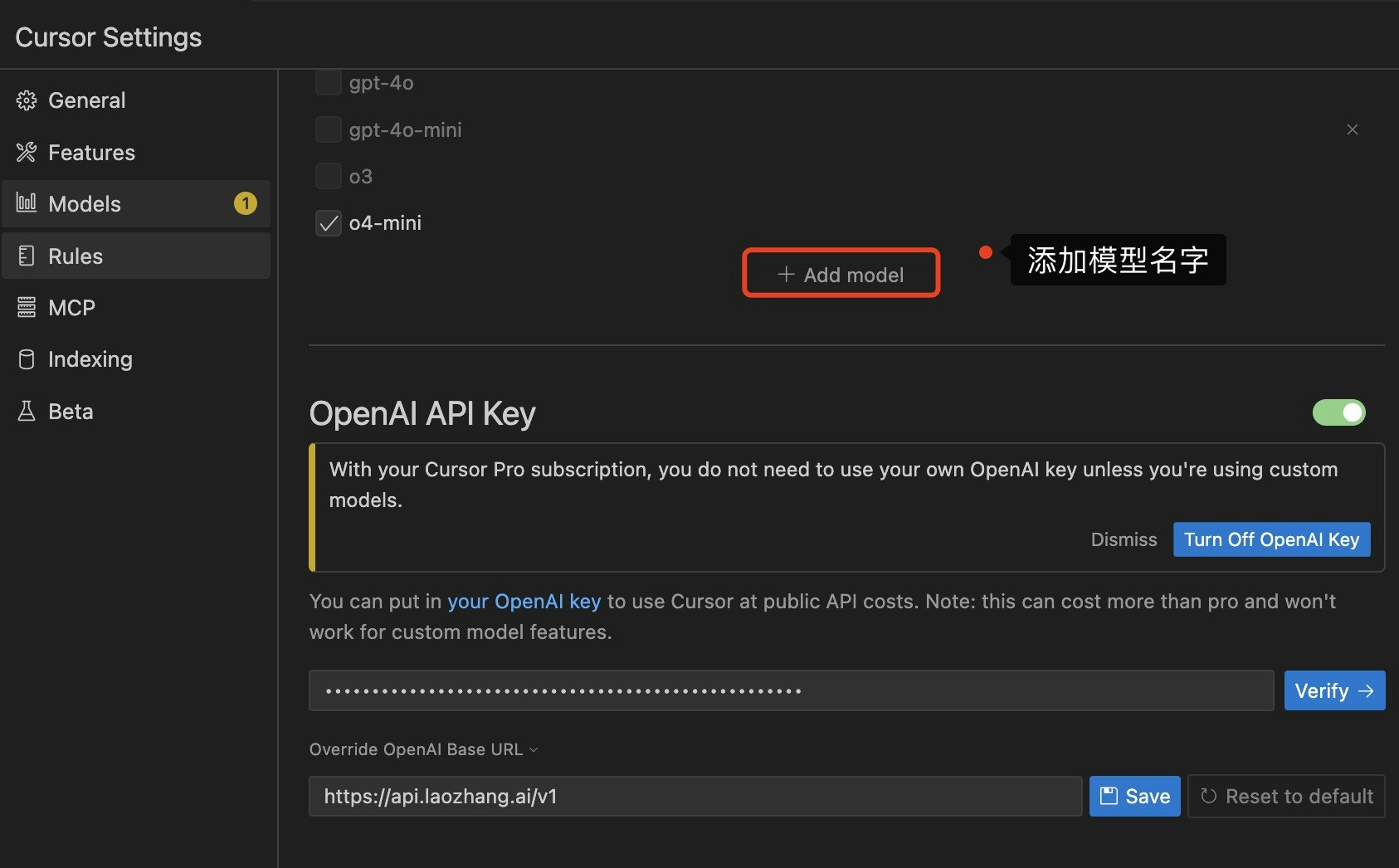
### 2. Configure Laozhang API
Click "Cursor" in the menu bar > "Settings" (or use shortcut `Cmd/Ctrl + ,`)
In the left sidebar, select "Models" option
Scroll to the "OpenAI API Key" section:
* **API Provider**: Select "OpenAI Compatible"
* **Base URL**: Enter `https://api2.laozhang.ai/v1`
* **API Key**: Enter your Laozhang API key
* **Default Model**: Choose a model (e.g., `gpt-5.5`)
Click "Save" button to complete configuration
 **Obtaining API Key**
1. Visit [Laozhang API Console](https://api2.laozhang.ai/token)
2. Click "Create New Token" button
3. Choose a suitable billing method
4. Copy the generated API Key
## Recommended Model Selection
Cursor supports multiple large language models, choose appropriate models based on different programming needs:
| Programming Scenario | Recommended Model | Cost | Performance |
| -------------------------------- | ------------------------ | ------ | ------------------------ |
| **Daily Code Completion** | `gpt-4.1-mini` | Low | Fast response |
| **Complex Function Development** | `gpt-5.5` | Medium | Strong reasoning ability |
| **Large Project Refactoring** | `claude-sonnet-4-6` | Medium | Long context support |
| **Multi-language Programming** | `gemini-3.1-pro-preview` | Medium | Broad language support |
| **Code Review and Optimization** | `gpt-5.5` | Medium | Deep code understanding |
**Model Selection Strategy**
* **Cost-sensitive users**: Recommend `gpt-4.1-mini` for daily coding
* **Quality prioritizers**: Recommend `gpt-5.5` or `claude-sonnet-4-6`
* **Large codebase**: Recommend `claude-sonnet-4-6`
* **Multimodal needs**: Recommend `gemini-3.1-pro-preview`, supports image understanding
## Core Features
### 1. AI Code Completion (Tab)
Cursor provides intelligent code completion triggered by the Tab key:
**Features:**
* Context-aware smart completion
* Multi-line code generation
* Automatic import statement generation
* Intelligent comment writing
**Usage Example:**
```python theme={null}
# Type a comment describing functionality, press Tab
def calculate_fibonacci(n):
# Cursor automatically generates complete function code
```
### 2. AI Chat (Cmd/Ctrl + K)
Chat with AI in the editor, get instant help:
**Use Cases:**
* Ask code questions
* Request refactoring suggestions
* Generate test cases
* Explain complex algorithms
* Debug error messages
**Usage Example:**
```
You: How to optimize this function's performance?
AI: Analyzes code and provides specific optimization suggestions
```
### 3. AI Editing (Cmd/Ctrl + L)
Select code, trigger AI editing mode:
**Features:**
* Code refactoring
* Style adjustment
* Add comments
* Type annotation
* Error fixing
**Usage Example:**
```python theme={null}
# Select this function, use Cmd+L
def calc(a, b):
return a + b
# AI can:
# 1. Add type hints
# 2. Write docstrings
# 3. Optimize code structure
```
### 4. Codebase Indexing
Cursor can index your entire codebase, providing:
* **Global code search**
* **Intelligent jump to definition**
* **Refactoring suggestions**
* **Dependency analysis**
### 5. Multi-file Editing
Operate on multiple files simultaneously:
* Batch code refactoring
* Consistent style modification
* Cross-file function extraction
* Unified dependency updates
## Advanced Features
### @Symbols Citation
Use `@` symbol in chat mode to cite code elements:
```
@filename - Cite specific file
@function - Cite specific function
@class - Cite specific class
@folder - Cite entire directory
```
**Example:**
```
You: @utils.py How should this file be refactored?
AI: Analyzes the file and provides refactoring suggestions
```
### Terminal Integration
Cursor integrates terminal, you can:
* Let AI generate terminal commands
* Explain command outputs
* Debug errors
* Optimize scripts
### Git Integration
Deeply integrated with Git:
* AI-generated commit messages
* Code review assistance
* Conflict resolution suggestions
* Branch management advice
## Configuration Best Practices
### Basic Configuration
```json theme={null}
{
"cursor.ai.baseUrl": "https://api2.laozhang.ai/v1",
"cursor.ai.apiKey": "Your Laozhang API key",
"cursor.ai.model": "gpt-5.5",
"cursor.ai.maxTokens": 2000,
"cursor.ai.temperature": 0.7
}
```
### Advanced Configuration
```json theme={null}
{
"cursor.ai.baseUrl": "https://api2.laozhang.ai/v1",
"cursor.ai.apiKey": "Your Laozhang API key",
"cursor.ai.model": "gpt-5.5",
"cursor.ai.maxTokens": 4000,
"cursor.ai.temperature": 0.7,
"cursor.ai.enableCodeLens": true,
"cursor.ai.enableInlineCompletion": true,
"cursor.ai.autoSuggest": true,
"cursor.ai.contextLines": 50
}
```
### Multi-Model Configuration
Configure different models for different scenarios:
```json theme={null}
{
"cursor.ai.completionModel": "gpt-4.1-mini", // Code completion uses lightweight model
"cursor.ai.chatModel": "gpt-5.5", // Chat uses powerful model
"cursor.ai.editModel": "claude-sonnet-4-6" // Editing uses long context model
}
```
## Usage Scenarios
### Scenario 1: New Project Development
```markdown theme={null}
1. Use AI Chat to discuss project architecture
2. Let AI generate project scaffolding
3. Use code completion to write core logic
4. Use AI editing to optimize code structure
5. Let AI generate unit tests
```
### Scenario 2: Code Refactoring
```markdown theme={null}
1. Select code needing refactoring
2. Use Cmd+L to trigger editing mode
3. Describe refactoring requirements
4. Review AI suggestions
5. Iterative optimization
```
### Scenario 3: Bug Fixing
```markdown theme={null}
1. Copy error message to AI chat
2. AI analyzes error cause
3. AI provides repair suggestions
4. Test repair effectiveness
5. Let AI generate test cases to prevent regression
```
### Scenario 4: Learning New Technologies
```markdown theme={null}
1. Ask AI how to use new library
2. Request sample code
3. Let AI explain key concepts
4. Use code completion to practice
5. Request best practice suggestions
```
## Troubleshooting
### Connection Issues
**Problem**: Unable to connect to API
**Solutions**:
1. Check if Base URL is correct: `https://api2.laozhang.ai/v1`
2. Verify API Key validity (visit [console](https://api2.laozhang.ai/token))
3. Check network connection
4. Confirm firewall settings
### No Response
**Problem**: AI doesn't respond
**Solutions**:
1. Check account balance
2. Confirm model availability
3. Try switching models
4. Check if request exceeds rate limit
### Inaccurate Suggestions
**Problem**: Code suggestions don't meet expectations
**Solutions**:
1. Provide more context information
2. Refine requirement descriptions
3. Try different models
4. Adjust temperature parameter (lower = more deterministic, higher = more creative)
### Response Too Slow
**Problem**: AI response speed is slow
**Solutions**:
1. Switch to a faster model (e.g., `gpt-4.1-mini`)
2. Reduce maxTokens setting
3. Simplify query content
4. Check network speed
## Best Practices
### 1. Effective Communication
Communicate clearly and specifically with AI:
```
❌ Bad example: "Optimize this code"
✅ Good example: "Optimize this sorting function's time complexity, preferably to O(n log n)"
❌ Bad example: "Write a function"
✅ Good example: "Write a Python function that receives a list of User objects, filters active users, sorts by registration time, and returns top 10"
```
### 2. Utilize Context
Make full use of Cursor's context awareness:
* Use `@` symbol to cite relevant files
* Provide necessary background information
* Keep editor open with related code
### 3. Iterative Improvement
Don't expect perfect results at once:
1. Get initial suggestions
2. Test and evaluate
3. Provide feedback
4. Iterative optimization
### 4. Security Awareness
Protect sensitive information:
* Don't paste actual API keys in chat
* Don't share production database connection strings
* Don't upload confidential business logic
### 5. Cost Control
Reasonably control usage costs:
* Use lighter models for simple tasks
* Avoid unnecessary repeated requests
* Set reasonable maxTokens limits
* Regularly review usage
## Shortcut Reference
| Shortcut | Function |
| ---------------------- | ----------------------- |
| `Tab` | Trigger code completion |
| `Cmd/Ctrl + K` | Open AI chat |
| `Cmd/Ctrl + L` | Trigger AI editing |
| `Cmd/Ctrl + Shift + P` | Open command panel |
| `Cmd/Ctrl + P` | Quick file open |
| `Cmd/Ctrl + ,` | Open settings |
## Further Learning
### Official Resources
* [Cursor Official Documentation](https://cursor.sh/docs)
* [Cursor Community Forum](https://forum.cursor.sh)
* [Cursor YouTube Channel](https://www.youtube.com/@cursor)
### Learning Resources
* [Cursor Quick Start Video](https://www.youtube.com/watch?v=...)
* [Cursor Usage Tips](https://cursor.sh/tips)
* [Cursor Best Practices](https://cursor.sh/best-practices)
### Community Support
* [Cursor Discord Community](https://discord.gg/cursor)
* [Cursor GitHub Discussions](https://github.com/getcursor/cursor/discussions)
Need more help? Please visit [Laozhang API Official Website](https://api2.laozhang.ai) or contact our support team.
**Obtaining API Key**
1. Visit [Laozhang API Console](https://api2.laozhang.ai/token)
2. Click "Create New Token" button
3. Choose a suitable billing method
4. Copy the generated API Key
## Recommended Model Selection
Cursor supports multiple large language models, choose appropriate models based on different programming needs:
| Programming Scenario | Recommended Model | Cost | Performance |
| -------------------------------- | ------------------------ | ------ | ------------------------ |
| **Daily Code Completion** | `gpt-4.1-mini` | Low | Fast response |
| **Complex Function Development** | `gpt-5.5` | Medium | Strong reasoning ability |
| **Large Project Refactoring** | `claude-sonnet-4-6` | Medium | Long context support |
| **Multi-language Programming** | `gemini-3.1-pro-preview` | Medium | Broad language support |
| **Code Review and Optimization** | `gpt-5.5` | Medium | Deep code understanding |
**Model Selection Strategy**
* **Cost-sensitive users**: Recommend `gpt-4.1-mini` for daily coding
* **Quality prioritizers**: Recommend `gpt-5.5` or `claude-sonnet-4-6`
* **Large codebase**: Recommend `claude-sonnet-4-6`
* **Multimodal needs**: Recommend `gemini-3.1-pro-preview`, supports image understanding
## Core Features
### 1. AI Code Completion (Tab)
Cursor provides intelligent code completion triggered by the Tab key:
**Features:**
* Context-aware smart completion
* Multi-line code generation
* Automatic import statement generation
* Intelligent comment writing
**Usage Example:**
```python theme={null}
# Type a comment describing functionality, press Tab
def calculate_fibonacci(n):
# Cursor automatically generates complete function code
```
### 2. AI Chat (Cmd/Ctrl + K)
Chat with AI in the editor, get instant help:
**Use Cases:**
* Ask code questions
* Request refactoring suggestions
* Generate test cases
* Explain complex algorithms
* Debug error messages
**Usage Example:**
```
You: How to optimize this function's performance?
AI: Analyzes code and provides specific optimization suggestions
```
### 3. AI Editing (Cmd/Ctrl + L)
Select code, trigger AI editing mode:
**Features:**
* Code refactoring
* Style adjustment
* Add comments
* Type annotation
* Error fixing
**Usage Example:**
```python theme={null}
# Select this function, use Cmd+L
def calc(a, b):
return a + b
# AI can:
# 1. Add type hints
# 2. Write docstrings
# 3. Optimize code structure
```
### 4. Codebase Indexing
Cursor can index your entire codebase, providing:
* **Global code search**
* **Intelligent jump to definition**
* **Refactoring suggestions**
* **Dependency analysis**
### 5. Multi-file Editing
Operate on multiple files simultaneously:
* Batch code refactoring
* Consistent style modification
* Cross-file function extraction
* Unified dependency updates
## Advanced Features
### @Symbols Citation
Use `@` symbol in chat mode to cite code elements:
```
@filename - Cite specific file
@function - Cite specific function
@class - Cite specific class
@folder - Cite entire directory
```
**Example:**
```
You: @utils.py How should this file be refactored?
AI: Analyzes the file and provides refactoring suggestions
```
### Terminal Integration
Cursor integrates terminal, you can:
* Let AI generate terminal commands
* Explain command outputs
* Debug errors
* Optimize scripts
### Git Integration
Deeply integrated with Git:
* AI-generated commit messages
* Code review assistance
* Conflict resolution suggestions
* Branch management advice
## Configuration Best Practices
### Basic Configuration
```json theme={null}
{
"cursor.ai.baseUrl": "https://api2.laozhang.ai/v1",
"cursor.ai.apiKey": "Your Laozhang API key",
"cursor.ai.model": "gpt-5.5",
"cursor.ai.maxTokens": 2000,
"cursor.ai.temperature": 0.7
}
```
### Advanced Configuration
```json theme={null}
{
"cursor.ai.baseUrl": "https://api2.laozhang.ai/v1",
"cursor.ai.apiKey": "Your Laozhang API key",
"cursor.ai.model": "gpt-5.5",
"cursor.ai.maxTokens": 4000,
"cursor.ai.temperature": 0.7,
"cursor.ai.enableCodeLens": true,
"cursor.ai.enableInlineCompletion": true,
"cursor.ai.autoSuggest": true,
"cursor.ai.contextLines": 50
}
```
### Multi-Model Configuration
Configure different models for different scenarios:
```json theme={null}
{
"cursor.ai.completionModel": "gpt-4.1-mini", // Code completion uses lightweight model
"cursor.ai.chatModel": "gpt-5.5", // Chat uses powerful model
"cursor.ai.editModel": "claude-sonnet-4-6" // Editing uses long context model
}
```
## Usage Scenarios
### Scenario 1: New Project Development
```markdown theme={null}
1. Use AI Chat to discuss project architecture
2. Let AI generate project scaffolding
3. Use code completion to write core logic
4. Use AI editing to optimize code structure
5. Let AI generate unit tests
```
### Scenario 2: Code Refactoring
```markdown theme={null}
1. Select code needing refactoring
2. Use Cmd+L to trigger editing mode
3. Describe refactoring requirements
4. Review AI suggestions
5. Iterative optimization
```
### Scenario 3: Bug Fixing
```markdown theme={null}
1. Copy error message to AI chat
2. AI analyzes error cause
3. AI provides repair suggestions
4. Test repair effectiveness
5. Let AI generate test cases to prevent regression
```
### Scenario 4: Learning New Technologies
```markdown theme={null}
1. Ask AI how to use new library
2. Request sample code
3. Let AI explain key concepts
4. Use code completion to practice
5. Request best practice suggestions
```
## Troubleshooting
### Connection Issues
**Problem**: Unable to connect to API
**Solutions**:
1. Check if Base URL is correct: `https://api2.laozhang.ai/v1`
2. Verify API Key validity (visit [console](https://api2.laozhang.ai/token))
3. Check network connection
4. Confirm firewall settings
### No Response
**Problem**: AI doesn't respond
**Solutions**:
1. Check account balance
2. Confirm model availability
3. Try switching models
4. Check if request exceeds rate limit
### Inaccurate Suggestions
**Problem**: Code suggestions don't meet expectations
**Solutions**:
1. Provide more context information
2. Refine requirement descriptions
3. Try different models
4. Adjust temperature parameter (lower = more deterministic, higher = more creative)
### Response Too Slow
**Problem**: AI response speed is slow
**Solutions**:
1. Switch to a faster model (e.g., `gpt-4.1-mini`)
2. Reduce maxTokens setting
3. Simplify query content
4. Check network speed
## Best Practices
### 1. Effective Communication
Communicate clearly and specifically with AI:
```
❌ Bad example: "Optimize this code"
✅ Good example: "Optimize this sorting function's time complexity, preferably to O(n log n)"
❌ Bad example: "Write a function"
✅ Good example: "Write a Python function that receives a list of User objects, filters active users, sorts by registration time, and returns top 10"
```
### 2. Utilize Context
Make full use of Cursor's context awareness:
* Use `@` symbol to cite relevant files
* Provide necessary background information
* Keep editor open with related code
### 3. Iterative Improvement
Don't expect perfect results at once:
1. Get initial suggestions
2. Test and evaluate
3. Provide feedback
4. Iterative optimization
### 4. Security Awareness
Protect sensitive information:
* Don't paste actual API keys in chat
* Don't share production database connection strings
* Don't upload confidential business logic
### 5. Cost Control
Reasonably control usage costs:
* Use lighter models for simple tasks
* Avoid unnecessary repeated requests
* Set reasonable maxTokens limits
* Regularly review usage
## Shortcut Reference
| Shortcut | Function |
| ---------------------- | ----------------------- |
| `Tab` | Trigger code completion |
| `Cmd/Ctrl + K` | Open AI chat |
| `Cmd/Ctrl + L` | Trigger AI editing |
| `Cmd/Ctrl + Shift + P` | Open command panel |
| `Cmd/Ctrl + P` | Quick file open |
| `Cmd/Ctrl + ,` | Open settings |
## Further Learning
### Official Resources
* [Cursor Official Documentation](https://cursor.sh/docs)
* [Cursor Community Forum](https://forum.cursor.sh)
* [Cursor YouTube Channel](https://www.youtube.com/@cursor)
### Learning Resources
* [Cursor Quick Start Video](https://www.youtube.com/watch?v=...)
* [Cursor Usage Tips](https://cursor.sh/tips)
* [Cursor Best Practices](https://cursor.sh/best-practices)
### Community Support
* [Cursor Discord Community](https://discord.gg/cursor)
* [Cursor GitHub Discussions](https://github.com/getcursor/cursor/discussions)
Need more help? Please visit [Laozhang API Official Website](https://api2.laozhang.ai) or contact our support team.