API Endpoint: https://api.laozhang.ai/v1/images/generationsAvailable Models:
  • seedream-4-0-250828 - $0.035/image
  • seedream-4-5-251128 - $0.045/image (Latest version)
Billing: Pay-per-use
Pricing Update Notice (January 2026)Official subsidy has ended, SeeDream prices have been adjusted:
  • SeeDream 4.0: 0.025/image0.025/image → **0.035/image**
  • SeeDream 4.5 (New version): $0.045/image

Prerequisites

1

Get API Key

Log in to laozhang.ai console to obtain your API key
2

Configure Billing Mode

Edit token settings and choose one of the following billing modes (same price for both):
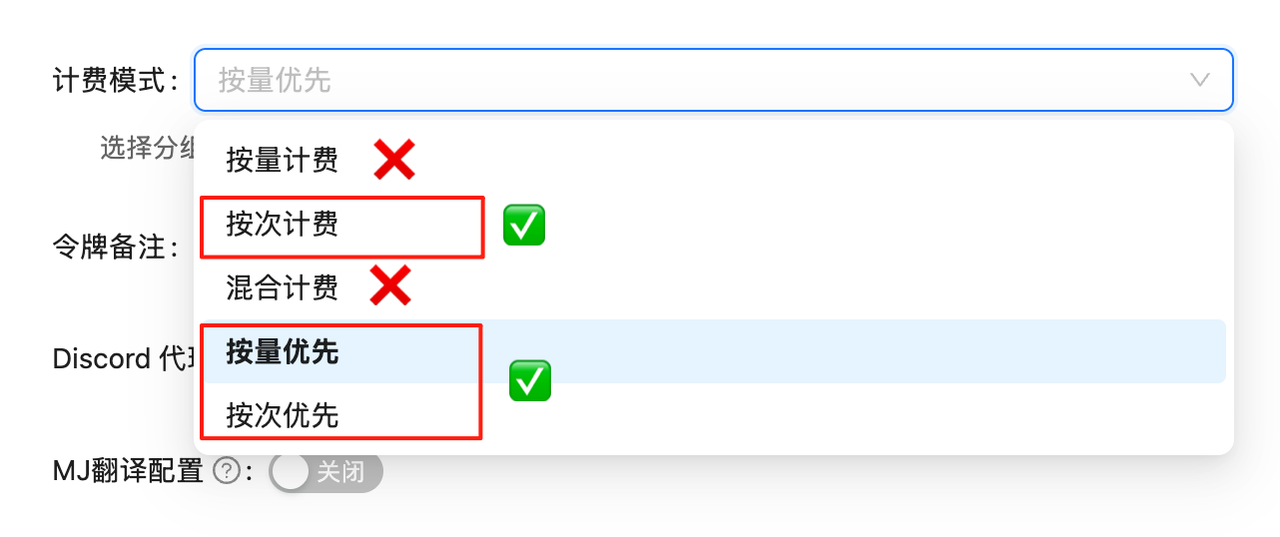
  • Volume Priority (Recommended): Uses balance billing first, automatically switches when balance is insufficient. Suitable for most users
  • Pay-per-call: Direct deduction for each call. Suitable for strict budget control scenarios
Both modes have exactly the same price, only the billing method differs. SeeDream 4.0 is $0.035/image, 4.5 is $0.045/image.
Token Settings
If billing mode is not configured, API calls will fail. You must complete this configuration first!

Changelog

September 11, 2025 - SeeDream 4.0 API launched officially, integrated by LaoZhang AI on the same day

Core Features

Text-to-Image

Generate high-quality images from text descriptions

Image-to-Image

AI editing and redrawing based on source images

Multi-Image Input

Supports up to 10 reference images

Flexible Dimensions

Customizable image resolution and size

OpenAI Format

Fully compatible with OpenAI Image API format

Flexible Versions

4.0 at 0.035/image,4.5at0.035/image, 4.5 at 0.045/image

Key Information

Source

Strategic PartnershipSeeDream 4.0 is powered by BytePlus Ark (international version). LaoZhang AI has established a strategic partnership to provide you with stable and reliable service.

Technical Specifications

ItemDescription
API FormatOpenAI Image API compatible
Request Endpoint/v1/images/generations
Model Nameseedream-4-0-250828 / seedream-4-5-251128
Max Reference Images10 images
Size SupportCustomizable resolution
WatermarkOptional (can be disabled)

Versions & Pricing

VersionModel IDPriceDescription
SeeDream 4.0seedream-4-0-250828$0.035/imageStable version
SeeDream 4.5seedream-4-5-251128$0.045/imageLatest version, higher quality
💰 Pricing Details
  • SeeDream 4.0: $0.035/image (approximately ¥0.25/image)
  • SeeDream 4.5: $0.045/image (approximately ¥0.32/image)
  • Recharge Bonus: Bulk recharge gets +10% bonus

Getting Started

1

Create Token

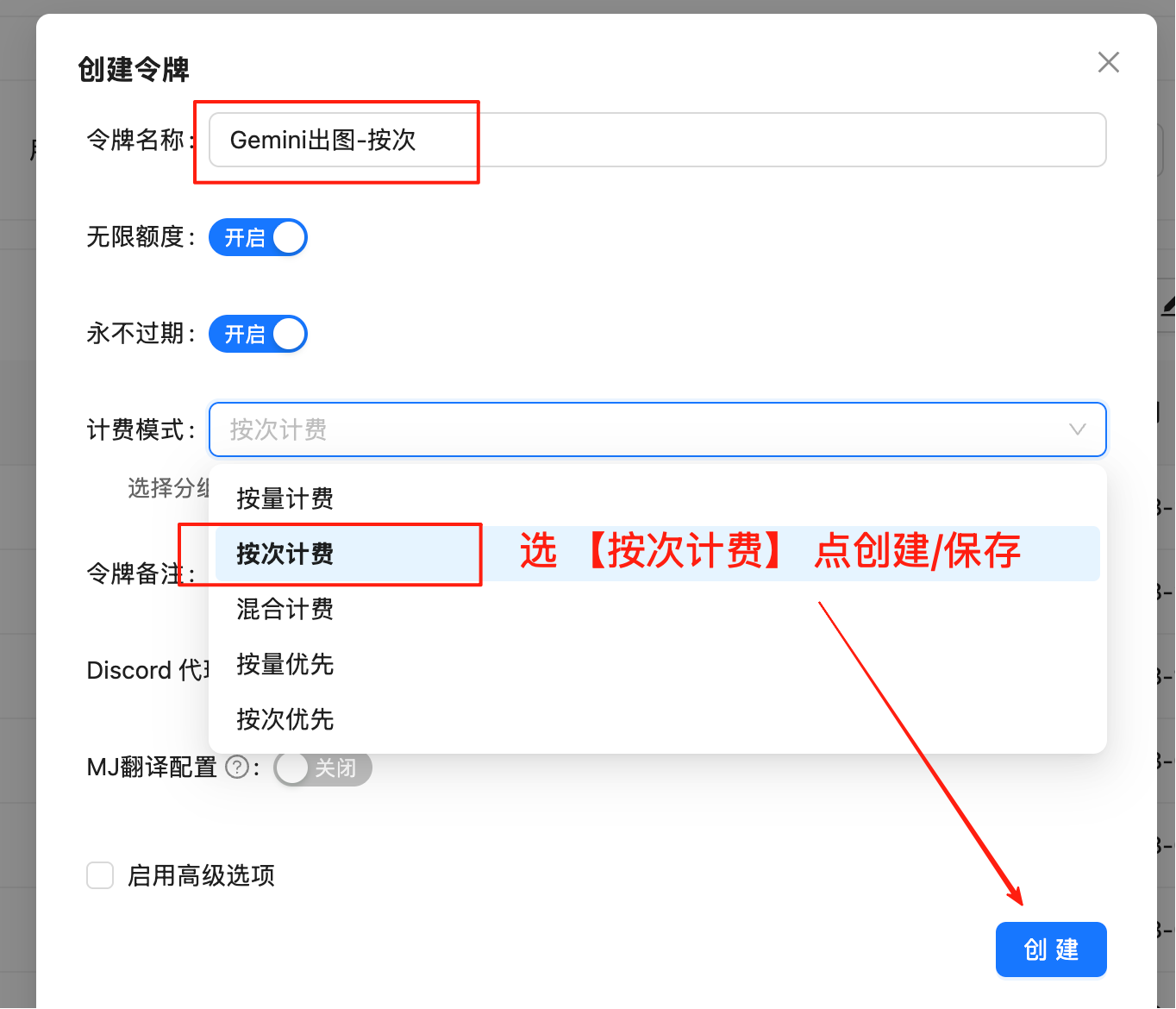
Login to LaoZhang API Token Management and create a pay-per-use tokenToken Creation Interface
2

Select Billing Type

Important: Must select “Pay-per-use” type
3

Save Token

Copy the generated token (format: sk-xxxxxx) and replace API_KEY in the code

Text-to-Image

Python Version

#!/usr/bin/env python3
# -*- coding: utf-8 -*-

"""
Seedream API Image Generator - Pure Python Version
Just modify API_KEY to use
"""

# =================== Configuration Section ===================
API_KEY = "sk-"                                              # Replace with your API key
API_URL = "https://api.laozhang.ai/v1/images/generations"    # API endpoint
PROMPT = "A beautiful sunset over mountains, realistic style"  # Image description
MODEL = "seedream-4-0-250828"                                # Model name
OUTPUT_DIR = "."                                             # Output directory
# ==============================================

import requests
import os
import datetime

def generate_image(prompt, output_dir="."):
    """Generate image and save to local"""
    print(f"🎨 Seedream Image Generator")
    print(f"📝 Prompt: {prompt}")
    print("=" * 50)
    
    # API request parameters
    headers = {
        "Content-Type": "application/json",
        "Authorization": f"Bearer {API_KEY}"
    }
    
    payload = {
        "model": MODEL,
        "prompt": prompt,
        "response_format": "url",
        "size": "2K",
        "watermark": False
    }
    
    try:
        print("⏳ Generating image...")
        
        # Call API
        response = requests.post(API_URL, headers=headers, json=payload, timeout=60)
        
        if response.status_code != 200:
            return False, f"API Error ({response.status_code}): {response.text}"
        
        # Parse response
        result = response.json()
        if "data" not in result or len(result["data"]) == 0:
            return False, "API returned no image data"
        
        # Get image URL
        image_url = result["data"][0]["url"]
        print(f"🌐 Got image URL successfully")
        
        # Download image
        print("⬇️ Downloading image...")
        img_response = requests.get(image_url, timeout=30)
        img_response.raise_for_status()
        
        # Generate filename with timestamp
        timestamp = datetime.datetime.now().strftime("%Y%m%d_%H%M%S")
        filename = os.path.join(output_dir, f"generated_{timestamp}.jpg")
        
        # Save image
        os.makedirs(output_dir, exist_ok=True)
        with open(filename, 'wb') as f:
            f.write(img_response.content)
        
        file_size = len(img_response.content)
        return True, f"✅ Generated successfully: {filename} ({file_size // 1024}KB)"
        
    except Exception as e:
        return False, f"Generation failed: {str(e)}"

def main():
    """Main function"""
    print("🚀 Seedream API Image Generator - Python Version")
    print("=" * 50)
    
    # Check API key
    if API_KEY == "sk-" or not API_KEY:
        print("⚠️  Please modify API_KEY at the top of the code")
        print("   Replace 'sk-' with your actual API key")
        print()
        print("📋 Instructions:")
        print("1. Modify API_KEY to your actual key")
        print("2. Optional: Modify PROMPT to generate different images")
        print("3. Run: python3 seedream-text-to-image.py")
        return
    
    # Execute image generation
    success, message = generate_image(PROMPT, OUTPUT_DIR)
    print(message)
    
    if success:
        print()
        print("🎉 Task completed!")
        print("💡 Tip: Modify PROMPT to generate different images")

if __name__ == "__main__":
    main()

Curl Simple Version

curl -X POST https://api.laozhang.ai/v1/images/generations \
  -H "Content-Type: application/json" \
  -H "Authorization: Bearer sk-YOUR_API_KEY" \
  -d '{
    "model": "seedream-4-0-250828",
    "prompt": "A beautiful sunset over mountains, realistic style",
    "response_format": "url",
    "size": "2K",
    "watermark": false
}'

Curl One-Line Version (with Auto Download)

Requires python3 installation, automatically parses response and downloads image
curl -X POST https://api.laozhang.ai/v1/images/generations \
  -H "Content-Type: application/json" \
  -H "Authorization: Bearer sk-YOUR_API_KEY" \
  -d '{"model": "seedream-4-0-250828","prompt": "A beautiful sunset over mountains, realistic style","response_format": "url","size": "2K","watermark": false}' \
  | python3 -c "import json,sys,os; data=json.loads(sys.stdin.read()); os.system(f'curl -L -o generated_\$(date +%Y%m%d_%H%M%S).jpg \"{data[\"data\"][0][\"url\"]}\"') if 'data' in data else print('Error')"

Image-to-Image

AI editing and redrawing based on source images, supports up to 10 reference images.

Python Version

#!/usr/bin/env python3
# -*- coding: utf-8 -*-

"""
Seedream API Image Editor - Python Version
Generate new images based on source image, just modify API_KEY to use
"""

# =================== Configuration Section ===================
API_KEY = "sk-"                                              # Replace with your API key
API_URL = "https://api.laozhang.ai/v1/images/generations"    # Image editing API endpoint        
PROMPT = "Generate a close-up image of a dog lying on lush grass."  # Editing prompt
IMAGE_URL = "https://ark-doc.tos-ap-southeast-1.bytepluses.com/doc_image/seedream4_imageToimage.png"  # Source image URL
MODEL = "seedream-4-0-250828"                                # Model to use
OUTPUT_DIR = "."                                             # Output directory
# ==============================================

import requests
import os
import datetime

def edit_image(prompt, image_url, output_dir="."):
    """Generate edited image based on source image"""
    print(f"🎨 Seedream Image Editor")
    print(f"📝 Edit Prompt: {prompt}")
    print(f"🖼️  Source URL: {image_url[:50]}...")
    print("=" * 50)
    
    # API request parameters
    headers = {
        "Content-Type": "application/json",
        "Authorization": f"Bearer {API_KEY}"
    }
    
    payload = {
        "model": MODEL,
        "prompt": prompt,
        "image": image_url,
        "sequential_image_generation": "disabled",
        "response_format": "url",
        "size": "2K",
        "stream": False,
        "watermark": False
    }
    
    try:
        print("⏳ Editing image...")
        
        # Call API
        response = requests.post(API_URL, headers=headers, json=payload, timeout=60)
        
        if response.status_code != 200:
            return False, f"API Error ({response.status_code}): {response.text}"
        
        # Parse response
        result = response.json()
        if "data" not in result or len(result["data"]) == 0:
            return False, "API returned no image data"
        
        # Get image URL
        edited_image_url = result["data"][0]["url"]
        print(f"🌐 Got edited image URL successfully")
        
        # Download image
        print("⬇️ Downloading edited image...")
        img_response = requests.get(edited_image_url, timeout=30)
        img_response.raise_for_status()
        
        # Generate filename with timestamp
        timestamp = datetime.datetime.now().strftime("%Y%m%d_%H%M%S")
        filename = os.path.join(output_dir, f"edited_{timestamp}.jpg")
        
        # Save image
        os.makedirs(output_dir, exist_ok=True)
        with open(filename, 'wb') as f:
            f.write(img_response.content)
        
        file_size = len(img_response.content)
        return True, f"✅ Edit successful: {filename} ({file_size // 1024}KB)"
        
    except Exception as e:
        return False, f"Edit failed: {str(e)}"

def main():
    """Main function"""
    print("🚀 Seedream API Image Editor - Python Version")
    print("=" * 50)
    
    # Check API key
    if API_KEY == "sk-" or not API_KEY:
        print("⚠️  Please modify API_KEY at the top of the code")
        print("   Replace 'sk-' with your actual API key")
        print()
        print("📋 Instructions:")
        print("1. Modify API_KEY to your actual key")
        print("2. Modify IMAGE_URL to the image you want to edit")
        print("3. Modify PROMPT to describe the desired editing effect")
        print("4. Run: python3 seedream-image-edit.py")
        return
    
    # Execute image editing
    success, message = edit_image(PROMPT, IMAGE_URL, OUTPUT_DIR)
    print(message)
    
    if success:
        print()
        print("🎉 Edit completed!")
        print("💡 Tip: Modify PROMPT and IMAGE_URL to edit different images")

if __name__ == "__main__":
    main()

Curl Version

#!/bin/bash

# Seedream API Image Editor - Curl Version
# Generate new images based on source image, modify API_KEY to use

# =============== Configuration Section ===============
API_KEY="sk-YOUR_API_KEY"                                    # Replace with your API key
API_URL="https://api.laozhang.ai/v1/images/generations"      # Image editing API endpoint
PROMPT="Generate a close-up image of a dog lying on lush grass."  # Editing prompt
IMAGE_URL="https://ark-doc.tos-ap-southeast-1.bytepluses.com/doc_image/seedream4_imageToimage.png"  # Source image URL
MODEL="seedream-4-0-250828"                                  # Model name
# ====================================

# Check API key
if [ "$API_KEY" = "sk-YOUR_API_KEY" ]; then
    echo "⚠️  Please modify API_KEY in the script"
    echo "   Replace 'sk-YOUR_API_KEY' with your actual API key"
    echo ""
    echo "📋 Instructions:"
    echo "1. Modify API_KEY to your actual key"
    echo "2. Modify IMAGE_URL to the image you want to edit"
    echo "3. Modify PROMPT to describe the desired editing effect"
    echo "4. Run: ./seedream-image-edit.sh"
    exit 1
fi

# Generate output filename
TIMESTAMP=$(date +"%Y%m%d_%H%M%S")
OUTPUT_FILE="edited_${TIMESTAMP}.jpg"

echo "🎨 Seedream API Image Editor - Curl Version"
echo "========================================"
echo "📝 Edit Prompt: $PROMPT"
echo "🖼️  Source URL: ${IMAGE_URL:0:50}..."
echo "📁 Output File: $OUTPUT_FILE"
echo "========================================"

# Step 1: Call API to get JSON response
echo "⏳ Editing image..."

# Build JSON request body
JSON_DATA=$(cat <<EOF
{
  "model": "$MODEL",
  "prompt": "$PROMPT",
  "image": "$IMAGE_URL",
  "sequential_image_generation": "disabled",
  "response_format": "url",
  "size": "2K",
  "stream": false,
  "watermark": false
}
EOF
)

RESPONSE=$(curl -s -X POST "$API_URL" \
  -H "Content-Type: application/json" \
  -H "Authorization: Bearer $API_KEY" \
  -d "$JSON_DATA")

# Check API response
if [ -z "$RESPONSE" ]; then
    echo "❌ No API response, please check network connection"
    exit 1
fi

echo "✅ API response successful"

# Step 2: Parse JSON with Python and extract image URL
echo "🔍 Parsing edited image URL..."
EDITED_IMAGE_URL=$(echo "$RESPONSE" | python3 -c "
import json
import sys

try:
    data = json.loads(sys.stdin.read())
    
    if 'data' in data and len(data['data']) > 0:
        url = data['data'][0]['url']
        print(url)
    else:
        print('ERROR: Image URL not found')
        sys.exit(1)
        
except Exception as e:
    print(f'ERROR: {e}')
    sys.exit(1)
")

# Check URL parsing result
if [[ "$EDITED_IMAGE_URL" == ERROR* ]]; then
    echo "❌ URL parsing failed: $EDITED_IMAGE_URL"
    echo "📄 Original API response:"
    echo "$RESPONSE"
    exit 1
fi

echo "🌐 Edited image URL retrieved successfully"

# Step 3: Download edited image
echo "⬇️ Downloading edited image..."
curl -s -L -o "$OUTPUT_FILE" "$EDITED_IMAGE_URL"

# Check download result
if [ -f "$OUTPUT_FILE" ] && [ -s "$OUTPUT_FILE" ]; then
    FILE_SIZE=$(du -h "$OUTPUT_FILE" | cut -f1)
    echo "✅ Image edited successfully!"
    echo "📁 File: $OUTPUT_FILE"
    echo "📊 Size: $FILE_SIZE"
    echo ""
    echo "🎉 Complete! Check the edited image file"
    echo "💡 Tip: Modify PROMPT and IMAGE_URL to edit different images"
else
    echo "❌ Image download failed"
    echo "🔗 You can manually access: $EDITED_IMAGE_URL"
fi

Resources

Official Documentation

API Documentation

BytePlus ModelArk official technical documentation

User Manual

Seedream 4.0 User Manual

User Guide

Seedream 4.0 User Guide

Prompting Tips

Prompting and style keyword guide

Common Questions

Supports custom image dimensions via size parameter:
  • 2K: 2048 pixels (recommended)
  • Also supports custom resolutions
See official documentation for parameter details.
  • Text-to-Image: No reference images needed
  • Image-to-Image: Supports 1-10 reference images
  • Pass via image parameter as URL or Base64
Control via watermark parameter:
  • false: No watermark (recommended)
  • true: With watermark
Supports two response formats (response_format):
  • url: Returns image link (recommended, convenient for download)
  • b64_json: Returns Base64 encoding
Control via sequential_image_generation parameter:
  • disabled: Standard generation mode (recommended)
  • enabled: Sequential generation mode

API Parameter Reference

Request Parameters

ParameterTypeRequiredDescription
modelstringModel name: seedream-4-0-250828
promptstringImage description or editing prompt
imagestringReference image URL (for image-to-image)
sizestringImage size, default 2K
response_formatstringResponse format: url or b64_json, default url
watermarkbooleanWhether to add watermark, default false
sequential_image_generationstringGeneration mode, default disabled
streambooleanWhether to stream response, default false

Response Format

{
  "created": 1726051200,
  "data": [
    {
      "url": "https://example.com/generated_image.jpg",
      "revised_prompt": "..."
    }
  ]
}

Next Steps

Nano Banana Image Generation

$0.025/image Gemini image generation

FLUX Image Generation

Check out FLUX image generation API

API Console

Create API token

Recharge Bonus

Top up $100, get +15% bonus