⚠️ Model Deprecation Notice
gemini-2.5-flash-image-preview preview version will be deprecated soon.Recommended Migration to Official Release :
✅ New Version: Gemini 2.5 Flash Image (official, more stable)
🎁 New Features: Supports custom aspect ratios (16:9, 9:16, and 10 other ratios)
💰 Same Price: Still $0.025/image
🔄 Easy Migration: Just update the model name
View New Documentation →
Prerequisites
Configure Billing Mode
Edit token settings and choose one of the following billing modes (same price for both):
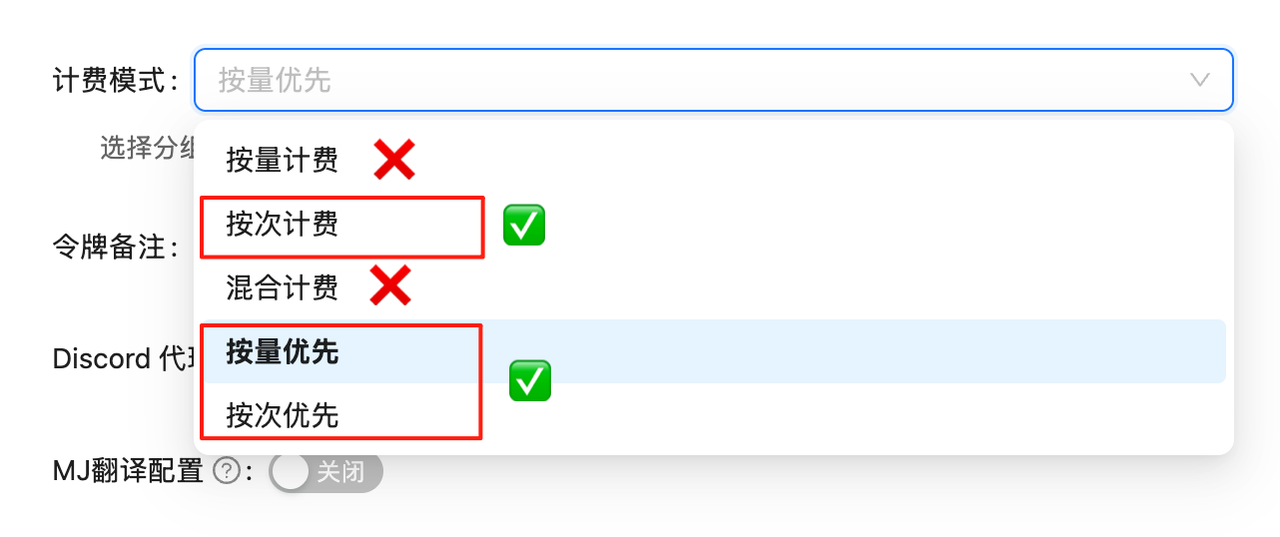
Volume Priority (Recommended): Uses balance billing first, automatically switches when balance is insufficient. Suitable for most users
Pay-per-call : Direct deduction for each call. Suitable for strict budget control scenarios
Both modes have exactly the same price at $0.025/image, only the billing method differs.
If billing mode is not configured, API calls will fail. You must complete this configuration first!
Model Overview
Nano Banana is the colloquial name for Google’s latest and most powerful image generation model gemini-2.5-flash-image-preview. It implements text-to-image functionality through the chat completions interface, fully compatible with gpt-4o-image and sora_image calling methods - just replace the model name for seamless switching.
🚀 Lightning-Fast Generation
Generates high-quality images in just 10 seconds on average, faster than OpenAI series! Returns base64 format data for direct use.
Free Trial Register and get $0.05 free credit for 2 test images
Live Demo AI Images - Try instantly, no code required
🌟 Core Features
⚡ Ultra-Fast Response : Generates in ~10 seconds on average, significantly faster than OpenAI series
💰 Great Value : 0.025 / i m a g e , 37.5 0.025/image, 37.5% cheaper than official price ( 0.025/ ima g e , 37.5 0.04/image)
🔄 Perfect Compatibility : Completely consistent with gpt-4o-image and sora_image calling methods
📦 Base64 Output : Returns base64 encoded image data directly, no secondary download needed
🎨 Google Technology : Based on Google’s latest image generation technology, outstanding quality
📋 Model Comparison
Model Model ID Billing LaoZhang AI Price Official Price Savings Speed Nano Banana gemini-2.5-flash-image-previewPay-per-use $0.025/image $0.04/image 37.5% ~10s Nano Banana2 gemini-3.1-flash-image-previewPay-per-use $0.045/image - - ~10s GPT-Image-1 gpt-image-1Token-based 10 i n p u t / 10 input/ 10 in p u t / 40 output per M- - Medium Flux Kontext Pro flux-kontext-proPay-per-use $0.035/image $0.04/image 12.5% Fast Sora Image sora_imagePay-per-use $0.01/image - - Slower
💡 Pricing Advantage
37.5% cheaper than official price
Top up $100, get +10% bonus, combined with exchange rate advantage, total ~7.3 fold off official price
Transparent and predictable pricing, no need to worry about token consumption
⚠️ Important Notes
API Endpoint Notice
✅ Correct: /v1/chat/completions (chat completions endpoint)
❌ Wrong: /v1/images/generations (traditional image generation endpoint)
This model uses the chat completions interface, consistent with gpt-4o-image and sora_image calling methods!
Return Format Differences
gemini-2.5-flash-image-preview: Returns base64 encoding
sora_image: Returns image URL
Calling method is exactly the same, only return format differs
🚀 Quick Start
Prerequisites
Create Token : Login to LaoZhang API and create a pay-per-use type token
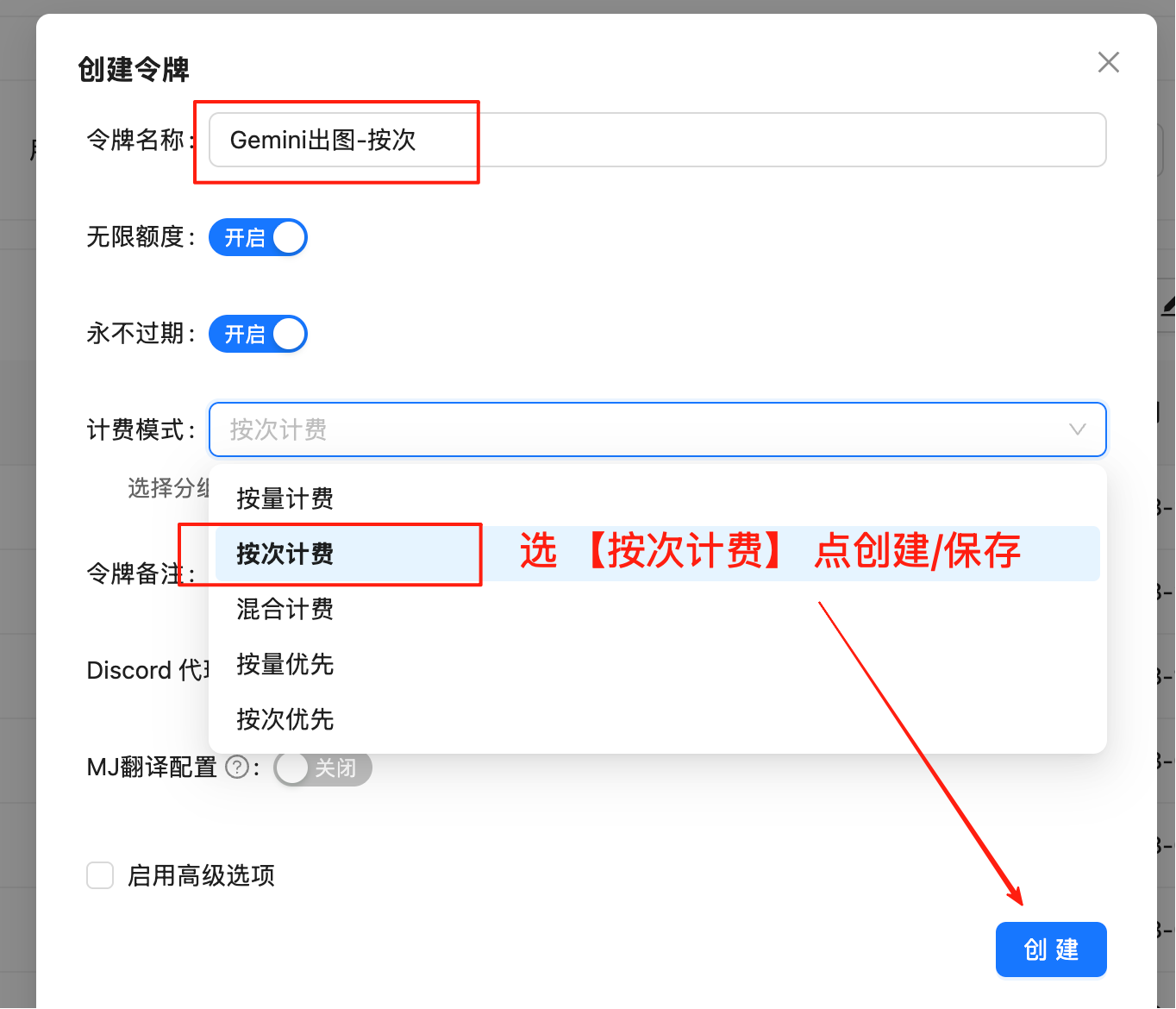
Create New Token
Click “Create New Token” button, make sure to select “Pay-per-use” type
Save Token
Copy and securely save the generated token, format is sk-xxxxxx
💰 Pricing Advantage Explained
LaoZhang AI Price : $0.025/image (37.5% cheaper than official)
Official Price : $0.04/image
Recharge Bonus : Top up $100, get +10% bonus
Exchange Rate Advantage : Combined advantage, total ~7.3 fold off official price
Select Domain : Recommended to use https://api.laozhang.ai (globally accelerated). Overseas servers can directly connect to https://api-vip.laozhang.ai, but switch back to the primary domain if unstable
Basic Example - Curl
curl -X POST "https://api.laozhang.ai/v1/chat/completions" \
-H "Authorization: Bearer $API_KEY " \
-H "Content-Type: application/json" \
-d '{
"model": "gemini-2.5-flash-image-preview",
"stream": false,
"messages": [
{
"role": "user",
"content": "a beautiful sunset over mountains"
}
]
}'
Complete Example - Python
#!/usr/bin/env python3
# -*- coding: utf-8 -*-
"""
Nano Banana (Gemini) Image Generation - Python Version
Supports non-streaming output and auto-saves base64 images locally
"""
import requests
import json
import base64
import re
import os
import datetime
from typing import Optional, Tuple
class GeminiImageGenerator :
def __init__ ( self , api_key : str , api_url : str = "https://api.laozhang.ai/v1/chat/completions" ):
"""
Initialize Gemini image generator
Args:
api_key: API key (pay-per-use type)
api_url: API endpoint
"""
self .api_key = api_key
self .api_url = api_url
self .headers = {
"Content-Type" : "application/json" ,
"Authorization" : f "Bearer { api_key } "
}
def generate_image ( self , prompt : str , model : str = "gemini-2.5-flash-image-preview" ,
output_dir : str = "." ) -> Tuple[ bool , str ]:
"""
Generate image and save locally
Args:
prompt: Image description prompt
model: Model to use
output_dir: Output directory
Returns:
Tuple[success status, result message]
"""
print ( "🚀 Starting image generation..." )
print ( f "Prompt: { prompt } " )
print ( f "Model: { model } " )
# Generate filename
timestamp = datetime.datetime.now().strftime( "%Y%m %d _%H%M%S" )
output_file = os.path.join(output_dir, f "gemini_generated_ { timestamp } .png" )
try :
# Prepare request data
payload = {
"model" : model,
"stream" : False ,
"messages" : [
{
"role" : "user" ,
"content" : prompt
}
]
}
print ( "📡 Sending API request..." )
# Send non-streaming request
response = requests.post(
self .api_url,
headers = self .headers,
json = payload,
timeout = 300
)
if response.status_code != 200 :
error_msg = f "API request failed, status code: { response.status_code } "
try :
error_detail = response.json()
error_msg += f ", error details: { error_detail } "
except :
error_msg += f ", response content: { response.text[: 500 ] } "
return False , error_msg
print ( "✅ API request successful, parsing response..." )
# Parse JSON response
try :
result = response.json()
print ( "✅ Successfully parsed JSON response" )
except json.JSONDecodeError as e:
return False , f "JSON parse failed: { str (e) } "
# Extract message content
full_content = ""
if "choices" in result and len (result[ "choices" ]) > 0 :
choice = result[ "choices" ][ 0 ]
if "message" in choice and "content" in choice[ "message" ]:
full_content = choice[ "message" ][ "content" ]
if not full_content:
return False , "Message content not found"
print ( f "📝 Got message content, length: { len (full_content) } characters" )
print ( "🔍 Parsing image data..." )
# Extract and save images
success, message = self ._extract_and_save_images(full_content, output_file)
if success:
return True , message
else :
return False , f "Image save failed: { message } "
except requests.exceptions.Timeout:
return False , "Request timeout (300 seconds)"
except requests.exceptions.ConnectionError as e:
return False , f "Connection error: { str (e) } "
except Exception as e:
return False , f "Unknown error: { str (e) } "
def _extract_and_save_images ( self , content : str , base_output_file : str ) -> Tuple[ bool , str ]:
"""
Efficiently extract and save base64 image data
Args:
content: Content containing image data
base_output_file: Base output file path
Returns:
Tuple[success status, result message]
"""
try :
print ( f "📄 Content preview (first 200 chars): { content[: 200 ] } " )
# Use precise regex to extract base64 image data
base64_pattern = r 'data:image/ ([ ^ ; ] + ) ;base64, ([ A-Za-z0-9+/= ] + ) '
match = re.search(base64_pattern, content)
if not match:
print ( '⚠️ base64 image data not found' )
return False , "Response does not contain base64 image data"
image_format = match.group( 1 ) # png, jpg, etc.
b64_data = match.group( 2 )
print ( f '🎨 Image format: { image_format } ' )
print ( f '📏 Base64 data length: { len (b64_data) } characters' )
# Decode and save image
image_data = base64.b64decode(b64_data)
if len (image_data) < 100 :
return False , "Decoded image data too small, possibly invalid"
# Set file extension based on detected format
output_file = base_output_file.replace( '.png' , f '. { image_format } ' )
os.makedirs(os.path.dirname(output_file) if os.path.dirname(output_file) else "." , exist_ok = True )
with open (output_file, 'wb' ) as f:
f.write(image_data)
print ( f '🖼️ Image saved successfully: { output_file } ' )
print ( f '📊 File size: { len (image_data) } bytes' )
return True , f "Image saved successfully: { output_file } "
except Exception as e:
return False , f "Error processing image: { str (e) } "
def main ():
"""
Main function example
"""
# Configuration parameters
API_KEY = "sk-YOUR_API_KEY" # Replace with your actual API key (pay-per-use type)
PROMPT = "A cute cat playing in a garden with bright sunshine and blooming flowers"
print ( "=" * 60 )
print ( "Nano Banana (Gemini) Image Generator" )
print ( "=" * 60 )
print ( f "Start time: { datetime.datetime.now() } " )
# Create generator instance
generator = GeminiImageGenerator( API_KEY )
# Generate image
success, message = generator.generate_image( PROMPT )
print ( " \n " + "=" * 60 )
if success:
print ( "🎉 Execution successful!" )
print ( f "✅ { message } " )
else :
print ( "❌ Execution failed!" )
print ( f "💥 { message } " )
print ( f "End time: { datetime.datetime.now() } " )
print ( "=" * 60 )
if __name__ == "__main__" :
main()
Bash Script - Auto Save
#!/bin/bash
# Nano Banana (Gemini) Image Generation - Bash Version
# Supports non-streaming output and auto-saves base64 images locally
API_KEY = "sk-YOUR_API_KEY" # Replace with your actual API key【pay-per-use】type
API_URL = "https://api.laozhang.ai/v1/chat/completions"
PROMPT = "a handsome dog under the tree"
OUTPUT_DIR = "."
# Generate timestamp filename
TIMESTAMP = $( date +"%Y%m%d_%H%M%S" )
OUTPUT_FILE = "gemini_generated_${ TIMESTAMP }.png"
TEMP_FILE = "temp_response_${ TIMESTAMP }.json"
echo "🚀 Starting image generation..."
echo "Prompt: ${ PROMPT }"
echo "Output file: ${ OUTPUT_FILE }"
# Send API request and save response
curl -s https://api.laozhang.ai/v1/chat/completions \
-H "Content-Type: application/json" \
-H "Authorization: Bearer ${ API_KEY }" \
-d "{
\" model \" : \" gemini-2.5-flash-image-preview \" ,
\" stream \" : false,
\" messages \" : [
{
\" role \" : \" user \" ,
\" content \" : \" ${ PROMPT } \"
}
]
}" > "${ TEMP_FILE }"
# Check if request was successful
if [ $? -eq 0 ]; then
echo "✅ API request successful"
echo "📄 Response saved to: ${ TEMP_FILE }"
else
echo "❌ API request failed"
exit 1
fi
# Efficiently extract and save base64 image
echo "🔍 Parsing response data..."
# Use Python script to extract and save image
python3 -c "
import json
import base64
import re
import sys
# Read API response file
try:
with open('${ TEMP_FILE }', 'r') as f:
data = json.load(f)
print('✅ Successfully parsed JSON response')
except Exception as e:
print(f'❌ JSON parse failed: {e}')
sys.exit(1)
# Extract message content
content = ''
if 'choices' in data and len(data['choices']) > 0:
choice = data['choices'][0]
if 'message' in choice and 'content' in choice['message']:
content = choice['message']['content']
if not content:
print('❌ Message content not found')
sys.exit(1)
print(f'📝 Got message content, length: {len(content)} characters')
# Efficiently extract base64 image data - supports multiple formats
base64_pattern = r'data:image/([^;]+);base64,([A-Za-z0-9+/=]+)'
match = re.search(base64_pattern, content)
if match:
image_format = match.group(1) # png, jpg, etc.
b64_data = match.group(2)
print(f'🎨 Image format: {image_format}')
print(f'📏 Base64 data length: {len(b64_data)} characters')
try:
# Decode and save image
image_data = base64.b64decode(b64_data)
# Set file extension based on detected format
output_file = '${ OUTPUT_FILE }'.replace('.png', f'.{image_format}')
with open(output_file, 'wb') as f:
f.write(image_data)
print(f'🖼️ Image saved successfully: {output_file}')
print(f'📊 File size: {len(image_data)} bytes')
# Output success flag
print('SUCCESS:' + output_file)
except Exception as e:
print(f'❌ Image processing error: {e}')
sys.exit(1)
else:
print('⚠️ base64 image data not found')
print(f'📄 Content preview: {content[:300]}...')
sys.exit(1)
"
# Get Python script execution result
PYTHON_EXIT_CODE = $?
if [ $PYTHON_EXIT_CODE -eq 0 ]; then
echo "✅ Image extraction and save complete"
else
echo "❌ Image processing failed"
echo "🔍 Keeping temp file for debugging: ${ TEMP_FILE }"
exit 1
fi
# Check generated image file
GENERATED_FILES = $( find . -name "gemini_generated_${ TIMESTAMP }.*" -type f )
if [ ! -z " $GENERATED_FILES " ]; then
echo "🎉 Image generation complete!"
for file in $GENERATED_FILES ; do
echo "📁 Save location: $( pwd )/${ file }"
echo "📊 File info:"
ls -lh "${ file }"
done
# Clean up temp file
rm -f "${ TEMP_FILE }"
echo "🧹 Temp files cleaned up"
else
echo "❌ Image file not generated"
echo "🔍 Keeping temp file for debugging: ${ TEMP_FILE }"
fi
echo "✨ Script execution complete"
🎯 Use Cases
1. Rapid Prototyping
# Generate product concept images
concept = generator.generate_image(
"Modern minimalist smartwatch design, white background, professional product photography"
)
# Generate UI interfaces
ui_design = generator.generate_image(
"Mobile app login interface design, dark theme, modern flat design style"
)
2. Content Creation
# Generate illustrations
illustration = generator.generate_image(
"Children's picture book style forest scene with cute animals playing"
)
# Generate social media graphics
social_media = generator.generate_image(
"Inspirational quote graphic, warm sunrise background, minimalist design"
)
💡 Best Practices
1. Prompt Optimization
# ❌ Too simple
prompt = "cat"
# ✅ Detailed description
prompt = """
An orange tabby cat sitting by the window,
golden sunset shining on it,
warm home environment in background,
professional pet photography style,
warm and soft atmosphere
"""
2. Base64 Processing
def save_base64_image ( base64_str , output_path ):
"""Safely save base64 image"""
try :
# Remove data URL prefix (if exists)
if "base64," in base64_str:
base64_str = base64_str.split( "base64," )[ 1 ]
# Decode and save
image_data = base64.b64decode(base64_str)
with open (output_path, 'wb' ) as f:
f.write(image_data)
return True
except Exception as e:
print ( f "Save failed: { e } " )
return False
Metric Nano Banana GPT-4o Image Sora Image Generation Speed ~10s ~20-30s ~10-15s Price $0.025/image Token-based $0.01/image Return Format Base64 Base64 URL Quality High High Medium-High Compatibility Fully compatible - Fully compatible
⚠️ Important Notes
Token Type : Must use pay-per-use type token
API Endpoint : Use /v1/chat/completions, not /v1/images/generations
Return Format : Returns base64 encoding, requires manual decoding and saving
Model Name : gemini-2.5-flash-image-preview (case-sensitive)
Request Format : Use chat format, put prompt in user message content
🔍 FAQ
What are the advantages of base64 format compared to URL?
Base64 returns image data directly, no secondary download needed, avoids URL expiration issues. Especially suitable for scenarios requiring immediate image processing.
How to switch from sora_image to Nano Banana?
Simply change the model name from sora_image to gemini-2.5-flash-image-preview, and modify result processing logic (from URL to base64).
Are there limits for batch generation?
No concurrency limits, but it’s recommended to control concurrency for optimal performance.
Image Editing API Edit existing images, multi-image composition
Nano Banana Pro 4K HD, complex instruction understanding
API Key Management Create and manage tokens
Pricing View detailed pricing
🎨 Pro Tip : Nano Banana model is particularly good at understanding complex scene descriptions and artistic styles. Utilizing detailed prompts can yield better results!