

gemini-2.5-flash-image) edits images from a text instruction (add or remove objects, replace a background, restyle a photo) and combines up to three images into one.
Before you start
1
Create an API key
In Token management, open the create-token dialog (创建令牌), set Billing mode (计费模式) to Usage first (按量优先, recommended) or Per-call (按次计费), and click Create (创建). Nano Banana models have only a per-call price: a Usage first key can call them as well as usage-based models, while a Per-call key calls only per-call models. The 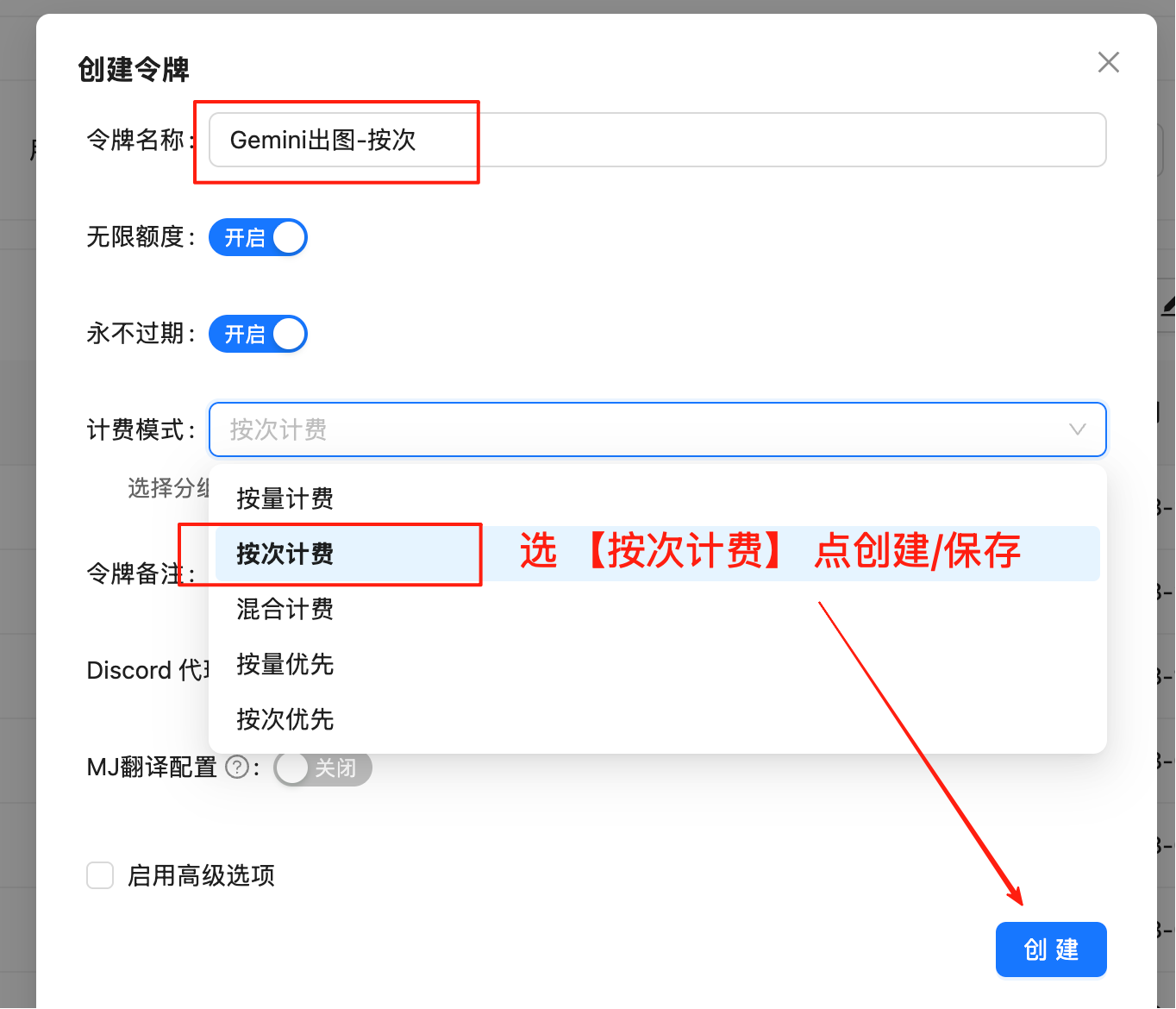
default group includes gemini-2.5-flash-image.2
Set the key and install the dependencies
jq, for example brew install jq or sudo apt-get install jq.3
Save the response helper
Save this module as
nano_banana_save.py. The Python examples import it, and after a cURL request you run it on the saved response. It finds every image in a chat completions or generateContent response, restores missing Base64 padding, and names each file by its real format:Edit an image
Put the instruction first and the image after it in the same user message. A local file goes in as a data URL whose MIME type matches the file, such asdata:image/jpeg;base64,....
- Python
- cURL
Save this script as Replace the background of a product photo:
nano_banana_edit.py. It sends the instruction with one to three images, either local files or public HTTPS URLs, and saves the result:product-studio.png, .jpg, or .webp, depending on the format the model returns. Ask for the change as an instruction: a prompt that reads like a question can get a text-only answer.
Combine two or three images
List the files after the instruction in the order you refer to them, and name each image’s role in the prompt:gemini-2.5-flash-image works best with up to three input images. For more references, or to keep several people consistent across images, use Nano Banana 2.1 or Nano Banana 2 or Nano Banana Pro, which accept up to 14.
Send an image by URL
Instead of a local file, pass a publichttps:// address; the script sends it unchanged as the image_url:
Set the aspect ratio
The OpenAI-compatible route has no aspect-ratio setting. To choose the shape of the result, call the Gemini-native endpoint and setgenerationConfig.imageConfig.aspectRatio to one of these values:
- Standard outputs about 1K at every ratio, so leave out
imageSize. - Without
aspectRatio, Google’s documented default is to match the output to the input image’s size.
- cURL
- Python
inlineData parts with a mimeType that matches each file, and the endpoint accepts your key as Authorization: Bearer or x-goog-api-key. For client setup with the Google Gen AI SDK, see Gemini protocol.
Handle the response
nano_banana_save.py covers both response formats. If you parse responses yourself:
- Chat completions: the image is inside the text of
choices[0].message.content, usually as a Markdown image such as. Read the format from the data URL instead of assuming PNG, strip thedata:image/...;base64,prefix before decoding, and add=padding when the length isn’t a multiple of 4. - generateContent: each image is an
inlineDatapart incandidates[].content.parts[], withmimeTypeand Base64data.- A part marked
thought: trueisn’t final output, so skip it.
- A part marked
- No image: the reply holds only text, or no part has
inlineData.- In native responses, check each candidate’s
finishReason, andpromptFeedbackif present. - Example values include
IMAGE_SAFETY,IMAGE_PROHIBITED_CONTENT, andNO_IMAGE.
- In native responses, check each candidate’s
Write clear edit instructions
- Name what should change and what must stay the same, for example: “Change only the blue sofa to a brown leather sofa. Keep the pillows, the rest of the room, and the lighting unchanged.” There is no mask parameter; Google calls this approach semantic masking.
- In a composite, refer to each image by its order and role, such as “the dress from the first image” and “the woman in the second image”.
- To protect a face or a logo, describe it in detail and say that it must not change.
- Describe the style, lighting, or placement you want instead of words like “better” or “nicer”.
- Make one change per request when precision matters. For a multi-step edit, send the saved result as the input of the next request.
Errors and billing
Each call is charged the per-call price, including a request that returns HTTP 200 without an image, for example when a safety check blocks the output. Don’t resend it unchanged; see Avoid paying for empty responses. The billing rules apply to every Nano Banana model, and call logs show each request’s status and charge.- HTTP 401: check the API key and the
Authorization: Bearerheader. Use an API key from Token management, not an account AccessToken. - HTTP 400: check the model ID, the JSON body, and the
aspectRatiovalue. Don’t sendimageSizeto Standard. - HTTP 429, 5xx, or a timeout: retry with exponential backoff. After a timeout, find the request in call logs before sending it again, so you don’t pay twice for the same edit.
- Large photos: Base64 makes a file about a third larger, so downscale very large images before you encode them.
Migrate to Nano Banana 2
Nano Banana 2 (gemini-3.1-flash-image) accepts the same chat completions and generateContent requests as Standard, so migrating an edit means changing one value:
https://api.laozhang.ai/v1beta/models/gemini-3.1-flash-image:generateContent. In the scripts on this page, replace gemini-2.5-flash-image in the model argument or the request URL. After you switch:
- Each call costs $0.055 (public pricing as of September 24, 2026).
- An edit can use up to 14 references: at most 10 object images and 4 character images.
- On the Gemini-native route you can choose from 14 aspect ratios and add
imageSizewith one of these values:512,1K,2K, or4K
- Results can differ for the same prompt, so run a sample of your usual edits before moving production traffic.
gemini-3.1-flash-lite-image, $0.025 per call) for customers moving off Standard. Lite edits single images at 1K with the same request format.
Google notes that Lite isn’t optimized for multiple reference inputs or multi-turn sequential editing, so keep composites on Nano Banana 2.1 or Nano Banana 2. The Nano Banana 2 Lite guide has a Lite edit example.
FAQ
Can I still call gemini-2.5-flash-image after October 2, 2026?
Yes, for now. Google’s pricing page warned of an October 2, 2026 shutdown, but its deprecations page has listed March 15, 2027 since October 8, 2026, and the pricing page showed the same date when checked on November 5, 2026. As of October 5, 2026, LaoZhang API still serves it at the same price.
- LaoZhang API doesn’t guarantee how long the model stays available; it can stop at any time.
- Once it stops, requests fail. Unlike the
-previewIDs, it isn’t mapped to another model, so requests won’t move to a newer model on their own.
Can a Standard edit return 2K or 4K images?
No. Standard outputs about 1K at every aspect ratio and doesn’t acceptimageSize; you can only choose the ratio, as shown in Set the aspect ratio. For 2K or 4K edits, migrate to Nano Banana 2 or use Nano Banana Pro, and add imageSize to the request.
Can I still use gemini-2.5-flash-image-preview?
No. Google shut it down on January 15, 2026, according to its deprecations page, and it isn’t in LaoZhang API’s model list. Since gemini-2.5-flash-image is also deprecated (Google plans to shut it down on March 15, 2027) and LaoZhang API can stop serving it at any time, move straight to Nano Banana 2 (gemini-3.1-flash-image).
Related pages and sources
- Nano Banana overview — compare the five models, the two request formats, and billing rules
- Nano Banana 2 — the migration target, with up to 14 references and 512px to 4K output
- Nano Banana 2 Lite — low-cost 1K generation and single-image edits
- Nano Banana Pro image editing — multi-image edits with up to 14 references and 4K output
- Call logs — find a request’s status and charge
- Google: Nano Banana image generation — editing prompts, input limits, and model guidance
- Google: Gemini API deprecations — the shutdown date for
gemini-2.5-flash-image - Google: generateContent reference —
imageConfigfields