Prerequisites

1

Get API Key

Log in to laozhang.ai console to obtain your API key
2

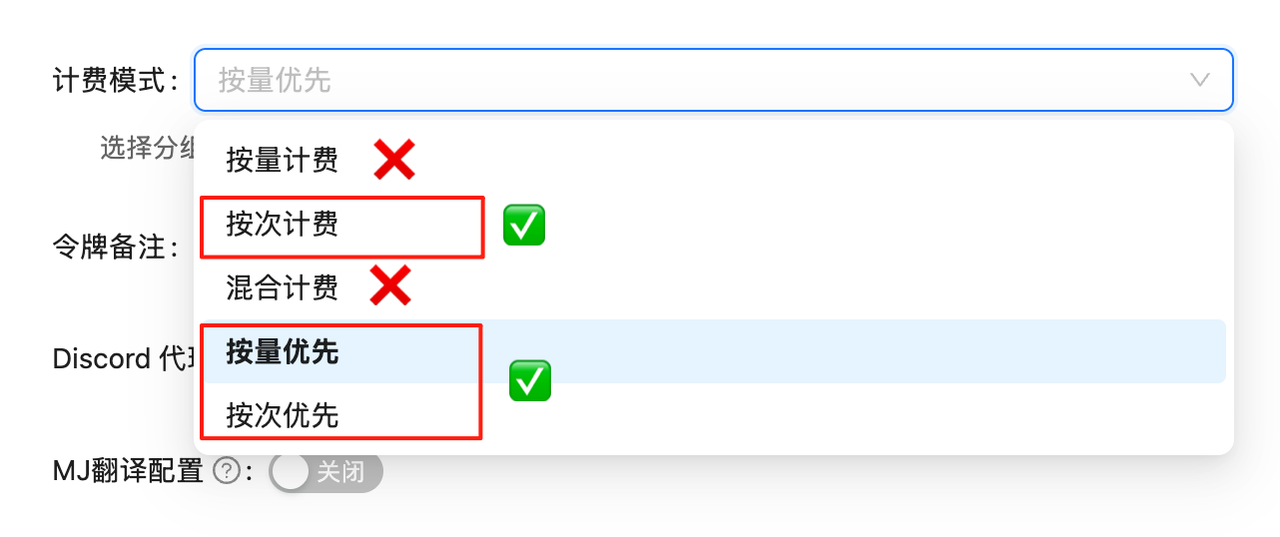
Configure Billing Mode

Edit token settings and choose one of the following billing modes (same price for both):
  • Volume Priority (Recommended): Uses balance billing first, automatically switches when balance is insufficient. Suitable for most users
  • Pay-per-call: Direct deduction for each call. Suitable for strict budget control scenarios
Both modes have exactly the same price at $0.01/image, only the billing method differs.
Token Settings
If billing mode is not configured, API calls will fail. You must complete this configuration first!

Model Overview

Sora Image is an image generation API based on reverse-engineered technology from sora.chatgpt.com, implementing text-to-image functionality through the chat completions interface. Compared to traditional OpenAI Images API, it offers better pricing at only $0.01/image.
💰 Exceptional Value
Pay-per-use billing, only 0.01perimage!ComparedtoGPTImage1sTokenbasedbilling(0.01 per image! Compared to GPT-Image-1's Token-based billing (10 input/$40 output per M Tokens), pricing is more transparent and predictable!

🌟 Core Features

  • 💸 Ultimate Value: $0.01/image, pay-per-use, no Token consumption worries
  • 🎨 High-Quality Output: Based on Sora official technology, results comparable to DALL·E 3
  • ⚡ Fast Response: Optimized reverse engineering, second-level generation
  • 📐 Multi-Size Support: Supports 2:3, 3:2, 1:1 aspect ratios
  • 🔧 Simple to Use: Uses standard chat completions interface, no new API to learn

📋 Model Information

ModelModel IDBilling MethodPriceFeatures
Sora Imagesora_imagePay-per-use$0.01/imageText-to-image, high quality
GPT-4o Imagegpt-4o-imagePay-per-use$0.01/imageSame technology, similar results
💡 Price Advantage
  • GPT-Image-1: Token-based billing (10input/10 input/40 output per M Tokens)
  • Sora Image: Fixed $0.01/image (regardless of prompt length)
  • Sora pricing is more transparent and predictable!

🚀 Quick Start

Basic Example

import requests
import re

# API Configuration
API_KEY = "YOUR_API_KEY"
API_URL = "https://api.laozhang.ai/v1/chat/completions"

def generate_image(prompt, ratio="2:3"):
    """
    Generate image using Sora Image
    
    Args:
        prompt: Image description text
        ratio: Image ratio, supports "2:3", "3:2", "1:1"
    """
    # Add ratio marker at end of prompt
    if ratio and ratio in ["2:3", "3:2", "1:1"]:
        prompt = f"{prompt}{ratio}】"
    
    headers = {
        "Authorization": f"Bearer {API_KEY}",
        "Content-Type": "application/json"
    }
    
    payload = {
        "model": "sora_image",
        "messages": [
            {
                "role": "user",
                "content": prompt
            }
        ]
    }
    
    response = requests.post(API_URL, headers=headers, json=payload)
    result = response.json()
    
    # Extract image URLs
    content = result['choices'][0]['message']['content']
    image_urls = re.findall(r'!\[.*?\]\((https?://[^)]+)\)', content)
    
    return image_urls

# Usage example
urls = generate_image("A cute cat playing in a garden", "2:3")
print(f"Generated image: {urls[0]}")

Batch Generation Example

def batch_generate_images(prompts, ratio="2:3"):
    """Batch generate images"""
    results = []
    
    for prompt in prompts:
        try:
            urls = generate_image(prompt, ratio)
            results.append({
                "prompt": prompt,
                "url": urls[0] if urls else None,
                "success": bool(urls)
            })
            print(f"✅ Generated successfully: {prompt}")
        except Exception as e:
            results.append({
                "prompt": prompt,
                "url": None,
                "success": False,
                "error": str(e)
            })
            print(f"❌ Generation failed: {prompt} - {e}")
    
    return results

# Batch generation example
prompts = [
    "Beach at sunset",
    "Futuristic tech city",
    "Fairy in a magical forest"
]

results = batch_generate_images(prompts, "3:2")

📐 Aspect Ratio Guide

Sora Image supports three preset ratios, specified by adding ratio markers at the end of prompts:
Ratio MarkerAspect RatioUse CaseExample
【2:3】VerticalPortrait, phone wallpaperBeautiful flowers【2:3】
【3:2】HorizontalLandscape, banner imagesMagnificent mountains【3:2】
【1:1】SquareSocial media avatar, iconsCute puppy【1:1】

Size Usage Examples

# Vertical portrait
portrait = generate_image("Elegant woman portrait, professional photography style【2:3】")

# Horizontal landscape
landscape = generate_image("Mountain valley at sunrise, soft lighting【3:2】")

# Square icon
icon = generate_image("Minimalist modern app icon design【1:1】")

🎯 Best Practices

1. Prompt Optimization

# ❌ Not recommended: Too simple
prompt = "cat"

# ✅ Recommended: Detailed description
prompt = """
A fluffy orange cat,
sitting on a sunny windowsill,
background shows blurred city scenery,
photography style, high-definition details
【2:3】
"""

2. Error Handling

import time

def generate_with_retry(prompt, max_retries=3):
    """Image generation with retry mechanism"""
    for attempt in range(max_retries):
        try:
            urls = generate_image(prompt)
            if urls:
                return urls[0]
        except Exception as e:
            if attempt < max_retries - 1:
                wait_time = 2 ** attempt  # Exponential backoff
                print(f"Retry {attempt + 1}/{max_retries}, waiting {wait_time}s...")
                time.sleep(wait_time)
            else:
                raise e
    
    return None

3. Result Saving

import requests
from datetime import datetime

def save_generated_image(url, prompt):
    """Save generated image locally"""
    timestamp = datetime.now().strftime("%Y%m%d_%H%M%S")
    filename = f"sora_{timestamp}.png"
    
    response = requests.get(url)
    with open(filename, 'wb') as f:
        f.write(response.content)
    
    # Save prompt information
    with open(f"sora_{timestamp}_prompt.txt", 'w', encoding='utf-8') as f:
        f.write(f"Prompt: {prompt}\n")
        f.write(f"URL: {url}\n")
        f.write(f"Time: {datetime.now()}\n")
    
    return filename

💡 Advanced Tips

1. Stylized Generation

# Art style templates
art_styles = {
    "Oil Painting": "Oil painting style, thick brushstrokes, rich color layers",
    "Watercolor": "Watercolor style, transparency, flowing colors",
    "Sketch": "Pencil sketch style, black and white, delicate lines",
    "Anime": "Japanese anime style, large eyes, vibrant colors",
    "Photorealistic": "Hyper-realistic photography, high-definition details, professional photography"
}

def generate_with_style(subject, style_name):
    """Generate image with preset style"""
    style = art_styles.get(style_name, "")
    prompt = f"{subject}, {style}【2:3】"
    return generate_image(prompt)

# Usage example
url = generate_with_style("Beautiful rose flower", "Watercolor")

2. Scene Templates

# Scene generation template
def generate_scene(subject, time="Sunset", weather="Clear", mood="Peaceful"):
    """Generate scene image based on parameters"""
    prompt = f"""
    {subject}
    Time: {time}
    Weather: {weather}
    Mood: {mood}
    Professional photography, cinematic quality
    【3:2】
    """
    return generate_image(prompt)

# Scene examples
beach = generate_scene("Tropical beach", "Golden hour", "Clear", "Relaxed")
city = generate_scene("Modern cityscape", "Night", "Rainy", "Dramatic")

⚠️ Important Notes

  1. Model Selection:
    • sora_image: Sora official technology
    • gpt-4o-image: Same underlying tech, similar results
    • Both are $0.01/image
  2. Ratio Markers:
    • Add ratio marker at end of prompt: 【2:3】, 【3:2】, or 【1:1】
    • Markers must use Chinese brackets 【】
    • Without marker, uses default ratio
  3. URL Extraction:
    • Response contains image URLs in Markdown format
    • Use regex to extract: !\[.*?\]\((https?://[^)]+)\)
    • Download images promptly after generation
  4. Chinese Support:
    • Fully supports Chinese prompts
    • No translation required
    • Natural language understanding

🔍 FAQ

Q: How is Sora Image different from GPT-Image-1?

A:
  • Sora Image: Pay-per-use, $0.01/image, fixed price
  • GPT-Image-1: Token-based, 10input/10 input/40 output per M Tokens, variable cost
  • Sora pricing is more predictable for image generation

Q: Can I use English prompts?

A: Yes! Both Chinese and English prompts are fully supported.

Q: How to specify aspect ratio?

A: Add ratio marker at end of prompt: Your prompt【2:3】

Q: Are generated images downloadable?

A: Yes, extract URLs from response and download immediately. URLs may expire after some time.

Q: What’s the maximum prompt length?

A: No strict limit, but recommended to keep prompts concise and descriptive for best results.
🎨 Pro Tip: Add detailed descriptions, artistic styles, and lighting conditions to your prompts for better results. The model excels at understanding natural language!