🧠 Intelligent Editing at New Heights Nano Banana Pro Edit uses Google’s Gemini 3 Pro model with exceptional semantic understanding. It doesn’t just “modify images” - it “understands and redraws” them.

Prerequisites

1

Get API Key

Login to laozhang.ai console to get your API key
2

Configure Billing Mode

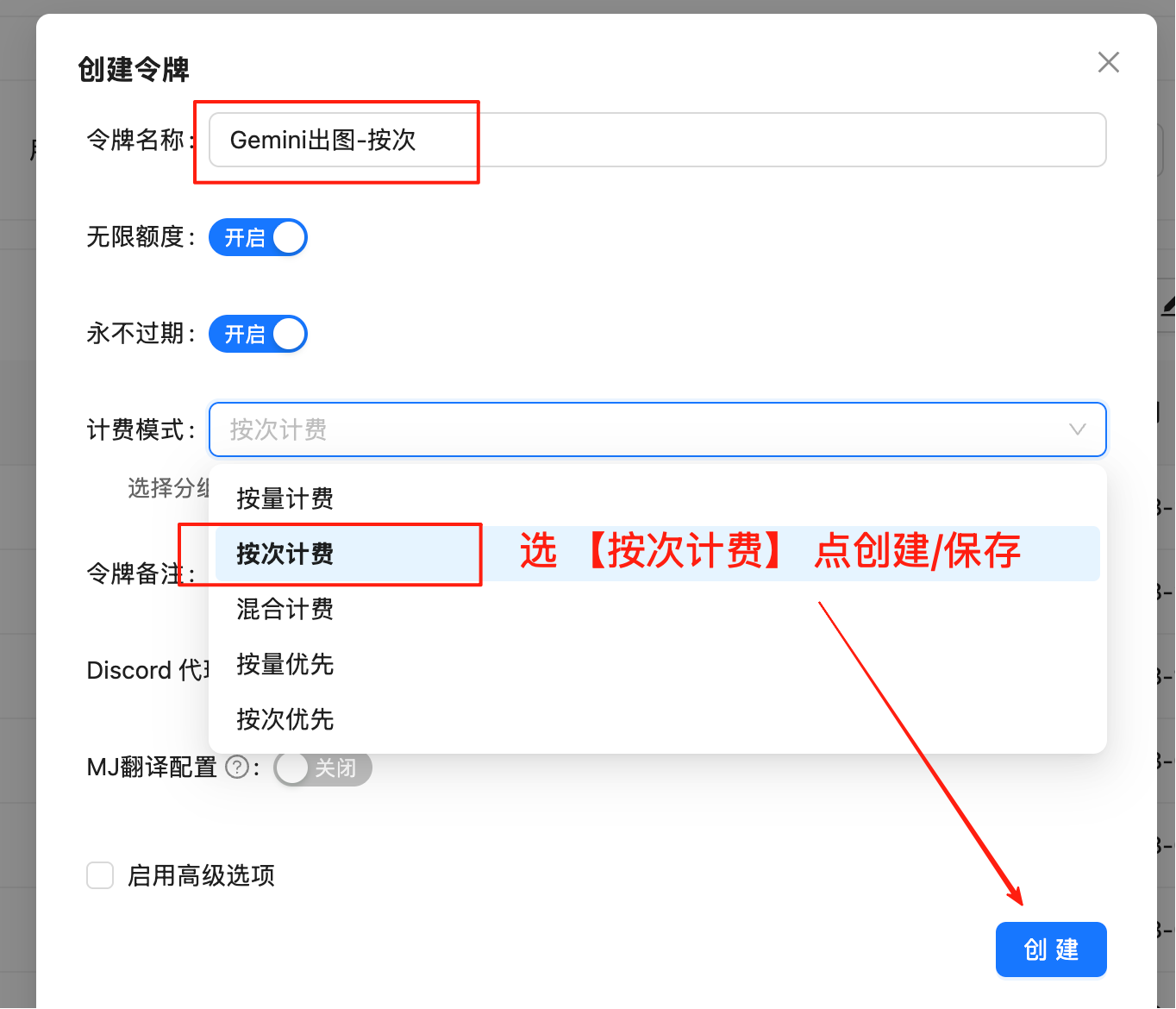
Edit token settings and select one of these billing modes (same price):
  • Pay-per-use Priority (Recommended): Use balance first, auto-switch when insufficient
  • Pay-per-use: Direct charge per request. Best for strict budget control
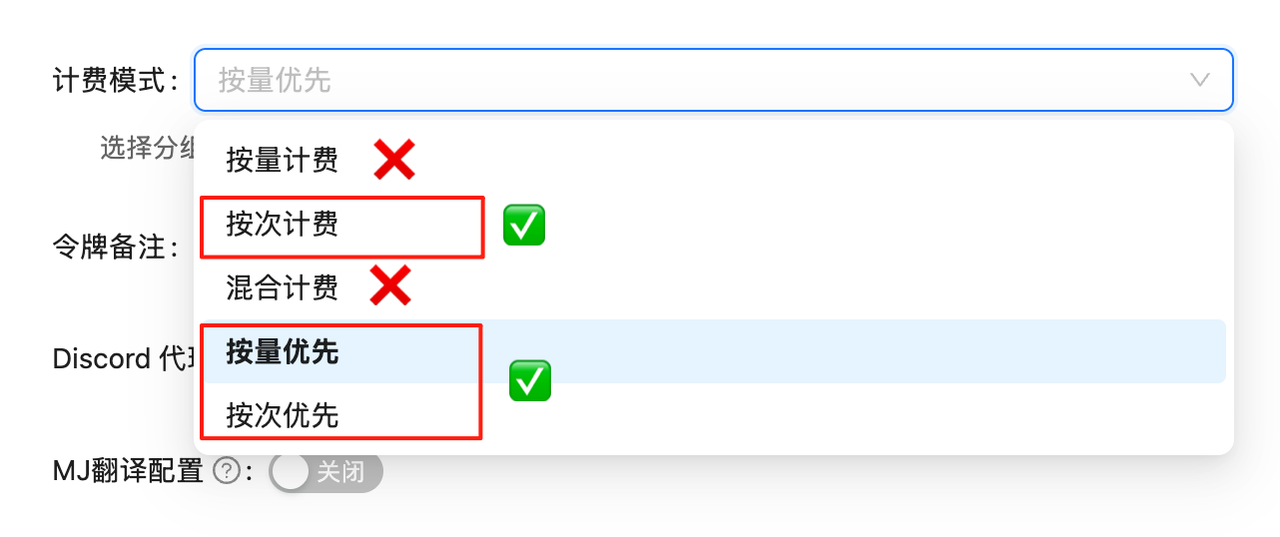
Both modes have identical pricing at $0.05/edit, only the billing method differs.
Token Settings
API calls will fail without proper billing configuration. Complete this setup first!

Model Overview

Nano Banana Pro Edit (gemini-3-pro-image-preview) is designed for scenarios requiring precise control and high-quality output. Unlike simple filters or patches, it understands complex natural language instructions and makes logical modifications to images.

Core Capabilities

  • Precise Local Editing: “Replace that cat with a dog wearing glasses, but keep the same pose”
  • Perfect Style Transfer: “Transform this photo into cyberpunk-style oil painting with stronger lighting”
  • Multi-Image Creative Fusion: “Combine these two images to generate a brand new poster”
  • 4K HD Output: Supports 2K/4K resolution output for edited results

🌟 Core Features

  • ⚡ Fast Response: ~10 seconds average for editing
  • 💰 Great Value: 0.05/edit(790.05/edit (79% cheaper than official 0.24)
  • 🔄 Dual Compatibility: Supports OpenAI SDK and Google native formats
  • 📐 Flexible Sizes: Google native format supports 10 aspect ratios
  • 🖼️ High Resolution: Supports 1K, 2K, 4K resolution output
  • 🧠 Thinking Mode: Built-in reasoning ability, understands complex editing instructions
  • 🌐 Search Grounding: Supports combining real-time search data for editing
  • 🎨 Multi-Image Reference: Supports up to 14 reference images for complex compositing
  • 📦 Base64 Output: Returns base64 encoded image data directly
  • 🔗 URL Direct Input: Google native format supports direct image URL input (overseas accessible required), no Base64 encoding needed

🔀 Two API Modes

FeatureOpenAI Compatible ModeGoogle Native Format
Endpoint/v1/chat/completions/v1beta/models/gemini-3-pro-image-preview:generateContent
Output SizeDefault ratio10 aspect ratios
ResolutionFixed 1K1K/2K/4K
Multi-Image✅ Supported✅ Supported (up to 14)
CompatibilityPerfect with OpenAI SDKRequires native calls
Return FormatBase64Base64
Image InputURL or Base64URL (fileData) or Base64 (inline_data)
💡 How to Choose?
  • For default ratio images, use OpenAI Compatible Mode - simple and fast
  • For custom aspect ratios (like 16:9, 9:16) or high-res (2K/4K), use Google Native Format

📋 Model Comparison

Comparison with Other Editing Models

ModelModel IDBillingLaoZhang PriceOfficial PriceSavingsResolutionSpeed
Nano Banana Progemini-3-pro-image-previewPer-use$0.05/edit$0.24/edit79%1K/2K/4K~10s
Nano Bananagemini-2.5-flash-imagePer-use$0.025/edit$0.04/edit37.5%1K (fixed)~10s
GPT-4o Editgpt-4oToken----~20s
DALL·E 2 Editdall-e-2Per-use-$0.018/image-FixedSlower

Pro vs Standard Detailed Comparison

FeatureNano Banana ProNano Banana
Modelgemini-3-pro-image-previewgemini-2.5-flash-image
TechnologyGemini 3Gemini 2.5
Resolution1K/2K/4K1K (fixed)
Price$0.05/edit$0.025/edit
Thinking Mode✅ Yes❌ No
Search Grounding✅ Yes❌ No
Multi-ImageUp to 14Up to 3
Speed~10s~10s
Best ForProfessional design, complex compositingQuick edits, simple modifications
💰 Price Advantage
  • Nano Banana Pro: 0.05/edit(LaoZhangAPI)vs0.05/edit (LaoZhang API) vs 0.24/edit (official), 79% cheaper
  • Bonus: Get +10% bonus on large deposits
  • Exchange Rate: Paying in CNY is even more cost-effective
Nano Banana Pro offers exceptional value at LaoZhang API!

🚀 Quick Start

Prerequisites

1

Create Token

Login to LaoZhang API Token Management and create a pay-per-use type tokenToken Creation Interface
2

Select Billing Type

Important: Must select “Pay-per-use” type
3

Save Token

Copy the generated token in format sk-xxxxxx

Method 1: OpenAI Compatible Mode

Single Image Edit - Curl

curl -X POST "https://api.laozhang.ai/v1/chat/completions" \
     -H "x-goog-api-key: sk-YOUR_API_KEY" \
     -H "Content-Type: application/json" \
     -d '{
    "model": "gemini-3-pro-image-preview",
    "stream": false,
    "messages": [
        {
            "role": "user",
            "content": [
                {
                    "type": "text",
                    "text": "Add a futuristic neon halo above the person head"
                },
                {
                    "type": "image_url",
                    "image_url": {
                        "url": "https://example.com/your-image.jpg"
                    }
                }
            ]
        }
    ]
}'

Single Image Edit - Python SDK

from openai import OpenAI
import base64
import re

client = OpenAI(
    api_key="sk-YOUR_API_KEY",
    base_url="https://api.laozhang.ai/v1"
)

response = client.chat.completions.create(
    model="gemini-3-pro-image-preview",
    messages=[
        {
            "role": "user",
            "content": [
                {
                    "type": "text",
                    "text": "Add a cute wizard hat on this cat's head"
                },
                {
                    "type": "image_url",
                    "image_url": {
                        "url": "https://example.com/your-image.jpg"
                    }
                }
            ]
        }
    ]
)

# Extract and save image
content = response.choices[0].message.content
match = re.search(r'!\[.*?\]\((data:image/png;base64,.*?)\)', content)

if match:
    base64_data = match.group(1).split(',')[1]
    image_data = base64.b64decode(base64_data)

    with open('edited.png', 'wb') as f:
        f.write(image_data)
    print("✅ Edited image saved: edited.png")

Multi-Image Compositing - Python SDK

from openai import OpenAI
import base64
import re

client = OpenAI(
    api_key="sk-YOUR_API_KEY",
    base_url="https://api.laozhang.ai/v1"
)

response = client.chat.completions.create(
    model="gemini-3-pro-image-preview",
    messages=[
        {
            "role": "user",
            "content": [
                {
                    "type": "text",
                    "text": "Combine the style of image A with the content of image B"
                },
                {
                    "type": "image_url",
                    "image_url": {"url": "https://example.com/style.jpg"}
                },
                {
                    "type": "image_url",
                    "image_url": {"url": "https://example.com/content.jpg"}
                }
            ]
        }
    ]
)

# Extract and save image
content = response.choices[0].message.content
match = re.search(r'!\[.*?\]\((data:image/png;base64,.*?)\)', content)

if match:
    base64_data = match.group(1).split(',')[1]
    image_data = base64.b64decode(base64_data)

    with open('merged.png', 'wb') as f:
        f.write(image_data)
    print("✅ Merged image saved: merged.png")

Method 2: Google Native Format (Custom Aspect Ratio + 4K)

Authentication Methods

Google native format supports three authentication methods:
# Method 1: URL parameter (recommended, simplest)
https://api.laozhang.ai/v1beta/models/gemini-3-pro-image-preview:generateContent?key=sk-YOUR_API_KEY

# Method 2: Authorization Bearer Header
-H "Authorization: Bearer sk-YOUR_API_KEY"

# Method 3: x-goog-api-key Header
-H "x-goog-api-key: sk-YOUR_API_KEY"
💡 All three methods work the same. Choose whichever you prefer.

Supported Resolutions

Aspect Ratio1K Resolution2K Resolution4K Resolution
1:11024×10242048×20484096×4096
16:91376×7682752×15365504×3072
9:16768×13761536×27523072×5504
4:31200×8962400×17924800×3584
3:4896×12001792×24003584×4800
💡 How to Set Resolution Pass "2K" or "4K" in generationConfig.imageConfig.imageSize. Default is "1K" if not specified.

Image Input Methods

Google native format supports two image input methods:
💡 Two Methods Comparison
  • inline_data: Pass Base64 encoded data, suitable for local images
  • fileData: Pass image URL directly, more concise (recommended for online images)
⚠️ URL Method Limitations When using fileData.fileUri to pass image URL, the following conditions must be met:
  • Image URL must be directly accessible from overseas public network
  • Image server must not have anti-crawling mechanisms (e.g., Cloudflare verification, CAPTCHA, User-Agent detection)
  • For images on domestic CDN or with access restrictions, use inline_data method (download first, then convert to Base64)

4K HD Editing - Curl (Base64 Method)

curl -X POST "https://api.laozhang.ai/v1beta/models/gemini-3-pro-image-preview:generateContent" \
  -H "x-goog-api-key: sk-YOUR_API_KEY" \
  -H "Content-Type: application/json" \
  -d '{
    "contents": [{
      "parts": [
        {"text": "Transform this image into a cyberpunk style with neon lights"},
        {"inline_data": {"mime_type": "image/jpeg", "data": "BASE64_IMAGE_DATA_HERE"}}
      ]
    }],
    "generationConfig": {
      "responseModalities": ["IMAGE"],
      "imageConfig": {
        "aspectRatio": "16:9",
        "imageSize": "4K"
      }
    }
  }'

4K HD Editing - Curl (URL Method)

Use fileData.fileUri to pass online image URL directly, no Base64 conversion needed:
curl -X POST "https://api.laozhang.ai/v1beta/models/gemini-3-pro-image-preview:generateContent" \
  -H "x-goog-api-key: sk-YOUR_API_KEY" \
  -H "Content-Type: application/json" \
  -d '{
    "contents": [{
      "parts": [
        {
          "fileData": {
            "fileUri": "https://example.com/your-image.png",
            "mimeType": "image/png"
          }
        },
        {"text": "Add five cute dogs to this image"}
      ],
      "role": "user"
    }],
    "generationConfig": {
      "responseModalities": ["IMAGE"],
      "imageConfig": {
        "aspectRatio": "16:9",
        "imageSize": "4K"
      }
    }
  }'
💡 URL Method Key Points
  • Use fileData.fileUri instead of inline_data.data
  • Must specify mimeType (e.g., image/png, image/jpeg)
  • Optionally add role: "user" to specify the role
  • Image URL must be directly accessible from overseas public network

Python Code Examples

💡 Progressive Examples Example 1 edits image → Example 2 transforms its style → Example 3 fuses both images. Clear progression!
import requests
import base64

# ========== Configuration ==========
API_KEY = "sk-YOUR_API_KEY"
API_URL = "https://api.laozhang.ai/v1beta/models/gemini-3-pro-image-preview:generateContent"
INPUT_IMAGE = "cat.jpg"
PROMPT = "Add a cute wizard hat on this cat's head"
ASPECT_RATIO = "1:1"
IMAGE_SIZE = "2K"  # 1K, 2K, 4K
# ============================

# Read and encode image
with open(INPUT_IMAGE, "rb") as f:
    image_b64 = base64.b64encode(f.read()).decode("utf-8")

headers = {"x-goog-api-key": API_KEY, "Content-Type": "application/json"}

payload = {
    "contents": [{
        "parts": [
            {"text": PROMPT},
            {"inline_data": {"mime_type": "image/jpeg", "data": image_b64}}
        ]
    }],
    "generationConfig": {
        "responseModalities": ["IMAGE"],
        "imageConfig": {
            "aspectRatio": ASPECT_RATIO,
            "imageSize": IMAGE_SIZE
        }
    }
}

response = requests.post(API_URL, headers=headers, json=payload, timeout=180)
result = response.json()

# Save image
output_data = result["candidates"][0]["content"]["parts"][0]["inlineData"]["data"]
with open("output.png", "wb") as f:
    f.write(base64.b64decode(output_data))

print("✅ Image saved: output.png")
import requests
import base64

# ========== Configuration ==========
API_KEY = "sk-YOUR_API_KEY"
API_URL = "https://api.laozhang.ai/v1beta/models/gemini-3-pro-image-preview:generateContent"

INPUT_IMAGE = "output.png"  # Use image from Example 1
PROMPT = "Transform this cat into Van Gogh Starry Night style oil painting"
ASPECT_RATIO = "1:1"
IMAGE_SIZE = "2K"
# ============================

# Read and encode image
with open(INPUT_IMAGE, "rb") as f:
    image_b64 = base64.b64encode(f.read()).decode("utf-8")

headers = {"x-goog-api-key": API_KEY, "Content-Type": "application/json"}

payload = {
    "contents": [{
        "parts": [
            {"text": PROMPT},
            {"inline_data": {"mime_type": "image/png", "data": image_b64}}
        ]
    }],
    "generationConfig": {
        "responseModalities": ["IMAGE"],
        "imageConfig": {
            "aspectRatio": ASPECT_RATIO,
            "imageSize": IMAGE_SIZE
        }
    }
}

response = requests.post(API_URL, headers=headers, json=payload, timeout=180)
result = response.json()

# Save image
output_data = result["candidates"][0]["content"]["parts"][0]["inlineData"]["data"]
with open("output_styled.png", "wb") as f:
    f.write(base64.b64decode(output_data))

print("✅ Image saved: output_styled.png")
import requests
import base64

# ========== Configuration ==========
API_KEY = "sk-YOUR_API_KEY"
API_URL = "https://api.laozhang.ai/v1beta/models/gemini-3-pro-image-preview:generateContent"

# Use the two images from Example 1 and Example 2
IMAGES = ["output.png", "output_styled.png"]
PROMPT = "Combine these two cat images into a single artistic composition"
ASPECT_RATIO = "16:9"
IMAGE_SIZE = "2K"
# ============================

# Build parts: text + multiple images
parts = [{"text": PROMPT}]

for img_path in IMAGES:
    with open(img_path, "rb") as f:
        img_b64 = base64.b64encode(f.read()).decode("utf-8")
    parts.append({"inline_data": {"mime_type": "image/png", "data": img_b64}})

headers = {"x-goog-api-key": API_KEY, "Content-Type": "application/json"}

payload = {
    "contents": [{"parts": parts}],
    "generationConfig": {
        "responseModalities": ["IMAGE"],
        "imageConfig": {
            "aspectRatio": ASPECT_RATIO,
            "imageSize": IMAGE_SIZE
        }
    }
}

response = requests.post(API_URL, headers=headers, json=payload, timeout=180)
result = response.json()

# Save image
output_data = result["candidates"][0]["content"]["parts"][0]["inlineData"]["data"]
with open("output_mixed.png", "wb") as f:
    f.write(base64.b64decode(output_data))

print("✅ Image saved: output_mixed.png")
import requests
import base64

# ========== Configuration ==========
API_KEY = "sk-YOUR_API_KEY"
API_URL = "https://api.laozhang.ai/v1beta/models/gemini-3-pro-image-preview:generateContent"

# Use online image URL (must be accessible from overseas)
IMAGE_URL = "https://example.com/your-image.png"
PROMPT = "Add a beautiful sunset in the background"
ASPECT_RATIO = "16:9"
IMAGE_SIZE = "4K"
# ============================

headers = {"x-goog-api-key": API_KEY, "Content-Type": "application/json"}

# Use fileData.fileUri method - no need to download and encode image
payload = {
    "contents": [{
        "parts": [
            {
                "fileData": {
                    "fileUri": IMAGE_URL,
                    "mimeType": "image/png"
                }
            },
            {"text": PROMPT}
        ],
        "role": "user"
    }],
    "generationConfig": {
        "responseModalities": ["IMAGE"],
        "imageConfig": {
            "aspectRatio": ASPECT_RATIO,
            "imageSize": IMAGE_SIZE
        }
    }
}

response = requests.post(API_URL, headers=headers, json=payload, timeout=180)
result = response.json()

# Save image
output_data = result["candidates"][0]["content"]["parts"][0]["inlineData"]["data"]
with open("output_url.png", "wb") as f:
    f.write(base64.b64decode(output_data))

print("✅ Image saved: output_url.png")
#!/usr/bin/env python3
# -*- coding: utf-8 -*-

"""
Nano Banana Pro Image Editing Tool - Python Version
Upload local image + text description, generate new image, supports custom aspect ratio and resolution
"""

import requests
import base64
import os
import datetime
import mimetypes
from typing import Optional, Tuple, List

class NanaBananaProEditor:
    """Nano Banana Pro Image Editor"""

    SUPPORTED_ASPECT_RATIOS = [
        "21:9", "16:9", "4:3", "3:2", "1:1",
        "9:16", "3:4", "2:3", "5:4", "4:5"
    ]

    SUPPORTED_SIZES = ["1K", "2K", "4K"]

    def __init__(self, api_key: str):
        self.api_key = api_key
        self.api_url = "https://api.laozhang.ai/v1beta/models/gemini-3-pro-image-preview:generateContent"
        self.headers = {
            "Content-Type": "application/json",
            "x-goog-api-key": api_key
        }

    def edit_image(self, image_path: str, prompt: str,
                   aspect_ratio: str = "1:1",
                   image_size: str = "2K",
                   output_dir: str = ".") -> Tuple[bool, str]:
        """
        Edit a single image

        Args:
            image_path: Input image path
            prompt: Edit description
            aspect_ratio: Aspect ratio
            image_size: Resolution (1K, 2K, 4K)
            output_dir: Save directory

        Returns:
            (success, result message)
        """
        print(f"🚀 Starting image edit...")
        print(f"📁 Input image: {image_path}")
        print(f"📝 Edit prompt: {prompt}")
        print(f"📐 Aspect ratio: {aspect_ratio}")
        print(f"🖼️  Resolution: {image_size}")

        if not os.path.exists(image_path):
            return False, f"Image file not found: {image_path}"

        if aspect_ratio not in self.SUPPORTED_ASPECT_RATIOS:
            return False, f"Unsupported aspect ratio {aspect_ratio}"

        if image_size not in self.SUPPORTED_SIZES:
            return False, f"Unsupported resolution {image_size}"

        # Read and encode image
        try:
            with open(image_path, 'rb') as f:
                image_data = f.read()
            image_base64 = base64.b64encode(image_data).decode('utf-8')

            mime_type, _ = mimetypes.guess_type(image_path)
            if not mime_type or not mime_type.startswith('image/'):
                mime_type = 'image/jpeg'
        except Exception as e:
            return False, f"Failed to read image: {str(e)}"

        # Generate output filename
        timestamp = datetime.datetime.now().strftime("%Y%m%d_%H%M%S")
        output_file = os.path.join(output_dir, f"edited_{timestamp}.png")

        try:
            payload = {
                "contents": [{
                    "parts": [
                        {"text": prompt},
                        {"inline_data": {"mime_type": mime_type, "data": image_base64}}
                    ]
                }],
                "generationConfig": {
                    "responseModalities": ["IMAGE"],
                    "imageConfig": {
                        "aspectRatio": aspect_ratio,
                        "imageSize": image_size
                    }
                }
            }

            print("📡 Sending request to API...")
            response = requests.post(self.api_url, headers=self.headers, json=payload, timeout=180)

            if response.status_code != 200:
                return False, f"API request failed, status code: {response.status_code}"

            result = response.json()
            output_image_data = result["candidates"][0]["content"]["parts"][0]["inlineData"]["data"]

            print("💾 Saving image...")
            decoded_data = base64.b64decode(output_image_data)

            with open(output_file, 'wb') as f:
                f.write(decoded_data)

            file_size = len(decoded_data) / 1024
            print(f"✅ Image saved: {output_file}")
            print(f"📊 File size: {file_size:.2f} KB")

            return True, f"Successfully saved image: {output_file}"

        except Exception as e:
            return False, f"Error: {str(e)}"

    def merge_images(self, image_paths: List[str], prompt: str,
                     aspect_ratio: str = "16:9",
                     image_size: str = "2K",
                     output_dir: str = ".") -> Tuple[bool, str]:
        """
        Merge multiple images

        Args:
            image_paths: List of input image paths
            prompt: Merge description
            aspect_ratio: Aspect ratio
            image_size: Resolution
            output_dir: Save directory

        Returns:
            (success, result message)
        """
        print(f"🚀 Starting to merge {len(image_paths)} images...")

        parts = [{"text": prompt}]

        for img_path in image_paths:
            if not os.path.exists(img_path):
                return False, f"Image file not found: {img_path}"

            with open(img_path, 'rb') as f:
                img_data = f.read()
            img_b64 = base64.b64encode(img_data).decode('utf-8')

            mime_type, _ = mimetypes.guess_type(img_path)
            if not mime_type:
                mime_type = 'image/jpeg'

            parts.append({"inline_data": {"mime_type": mime_type, "data": img_b64}})

        timestamp = datetime.datetime.now().strftime("%Y%m%d_%H%M%S")
        output_file = os.path.join(output_dir, f"merged_{timestamp}.png")

        try:
            payload = {
                "contents": [{"parts": parts}],
                "generationConfig": {
                    "responseModalities": ["IMAGE"],
                    "imageConfig": {
                        "aspectRatio": aspect_ratio,
                        "imageSize": image_size
                    }
                }
            }

            print("📡 Sending request to API...")
            response = requests.post(self.api_url, headers=self.headers, json=payload, timeout=180)

            if response.status_code != 200:
                return False, f"API request failed, status code: {response.status_code}"

            result = response.json()
            output_image_data = result["candidates"][0]["content"]["parts"][0]["inlineData"]["data"]

            print("💾 Saving image...")
            decoded_data = base64.b64decode(output_image_data)

            with open(output_file, 'wb') as f:
                f.write(decoded_data)

            print(f"✅ Image saved: {output_file}")
            return True, f"Successfully saved image: {output_file}"

        except Exception as e:
            return False, f"Error: {str(e)}"


def main():
    """Main function - Usage examples"""

    API_KEY = "sk-YOUR_API_KEY"

    editor = NanaBananaProEditor(API_KEY)

    # Example 1: Single image edit
    success, message = editor.edit_image(
        image_path="./input.jpg",
        prompt="Add a rainbow in the sky",
        aspect_ratio="16:9",
        image_size="2K"
    )
    print(message)

    # Example 2: Multi-image merge
    success, message = editor.merge_images(
        image_paths=["./cat.jpg", "./dog.jpg"],
        prompt="Combine these two pets into one happy family portrait",
        aspect_ratio="1:1",
        image_size="2K"
    )
    print(message)


if __name__ == "__main__":
    main()

🎯 Editing Scenarios

1. Single Image Edit - Add Elements

def add_element_to_image(image_url, element_description):
    """Add new elements to image"""
    headers = {
        "x-goog-api-key": API_KEY,
        "Content-Type": "application/json"
    }

    data = {
        "model": "gemini-3-pro-image-preview",
        "stream": False,
        "messages": [{
            "role": "user",
            "content": [
                {"type": "text", "text": f"Add {element_description} to this image"},
                {"type": "image_url", "image_url": {"url": image_url}}
            ]
        }]
    }

    response = requests.post(API_URL, headers=headers, json=data)
    return extract_base64_from_response(response.json())

# Usage example
result = add_element_to_image(
    "https://example.com/landscape.jpg",
    "a rainbow in the sky"
)

2. Style Transfer

def style_transfer(image_url, style_description):
    """Image style transfer"""
    headers = {
        "x-goog-api-key": API_KEY,
        "Content-Type": "application/json"
    }

    data = {
        "model": "gemini-3-pro-image-preview",
        "stream": False,
        "messages": [{
            "role": "user",
            "content": [
                {"type": "text", "text": f"Transform this image into {style_description} style"},
                {"type": "image_url", "image_url": {"url": image_url}}
            ]
        }]
    }

    response = requests.post(API_URL, headers=headers, json=data)
    return extract_base64_from_response(response.json())

# Usage example
result = style_transfer(
    "https://example.com/photo.jpg",
    "Van Gogh oil painting"
)

3. Multi-Image Compositing

def creative_merge(image_urls, merge_instruction):
    """Creatively merge multiple images"""
    content = [{"type": "text", "text": merge_instruction}]

    for url in image_urls:
        content.append({
            "type": "image_url",
            "image_url": {"url": url}
        })

    headers = {
        "x-goog-api-key": API_KEY,
        "Content-Type": "application/json"
    }

    data = {
        "model": "gemini-3-pro-image-preview",
        "stream": False,
        "messages": [{"role": "user", "content": content}]
    }

    response = requests.post(API_URL, headers=headers, json=data)
    return extract_base64_from_response(response.json())

# Usage example
images = ["https://example.com/cat.jpg", "https://example.com/background.jpg"]
result = creative_merge(images, "Naturally blend the cat into the background")

💡 Best Practices

Edit Instruction Optimization

# ❌ Vague instruction
instruction = "edit the image"

# ✅ Clear and specific instruction
instruction = """
1. Add a bright moon in the upper right corner
2. Adjust overall color tone to warm tones
3. Add some firefly light effects
4. Keep the main subject unchanged
"""

Multi-Image Processing Strategy

def smart_multi_image_edit(images, instruction):
    """Smart multi-image editing"""

    if len(images) == 1:
        prompt = f"Edit this image: {instruction}"
    elif len(images) == 2:
        prompt = f"Combine these two images creatively: {instruction}"
    else:
        prompt = f"Process these {len(images)} images together: {instruction}"

    # Build content...
    return send_edit_request(content)

❓ FAQ

FeatureNano Banana ProNano Banana
Resolution1K/2K/4K1K (fixed)
Thinking Mode✅ Yes❌ No
Search Grounding✅ Yes❌ No
Multi-ImageUp to 14Up to 3
Price$0.05/edit$0.025/edit
Best ForProfessional design, complex compositingQuick edits, simple modifications
4K is only supported by Nano Banana Pro, use Google native format and add imageSize parameter:
{
  "generationConfig": {
    "responseModalities": ["IMAGE"],
    "imageConfig": {
      "aspectRatio": "16:9",
      "imageSize": "4K"
    }
  }
}
Important: Must use uppercase “K” (1K, 2K, 4K).
Common image formats are supported:
  • JPG/JPEG
  • PNG
  • WebP
  • GIF (static)
JPG or PNG recommended for best results.
  • Recommended size: Single image ≤ 5MB
  • Maximum size: ≤ 10MB
  • Larger images increase processing time, recommend compressing before upload
  • Nano Banana Pro: Up to 14 images
  • Nano Banana: Up to 3 images
  • Too many images affects quality and processing time, recommend ≤ 4
ModelLaoZhang APIOfficialSavings
Nano Banana Pro$0.05/edit$0.24/edit79%
Nano Banana$0.025/edit$0.04/edit37.5%
Nano Banana Pro offers exceptional value at LaoZhang API!
Perfectly supported! Gemini 3 Pro has top-tier multilingual understanding. You can describe editing requirements in Chinese directly.
  1. Detailed description: Provide specific editing details
  2. Step by step: Describe complex edits in multiple steps
  3. Reference style: Specify art style
  4. Keep subject: Clearly state what needs to be preserved
Google native format supports two image input methods:1. URL Method (fileData.fileUri) - More concise
{
  "fileData": {
    "fileUri": "https://example.com/image.png",
    "mimeType": "image/png"
  }
}
2. Base64 Method (inline_data) - More universal
{
  "inline_data": {
    "mime_type": "image/png",
    "data": "BASE64_ENCODED_DATA"
  }
}
⚠️ URL Method Limitations:
  • Image URL must be directly accessible from overseas public network
  • Image server must not have anti-crawling mechanisms (Cloudflare verification, CAPTCHA, etc.)
  • For images on domestic CDN or with access restrictions, use Base64 method
Recommended Scenarios:
  • Images hosted on AWS S3, Google Cloud Storage, Cloudinary, etc. → Use URL
  • Images on domestic servers or with access restrictions → Use Base64

🎯 Common Use Cases

  1. E-commerce Model Swap: Upload clothing and model photos, generate outfit effects
  2. Interior Design: Upload raw room photos, generate decorated results via prompt
  3. Game Assets: Quickly modify game icons or character appearances
  4. Social Media: Transform portrait photos into various art styles
  5. Product Display: Place products into different scene backgrounds
  6. Creative Posters: Fuse multiple assets to generate poster designs

📝 Changelog

🔗 New fileData.fileUri Method
  • Support direct online image URL input, no download and Base64 encoding needed
  • Added Curl and Python code examples
  • Note: Image URL must be accessible from overseas public network without anti-crawling
  • Added related FAQ
🚀 Nano Banana Pro Edit Dedicated Page
  • Split from combined documentation into dedicated Pro version
  • Complete 4K resolution editing guide
  • Detailed multi-image compositing instructions
  • Complete code examples and best practices
  • Comparison with Nano Banana Standard