🚀 Nano Banana Pro (Gemini 3) Now Available!
This is Google’s most powerful image generation model.
4K Quality : Supports 1K, 2K, 4K resolutions
Ultra Intelligent : Based on Gemini 3 architecture, precise understanding of complex prompts
Best Value : Only **0.05 / i m a g e ∗ ∗ ( 80 0.05/image** (80% off official 0.05/ ima g e ∗ ∗ ( 80 0.24)
Prerequisites
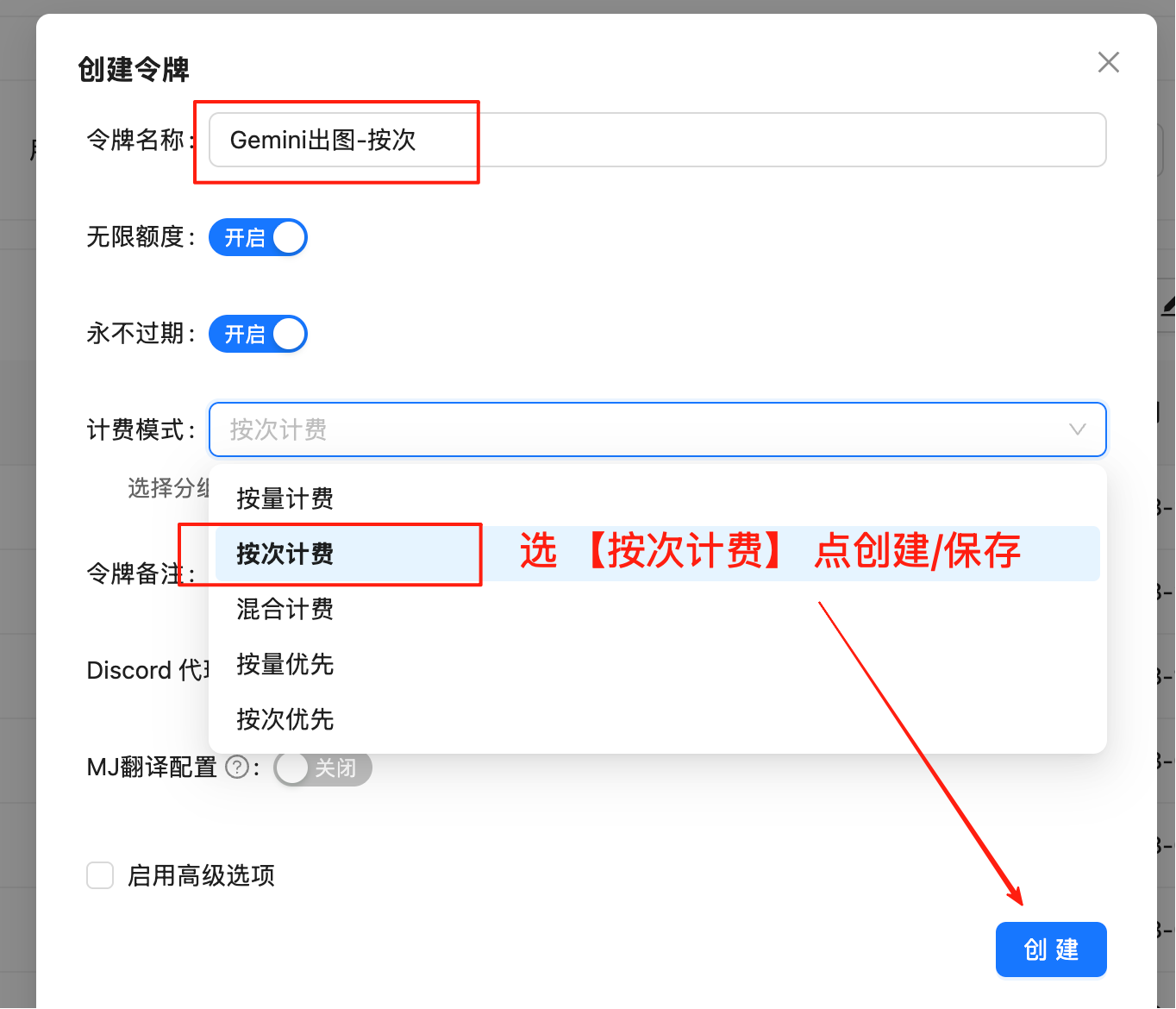
Configure Billing Mode
Edit token settings and select one of these billing modes (same price):
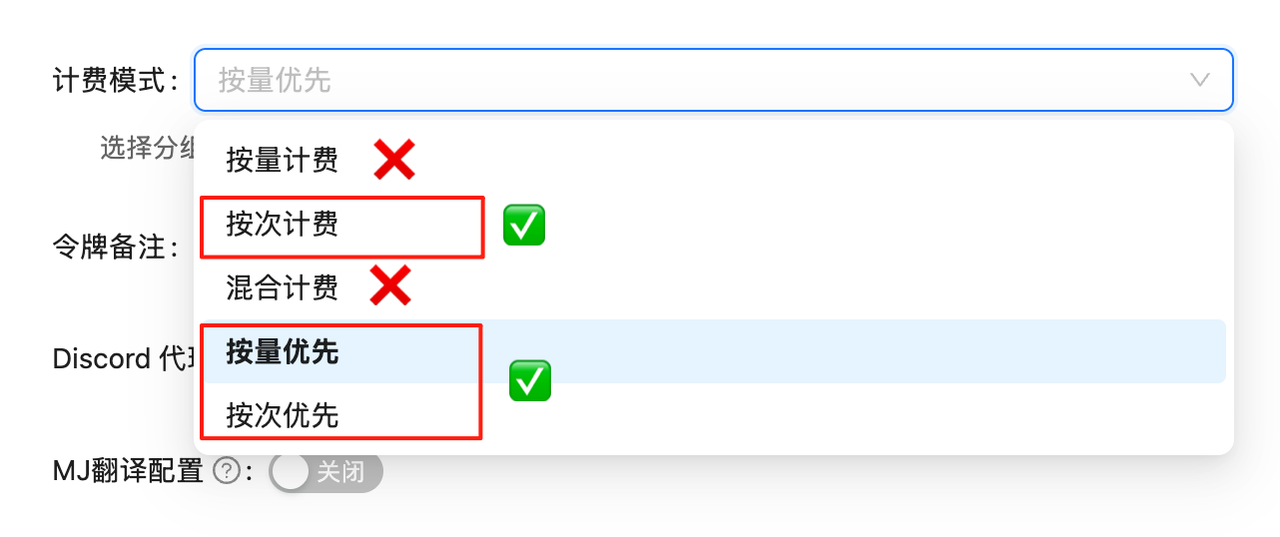
Pay-per-use Priority (Recommended): Use balance first, auto-switch when insufficient. Best for most users
Pay-per-use : Direct charge per request. Best for strict budget control
Both modes have identical pricing at $0.05/image, only the billing method differs.
API calls will fail without proper billing configuration. Complete this setup first!
Model Overview
Nano Banana Pro is LaoZhang API’s custom name for Google’s Gemini 3 Pro Image Preview (gemini-3-pro-image-preview) model. Designed for professional use cases requiring ultimate image quality and complex semantic understanding.
Core Advantages
🌟 Native 4K Resolution : Generate up to 4096×4096 ultra-high-definition images.
🧠 Gemini 3 Intelligence : Built-in logical reasoning, understands abstract descriptions like “a cat looking at an empty bowl with disappointment after missing breakfast”.
💪 Complex Composition : Precise control over object placement, quantity, and text rendering.
💰 Best Price : $0.05/image, breaking industry price barriers.
🌟 Core Features
⚡ Fast Response : ~10 seconds average, significantly faster than OpenAI series
💰 Great Value : 0.05 / i m a g e ( 79 0.05/image (79% cheaper than official 0.05/ ima g e ( 79 0.24)
🔄 Dual Compatibility : Supports OpenAI SDK and Google native formats
📐 Flexible Sizes : Google native format supports 10 aspect ratios
🖼️ High Resolution : Supports 1K, 2K, 4K resolutions
🧠 Thinking Mode : Built-in reasoning process, optimizes composition before generation (enabled by default)
🌐 Search Grounding : Supports Google Search for fact verification and image generation
🎨 Multi-Image Reference : Supports up to 14 reference images (6 objects + 5 characters, etc.)
📦 Base64 Output : Returns base64 encoded image data directly, no secondary download needed
🔀 Two API Modes
Nano Banana Pro supports two endpoints, each with unique advantages:
Feature OpenAI Compatible Mode Google Native Format Endpoint /v1/chat/completions/v1beta/models/gemini-3-pro-image-preview:generateContentModel Name gemini-3-pro-image-previewSpecified in URL Image Size Fixed 1:1 10 aspect ratios Resolution Fixed 1K 1K/2K/4K Compatibility Perfect with OpenAI SDK Requires native calls Return Format Base64 Base64 Use Case Quick migration, simple needs Custom sizes or high resolution
💡 How to Choose?
For square (1:1) images only, use OpenAI Compatible Mode - simpler
For widescreen (16:9), portrait (9:16), or other specific ratios or high-res (2K/4K), use Google Native Format
📋 Model Comparison
Comparison with Other Image Models
Model Model ID Billing LaoZhang API Price Official Price Savings Resolution Speed Nano Banana Pro gemini-3-pro-image-previewPer-use $0.05/image $0.24/image 79% 1K/2K/4K ~10s Nano Banana gemini-2.5-flash-imagePer-use $0.025/image $0.04/image 37.5% 1K (fixed) ~10s GPT-Image-1 gpt-image-1Token-based 10 i n p u t / 10 input/ 10 in p u t / 40 output per M- - - Medium Flux Kontext Pro flux-kontext-proPer-use $0.035/image $0.04/image 12.5% - Fast Sora Image sora_imagePer-use $0.01/image - - - Slower
💰 Price Advantage Details
Nano Banana Pro : 0.05 / i m a g e ( L a o Z h a n g A P I ) v s 0.05/image (LaoZhang API) vs 0.05/ ima g e ( L a o Z han g A P I ) v s 0.24/image (official), 79% cheaper
Bonus : Get +10% bonus on large deposits
Exchange Rate : Paying in CNY is even more cost-effective
Nano Banana Pro offers exceptional value at LaoZhang API!
🚀 Quick Start
Prerequisites
Select Billing Type
Important : Must select “Pay-per-use” type, not “Pay-as-you-go”
Save Token
Copy the generated token in format sk-xxxxxx
Method 1: OpenAI Compatible Mode (1:1 Images)
Best for quick integration, generates 1024x1024 (1K) images by default.
Basic Example - Curl
curl -X POST "https://api.laozhang.ai/v1/chat/completions" \
-H "Authorization: Bearer $API_KEY " \
-H "Content-Type: application/json" \
-d '{
"model": "gemini-3-pro-image-preview",
"stream": false,
"messages": [
{
"role": "user",
"content": "a beautiful sunset over mountains"
}
]
}'
Python SDK Example
from openai import OpenAI
import base64
import re
client = OpenAI(
api_key = "sk-YOUR_API_KEY" ,
base_url = "https://api.laozhang.ai/v1"
)
response = client.chat.completions.create(
model = "gemini-3-pro-image-preview" ,
messages = [
{
"role" : "user" ,
"content" : "a beautiful sunset over mountains"
}
]
)
# Extract base64 image data
content = response.choices[ 0 ].message.content
match = re.search( r '! \[ . *? \]\( ( data:image/png;base64, . *? ) \) ' , content)
if match:
base64_data = match.group( 1 ).split( ',' )[ 1 ]
image_data = base64.b64decode(base64_data)
with open ( 'output.png' , 'wb' ) as f:
f.write(image_data)
print ( "✅ Image saved: output.png" )
Best for 4K resolution or custom aspect ratio needs.
Supported Aspect Ratios
Type Aspect Ratio Options Landscape 21:9 (Ultra-wide), 16:9 (Widescreen), 4:3, 3:2 Square 1:1 Portrait 9:16 (Vertical), 3:4, 2:3 Other 5:4, 4:5
Supported Resolutions
Aspect Ratio 1K Resolution 2K Resolution 4K Resolution 1:1 1024×1024 2048×2048 4096×4096 16:9 1376×768 2752×1536 5504×3072 9:16 768×1376 1536×2752 3072×5504 4:3 1200×896 2400×1792 4800×3584 3:4 896×1200 1792×2400 3584×4800 21:9 1584×672 3168×1344 6336×2688 3:2 1248×832 2496×1664 4992×3328 2:3 832×1248 1664×2496 3328×4992 5:4 1152×896 2304×1792 4608×3584 4:5 896×1152 1792×2304 3584×4608
💡 Resolution Selection Guide
1K : Best for web display, social media, quick previews
2K : Best for high-quality printing, professional display
4K : Best for large prints, professional design, extreme detail
Complete Curl Example (Text-to-Image 4K)
#!/bin/bash
# 1. Set API Key
export API_KEY = "sk-YOUR_API_KEY"
# 2. Send request (Generate 4K image with Nano Banana Pro)
curl -s -X POST "https://api.laozhang.ai/v1beta/models/gemini-3-pro-image-preview:generateContent" \
-H "Authorization: Bearer $API_KEY " \
-H "Content-Type: application/json" \
-d '{
"contents": [{
"parts": [
{"text": "A futuristic city skyline at sunset, high detailed, 4k"}
]
}],
"generationConfig": {
"responseModalities": ["IMAGE"],
"imageConfig": {
"aspectRatio": "16:9",
"imageSize": "4K"
}
}
}' \
| jq -r '.candidates[0].content.parts[0].inlineData.data' \
| base64 --decode > output_4k.png
echo "✅ Image saved: output_4k.png"
Python Code Examples
💡 Progressive Examples
Example 1 generates image → Example 2 transforms its style → Example 3 fuses both images. Clear progression!
Example 1: Text-to-Image → Generate First Image
import requests
import base64
# ========== Configuration ==========
API_KEY = "sk-YOUR_API_KEY"
API_URL = "https://api.laozhang.ai/v1beta/models/gemini-3-pro-image-preview:generateContent"
PROMPT = "A cute orange cat"
ASPECT_RATIO = "1:1"
IMAGE_SIZE = "2K" # Nano Banana Pro supports: 1K, 2K, 4K
# ============================
headers = { "Authorization" : f "Bearer { API_KEY } " , "Content-Type" : "application/json" }
payload = {
"contents" : [{ "parts" : [{ "text" : PROMPT }]}],
"generationConfig" : {
"responseModalities" : [ "IMAGE" ],
"imageConfig" : {
"aspectRatio" : ASPECT_RATIO ,
"imageSize" : IMAGE_SIZE
}
}
}
response = requests.post( API_URL , headers = headers, json = payload, timeout = 180 )
result = response.json()
# Save image
image_data = result[ "candidates" ][ 0 ][ "content" ][ "parts" ][ 0 ][ "inlineData" ][ "data" ]
with open ( "output.png" , "wb" ) as f:
f.write(base64.b64decode(image_data))
print ( "✅ Image saved: output.png" )
Example 2: Image-to-Image → Use First Image to Generate Second
import requests
import base64
# ========== Configuration ==========
API_KEY = "sk-YOUR_API_KEY"
API_URL = "https://api.laozhang.ai/v1beta/models/gemini-3-pro-image-preview:generateContent"
INPUT_IMAGE = "output.png" # Use image from Example 1
PROMPT = "Transform this image into Van Gogh Starry Night style oil painting"
ASPECT_RATIO = "1:1"
IMAGE_SIZE = "2K"
# ============================
# Read and encode image
with open ( INPUT_IMAGE , "rb" ) as f:
image_b64 = base64.b64encode(f.read()).decode( "utf-8" )
headers = { "Authorization" : f "Bearer { API_KEY } " , "Content-Type" : "application/json" }
payload = {
"contents" : [{
"parts" : [
{ "text" : PROMPT },
{ "inline_data" : { "mime_type" : "image/jpeg" , "data" : image_b64}}
]
}],
"generationConfig" : {
"responseModalities" : [ "IMAGE" ],
"imageConfig" : {
"aspectRatio" : ASPECT_RATIO ,
"imageSize" : IMAGE_SIZE
}
}
}
response = requests.post( API_URL , headers = headers, json = payload, timeout = 180 )
result = response.json()
# Save image
output_data = result[ "candidates" ][ 0 ][ "content" ][ "parts" ][ 0 ][ "inlineData" ][ "data" ]
with open ( "output_styled.png" , "wb" ) as f:
f.write(base64.b64decode(output_data))
print ( "✅ Image saved: output_styled.png" )
Example 3: Multi-Image Mix → Use First and Second to Generate Third
import requests
import base64
# ========== Configuration ==========
API_KEY = "sk-YOUR_API_KEY"
API_URL = "https://api.laozhang.ai/v1beta/models/gemini-3-pro-image-preview:generateContent"
# Use the two images from Example 1 and Example 2
IMAGES = [ "output.png" , "output_styled.png" ]
PROMPT = "Fuse these two images into an artwork"
ASPECT_RATIO = "16:9"
IMAGE_SIZE = "2K"
# ============================
# Build parts: text + multiple images
parts = [{ "text" : PROMPT }]
for img_path in IMAGES :
with open (img_path, "rb" ) as f:
img_b64 = base64.b64encode(f.read()).decode( "utf-8" )
parts.append({ "inline_data" : { "mime_type" : "image/png" , "data" : img_b64}})
headers = { "Authorization" : f "Bearer { API_KEY } " , "Content-Type" : "application/json" }
payload = {
"contents" : [{ "parts" : parts}],
"generationConfig" : {
"responseModalities" : [ "IMAGE" ],
"imageConfig" : {
"aspectRatio" : ASPECT_RATIO ,
"imageSize" : IMAGE_SIZE
}
}
}
response = requests.post( API_URL , headers = headers, json = payload, timeout = 180 )
result = response.json()
# Save image
output_data = result[ "candidates" ][ 0 ][ "content" ][ "parts" ][ 0 ][ "inlineData" ][ "data" ]
with open ( "output_mixed.png" , "wb" ) as f:
f.write(base64.b64decode(output_data))
print ( "✅ Image saved: output_mixed.png" )
Complete Demo Script (All Three Scenarios)
#!/usr/bin/env python3
# -*- coding: utf-8 -*-
"""
Nano Banana Pro Image Generation - Complete Demo Script
Includes three scenarios: text-to-image, single image-to-image, multi-image mix
"""
import requests
import base64
import os
from datetime import datetime
# ========== Configuration ==========
API_KEY = "sk-YOUR_API_KEY"
API_URL = "https://api.laozhang.ai/v1beta/models/gemini-3-pro-image-preview:generateContent"
# ============================
def generate_text_to_image ( prompt , aspect_ratio = "16:9" , image_size = "2K" ):
"""Scenario 1: Text-to-Image"""
print ( f " \n 📸 Text-to-Image: { prompt } " )
payload = {
"contents" : [{ "parts" : [{ "text" : prompt}]}],
"generationConfig" : {
"responseModalities" : [ "IMAGE" ],
"imageConfig" : {
"aspectRatio" : aspect_ratio,
"imageSize" : image_size
}
}
}
return call_api(payload, f "text_ { image_size } " )
def generate_image_to_image ( input_image , prompt , aspect_ratio = "1:1" , image_size = "2K" ):
"""Scenario 2: Single Image-to-Image"""
print ( f " \n 🎨 Image-to-Image: { input_image } " )
with open (input_image, "rb" ) as f:
img_b64 = base64.b64encode(f.read()).decode( "utf-8" )
payload = {
"contents" : [{
"parts" : [
{ "text" : prompt},
{ "inline_data" : { "mime_type" : "image/jpeg" , "data" : img_b64}}
]
}],
"generationConfig" : {
"responseModalities" : [ "IMAGE" ],
"imageConfig" : {
"aspectRatio" : aspect_ratio,
"imageSize" : image_size
}
}
}
return call_api(payload, f "styled_ { image_size } " )
def generate_multi_image_mix ( images , prompt , aspect_ratio = "16:9" , image_size = "2K" ):
"""Scenario 3: Multi-Image Mix"""
print ( f " \n 🖼️ Multi-Image Mix: { len (images) } images" )
parts = [{ "text" : prompt}]
for img in images:
with open (img, "rb" ) as f:
parts.append({ "inline_data" : { "mime_type" : "image/jpeg" , "data" : base64.b64encode(f.read()).decode()}})
payload = {
"contents" : [{ "parts" : parts}],
"generationConfig" : {
"responseModalities" : [ "IMAGE" ],
"imageConfig" : {
"aspectRatio" : aspect_ratio,
"imageSize" : image_size
}
}
}
return call_api(payload, f "mixed_ { image_size } " )
def call_api ( payload , prefix ):
"""Call API"""
headers = { "Authorization" : f "Bearer { API_KEY } " , "Content-Type" : "application/json" }
try :
response = requests.post( API_URL , headers = headers, json = payload, timeout = 180 )
result = response.json()
image_data = result[ "candidates" ][ 0 ][ "content" ][ "parts" ][ 0 ][ "inlineData" ][ "data" ]
filename = f " { prefix } _ { datetime.now().strftime( '%Y%m %d _%H%M%S' ) } .png"
with open (filename, "wb" ) as f:
f.write(base64.b64decode(image_data))
print ( f "✅ Saved: { filename } " )
return filename
except Exception as e:
print ( f "❌ Error: { e } " )
return None
# ========== Main Program ==========
def main ():
print ( "🎨 Nano Banana Pro Image Generation - Complete Demo" )
# Scenario 1: Text-to-Image
img1 = generate_text_to_image(
"A futuristic cyberpunk city at night, 4k" ,
aspect_ratio = "16:9" ,
image_size = "4K"
)
# Scenario 2: Image-to-Image (requires test_cat.jpg)
if os.path.exists( "test_cat.jpg" ):
img2 = generate_image_to_image(
"test_cat.jpg" ,
"Van Gogh Starry Night style" ,
aspect_ratio = "1:1" ,
image_size = "2K"
)
# Scenario 3: Multi-Image Mix (requires test_cat.jpg, test_apple.jpg)
if os.path.exists( "test_cat.jpg" ) and os.path.exists( "test_apple.jpg" ):
generate_multi_image_mix(
[ "test_cat.jpg" , "test_apple.jpg" ],
"A cat eating an apple" ,
aspect_ratio = "16:9" ,
image_size = "2K"
)
print ( " \n ✅ Demo complete!" )
if __name__ == "__main__" :
main()
Bash Script Example
Expand to view complete Bash script (with aspect ratio config)
#!/bin/bash
# ============================================================
# Nano Banana Pro Image Generation Tool - Bash/Curl Version
# Supports 4K resolution and multiple aspect ratios
# ============================================================
# ========== Configuration ==========
API_KEY = "sk-YOUR_API_KEY"
API_URL = "https://api.laozhang.ai/v1beta/models/gemini-3-pro-image-preview:generateContent"
PROMPT = "A futuristic cyberpunk city at night, neon lights, flying cars, highly detailed, 4k"
ASPECT_RATIO = "16:9"
IMAGE_SIZE = "4K" # 1K, 2K, 4K
OUTPUT_FILE = "gemini_${ IMAGE_SIZE }_$( date +%Y%m%d_%H%M%S).png"
# ============================
# Check dependencies
if ! command -v jq & > /dev/null; then
echo "❌ Error: jq tool required"
echo ""
echo "Installation:"
echo " macOS: brew install jq"
echo " Ubuntu: sudo apt-get install jq"
echo " CentOS: sudo yum install jq"
exit 1
fi
echo "============================================================"
echo "Nano Banana Pro Image Generation Tool"
echo "============================================================"
echo "⏰ Start time: $( date '+%Y-%m-%d %H:%M:%S')"
echo "🚀 Generating image..."
echo "📝 Prompt: ${ PROMPT }"
echo "📐 Aspect Ratio: ${ ASPECT_RATIO }"
echo "🖼️ Resolution: ${ IMAGE_SIZE }"
# Build JSON request
REQUEST_JSON = $( jq -n \
--arg prompt " $PROMPT " \
--arg ratio " $ASPECT_RATIO " \
--arg size " $IMAGE_SIZE " \
'{
contents: [{
parts: [{text: $prompt}]
}],
generationConfig: {
responseModalities: ["IMAGE"],
imageConfig: {
aspectRatio: $ratio,
imageSize: $size
}
}
}' )
# Send request
RESPONSE = $( curl -s -X POST "${ API_URL }" \
-H "Authorization: Bearer ${ API_KEY }" \
-H "Content-Type: application/json" \
-d "${ REQUEST_JSON }" )
# Check for errors
if echo "${ RESPONSE }" | jq -e '.error' & > /dev/null; then
echo "❌ Generation failed"
echo "💥 Error message:"
echo "${ RESPONSE }" | jq -r '.error.message // .error'
exit 1
fi
# Extract image data
echo "💾 Saving image..."
IMAGE_DATA = $( echo "${ RESPONSE }" | jq -r '.candidates[0].content.parts[0].inlineData.data' 2> /dev/null )
if [ -z " $IMAGE_DATA " ] || [ " $IMAGE_DATA " = "null" ]; then
echo "❌ No image data found"
exit 1
fi
# Decode and save image
echo "${ IMAGE_DATA }" | base64 --decode > "${ OUTPUT_FILE }"
# Check result
if [ -f "${ OUTPUT_FILE }" ]; then
FILE_SIZE = $( du -h "${ OUTPUT_FILE }" | cut -f1 )
echo "✅ Image saved: ${ OUTPUT_FILE }"
echo "📊 File size: ${ FILE_SIZE }"
echo "============================================================"
echo "🎉 Generation successful!"
echo "⏰ End time: $( date '+%Y-%m-%d %H:%M:%S')"
else
echo "❌ Image save failed"
exit 1
fi
🚀 Gemini 3 Pro Advanced Features (Nano Banana Pro Exclusive)
🧠 Thinking Mode
Nano Banana Pro has built-in reasoning capability that automatically optimizes composition and logic before generating images to ensure higher quality output. This feature is enabled by default, no extra configuration needed.
💡 Thinking Mode Advantages
Automatically optimizes composition and layout
Understands complex multi-step instructions
Creates temporary “thinking images” during generation (backend only, no extra charge)
Final output is higher quality and more aligned with expectations
🌐 Google Search Grounding
The model can use Google Search as a tool to generate images using real-time data (weather, stock prices, news).
curl -s -X POST "https://api.laozhang.ai/v1beta/models/gemini-3-pro-image-preview:generateContent" \
-H "Authorization: Bearer $API_KEY " \
-H "Content-Type: application/json" \
-d '{
"contents": [{"parts": [{"text": "Visualize the current weather forecast for the next 5 days in San Francisco as a clean, modern weather chart."}]}],
"tools": [{"google_search": {}}],
"generationConfig": {
"responseModalities": ["TEXT", "IMAGE"],
"imageConfig": {"aspectRatio": "16:9"}
}
}'
Note : When using search grounding, responseModalities must include "TEXT" (i.e., ["TEXT", "IMAGE"]). Pure image mode cannot return search results.
🎨 Multi-Image Reference (Reference Images)
Nano Banana Pro supports mixing up to 14 reference images :
Up to 6 high-fidelity object images (for inclusion in final image)
Up to 5 person images (for maintaining character consistency)
# Multi-Image Reference Example (Python)
import requests
import base64
API_KEY = "sk-YOUR_API_KEY"
API_URL = "https://api.laozhang.ai/v1beta/models/gemini-3-pro-image-preview:generateContent"
# Prepare multiple reference images
image_paths = [ "cat.jpg" , "apple.jpg" ]
parts = [{ "text" : "Combine these images: a cat eating an apple on a table" }]
for path in image_paths:
with open (path, "rb" ) as f:
image_data = base64.b64encode(f.read()).decode( "utf-8" )
parts.append({
"inline_data" : {
"mime_type" : "image/jpeg" ,
"data" : image_data
}
})
# Send request
response = requests.post(
API_URL ,
headers = {
"Authorization" : f "Bearer { API_KEY } " ,
"Content-Type" : "application/json"
},
json = {
"contents" : [{ "parts" : parts}],
"generationConfig" : {
"responseModalities" : [ "IMAGE" ],
"imageConfig" : {
"aspectRatio" : "16:9" ,
"imageSize" : "2K"
}
}
}
)
💡 Multi-Image Reference Best Practices
Object images: For product composition, scene building
Person images: Maintain character appearance consistency (for image series)
Combined use: Create complex visual narratives
💡 Best Practices
Prompt Optimization
Clear Description Use specific, detailed descriptions including subject, style, color, lighting, etc.
Reference Style Specify art styles: “oil painting style”, “watercolor”, “cyberpunk style”, etc.
Avoid Vagueness Avoid overly abstract or vague terms
English First English prompts typically work better, but Chinese is also supported
Aspect Ratio Selection Guide
Use Case Recommended Ratio Social media landscape 16:9 Phone wallpaper/vertical 9:16 Instagram square 1:1 Print photos 4:3 or 3:2 Movie posters 2:3 Banner ads 21:9
❓ FAQ
How to test Nano Banana Pro API for free?
Visit api.laozhang.ai to register
Automatically receive $0.05 free credit
Create token and select “Pay-per-use”
Call the gemini-3-pro-image-preview model
$0.05 lets you test Nano Banana Pro once for free!
What is the Nano Banana Pro API price?
Channel Price Notes LaoZhang API $0.05/image 80% off official Google Official $0.24/image Full price
Register to get $0.05 and test for free!
How to test Nano Banana Pro API online?
Method 1 : API Playground visual testingMethod 2 : Curl commandcurl -X POST "https://api.laozhang.ai/v1/chat/completions" \
-H "Authorization: Bearer YOUR_API_KEY" \
-d '{"model": "gemini-3-pro-image-preview", "messages": [{"role": "user", "content": "a cute cat"}]}'
What's the difference between Nano Banana Pro and Nano Banana?
Feature Nano Banana Pro Nano Banana Model gemini-3-pro-image-previewgemini-2.5-flash-imageTechnology Gemini 3 Gemini 2.5 Resolution 1K/2K/4K 1K (fixed) Price $0.05/image $0.025/image Thinking Mode ✅ Yes ❌ No Search Grounding ✅ Yes ❌ No Multi-Image Reference Up to 14 Up to 3
How to choose the API mode?
For 1:1 square images only, use OpenAI Compatible Mode - simpler
For specific aspect ratios (like 16:9 widescreen) or high-res (2K/4K), use Google Native Format
How to use 4K resolution?
4K is only supported by Nano Banana Pro , use Google native format and add imageSize parameter:{
"generationConfig" : {
"responseModalities" : [ "IMAGE" ],
"imageConfig" : {
"aspectRatio" : "16:9" ,
"imageSize" : "4K"
}
}
}
Important : Must use uppercase “K” (1K, 2K, 4K).
Does it support Chinese prompts?
Perfectly supported! Gemini 3 Pro has top-tier multilingual understanding. You can describe scenes in Chinese directly, no translation needed.
How to get better generation results?
Detailed description : Provide specific details (color, style, scene, etc.)
English prompts : English typically works better
Reference style : Specify art style (like “oil painting style”, “watercolor”)
Multiple attempts : Try different prompts, pricing is affordable
How to use the returned Base64 data?
Base64 data can be displayed directly in web pages: < img src = "data:image/png;base64,iVBORw0KG..." />
Or decode and save as file (see code examples above)
📝 Changelog
2025-01: Nano Banana Pro standalone documentation launched
🚀 Nano Banana Pro Dedicated Page
Split from combined documentation into dedicated Pro version
Complete 4K resolution usage guide
Detailed advanced features (thinking mode, search grounding, multi-image reference)
Complete code examples and best practices
Comparison with Nano Banana Standard