

Archived page: the Sora 2 video API has been retired. LaoZhang API stopped serving Sora 2 on July 1, 2026, and OpenAI removed the Videos API,
sora-2, and sora-2-pro from its API on September 24, 2026. This page keeps the legacy route documentation for existing integrations, and its examples no longer work.For video generation, use Wan 2.7 or Seedance 2.0. To migrate, see Sora 2 API retired: move to Wan or Seedance.Complete Python Examples
Basic Text-to-Video
import openai
import time

# Initialize client
client = openai.OpenAI(
    api_key="YOUR_API_KEY",
    base_url="https://api.laozhang.ai/v1"
)

def generate_video(prompt, model="sora_video2"):
    """Generate video"""
    try:
        response = client.chat.completions.create(
            model=model,
            messages=[
                {
                    "role": "user",
                    "content": [
                        {
                            "type": "text",
                            "text": prompt
                        }
                    ]
                }
            ]
        )

        return response.choices[0].message.content
    except Exception as e:
        print(f"Error: {e}")
        return None

# Usage example
prompt = "A cute cat playing with a ball in a sunny garden"
result = generate_video(prompt)
print(result)
Streaming Output Example
import openai

client = openai.OpenAI(
    api_key="YOUR_API_KEY",
    base_url="https://api.laozhang.ai/v1"
)

def generate_video_stream(prompt, model="sora_video2"):
    """Generate video with streaming, displaying progress in real-time"""
    stream = client.chat.completions.create(
        model=model,
        messages=[
            {
                "role": "user",
                "content": [
                    {
                        "type": "text",
                        "text": prompt
                    }
                ]
            }
        ],
        stream=True
    )

    video_url = None
    for chunk in stream:
        if chunk.choices[0].delta.content:
            content = chunk.choices[0].delta.content
            print(content, end='', flush=True)

            # Extract video link
            if "https://" in content and ".mp4" in content:
                import re
                match = re.search(r'https://[^\s\)]+\.mp4', content)
                if match:
                    video_url = match.group(0)

    print("\n")
    return video_url

# Usage example
prompt = "A cute cat playing with a ball in a sunny garden"
video_url = generate_video_stream(prompt)
print(f"\nVideo link: {video_url}")
Image-to-Video (URL)
import openai

client = openai.OpenAI(
    api_key="YOUR_API_KEY",
    base_url="https://api.laozhang.ai/v1"
)

def generate_video_from_image(prompt, image_url, model="sora_video2"):
    """Generate video from image"""
    response = client.chat.completions.create(
        model=model,
        messages=[
            {
                "role": "user",
                "content": [
                    {
                        "type": "text",
                        "text": prompt
                    },
                    {
                        "type": "image_url",
                        "image_url": {
                            "url": image_url
                        }
                    }
                ]
            }
        ]
    )

    return response.choices[0].message.content

# Usage example
prompt = "Generate video: Make this figurine jump out from the desk and become a living person~"
image_url = "https://example.com/images/input.png"
result = generate_video_from_image(prompt, image_url)
print(result)
Image-to-Video (Base64)
import openai
import base64

client = openai.OpenAI(
    api_key="YOUR_API_KEY",
    base_url="https://api.laozhang.ai/v1"
)

def encode_image(image_path):
    """Encode local image to base64"""
    with open(image_path, "rb") as image_file:
        return base64.b64encode(image_file.read()).decode('utf-8')

def generate_video_from_local_image(prompt, image_path, model="sora_video2"):
    """Generate video from local image"""
    # Encode image
    base64_image = encode_image(image_path)

    response = client.chat.completions.create(
        model=model,
        messages=[
            {
                "role": "user",
                "content": [
                    {
                        "type": "text",
                        "text": prompt
                    },
                    {
                        "type": "image_url",
                        "image_url": {
                            "url": f"data:image/png;base64,{base64_image}"
                        }
                    }
                ]
            }
        ]
    )

    return response.choices[0].message.content

# Usage example
prompt = "Make this scene come alive, add more dynamic elements"
image_path = "/path/to/your/image.png"
result = generate_video_from_local_image(prompt, image_path)
print(result)
Automatic Video Download
import openai
import re
import requests
import os

client = openai.OpenAI(
    api_key="YOUR_API_KEY",
    base_url="https://api.laozhang.ai/v1"
)

def extract_video_url(content):
    """Extract video link from response"""
    match = re.search(r'https://[^\s\)]+\.mp4', content)
    return match.group(0) if match else None

def download_video(url, save_path):
    """Download video to local"""
    try:
        response = requests.get(url, stream=True)
        response.raise_for_status()

        with open(save_path, 'wb') as f:
            for chunk in response.iter_content(chunk_size=8192):
                f.write(chunk)

        print(f"Video saved to: {save_path}")
        return True
    except Exception as e:
        print(f"Download failed: {e}")
        return False

def generate_and_download(prompt, save_dir="./videos", model="sora_video2"):
    """Generate video and download automatically"""
    # Create save directory
    os.makedirs(save_dir, exist_ok=True)

    # Generate video
    print("Generating video...")
    response = client.chat.completions.create(
        model=model,
        messages=[
            {
                "role": "user",
                "content": [
                    {
                        "type": "text",
                        "text": prompt
                    }
                ]
            }
        ]
    )

    content = response.choices[0].message.content
    print(content)

    # Extract video link
    video_url = extract_video_url(content)
    if not video_url:
        print("Video link not found")
        return None

    # Download video
    import time
    filename = f"sora_{int(time.time())}.mp4"
    save_path = os.path.join(save_dir, filename)

    if download_video(video_url, save_path):
        return save_path
    return None

# Usage example
prompt = "A cute cat playing with a ball in a sunny garden"
video_path = generate_and_download(prompt)
print(f"Video path: {video_path}")
JavaScript/Node.js Examples
Basic Text-to-Video
const OpenAI = require('openai');

const client = new OpenAI({
  apiKey: 'YOUR_API_KEY',
  baseURL: 'https://api.laozhang.ai/v1'
});

async function generateVideo(prompt, model = 'sora_video2') {
  try {
    const response = await client.chat.completions.create({
      model: model,
      messages: [
        {
          role: 'user',
          content: [
            {
              type: 'text',
              text: prompt
            }
          ]
        }
      ]
    });

    return response.choices[0].message.content;
  } catch (error) {
    console.error('Error:', error);
    return null;
  }
}

// Usage example
generateVideo('A cute cat playing with a ball in a sunny garden')
  .then(result => console.log(result));
Streaming Output
const OpenAI = require('openai');

const client = new OpenAI({
  apiKey: 'YOUR_API_KEY',
  baseURL: 'https://api.laozhang.ai/v1'
});

async function generateVideoStream(prompt, model = 'sora_video2') {
  const stream = await client.chat.completions.create({
    model: model,
    messages: [
      {
        role: 'user',
        content: [
          {
            type: 'text',
            text: prompt
          }
        ]
      }
    ],
    stream: true
  });

  let videoUrl = null;
  for await (const chunk of stream) {
    const content = chunk.choices[0]?.delta?.content;
    if (content) {
      process.stdout.write(content);

      // Extract video link
      const match = content.match(/https:\/\/[^\s\)]+\.mp4/);
      if (match) {
        videoUrl = match[0];
      }
    }
  }

  console.log('\n');
  return videoUrl;
}

// Usage example
generateVideoStream('A cute cat playing with a ball in a sunny garden')
  .then(url => console.log(`\nVideo link: ${url}`));
Automatic Video Download
const OpenAI = require('openai');
const fs = require('fs');
const https = require('https');
const path = require('path');

const client = new OpenAI({
  apiKey: 'YOUR_API_KEY',
  baseURL: 'https://api.laozhang.ai/v1'
});

function downloadVideo(url, savePath) {
  return new Promise((resolve, reject) => {
    const file = fs.createWriteStream(savePath);
    https.get(url, (response) => {
      response.pipe(file);
      file.on('finish', () => {
        file.close();
        console.log(`Video saved to: ${savePath}`);
        resolve(savePath);
      });
    }).on('error', (err) => {
      fs.unlink(savePath, () => {});
      console.error(`Download failed: ${err.message}`);
      reject(err);
    });
  });
}

async function generateAndDownload(prompt, saveDir = './videos', model = 'sora_video2') {
  // Create save directory
  if (!fs.existsSync(saveDir)) {
    fs.mkdirSync(saveDir, { recursive: true });
  }

  // Generate video
  console.log('Generating video...');
  const response = await client.chat.completions.create({
    model: model,
    messages: [
      {
        role: 'user',
        content: [
          {
            type: 'text',
            text: prompt
          }
        ]
      }
    ]
  });

  const content = response.choices[0].message.content;
  console.log(content);

  // Extract video link
  const match = content.match(/https:\/\/[^\s\)]+\.mp4/);
  if (!match) {
    console.log('Video link not found');
    return null;
  }

  const videoUrl = match[0];
  const filename = `sora_${Date.now()}.mp4`;
  const savePath = path.join(saveDir, filename);

  // Download video
  await downloadVideo(videoUrl, savePath);
  return savePath;
}

// Usage example
generateAndDownload('A cute cat playing with a ball in a sunny garden')
  .then(path => console.log(`Video path: ${path}`));
Cherry Studio Use Case
Cherry Studio is an AI chat client. With the legacy route, you could generate videos in it throughsora_video2.
Configuration Steps
1
Configure API
Add laozhang.ai API configuration in Cherry Studio
2
Enable Video Feature
Find 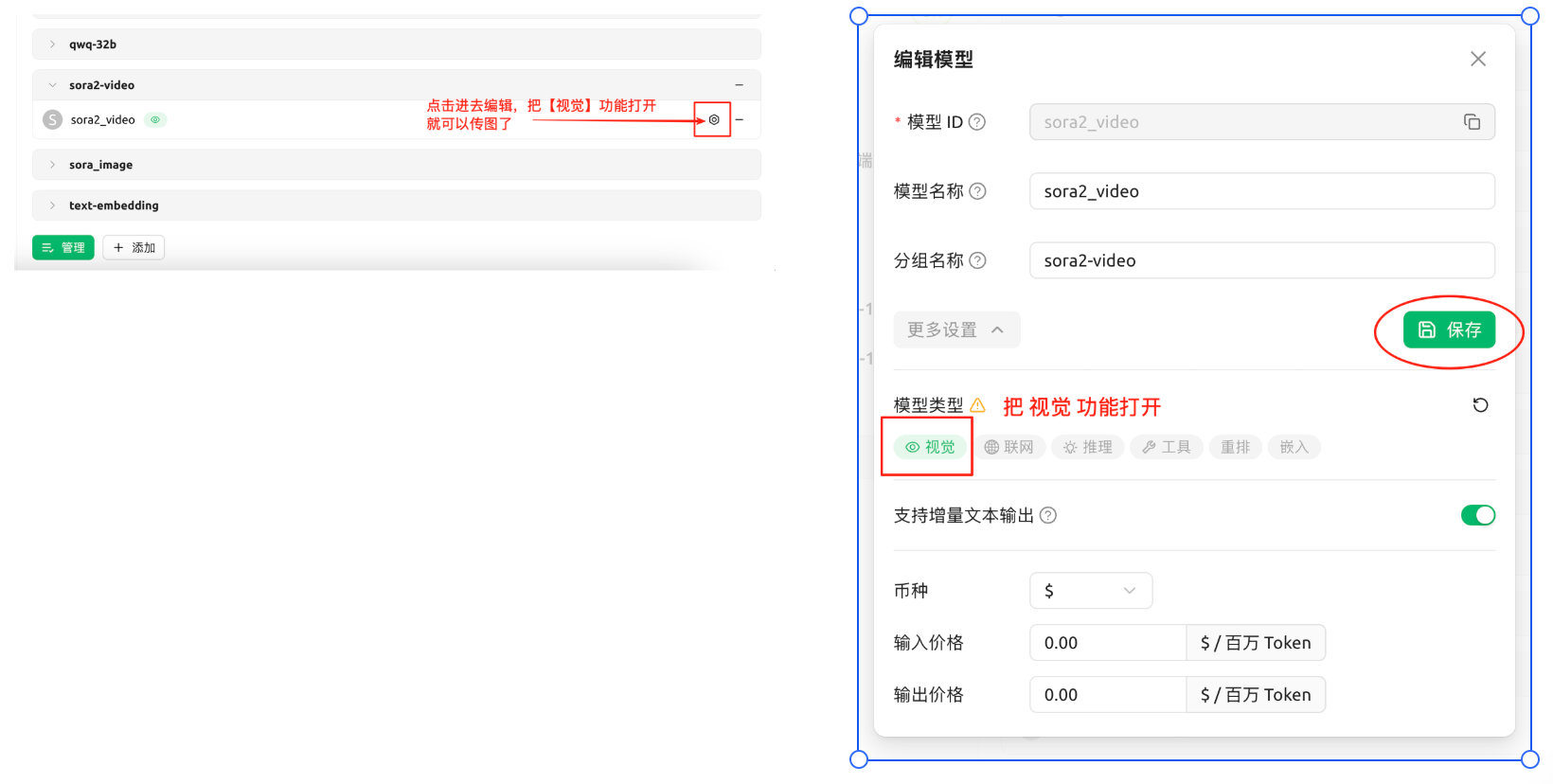
sora_video2 in model settings and enable video generation feature3
Text-to-Video
Simply enter text description to generate video
4
Image-to-Video
Upload image + prompt to generate video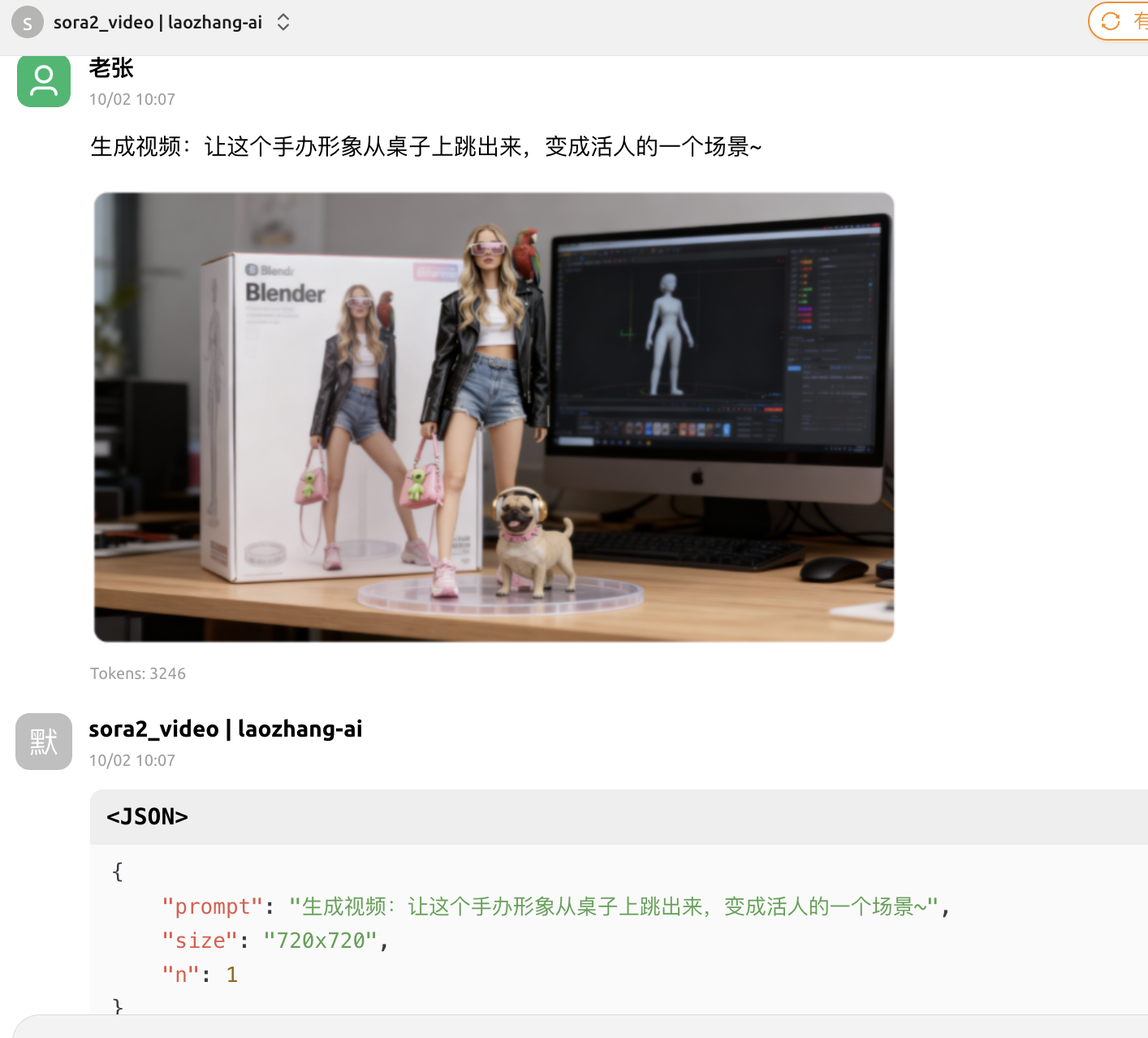
Usage Examples
Text-to-Video
Directly enter in Cherry Studio dialogue box:A cute orange cat napping in the sun, suddenly woken by a butterfly, starts chasing the butterfly
- Display prompt optimization results
- Show generation progress (queue status, percentage)
- Provide video playback link
Image-to-Video
- Click upload image button and select reference image
- Enter prompt:
Generate video: Make this scene come alive, add breeze blowing and leaves swaying effects
Batch Generation Examples
Python Batch Generation
import openai
import time
import concurrent.futures

client = openai.OpenAI(
    api_key="YOUR_API_KEY",
    base_url="https://api.laozhang.ai/v1"
)

def generate_single_video(prompt, model="sora_video2"):
    """Generate single video"""
    try:
        response = client.chat.completions.create(
            model=model,
            messages=[
                {
                    "role": "user",
                    "content": [
                        {
                            "type": "text",
                            "text": prompt
                        }
                    ]
                }
            ]
        )
        return {
            "prompt": prompt,
            "result": response.choices[0].message.content,
            "success": True
        }
    except Exception as e:
        return {
            "prompt": prompt,
            "error": str(e),
            "success": False
        }

def batch_generate(prompts, max_workers=3, model="sora_video2"):
    """Batch generate videos"""
    results = []

    with concurrent.futures.ThreadPoolExecutor(max_workers=max_workers) as executor:
        futures = [
            executor.submit(generate_single_video, prompt, model)
            for prompt in prompts
        ]

        for future in concurrent.futures.as_completed(futures):
            result = future.result()
            results.append(result)

            if result['success']:
                print(f"✓ Success: {result['prompt'][:30]}...")
            else:
                print(f"✗ Failed: {result['prompt'][:30]}... - {result['error']}")

    return results

# Usage example
prompts = [
    "A cat playing with a ball in the garden",
    "Beach at sunset, waves gently lapping the shore",
    "Busy city street with heavy traffic",
    "Forest stream with sunlight filtering through leaves",
]

results = batch_generate(prompts, max_workers=2)

# Statistics
success_count = sum(1 for r in results if r['success'])
print(f"\nGeneration complete: Successful {success_count}/{len(prompts)}")
Best Practices
Prompt Optimization
Prompt Optimization
- Describe specific scenes and actions
- Include details like lighting and atmosphere
- Use authorized real person IDs like
@sama - Avoid describing real human faces (will be rejected)
Error Handling
Error Handling
- Set reasonable timeout (recommended 5 minutes)
- Add retry logic
- Record failure reasons
- Use streaming output to monitor progress
Video Download
Video Download
- Download immediately after generation (valid for 1 day)
- Use streaming download for large files
- Save to local or cloud storage
- Make backups
Cost Optimization
Cost Optimization
- Control concurrency when batch generating
- Billing for failed tasks follows the console records
- Download videos promptly (storage validity 1 day)
Next Steps
FAQ
View frequently asked questions
Model Pricing
Learn detailed model comparison
API Reference
View complete API documentation
Quick Start
Back to quick start guide