

gemini-3.1-flash-image) is Google’s general-purpose Gemini image model and the one Google recommends for most image work. This guide shows how to generate and edit images from 512px to 4K on LaoZhang API at a fixed price per call.
What Nano Banana 2 supports
Thinking and Google Search grounding aren’t limited to Pro. Nano Banana 2 reasons through a prompt before it renders, with a minimal (default) or high thinking level, and it can ground an image in Google web and image search results.
Google shut down
gemini-3.1-flash-image-preview on June 25, 2026, according to its deprecations page. On LaoZhang API, the -preview IDs are mapped to the matching stable IDs; use the stable ID, gemini-3.1-flash-image, directly. To compare Nano Banana 2 with Standard, 2 Lite, and Pro, see the Nano Banana overview.
Before you call
1
Create an API key
In Token management, open the create-token dialog (创建令牌), set Billing mode (计费模式) to Usage first (按量优先, recommended) or Per-call (按次计费), and click Create (创建). Nano Banana 2 has only a per-call price, and a Usage-based (按量计费) key can’t call it; the billing rules explain when a request is charged.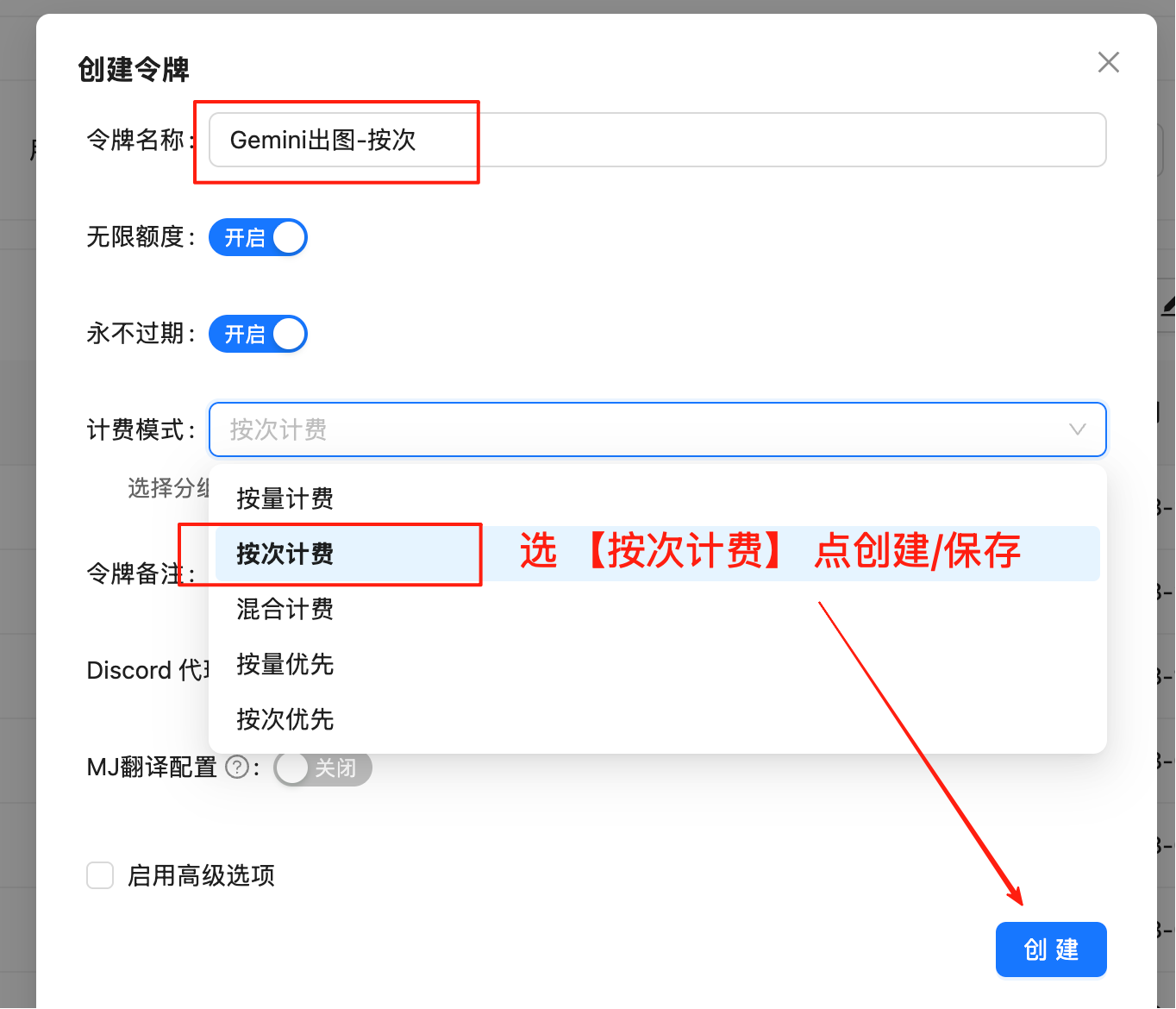
2
Set the key and install the dependencies
3
Add a save function for cURL
The cURL examples need When the response holds no image, the function prints the error,
jq. Define this shell function to save the last image in a Gemini-native response, which is the final result if interim images come back too, with the extension that matches its mimeType:promptFeedback, and finishReason fields instead.Generate an image
- cURL
- Python
candidates[0].content.parts[].inlineData.data, and mimeType gives its format. Both examples decode it and save a PNG, JPEG, or WebP file to match.
Larger sizes take longer to render, so keep a generous client timeout; the examples allow 300 seconds.
Output sizes
imageSize accepts four values from 512 to 4K, with the K in uppercase; 1K is the default. Google publishes these pixel dimensions for Nano Banana 2:
At
512, a 1:1 image is 512×512; Google’s image generation guide lists the other 512px sizes.
Edit images
Send the instruction first, then the reference images asinlineData parts, and refer to the images by their order in the prompt (“the first image”, “the second image”). Nano Banana 2 accepts up to 14 references: at most 10 object images and 4 character images.
- cURL
- Python
This request combines two local files. Build the body with
jq so large images don’t exceed shell argument limits, and keep each mimeType consistent with its file:Ground images in Google Search
Add thegoogleSearch tool to base an image on current information, such as a forecast or recent results. Allow TEXT in responseModalities so any text the model writes alongside the image comes back too:
Use the OpenAI-compatible route
If your app already uses the OpenAI SDK, call Nano Banana 2 through chat completions. This route has no ratio or size settings, so a text-only prompt returns a 1:1 image at 1K. The image comes back as a Base64 data URL insidemessage.content. Save this script as nano_banana_2_chat.py:
Errors and billing
Send values from these lists:- The ratios
1:4,4:1,1:8, and8:1work only on Nano Banana 2 and Nano Banana 2.1. - Google rejects lowercase sizes such as
2k. - A request can return HTTP 200 without an image, for example when the prompt doesn’t ask for one or a safety check blocks the output. It is charged as one call. Check
finishReason(andpromptFeedbackif present), then change the prompt or references before resending; see Avoid paying for empty responses. - HTTP 401 means the key or the
Authorization: Bearerheader is wrong. Retry 429 and 5xx responses with backoff, and check call logs before resending a request that timed out.
FAQ
How do I request 512px output?
SetgenerationConfig.imageConfig.imageSize to the string 512 on the Gemini-native route. Only Nano Banana 2 accepts it; Output sizes lists the other values.
How do I change the thinking level, and does it affect the price?
Nano Banana 2 and Nano Banana 2 Lite support two thinking levels,minimal (the default) and high, to trade latency for quality, and LaoZhang API passes the setting through. On the Gemini-native route, set it in generationConfig.thinkingConfig.thinkingLevel, for example "thinkingConfig": {"thinkingLevel": "high"}.
The level doesn’t change the price: LaoZhang API bills per call only, so a high request still costs the Nano Banana 2 per-call price (Google itself bills thinking tokens on top). Nano Banana Pro always thinks, and its level can’t be changed.
How do I turn on image search grounding, and what are the limits?
AddsearchTypes to the Google Search tool from Ground images in Google Search, and list both webSearch and imageSearch:
- A tool without
searchTypesuses web search only, andimageSearchalone uses image search only. - With both types listed, as above, either is allowed; the model decides whether to search and which type to use.
searchTypesmust be an object; an array has no effect. When image search is used,groundingMetadatain the response includesimageSearchQueries.
Related pages and sources
- Nano Banana overview — compare the five models, the two protocols, and billing
- Nano Banana 2.1 — the newer version, 1K to 4K at a lower price per call
- Nano Banana 2 Lite — low-cost 1K images
- Nano Banana Pro — complex layouts and brand-critical assets
- Nano Banana image editing (Standard) — move
gemini-2.5-flash-imageedits to Nano Banana 2 - Google: Nano Banana image generation — sizes, aspect ratios, reference limits, thinking, and grounding
- Google: generateContent reference —
imageConfig,thinkingConfig, and Google Search tool fields - Google: Gemini API deprecations — upstream model shutdown dates
- Call logs — check a request’s status and charge